

UBank is an Australian online bank providing savings accounts, home loans and personal loans to over 500,000 customers. As a digital banking service, UBank account holders are being targeted by SMS phishing scams aimed at stealing login credentials and financial information.
One such scam uses text messages about “unusual login attempts” to trick recipients into revealing their account details and passwords. If you receive a suspicious message like this, it’s important to understand how the scam works so you can stay secure.
Overview of the UBank Unusual Login Scam
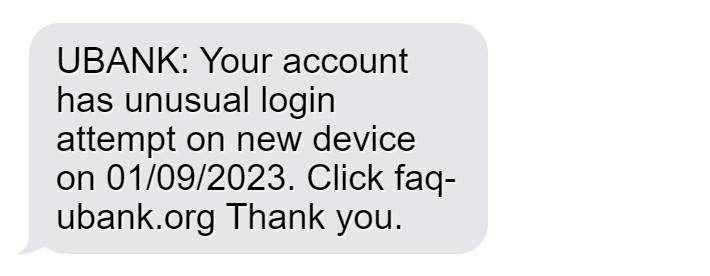
The UBank “Unusual Login Attempt” scam involves a text message stating there has been suspicious activity on your account from a new device. It claims this is a security alert, often including a date of the “login attempt”.
A link is provided to “secure your account” which actually directs to a fake UBank login portal to harvest your username, password and financial information.
In reality, this is a phishing scam aimed at stealing UBank account credentials and data for fraudulent use. UBank would never unilaterally contact customers via text with a hyperlink to a login portal in response to suspicious activity.
This message is designed to create fear your account is compromised, tricking you into clicking the link and entering details urgently without considering the legitimacy of the unfamiliar text message source.
Red flags indicating this is a phishing scam include:
- UBank would never text direct links for account login randomly.
- Messages from unknown numbers should always be treated cautiously.
- Urgent calls to action are manipulative and designed to overcome skepticism.
- Links can direct anywhere, not just to official UBank portals.
Scrutinizing contact from unknown sources is crucial. UBank will advise customers directly within internet banking regarding account security – not via text message clicks.
How the UBank Unusual Login Scam Works
Scammers exploit fear around account security and imitation websites to carry out this phishing scam. Knowing the techniques used helps avoid becoming a victim.
Crafting Deceptive Phishing Text Messages
The first step is composing a text message that convinces recipients to click the link. The content warns of an “unusual login attempt” from a “new device” to your UBank account.
A date is often included to add legitimacy and urgency. The message appeals to fears of account takeovers and compromises, making the user feel their finances and data are at risk.
A link is provided to urgently “secure your account” against unauthorized access. But the link actually directs to the phishing website. This manipulates users into clicking hastily without proper verification.
Directing Victims to Fake UBank Login Portal
The scam link leads to a fake login page mimicking the real UBank online banking platform. The site is designed to closely imitate the branding, web address and login layout.
You are prompted to enter your UBank username, password and potentially other credentials or personal information to “secure your account”. In reality, details entered are harvested by scammers.
Without close inspection, the imitation portal looks convincing. But legitimate banks would never text unsolicited login links – this indicates a scam.
Capturing Entered Account Credentials and Information
When victims enter their UBank username, password or other details into the fake portal, this sensitive information is captured directly by scammers.
Armed with your account credentials, scammers can now access your real UBank account and banking features by logging in with your stolen username and password.
With access to your account, scammers can steal funds, view and exploit financial information, access linked accounts and services, change account details, and carry out fraud in your name. Considerable financial damage can be done.
Any further personal details entered also aids scammer identity theft and account access. Information like addresses, phone numbers and account numbers have extensive malicious use.
Enabling Further Fraudulent Activity
Beyond initially accessing the victim’s UBank account, scammers can utilize stolen banking details in various follow-up fraudulent activities.
Login credentials may be tried against other Australian bank accounts the victim may hold to compromise more finances. Stolen identities and information also allow more sophisticated account takeovers.
Banking details can be sold on dark web marketplaces to equip other scammers to commit payment fraud using your accounts.
Compromised information furthers phishing attempts targeting you specifically as well. Once scammed once, users often fall victim again.
Avoiding engagement with the fake login portal limits the damage caused by preventing the initial credential theft.
How to Spot The UBank “Unusual Login Attempt” scam
While the phishing text looks convincing at first glance, there are key signs indicating it is a scam attempt to steal your UBank credentials:
- UBank will never text customers directly with links to login portfolios. Any security notifications occur within your online banking once logged in.
- Messages from phone numbers you don’t recognize should always raise red flags, especially with urgent calls to action.
- Poor grammar, spelling errors and inconsistent formatting are telltale signs of phishing texts.
- Random security alerts with no prior notification or context from your bank are highly suspicious.
- The text often does not address you by name, using generic greetings like “Dear customer”.
- Phishing links can direct anywhere – never click links in messages unless from a known, verified source.
- Highly urgent language and threats of account deactivation pressure you to bypass scrutiny and click.
Stay cautious of all text messages regarding account security and do not click links or provide information without independently verifying the source with UBank. Their official customer service channels will confirm any texts are legitimate.
What to Do If You Are a Victim of This Scam
If you have fallen for the UBank “Unusual Login” or similar phishing text message scam, urgent action is required to secure your accounts and limit damages. Follow these steps:
Step 1: Contact UBank
Contact UBank immediately by phone to report unauthorized access to your account enabled through stolen credentials. This alerts them to begin securing your account.
Step 2: Reset Your UBank Password
As the scammers have your password, change it right away. Create a new, unique password to prevent further account access. Enable two-factor authentication for enhanced security.
Step 3: Review Recent Transactions
Log into UBank and check your transaction history for any unauthorized transfers or activity indicating your account was accessed by scammers. Report any unknown transactions.
Step 4: Monitor Accounts Closely
Carefully monitor all your UBank accounts and features over the next months for any unusual behavior that may indicate compromised credentials were misused or sold on. Report suspicious activity ASAP.
Step 5: Be Wary of Further Scams
Now known to be vulnerable to phishing texts, you may be targeted with more scam messages attempting to steal your new banking passwords or account details. Verify every source directly with UBank.
Step 6: Watch for Identity Fraud
Monitor your credit history and other services for signs your personal information provided to scammers is being used to open illicit accounts or commit identity fraud.
Prompt action to change credentials and report unauthorized transactions limits damages by preventing extensive account access and stopping funds being stolen. But continued vigilance against ongoing misuse of compromised data is crucial.
UBank “Unusual Login” Scam Frequently Asked Questions
How can I tell if an unusual login text from UBank is legitimate?
UBank will never text you unsolicited links to login portals. Any genuine security notifications will happen within your UBank online banking dashboard when you login.
What should I do if I entered my details on the phishing site?
Contact UBank immediately to report unauthorized access and reset your password. Closely monitor your account activity and transactions for any signs your credentials were misused.
Can scammers access my account with just my username and password?
Yes, your UBank online banking credentials provide full account access. Scammers can steal funds, view personal data, change account details and more. Promptly resetting your password limits this risk.
What other risks are there if scammers get my information?
Stolen credentials may be used to compromise other linked financial accounts you hold. Personal information also equips scammers for sophisticated identity theft and account takeover fraud.
Should I click the link to secure my account against unusual logins?
No, the link sends you to a fake phishing site to harvest your details. Never click links in unsolicited messages – instead contact UBank directly through their official contact channels.
How can I better protect my UBank account from phishing?
Never share your login details unless on the official UBank portal you accessed directly. Use unique passwords and enable multi-factor authentication. Verify any unusual contact before acting.
Who should I contact if I shared details with the phishing scam?
Contact UBank’s customer support right away to report unauthorized account access and implement increased security solutions to limit damages enabled through stolen credentials.
Conclusion
The UBank “Unusual Login Attempt” phishing scam aims to steal online banking details by exploiting fears around account security. Understanding how common phishing tactics are applied in this scam offers the knowledge to identify risks and avoid providing information to fraudulent sources.
Any texts regarding account access should be verified directly with UBank before clicking links or sharing credentials. Real UBank security alerts will advise customers within internet banking – not via text message.
If compromised, act immediately to contact UBank, reset your password and monitor transactions closely for misuse. With fast response, you can restrict the access scammers gain and prevent stolen data empowering further fraud against your identity and linked accounts.

Join the discussion
0 commentsShare your experience or ask a question about this article.
Discussion
Start the conversation
Have a question or something useful to share? Add the first comment.