

If you recently received a text claiming your UPS delivery was interrupted and additional fees must be paid before it can be delivered, think twice before clicking any links. This is a new phishing scam looking to steal financial information by impersonating UPS.
The scam starts with a text message instilling urgency to click a link and pay a small “redelivery” fee. But the link directs to a fake UPS website gathering your credit card details for fraudulent charges. By understanding the deception used, you can recognize the scam and safeguard your information.
This guide will uncover the inner workings of this scam and provide the knowledge to outwit cybercriminals trying to intercept both your packages and your identity. Don’t let anxiety over stalled shipments put your data at risk.
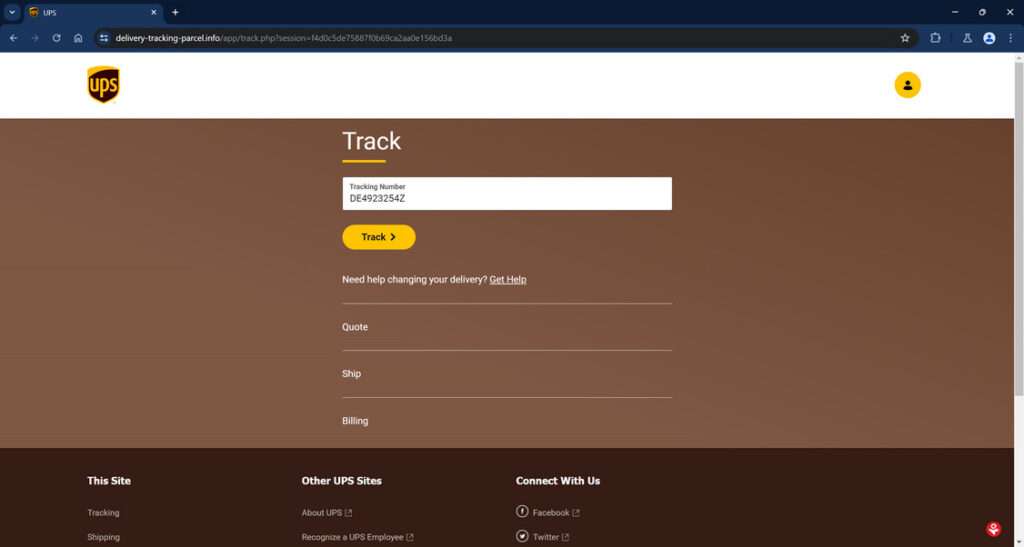
An In-Depth Look at the UPS “Delivery Interrupted” Text Scam
The UPS “Delivery Interrupted” scam starts by sending a text message stating that an expected UPS delivery has been interrupted, and additional fees must now be paid for the package to be delivered. The message claims to be from UPS and provides a link to supposedly pay the fees online so delivery can resume.
However, in reality, this link directs to an elaborate and fully-designed fake version of the real UPS website. This fraudulent site prompts victims to enter credit card information under the guise of paying added delivery fees. Once submitted, scammers steal this financial data and use it for unauthorized purchases or resell it on the black market.
For example, the initial scam text may state:
“URGENT ALERT FROM UPS: Your scheduled delivery has been interrupted due to unpaid fees. Please click here to pay additional fees so we can complete delivery: [Link to fake UPS site]”
This message is crafted to make recipients anxious about their stalled package and urgently click the link to resolve the problem. However, the link goes to a spoof UPS website that mirrors the real one in branded colors, graphics, logos and navigation. This tricks users into believing it is the official UPS site.
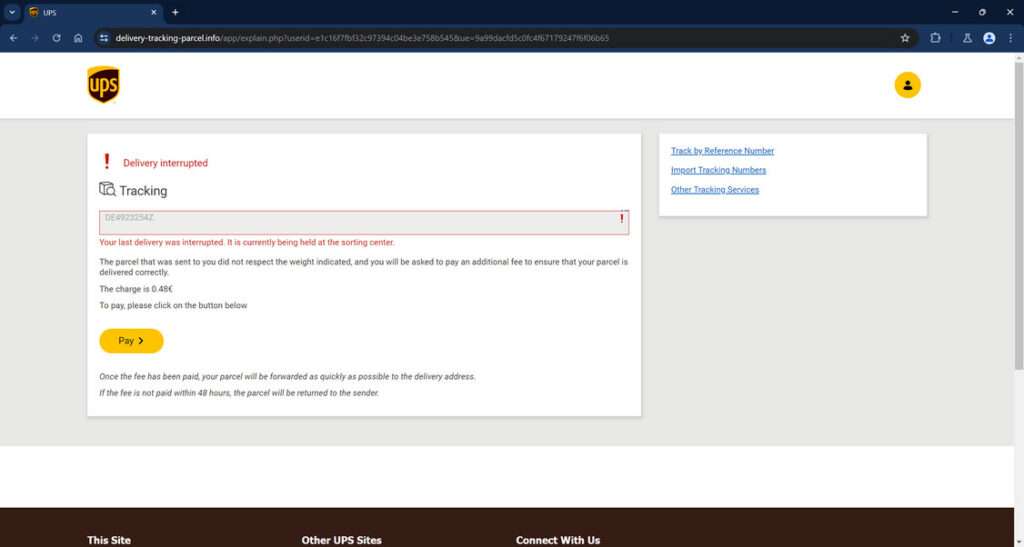
Once at the fraudulent site, victims are shown fake tracking information for a non-existent package. The site then claims additional fees were incurred due to the package being overweight or other fabricated reasons. Users are prompted to enter their credit card details, supposedly to pay these fees so delivery can proceed.
If victims input their credit card number, expiration date, and CVV code, the scammers immediately capture this financial data and begin making fraudulent purchases online or reselling the card numbers. Because the $1 or $2 fee seems small and legitimate, many people fall for this ploy without verifying the site.
With the stolen credit card details, scammers can now commit various types of financial fraud, including:
- Testing small charges to see if the cards are valid
- Making large unauthorized purchases online
- Duplicating credit cards for in-person fraudulent use
- Cashing out balances via ATM withdrawals
- Selling bundles of card data on the dark web
- Paying for illegal items with stolen cards
- Impersonating victims to get replacement cards issued
- Opening financial accounts in victims’ names
- Signing victims up for unwanted subscriptions
Victims often don’t notice the breach until they review their statement and see the unauthorized charges mixed with legitimate purchases. By then, the scammers have typically committed extensive fraud with potentially devastating financial impact.
According to the FBI, these types of package delivery scams cost victims over $100 million in 2021, a 20% increase from the prior year. The ubiquity of ecommerce and anxiety around missing packages make this scam resonate widely.
With the surge in online shopping and deliveries, cunning scams like this are likely to increase. But an informed public can stay safe by scrutinizing text senders, analyzing site details carefully, and never paying fees from out of the blue texts. Learning to identify the warning signs is key to avoiding this scam’s snare. Don’t hand your financial data over to scammers masquerading as trusted delivery firms.
How the UPS Delivery Interrupted Scam Works
Here is a close examination of how each step of this scam works to deceive victims:
1. Recipients Get Deceptive Text
The scam starts with an SMS text message sent to target mobile devices stating that an expected UPS delivery has been interrupted. It claims additional fees must be paid before the package can be delivered.
A link is provided to supposedly remit these fees so delivery can resume. But it directs to a fake UPS website.
2. Users Redirected to Elaborate Fake UPS Site
If recipients click the link, they are taken to an authentic-looking fake UPS website mimicking the real site in design, branding and functionality. The scam site displays tracking info for a fictional package.
The site states delivery was paused because additional fees must now be paid due to weight limit overages or other made-up reasons. Victims are led to believe this is the real UPS site.
3. Fake Site Requests Credit Card Information
This counterfeit site requests users enter their credit card number, expiration date and CVV code to pay the additional fees so delivery can proceed.
If victims provide this financial data, the scammers immediately capture it to use fraudulently. The small $1 or $2 fee seems innocuous and tricks many people.
4. Scammers Steal Credit Card Data
Once users input their credit card information on the fake site, the scammers instantly gain access to this sensitive data and theft begins.
Criminals either make unauthorized purchases with the stolen card numbers or sell bundles of the data on the dark web. This allows for even more fraud by third parties.
5. Fraudulent Use of Stolen Credit Cards
With the illegally obtained credit card numbers, scammers can now commit various types of fraud, including:
- Testing small charges to see if cards work
- Making large unauthorized purchases online
- Cashing out credit card limits via ATMs
- Impersonating victims to get replacement cards
- Opening accounts with victims’ identities
- Cloning credit cards for in-person fraudulent use
- Reselling card data on the black market
Legitimate charges can also be made to hide among the unauthorized activity. Victims may not notice the security breach for weeks or months until seeing their statement.
What To Do If You Entered Credit Card Details on the Fake UPS Site
If you suspect you may have entered information into a deceptive UPS page, take these steps right away:
- Contact your credit card company to freeze your card and request a new one be issued.
- Monitor your credit card statements and account activity vigilantly for fraudulent charges, even small charges.
- Review your credit reports from Equifax, Experian and TransUnion for any accounts opened without your permission.
- Reset online account passwords and security questions/answers for banking, credit cards, email, and other accounts.
- Consider signing up for dark web monitoring services that can detect if your information is sold online.
- File reports with the FTC, FBI, FCC, and UPS providing details on the scam text, website, and any losses.
Acting quickly can help halt damages and prevent further unauthorized use of your card. Catching fraud early limits the financial impact and hassle.
How to Detect the UPS Delivery Interrupted Scam
Stay vigilant against this scam by watching for these telltale signs of the deceptive text messages and websites:
Text Message Red Flags
- Originates from unknown sender, not UPS’s verified mobile number
- Contains spelling/grammar errors
- Requests immediate payment via text
- Includes shortened, obscured link that redirects
- Uses threats or urgent demands for payment
Fake UPS Website Warning Signs
- URL looks legitimate but site redirects to suspicious domain
- Missing verified HTTPS protocol in the URL
- Low resolution graphics, images and logos
- Credit card portal lacks standard security measures
- Requests unnecessary personal info like SSN
Go slowly and verify site legitimacy before entering payment data. Only pay fees through the official UPS website after logging in to your account.
Frequently Asked Questions About the UPS Delivery Interrupted Scam
This FAQ provides crucial facts and guidance regarding the deceptive UPS “delivery interrupted” phishing scam.
1. How can I identify the UPS delivery interrupted scam text?
Watch for these common traits:
- Claims delivery was interrupted and fees must be paid
- Urges immediate action via a linked website
- Comes from an unknown number, not UPS’s verified SMS code
- Has typos, grammar errors or odd phrasing
- Requests payment or financial details over text
- Includes a suspicious shortened URL
Verify the sender before clicking text links about packages.
2. Where does the link in the scam text redirect users?
The link goes to a fake UPS website impersonating the real UPS site. This fraudulent site requests credit card information, falsely claiming it’s to pay delivery fees.
3. What are the red flags of the fake UPS website?
Warning signs of the scam site include:
- URL looks valid but site redirects to obscure domain
- Missing verified HTTPS protocol in the URL
- Low resolution graphics and images
- Credit card portal lacks standard security measures
- Requests unnecessary personal info like SSN
Access UPS.com directly, not via text links.
4. What do scammers do with my credit card details from the fake site?
Scammers use your financial info for various criminal schemes like:
- Making unauthorized purchases online and in stores
- Cashing out credit card limits via ATM withdrawals
- Selling your card data on the black market
- Opening accounts in your name using your identity
- Signing you up for recurring billing subscriptions
5. What should I do if I entered my card on the fake site?
If you shared any financial data, take these steps immediately:
- Contact your card company to freeze your card and get a new one
- Monitor statements closely for fraudulent charges
- Review credit reports from Equifax, Experian, and TransUnion
- Reset account passwords and security questions
- Sign up for dark web monitoring to detect stolen data
- Report the scam to UPS, FBI, FTC, and FCC
6. How can I avoid the UPS delivery interrupted scam?
Protect yourself using these tips:
- Don’t click links in texts from unknown numbers
- Verify the UPS SMS short code before responding
- Go directly to UPS.com, not via text links
- Scrutinize sites carefully before entering payment info
- Never provide financial data from out of the blue texts
Staying vigilant against phishing and verifying sites can help you steer clear of this scam.
Don’t Let Scammers Intercept Your Data
This scam offers a sobering reminder of how impersonation and deception can be used to steal financial information and rip off consumers. By exploiting anxieties around delayed packages and mimicking trusted brands, these scams achieve a veneer of legitimacy that tricks countless targets.
However, savvy citizens can outmaneuver these frauds by being aware of their techniques and refusing to let anxiety override caution with links or payment portals. If anything seems off, listen to your instincts and investigate further. Don’t hand your data over blindly.
Staying vigilant against phishing tactics and verifying sites can help users avoid becoming victims. Spread awareness of these scams to protect more citizens from fraud. With vigilance and awareness, we can intercept these scams before they intercept our hard-earned assets.








