

If you received a suspicious text message from “USPS ECCC SMS” claiming issues with a package delivery, think twice before clicking any links. This is a crafty new phishing scam trying to steal personal and financial information by posing as a USPS alert.
The scam starts with a text message stating your shipment is on hold due to incomplete address information. It provides a link supposedly to verify your address so the fictional package can be delivered. However, the link actually directs to a fake website designed to harvest your sensitive data for criminal purposes.
This comprehensive guide will uncover how the scam operates, red flags to watch for, and ways to avoid becoming trapped by this deceit. Understanding the deception involved is key to safeguarding your identity, accounts, and assets. Don’t let scammers masquerading as USPS intercept your private information and finances.
An In-Depth Examination of the USPS ECCC SMS Text Scam
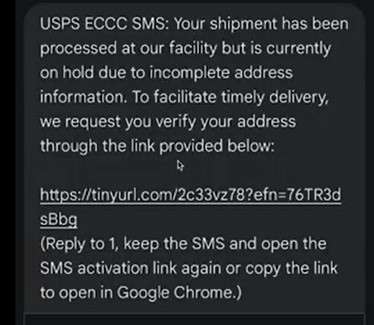
This scam starts with a text message claiming to be from “USPS ECCC SMS.” It states that a package delivery is currently on hold because the recipient’s address is incomplete or incorrect. The message includes a link supposedly to verify the address so the fictional stalled shipment can be delivered. However, the link actually directs to an elaborate fake USPS website designed to steal personal information and account credentials from victims.
For example, targets may receive a text that says:
USPS ECCC SMS: Your shipment has been proccesed at out faciltiy but is currently on hold due to incomplete address information. To facilitate timely delivery, we request you very your adress though the link provided below:
[malicious link]
(Reply to 1, keep the SMS and open the SMS activation link again or copy the link to open in Google Chrome.)
This message is not truly from USPS, and there is no real stalled package. The link goes to a convincing but completely fraudulent USPS website. This phishing site prompts victims to enter various personal details like full name, date of birth, address, phone number, and sometimes even Social Security Number.
If users provide their private data, scammers can use it to commit serious identity theft and account fraud. Criminals will quickly sell the stolen personal information on the dark web to fellow fraudsters. They may also directly use it themselves to open fake accounts, take out loans in the victim’s name, file fake tax returns to collect refunds, and commit other identity fraud causing severe financial and legal consequences.
According to the FTC, these types of USPS and shipping-related phishing scams have caused more than $44 million in losses for victims in 2022 already. The huge volume of packages sent through USPS makes these scams resonate widely and seem legitimate. The additional detail of referencing address verification makes the scam extra convincing.
With more people relying on USPS and other carriers for online shopping deliveries, cunning scams like this are on the rise. But an informed public can stay safe by never clicking links in unexpected texts, verifying senders, and scrutinizing site details carefully before entering any personal information.
How the Fraudulent USPS ECCC SMS Scam Functions
The deceptive USPS ECCC SMS text message scam leverages a fake shipping alert and phony tracking details to steal financial and personal information from victims. Here is an in-depth look at how the cunning fraudsters carry out this scam:
Step 1: Targets Receive SMS Text About Fake Package
It starts when targets get a text claiming a package with a made-up tracking number is stalled due to an incorrect address. The message claims to be from “USPS ECCC SMS” and provides a link to resolve the delivery issue.
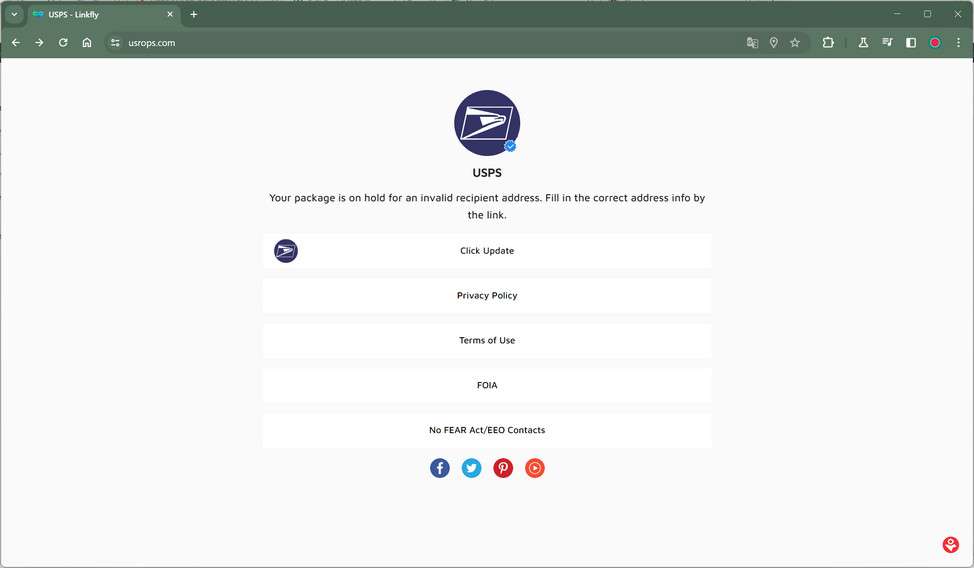
Step 2: Victims Redirected to Elaborate Fake USPS Site
Clicking the link sends victims to a highly realistic but completely fraudulent USPS website. This phishing site mirrors the look of the real USPS.com to deceive victims.
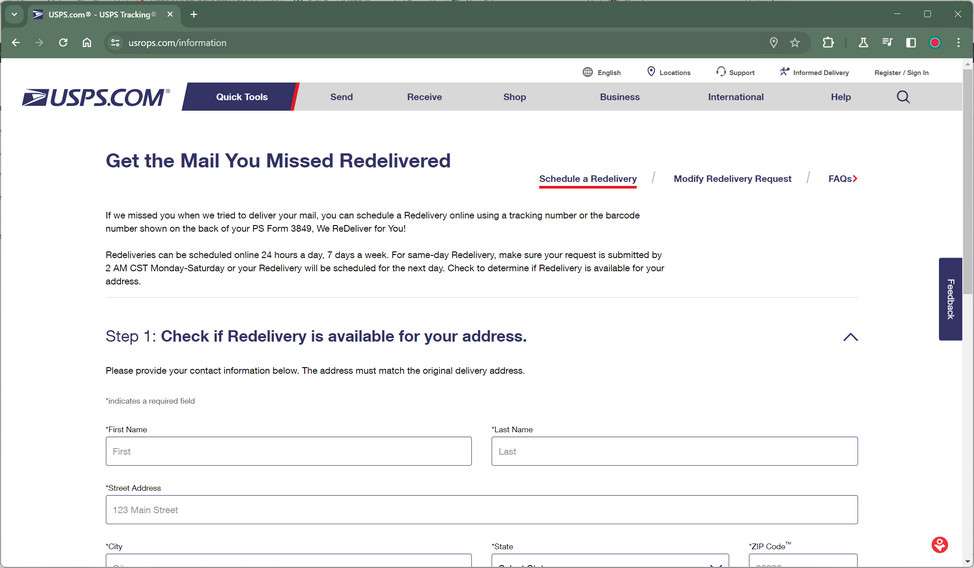
Step 3: Fake Site Shows Fake Tracking Details
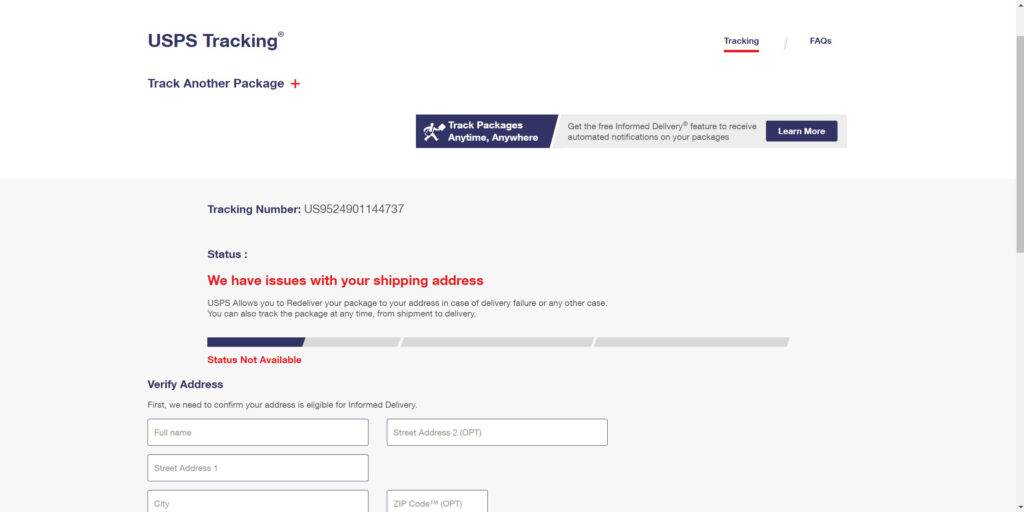
The scam site displays phony tracking details for the fictional package, tied to the fake tracking number in the initial text. This convinces victims it’s one of their real packages.
Step 4: Site Says Address Needs Verification to Redeliver
The site states the recipient’s address couldn’t be verified, so redelivery of the imaginary package requires address confirmation first.
Step 5: Victims Enter Name, Phone, Address into Phishing Site
Victims enter personal details like full name, phone number, and home address into the site to supposedly correct the address error.
Step 6: Fake Site Requests Small Fee to Redeliver “Package”
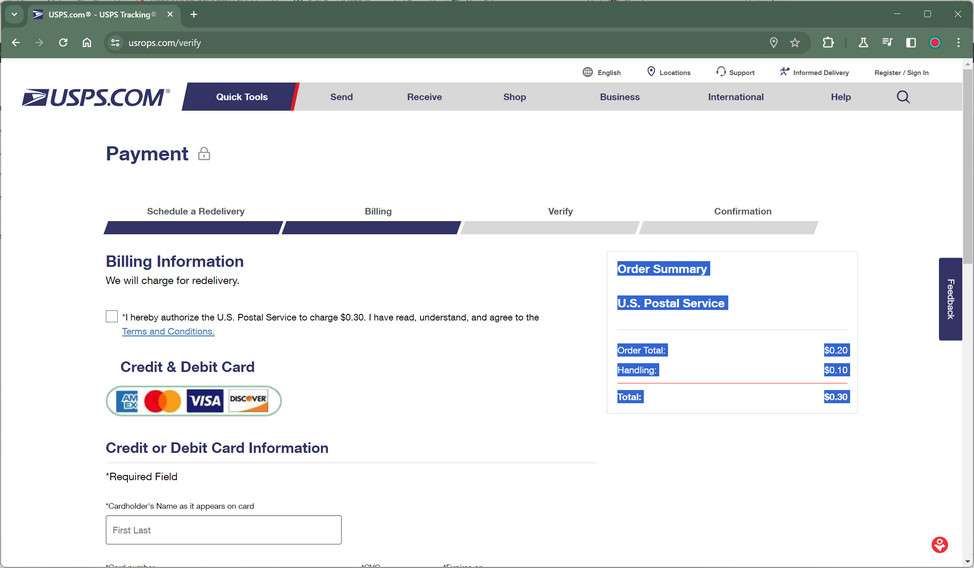
After entering personal info, the site states a small redelivery fee (under $1) must be paid before the fictional package can be resent to the updated address.
Step 7: Victims Enter Credit Card into Phishing Site
If victims provide their credit card number, expiration date, and CVV code into the fraudulent site to pay the small “redelivery fee”, the scammers instantly capture this financial data.
Step 8: Criminals Misuse Credit Cards and Sell Info
The scammers use victims’ credit cards to make fraudulent purchases and sign them up for costly monthly subscriptions. They also quickly resell the financial details on the dark web.
Step 9: Stolen Personal Info Used to Commit Identity Theft
Scammers use victims’ names, phone numbers, addresses, and other data stolen in the scam to open fake accounts, file fraudulent tax returns, and commit identity theft.
The phony tracking details and minimal redelivery fee provide cover for stealing financial and personal information through an extremely deceptive process. This scam shows the lengths criminals will go to in order to steal identities and money from victims.
What To Do If You Entered Information on the Scam USPS Site
If you suspect you may have fallen for this scam and entered any personal details on the fraudulent USPS website, take these steps immediately:
- Place a fraud alert and security freeze on your credit reports.
- Monitor your credit reports and financial accounts for any suspicious activity.
- Change passwords on all online accounts, using unique strong passwords for each.
- Be on high alert for additional phishing attempts via phone, text, or email.
- Contact the FTC, FBI, and USPS to report this phishing scam.
Taking swift action can help limit damages and prevent further identity theft as a result of this scam. But prevention is most crucial by learning to recognize phishing attempts.
How to Detect This USPS ECCC SMS Text Scam
Stay vigilant against this scam by watching for these telltale indicators of fraudulent texts and websites:
Text Message Red Flags
- Uses urgent language about a package being stuck or delayed
- Originates from unknown sender, not a verified USPS number
- Includes link to a suspicious shortened URL
- Has poor grammar, spelling mistakes, and typos
- Requests personal information over text
Fake USPS Site Warning Signs
- Asks for sensitive data like SSN, birthdate, etc.
- URL looks credible but site redirects to sketchy domain
- Missing verified HTTPS protocol in the URL
- Low resolution images and graphics
- Credit card/social security portals lack security measures
Go slowly and check for site legitimacy before entering any information.
Frequently Asked Questions About the USPS ECCC SMS Text Scam
1. What is the USPS ECCC SMS text message scam?
This scam sends a phony text message claiming issues with a USPS package delivery and providing a link to verify your address. However, the link goes to a fake USPS website designed to steal your personal information and data.
2. What delivery issues does the text claim are happening?
The text states the fictional package is stuck on hold due to an incomplete, unverified or incorrect delivery address.
3. What link is included in the text message?
The text contains a link that supposedly leads to the USPS site to verify your address and get the fake stalled package moving again. But it actually goes to an elaborate phishing site.
4. What personal information do scammers gather from the phishing site?
The fake USPS site tricks victims into entering info like full name, DOB, address, phone number, SSN, or even financial account details.
5. How do criminals use the stolen personal information?
Scammers use victims’ info to open fraudulent accounts, file fake tax returns, commit identity theft, make unauthorized purchases, take out loans in the victim’s name, and more.
6. What are signs this text is a scam?
Red flags include unknown sender, fake looking links, typos/grammar issues, urgent pleas, request for personal info over text, and threats of account suspension.
7. How can I avoid falling for this USPS ECCC SMS scam?
Carefully scrutinize all texts, verify real USPS senders, avoid clicking links in messages, check for site legitimacy before entering info, and never give personal data to unsolicited requests.
Key Takeaways About the USPS ECCC SMS Scam
This scam reveals important lessons about online safety and protecting your personal information:
- Unexpected texts requesting personal data or claiming package issues should raise red flags. Verify the sender is legit first.
- Clicking on links in suspicious texts can direct you to very convincing phishing websites designed to steal your information.
- Fake shipping alerts and small fees are tricks scammers use to get your guard down and harvest your financial details.
- Providing any sensitive data to unverified sources gives scammers the power to commit serious identity theft and financial fraud in your name.
- Monitor your accounts closely if you shared any information with a suspicious text or website. Report fraud to your bank, USPS, and authorities immediately.
Staying vigilant against phishing and verifying senders can help you steer clear of this scam. Don’t let scammers hide behind trusted names like USPS to intercept your personal data and identity.








