

If you have received a text message from USPS claiming that your package was delayed due to an incomplete door number, you might be a target of a phishing scam. This scam is designed to trick you into clicking on a malicious link that leads to a fake website that steals your personal and financial information. In this blog post, we will explain what this scam is, how it works, how to spot it, and how to protect yourself from it.
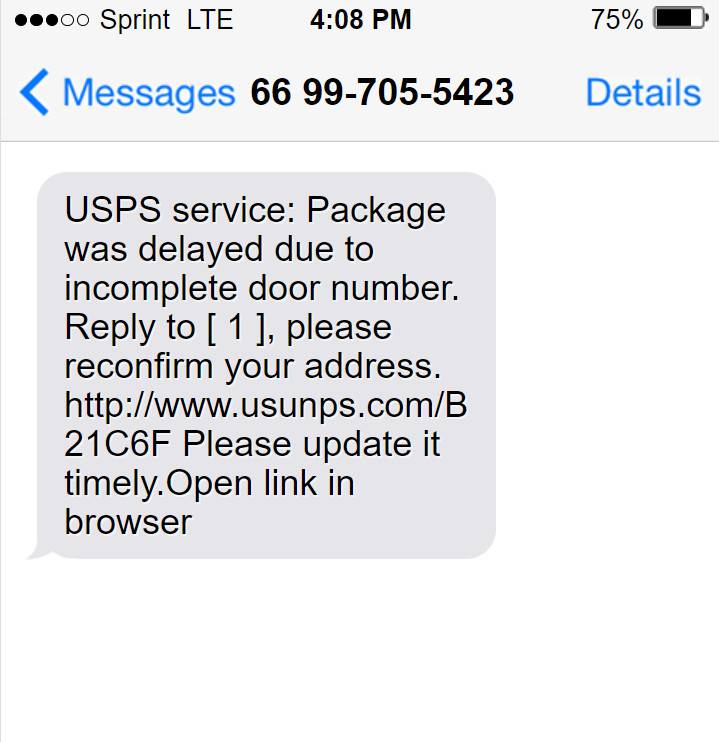
What is the “USPS Package was delayed due to incomplete door number” Scam?
The “USPS Package was delayed due to incomplete door number” scam is a type of smishing, which is a form of phishing that uses text messages instead of emails. Smishing scams aim to lure you into clicking on a link or replying to a message that appears to come from a legitimate source, such as a bank, a government agency, or a delivery service. However, the link or the message is actually sent by scammers who want to access your personal and financial information, such as your credit card details, your bank account number, or your social security number.
The “USPS Package was delayed due to incomplete door number” scam specifically targets people who are expecting a package from the U.S. Postal Service (USPS). The scammers send you a text message that looks like an official notification from USPS, informing you that your package was delayed because of an incorrect address. The message asks you to reply with your correct address or to click on a link to update it. The link leads to a fake website that mimics the appearance of the USPS website, but is actually controlled by the scammers. If you enter your address or any other information on the fake website, the scammers can use it for identity theft, fraud, or other malicious purposes.
How The “USPS Package was delayed due to incomplete door number” Scam Works?
The “USPS Package was delayed due to incomplete door number” scam works by exploiting your curiosity and urgency. The scammers know that many people are waiting for their packages, especially during holidays or special occasions. They also know that many people are not familiar with how USPS operates or what their official communications look like. Therefore, they use these factors to create a sense of urgency and legitimacy in their messages.
The scammers use various techniques to make their messages look convincing. For example, they may use:
- A spoofed sender ID that shows “USPS” or a similar name
- A fake tracking number that resembles a real one
- A link that contains “usp” or “usps” in the URL
- A logo or a design that matches the USPS website
- A polite or professional tone that requests your cooperation
However, these techniques are also easy to spot if you pay attention to some details. For example, you can notice:
- Grammatical errors or spelling mistakes in the message
- A generic greeting or salutation that does not address you by name
- A request for personal or financial information that USPS would never ask for
- A link that does not start with “https://” or does not end with “.gov”
- A website that does not have the official USPS seal or other security features
How To Spot The “USPS Package was delayed due to incomplete door number” Scam?
The best way to spot the “USPS Package was delayed due to incomplete door number” scam is to be skeptical and cautious whenever you receive an unexpected text message from USPS or any other sender. Here are some tips to help you avoid falling for this scam:
- Do not click on any links or reply to any messages that claim your package was delayed due to an incorrect address. Instead, contact USPS directly through their official website (https://www.usps.com) or phone number (1-800-ASK-USPS) and verify the status of your package.
- Do not provide any personal or financial information through text messages or websites that you do not trust. USPS will never ask you for such information via text messages or emails. If you need to update your address or pay for any fees, do it through the official USPS website or at your local post office.
- Do not download any attachments or open any files that come with suspicious text messages. They may contain malware that can infect your device and compromise your security.
- Report any suspicious text messages or websites to USPS and other authorities. You can forward the text message to 7726 (SPAM) and report the website to USPIS (https://www.uspis.gov/report/). You can also report the scam to the Federal Trade Commission (FTC) (https://reportfraud.ftc.gov/) or the Internet Crime Complaint Center (IC3) (https://www.ic3.gov/).
What to do if you have fallen for the “USPS Package was delayed due to incomplete door number” scam
If you have clicked on the link and entered your information on the fake website, you should take immediate action to protect yourself from identity theft and fraud. Here are some steps you can take:
- Contact your bank and credit card companies and inform them of the situation. They may be able to freeze your accounts and issue new cards.
- Report the scam to the USPS by calling 1-800-ASK-USPS or visiting https://www.uspis.gov/report/.
- Report the scam to the Federal Trade Commission (FTC) by calling 1-877-FTC-HELP or visiting https://reportfraud.ftc.gov/.
- Monitor your credit reports and bank statements for any suspicious activity. You can get a free credit report from each of the three major credit bureaus once a year at https://www.annualcreditreport.com/.
- Change your passwords and security questions for any online accounts that may have been compromised.
Conclusion
The “USPS Package was delayed due to incomplete door number” scam is a common and dangerous smishing scam that tries to steal your personal and financial information by pretending to be from USPS. To avoid falling for this scam, you should always be skeptical and cautious of any text messages that claim your package was delayed due to an incorrect address. You should also contact USPS directly to verify the status of your package and report any suspicious messages or websites to the authorities. By following these tips, you can protect yourself and your identity from this scam and other similar ones.








