

Imagine receiving an urgent text message claiming you owe unpaid tolls and must pay immediately to avoid steep late fees. It’s an alarming situation that could catch anyone off guard. Unfortunately, this is exactly the tactic being used in a widespread text message scam targeting unsuspecting victims. The VA-EZ.com text scam is tricking people into revealing their personal and financial information on a fake website. In this article, we’ll take an in-depth look at how the scam works and what you can do to protect yourself.
Scam Overview
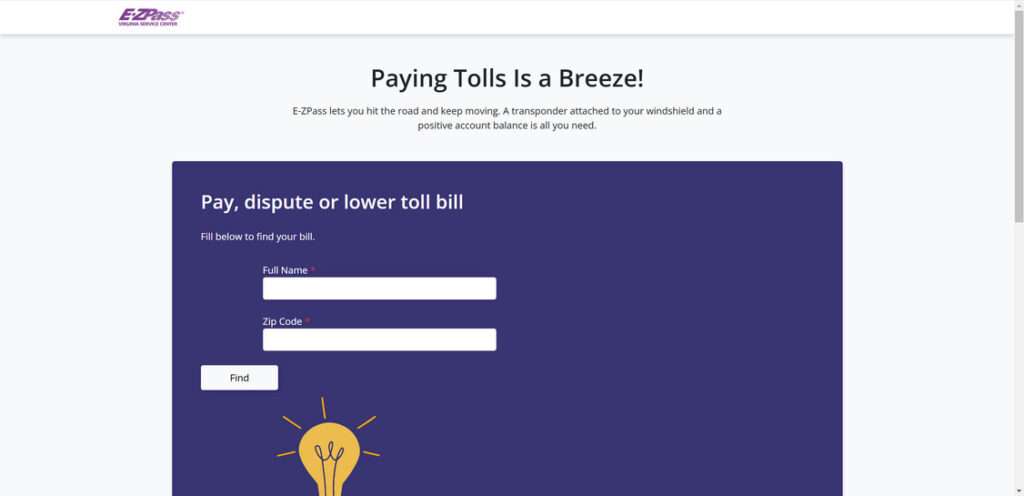
The VA-EZ.com text scam is a fraudulent scheme where scammers send out mass text messages claiming to be from the “E-ZPass Virginia Service Center.” The messages allege that the recipient has an unpaid invoice for driving on the Virginia Express lanes and must pay a small amount, usually around $4-5, to avoid much higher late fees of $35 or more.
To create a false sense of urgency and legitimacy, the scam texts include very specific dollar amounts for the supposed unpaid toll and late fee. They also provide a link, usually to a website like VA-EZ.com or a similar variation, where the victim can supposedly go to pay their bill securely.
But there is no unpaid bill and the website is a complete fake, carefully designed to look like an official payment portal. The scammers’ goal is to trick victims into entering their sensitive personal and financial data, like credit card numbers, bank account info, Social Security number, date of birth, etc.
Once the scammers capture this information from the phony website, they can exploit it in numerous ways, like making fraudulent purchases, stealing the victim’s identity, selling the data on the dark web to other criminals, or using it in future scams and cybercrimes. Meanwhile, the victim is left dealing with the fallout and damages.
The VA-EZ.com scam often targets Virginia residents, leveraging the name recognition of the actual E-ZPass system used for electronic toll collection across multiple states. But the scam could easily be adapted to other states and toll systems. Scammers usually blast the texts out to huge lists of phone numbers, hoping to ensnare as many victims as possible with each campaign.
How the Scam Works
The VA-EZ.com scam is deployed in a typical phishing attack format, where fraudsters impersonate a trusted entity in order to dupe victims into revealing confidential data. Here’s a step-by-step breakdown of how the con unfolds:
Step 1: You receive a scam text message
The scam usually starts when you receive an unsolicited text message that appears to be from the “E-ZPass Virginia Service Center” or a similar official-sounding name. The message claims you have an unpaid toll balance of a small amount, usually $5 or less.
Step 2: Scammers create a false sense of urgency
To pressure you into acting quickly without scrutinizing the message too closely, the text will claim you need to pay the small outstanding balance immediately in order to avoid much higher late fees, often $35 or more. This false sense of urgency is a common phishing tactic.
Step 3: You’re directed to a phony payment website
The message includes a link to a website, which it claims you must visit in order to securely access your account and pay the alleged unpaid toll. The URL is usually something like VA-EZ.com or a similar variation designed to look like an official E-ZPass payment portal.
Step 4: The fake website captures your sensitive data
If you click the link, you’re taken to the scam website which is carefully designed to resemble a legitimate payment page. It will prompt you to enter sensitive info like your credit card number, bank account details, Social Security number, date of birth, address, etc. – All under the pretense of verifying your identity and processing the payment.
Step 5: Scammers steal your data for financial fraud and identity theft
Any data you enter on the phony VA-EZ.com payment page goes straight to the scammers. They can then exploit this treasure trove of personal and financial information for fraudulent online purchases, taking out loans in your name, selling the data to other criminals on the dark web, or using it in future identity theft scams.
Step 6: You’re left dealing with the damages
Meanwhile, you’re left to deal with the financial damages and fallout of the scam. You may face unauthorized charges on your accounts, damaged credit, and even full-blown identity theft. Recovering from these impacts can be stressful and time-consuming.
What to Do If You’ve Fallen Victim to This Scam
If you suspect you’ve fallen for the VA-EZ.com scam text, take these steps to start mitigating the potential damages:
- Report the scam text to your cell carrier by forwarding it to 7726 (SPAM). This helps carriers identify and block scam numbers.
- Notify your bank and credit card companies if you entered any financial data on the fake website. They can monitor your accounts for fraudulent activity and replace compromised cards if needed.
- Change the passwords on any accounts that could be compromised. Use strong, unique passwords for each account.
- Check your credit reports for suspicious activity or accounts you don’t recognize. You can request free reports from the three major credit bureaus at AnnualCreditReport.com. Consider placing a fraud alert or freeze on your credit files.
- Report the scam to the Federal Trade Commission at ReportFraud.ftc.gov. This helps the FTC track and warn the public about prevalent scams.
- Stay vigilant for signs of identity theft. Review your statements regularly and be on the lookout for phishing emails or scam texts trying to capitalize on the data stolen in this scam.
Frequently Asked Questions about the VA-EZ.com Text Scam
Q1: What is the VA-EZ.com text scam?
A: The VA-EZ.com text scam is a fraudulent scheme where scammers send text messages claiming to be from the “E-ZPass Virginia Service Center.” The messages allege the recipient has unpaid tolls and must pay immediately via a provided link to avoid hefty late fees. But the link leads to a fake website designed to steal personal and financial information.
Q2: How can I spot a VA-EZ.com scam text?
A: VA-EZ.com scam texts usually have a few red flags:
- Unsolicited messages claiming you owe unpaid tolls
- A false sense of urgency, pressuring you to pay immediately
- Links to unfamiliar websites that aren’t the official E-ZPass site
- Requests for sensitive info like credit card numbers or Social Security numbers
- Poor grammar or spelling errors in the message text
Q3: What should I do if I get a suspected VA-EZ.com scam text?
A: If you receive a suspicious text claiming to be from E-ZPass Virginia, do not click any links in the message. Forward the text to 7726 (SPAM) to alert your carrier, then delete it. If you have concerns about your toll account, contact E-ZPass directly through the phone number or website listed on your official billing statements.
Q4: What happens if I click the link in a VA-EZ.com scam text?
A: Clicking the link takes you to a fraudulent website designed to look like an E-ZPass payment portal. The site will ask you to enter sensitive personal and financial data, which the scammers can then steal and use for fraudulent purchases, identity theft, and other cybercrimes.
Q5: I think I entered my information on the fake VA-EZ.com site. What should I do now?
A: If you suspect you’ve fallen victim to the scam, take these steps:
- Contact your bank and credit card companies to alert them of potential fraudulent activity on your accounts.
- Change passwords on any compromised accounts and enable two-factor authentication if available.
- Check your credit reports for suspicious activity and consider placing a fraud alert or freeze.
- Report the scam to the FTC at ReportFraud.ftc.gov to help track and warn others about it.
Q6: How can I protect myself from text scams like VA-EZ.com in the future?
A: Stay cautious of unsolicited text messages, even if they appear to come from a legitimate source. Scammers often spoof real companies and agencies. Don’t click links in suspicious messages, and never provide sensitive personal info in response to an unexpected text. If you have questions about your accounts, contact companies directly using verified contact information.
Q7: Are there other versions of this scam targeting other states besides Virginia?
A: While the VA-EZ.com scam specifically targets Virginia residents and the E-ZPass toll system, the underlying phishing tactics could easily be adapted to other states and toll agencies. Always be wary of unsolicited messages claiming you owe money, no matter what state you live in or what company they claim to represent.
Q8: What do scammers do with information stolen in the VA-EZ.com scam?
A: Scammers can use your stolen personal and financial data in many fraudulent ways, like:
- Making unauthorized purchases on your accounts
- Opening new accounts or loans in your name
- Selling the information to other scammers on the dark web
- Using your info for future scams and identity theft attempts
- Filing fraudulent tax returns to steal your refund
Protecting your sensitive data is key to avoiding these damaging outcomes.
The Bottom Line
The VA-EZ.com text scam is a devious phishing attack designed to trick victims into revealing sensitive personal and financial data. By impersonating the real-life E-ZPass toll system and creating a false sense of urgency around alleged unpaid tolls, scammers convince people to visit a phony website and enter information like credit card numbers, bank details, and Social Security numbers. This data is then exploited for financial fraud, identity theft, and future cybercrimes.
To protect yourself, be highly wary of unsolicited text messages claiming you owe money, even if they appear to come from a legitimate source. Never click links in suspicious messages. If you have concerns about unpaid tolls, contact the toll agency directly through their official website or customer service line.
If you believe you’ve fallen victim to this scam, notify your financial institutions, change compromised passwords, check your credit reports, and report the incident to the proper authorities. Staying vigilant and informed is key to thwarting the efforts of cyber thieves.

Reviews & discussion
0 commentsShare a firsthand experience, or ask a question.
Community reviews
va-ez.com
Moderated reader experiences, not an editorial verdict.
Start the conversation
Have a question or something useful to share? Add the first comment.