

If you come across a website claiming you can get up to $750 in gift cards from Target just by filling out a form or completing a few deals, treat it as fraudulent. VeloPerks.com is not a legitimate Target promotion.
It is designed to look convincing while collecting personal data and generating affiliate revenue. This guide breaks down how the scam works, the warning signs, and what to do if you’ve already interacted with it.
Scam Overview
VeloPerks.com is part of a broader network of fake “free gift card” scams. These sites impersonate well-known brands to lure users into completing tasks under the promise of a high-value reward.
In reality, there is no reward. The entire setup exists to monetize your data and actions.
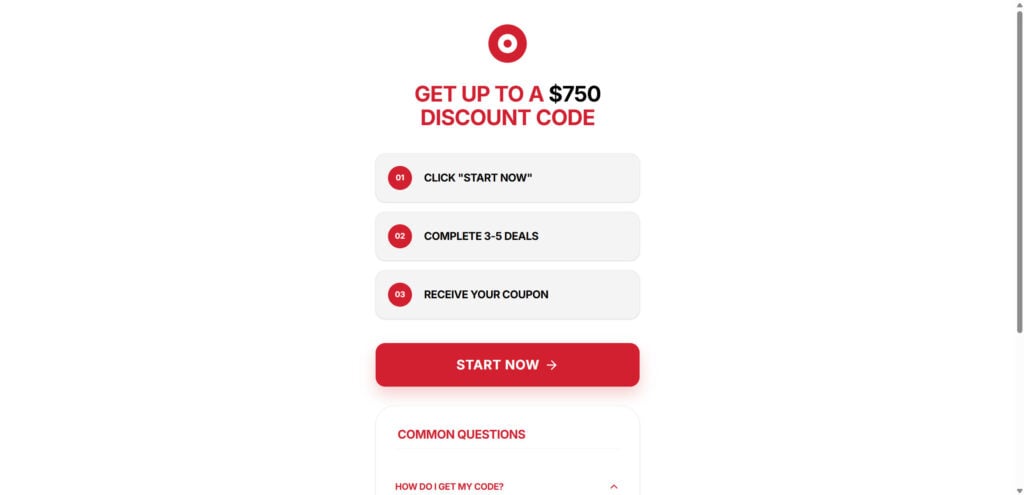
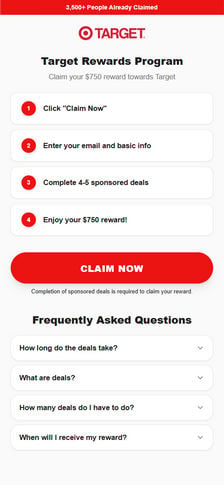
What the Site Looks Like
The page is intentionally simple and familiar:
- Prominent Target logo and red color scheme
- Headline such as: “Click Below to Claim Your Target Gift Card”
- A large “Apply Today” button
- A short list of steps:
- Click Apply
- Enter your email
- Complete 3–5 deals
- Earn $100–$750
The design mimics official branding to reduce skepticism and encourage quick action.
The False Promise
The core claim — earning up to $750 in gift cards — is fabricated.
- Target does not run promotions through VeloPerks.com
- The required “deals” are unrelated to Target
- No reward is ever delivered
Users who complete the process typically receive nothing except spam and potential charges.
Why the Target Brand Is Used
Scammers rely on brand trust.
- Target is widely recognized and trusted
- Using its logo creates instant credibility
- Users assume the offer is legitimate
This is unauthorized brand impersonation. Legitimate promotions only appear on Target’s official channels.
Red Flags That Expose the Scam
Several indicators clearly show VeloPerks.com is not legitimate:
- Domain is not owned by Target
- No real company details or contact information
- Vague instructions with no clear reward process
- Requires completing unrelated “deals”
- Redirects through multiple affiliate links
- Recently registered domain
- No verifiable success stories
If multiple red flags appear together, the site should not be trusted.
The Real Goal: Data and Commissions
VeloPerks.com is built to extract value from users in two ways:
Data Collection
- Email, phone number, and personal details are collected
- Data is shared or sold to marketing networks
- Leads to spam, robocalls, and future scam targeting
Affiliate Revenue
- Each completed “deal” generates commission
- Actions include:
- Signing up for trials
- Downloading apps
- Completing surveys
Users provide the value. Scammers collect the profit.
What Victims Commonly Report
People who interact with these sites often experience:
- Large volumes of spam emails and texts
- Unexpected subscription charges
- No gift card or confirmation
- Difficulty canceling services
- Ongoing marketing and scam exposure
The impact is usually long-term, especially regarding data exposure.
How the Scam Works
Understanding the process helps you recognize similar schemes.
Step 1: The Hook
Users encounter ads or pop-ups claiming:
- “You’ve been selected for a $750 Target gift card”
- “Limited-time reward for loyal customers”
- “Claim your prize now”
These appear on platforms like Facebook, YouTube, or low-quality websites.
Step 2: Redirect to Landing Page
Clicking the ad leads to VeloPerks.com.
- Clean, minimal design
- Target branding
- One primary action: Apply Today
The page is engineered to push users forward quickly.
Step 3: Data Entry
Users are asked to provide:
- Name
- Phone number (sometimes)
This is presented as “verification,” but it is data harvesting.
Step 4: The Deals Trap
Users must complete multiple offers, such as:
- Free trials
- App downloads
- Surveys
- Account registrations
Each action generates revenue for the scammers.
Step 5: Hidden Costs
Some offers require payment details.
- “Free trials” convert into paid subscriptions
- Charges may appear weeks later
- Cancellation is often difficult
Step 6: Progress Manipulation
The site uses psychological pressure:
- Progress bars
- “Almost done” messages
- Countdown timers
This keeps users engaged and committed.
Step 7: No Reward
After completing everything:
- No gift card is sent
- No real confirmation exists
- Users are left with nothing
Step 8: Data Monetization
Collected data is used to:
- Send spam campaigns
- Target users with more scams
- Sell to third-party advertisers
Step 9: Domain Recycling
Once exposed, the site disappears and reappears under a new name.
Common pattern:
- Same layout
- Different domain
- Same scam
Step 10: Expansion Across Brands
The same model is reused with different logos:
- Walmart
- Amazon
- Costco
Only the branding changes. The mechanism stays identical.
What to Do If You Interacted With VeloPerks.com
Take action immediately to limit damage.
1. Stop Using the Site
- Close the page
- Do not complete any additional offers
2. Change Passwords
- Update passwords for any reused accounts
- Enable two-factor authentication
3. Monitor Accounts
- Check bank and card statements
- Look for unknown subscriptions or charges
4. Handle Spam Safely
- Mark messages as spam
- Avoid clicking unsubscribe links in suspicious emails
5. Cancel Subscriptions
- Contact companies tied to any “deals”
- Cancel trials before billing starts
- Request refunds or chargebacks if needed
6. Scan Your Device
- Run antivirus or anti-malware software
- Remove suspicious apps or files
7. Report the Scam
File reports with:
- Federal Trade Commission
- Internet Crime Complaint Center
- Better Business Bureau
You can also notify Target about brand misuse.
8. Consider Identity Protection
If sensitive data was shared:
- Monitor for identity theft
- Use credit monitoring services
9. Warn Others
- Share your experience
- Help others recognize the pattern
10. Stay Alert
- Avoid similar “reward” offers
- Always verify through official websites
Is Your Device Infected? Run a Free Malware Scan
Slow performance, constant pop-ups, or strange behavior? These are classic signs of a malware infection. The fastest way to find out is to scan your device with Malwarebytes Free — one of the most trusted malware removal tools available.
The free version detects and removes the most common threats, including:
- Adware — the cause of those annoying pop-ups
- Browser hijackers — unwanted redirects and changed homepages
- Trojans and spyware — hidden programs stealing your data
- Potentially unwanted programs (PUPs) — software you never asked for
👉 Select your device below — Windows, Mac, or Android — then follow the simple steps to download Malwarebytes, scan your system, and remove any threats it finds. The scan usually takes 5 to 20 minutes.
Run a Malware Scan with Malwarebytes for Windows
Malwarebytes is one of the most popular and trusted anti-malware tools for Windows — and it’s completely free for removing infections. It catches threats that many antivirus programs miss, including adware, browser hijackers, and trojans. Follow the steps below to scan and clean your PC in just a few minutes.
Download Malwarebytes
Click the button below to download the latest version of Malwarebytes for Windows from the official source. The free version is all you need — it will scan your computer and remove adware, browser hijackers, and other malicious software at no cost.
Download MalwarebytesOfficial installer for Windows 11 and 10. Your download starts right away.Want real-time protection? See Malwarebytes Premium Malwarebytes Free for WindowsScans and removes malware at no cost
-
Install Malwarebytes
When the download finishes, open your Downloads folder and double-click the MBSetup file. If Windows shows a User Account Control pop-up, click “Yes” to allow the installation.

Follow the On-Screen Prompts to Install Malwarebytes
The setup wizard will walk you through a few quick screens:
-
Choose where you’re installing the program — “Personal Computer” or “Work Computer” — then click Next.

-
Malwarebytes will now install on your device. This usually takes under a minute.

-
When installation is complete, the “Welcome to Malwarebytes” screen will open automatically.

-
On the final screen, click Open Malwarebytes to launch the program.

-
Enable “Scan for Rootkits”
Before scanning, turn on rootkit detection so Malwarebytes can find even the most hidden threats. Click the Settings gear icon on the left side of the screen.

In the settings menu, find “Scan for rootkits” and click the toggle so it turns blue.

Done? Click “Dashboard” in the left pane to return to the main screen.
Start the Scan
Click the blue Scan button. Malwarebytes will automatically update its virus database and start checking your computer for malware.

-
Wait for the Scan to Finish
The scan checks your entire system for browser hijackers and other malicious programs, so it can take 5 to 20 minutes depending on your computer. Feel free to do something else — just check back occasionally to see the progress.

-
Quarantine the Detected Threats
When the scan is done, you’ll see a list of everything Malwarebytes found — malware, adware, and potentially unwanted programs. Click the “Quarantine” button to remove all of them at once.

Malwarebytes will now remove the malicious files and registry entries and move them safely into quarantine.

-
Restart Your Computer
Some threats can only be fully removed after a reboot. If Malwarebytes asks you to restart, click Yes. Once you’re logged back in, Malwarebytes has finished removing the threats it found.

That’s it — your Windows PC is now clean of trojans, adware, and other malware, and should be back to running smoothly.
If you are still having problems with your computer after completing these instructions, then please follow one of the steps:
- Run a computer scan with ESET Online Scanner
- Ask for help in our Windows Malware Removal Help & Support forum.
Run a Malware Scan with Malwarebytes for Mac
Malwarebytes for Mac is a free on-demand scanner that removes the malware other security software tends to miss — adware, browser hijackers, and unwanted programs included. Cleaning an infected Mac with Malwarebytes has always been completely free, and it’s our go-to recommendation. Follow the steps below to scan and clean your Mac in just a few minutes.
-
Download Malwarebytes for Mac
Click the button below to download the latest version of Malwarebytes for Mac.
Download MalwarebytesOfficial installer for macOS. Your download starts right away.Want real-time protection? See Malwarebytes PremiumMalwarebytes Free for MacScans and removes malware at no cost -
Open the Malwarebytes setup file
When the download finishes, open your Downloads folder and double-click the setup file to begin the installation.

-
Follow the On-Screen Prompts to Install Malwarebytes
The Malwarebytes for Mac Installer will guide you through a few quick screens. Click “Continue” and keep following the prompts until the installation completes.



When the installation is complete, Malwarebytes opens to the Welcome to Malwarebytes screen. Click “Get started“.
-
Select “Personal Computer” or “Work Computer”
Malwarebytes will ask what type of computer you’re installing it on. Click either Personal Computer or Work Computer, whichever applies.

-
Start the Scan
Click the “Scan” button. Malwarebytes will automatically update its detection database and begin checking your Mac for malware.

-
Wait for the Scan to Finish
Malwarebytes will scan your Mac for adware, browser hijackers, and other malicious programs. This can take a few minutes, so feel free to do something else — just check back occasionally to see the progress.

-
Quarantine the Detected Threats
When the scan is done, you’ll see a list of everything Malwarebytes found. Click the “Quarantine” button to remove all the threats at once.

-
Restart Your Mac
Malwarebytes will now remove all the malicious files it found. Some threats can only be fully removed after a reboot — if Malwarebytes asks you to restart, allow it. Once you’re logged back in, your Mac is clean.

That’s it — your Mac is now free of adware, rogue browser extensions, and other potentially harmful software.
If you are still experiencing problems while trying to remove a malicious program from your computer, please ask for help in our Mac Malware Removal Help & Support forum.
Run a Malware Scan with Malwarebytes for Android
Malwarebytes for Android automatically detects and removes dangerous threats like malware and ransomware so you don’t have to worry about your most-used device being compromised. Aggressive detection of adware and potentially unwanted programs keeps your Android phone or tablet running smooth.
-
Download Malwarebytes for Android.
You can download Malwarebytes for Android by clicking the link below.
Get Malwarebytes for AndroidOpens Google Play in a new tab.Want real-time protection? See Malwarebytes Premium for AndroidMalwarebytes for AndroidScans your phone and removes malware at no cost -
Install Malwarebytes for Android on your phone.
In the Google Play Store, tap “Install” to install Malwarebytes for Android on your device.

When the installation process has finished, tap “Open” to begin using Malwarebytes for Android. You can also open Malwarebytes by tapping on its icon in your phone menu or home screen.

-
Follow the on-screen prompts to complete the setup process
When Malwarebytes will open, you will see the Malwarebytes Setup Wizard which will guide you through a series of permissions and other setup options.
This is the first of two screens that explain the difference between the Premium and Free versions. Swipe this screen to continue.
Tap on “Got it” to proceed to the next step.
Malwarebytes for Android will now ask for a set of permissions that are required to scan your device and protect it from malware. Tap on “Give permission” to continue.
Tap on “Allow” to permit Malwarebytes to access the files on your phone.
-
Update database and run a scan with Malwarebytes for Android
You will now be prompted to update the Malwarebytes database and run a full system scan.

Click on “Update database” to update the Malwarebytes for Android definitions to the latest version, then click on “Run full scan” to perform a system scan.

-
Wait for the Malwarebytes scan to complete.
Malwarebytes will now start scanning your phone for adware and other malicious apps. This process can take a few minutes, so we suggest you do something else and periodically check on the status of the scan to see when it is finished.

-
Click on “Remove Selected”.
When the scan has been completed, you will be presented with a screen showing the malware infections that Malwarebytes for Android has detected. To remove the malicious apps that Malwarebytes has found, tap on the “Remove Selected” button.

-
Restart your phone.
Malwarebytes for Android will now remove all the malicious apps that it has found. To complete the malware removal process, Malwarebytes may ask you to restart your device.
That’s it — your Android phone is now clean — no more malicious apps, adware, or browser redirects.
If you are still having problems with your phone after completing these instructions, then please follow one of the steps:
- Restore your phone to factory settings by going to Settings > General management > Reset > Factory data reset.
- Ask for help in our Mobile Malware Removal Help & Support forum.
Stay Protected: Block Ads and Malicious Sites
Now that your device is clean, keep it that way. Most infections start with a malicious ad or a fake download button — so blocking them at the source is your best defense.
We recommend AdGuard, which blocks malicious ads, phishing pages, and dangerous redirects before they can reach you.
👉 Download AdGuard and browse safely
The Bottom Line
VeloPerks.com is not a legitimate promotion. It is a deceptive affiliate scheme that uses Target branding to collect data and generate revenue.
There are no real gift cards, no official affiliation, and no payout.
If an offer promises a large reward for minimal effort, assume it is fraudulent. Verify everything through official sources before sharing personal information.
Frequently Asked Questions
What is the VeloPerks.com Target Gift Card Scam?
It is a fake promotion that claims users can earn up to $750 in Target gift cards by completing tasks. In reality, it collects personal data and generates affiliate revenue. No reward is ever delivered.
Is VeloPerks.com affiliated with Target?
No. VeloPerks.com has no connection to Target. The branding is used without authorization to create false credibility.
How does the scam work?
- Users click an ad
- Enter personal details
- Complete multiple offers
- Scammers earn commissions
- No reward is provided
Why is it considered a scam?
- False promises of rewards
- No actual gift cards
- Data harvesting
- Hidden subscriptions
- No legitimate company backing
What are the main warning signs?
- Non-official domain
- No contact information
- Vague instructions
- Required “deal” completion
- No verifiable success cases
What happens if I complete the deals?
You may:
- Generate profit for scammers
- Receive spam
- Be enrolled in subscriptions
- Still receive no reward
Will I ever get the gift card?
No. The reward does not exist.
What should I do if I entered my information?
- Change passwords
- Monitor financial accounts
- Cancel subscriptions
- Run security scans
- Report the scam
What if I entered credit card details?
- Contact your bank immediately
- Cancel or replace the card
- Dispute unauthorized charges
- Monitor future transactions
Why do people fall for this?
Because the scam combines:
- Trusted branding
- Urgency
- High-value rewards
These factors reduce skepticism and encourage quick decisions.

Reviews & discussion
0 commentsShare a firsthand experience, or ask a question.
Community reviews
veloperks.com
Moderated reader experiences, not an editorial verdict.
Start the conversation
Have a question or something useful to share? Add the first comment.