

Earning money online has become increasingly popular over the past few years. While there are many legitimate websites and apps that allow you to make money from home, there are also a growing number of scams designed to steal your money and personal information. One such online scam is called “VideoToEarn”, which claims you can earn money simply by watching promotional videos.
In this article, we will provide an in-depth overview explaining how the VideoToEarn scam operates, including background details on the company behind it, how the scam works to hook unsuspecting victims, the red flags and details about why it is a scam, as well as recommendations on what you should do if you have fallen victim to this scam website.
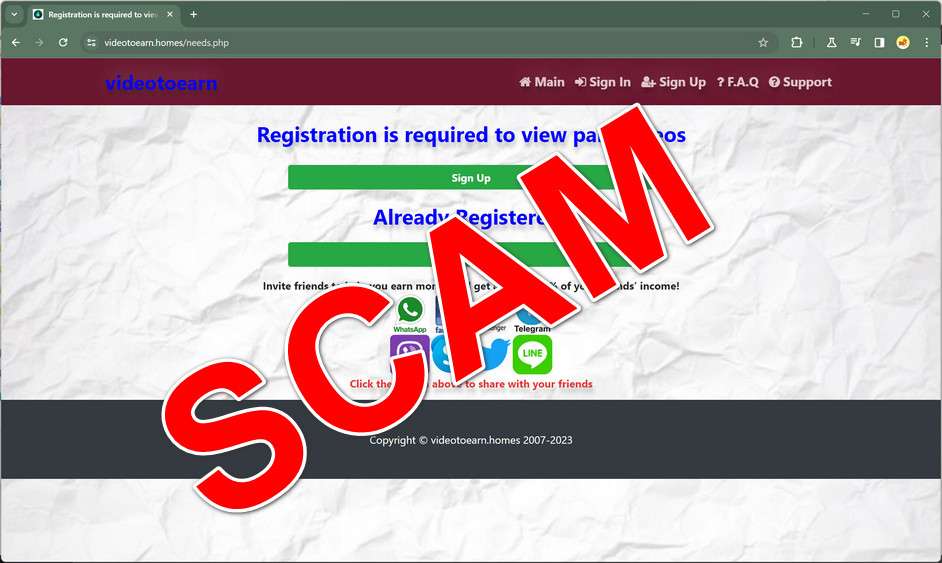
Scam Overview
VideoToEarn operates under the domain name VideoToEarn.homes and claims to offer an opportunity for users to earn money simply by watching promotional videos. According to the website, by becoming a member you can purportedly earn up to $0.60 per minute spent watching videos. The site also claims to offer a $10 sign-up bonus just for registering as a new user.
Additionally, VideoToEarn states that you can refer others to increase your earnings through a multi-level marketing structure that pays out commissions based on referrals. The site claims you can earn 40% commission on the earnings of anyone you refer to the platform.
At first glance, the concept seems like an easy way to earn extra money passively in your spare time. However, there are several red flags with both the website itself as well as the earning opportunity that point to VideoToEarn being a scam designed to steal money from unsuspecting victims.
The website itself is amateurish, filled with grammatical errors, stock photos, and other signs of being hastily put together. There is no company address, business registration information, or contact details beyond a web form – all highly unusual and suspect for a legitimate business opportunity.
Additionally, reputable review websites warn that VideoToEarn is a confirmed scam, with details on victims losing hundreds of dollars to this shady operation. The income opportunity itself also mirrors many classic scam offerings with promises of easy money for doing very little work.
In the following sections, we will break down exactly how the VideoToEarn scam works as well as provide tips on how to avoid falling victim.
How the VideoToEarn Scam Works
The VideoToEarn scam employs some classic techniques used by many online scams to rope in unsuspecting victims. Here is an overview of how the scam works at each step:
Step 1: Discover the Website
The first step is driving traffic to the VideoToEarn.homes website through ads and links. Given the promises of easy passive income, it likely shows up in search results for terms like “earn money watching videos” or “get paid to watch ads”.
Scammers may also buy cheap online ads to further promote the website and increase the chances of it being discovered by those looking for legitimate work from home opportunities.
Step 2: Sign Up for an Account
Once on the website, users are prompted to sign up for a free account in order to access the money making opportunity. Only a name and email address are required initially to register.
The site claims this will give you access to a $10 bonus just for signing up. This helps create excitement and urgency to register right away to claim your bonus money.
Step 3: Verify Your Account
After registering, users are required to “verify” their account before being able to earn money. This involves providing additional personal details including your full name, date of birth, address, phone number, and a copy of a government ID.
Victims are often told this is necessary for “security purposes” or to “prevent fraud”, when in reality it is just a tactic to harvest personal data. Providing these details gives scammers valuable information and makes the scam appear more legitimate.
Step 4: Deposit Funds to “Unlock” Earning
This is the critical step where victims of the scam are manipulated into actually spending money. After verifying your account, users are prompted to deposit an “activation fee” of $119 in order to unlock access to the video watching income opportunity.
Scammers use high-pressure tactics and false scarcity to convince victims to pay the fee right away or risk losing out on the opportunity. In reality, your money is gone as soon as you deposit it.
Step 5: Discover You’ve Been Scammed
Shortly after paying the activation fee, victims realize the earning opportunity does not actually exist. The login area remains inaccessible, account balances stay at $0, support requests go unanswered, and it becomes clear no income can actually be earned.
At this point, any money sent to the scammers is usually lost for good. Phone numbers are out of service, email addresses no longer work, and sites like VideoToEarn.homes ultimately vanish after collecting funds from enough victims.
This outlines the major stages victims go through as part of the VideoToEarn scam funnel. In the next sections, we will cover common red flags as well as what you can do if you were deceived by this scam website.
Red Flags of the VideoToEarn Scam
While the promises of easy passive income are exciting, it is important to watch for red flags when evaluating money making opportunities online. Here are some of the signs that VideoToEarn is a scam:
- Amateur site design – The VideoToEarn website is very basic with strange formatting, numerous spelling and grammar errors, and other signs of being cheaply and quickly put together. Legitimate businesses put more time and resources into presenting a professional image.
- No company details – There is zero information provided about the owners, management, or location of the business. No mailing address, business registration numbers, or names of anyone actually behind the website.
- Aggressive upselling – Pressuring users to immediately pay a large upfront fee before unlocking earning potential is a common online scam tactic. Legit businesses do not demand over $100 just to get started.
- No actual product or service – Beyond signing up, there is no real video watching program provided. Users are unable to access any apps or video watching tools after registering and paying.
- Fake reviews – The site includes obvious fake testimonials using stock images and generic names. There are no links to verified review sites confirming the business is legitimate.
- Reputation concerns – Searching online reveals many reviews warning VideoToEarn is a confirmed scam. Victims report losing money and being unable to reach any real company contacts.
- Copied content – The VideoToEarn website uses duplicated text taken from other websites without permission. Scammers often steal content to quickly put together scam sites.
These types of warning signs should make any user think twice before handing over money or personal details. The safest option is to avoid the opportunity altogether when this many red flags are present.
What to Do If You Are Victimized
If you have already fallen victim to the VideoToEarn scam, here are some important steps to take right away:
- Report the Fraud – File reports with the FTC, ICC, and FBI with all the details about how you were scammed. The more victims who report, the more likely action will be taken to shut down the scheme.
- Notify Your Bank – Contact your bank and any other payment providers used to send money to the scammers. Reporting fraudulent transactions right away gives you the best chance of recovering lost funds.
- Watch for Identity Theft – Since personal data was provided, be vigilant in monitoring your credit reports and financial accounts for any signs of identity theft. Consider a credit freeze if needed.
- Warn Others – Share details of your experience on consumer warning sites and social media. Posting warnings could prevent someone else from being victimized.
- Seek Legal Counsel – Consulting with an attorney may be advised depending on the amount lost. Lawyers may be able to assist in recovering funds or pursuing civil action if possible.
The earlier you take action, the better chances you have protecting yourself and potentially getting back money lost in the scam. Be wary of any follow up communication from the scammers trying to rope you back in for more payments.
Frequently Asked Questions
What is VideoToEarn?
VideoToEarn.homes is a scam website that claims to pay users to watch promotional videos. It lures in victims with promises of earning up to $0.60 per minute. However, it is a fraudulent site designed to steal money.
How does the scam work?
The scam gets users to sign up for an account and verify with personal information. Then it pressures victims to pay a $119 activation fee to supposedly unlock access to earning money. In reality, there is no video watching system or payouts.
What are some red flags of a scam?
Red flags include an amateurish site, no company details, fake testimonials, aggressive fees before providing a service, copied content, and reputation as a known scam online. VideoToEarn displays all these warning signs.
Can I really earn money watching videos online?
Yes, there are legitimate websites that provide rewards for watching videos, doing surveys, or completing various online tasks. But you should research sites thoroughly before joining. Beware of any site asking for large upfront fees.
I already paid the fee, what should I do now?
If you paid any money to the VideoToEarn scam, immediately report it to authorities, your bank, and credit bureaus. Monitor your accounts closely for any fraudulent activity. You likely won’t recoup your losses, but you may help shut down the scam.
Is VideoToEarn associated with VidoeToEarn.net?
No. VideoToEarn.net appears to be a separate program not connected to the VideoToEarn.homes scam. Still, any site promising easy money should be carefully vetted before providing payment or personal information.
How can I avoid online scams in the future?
Slow down and watch for red flags on any site offering a money making opportunity. Only sign up for sites backed by legitimate contact details, positive reviews, and a real service. Do your research before joining to avoid losing money to scams.
Conclusion
In summary, VideoToEarn operates as an online scam encouraging victims to pay an upfront fee of $119 in exchange for the ability to earn money watching promotional videos. However, no such opportunity actually exists. Any funds sent are simply lost, leaving victims unable to reach anyone associated with the website.
Based on amateur site design, aggressive sales tactics, lack of company details, and absence of any real product or service, this scam displays many clear red flags. Victims report VideoToEarn fits the pattern of a classic scam website looking to collect quick payments from as many people as possible.
The best way to avoid this scam is to be wary of any opportunity that promises easy passive income in exchange for an initial payment. Conduct proper due diligence, research the company reputation, and watch for warning signs before providing payment information or personal details. If you have been victimized, take action immediately to report the fraud and monitor for any resulting identity theft.








