


The message looks like the sort of notice you might file once a customer pays. The subject mentions an updated statement, and the body uses a name that sounds familiar.
There is a difference between being told that a payment has been made and seeing it in your own accounts. This email makes that distinction easy to miss.
Overview
A remittance notice made to look like ordinary accounting mail
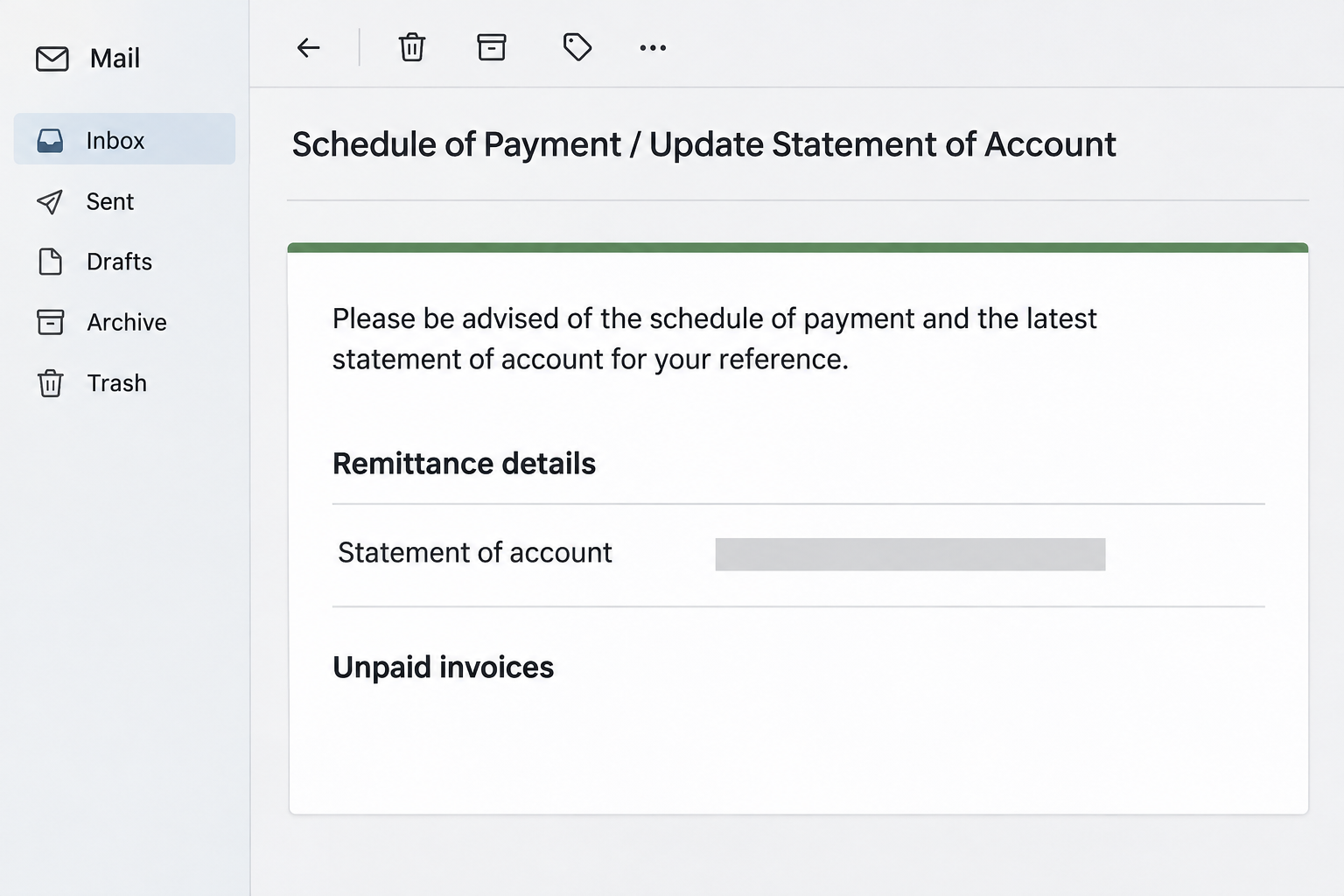
The reported email used the subject “Schedule of Payment / Update Statement of Account.” It presented itself as a remittance notice from Black Ace Powdercoating Pty Ltd.
The captured example put the company name on a white accounting-style card and included MYOB text in the footer. It invited the reader to view remittance details.
The notice also displayed a route labeled for unpaid invoices. The combination made it look like an ongoing accounting relationship rather than a generic request for attention.
None of that established that the named company or MYOB sent the message. The warning concerns the email that used these names, not the real businesses.
The link was unavailable when it was investigated
The message said the remittance was attached, but the visible email directed the reader toward a link. The page behind the lure did not load when analysts checked it.
The archive therefore does not confirm which sign-in, download, or form would have appeared. Do not treat a predicted credential page as something a visitor was actually shown.
The suspicious notice still presents a practical problem. It tries to move a finance task outside the recipient’s verified ledger and into a path controlled by an unverified sender.
If you received a similar copy and saw an active form, assess what you did on that form. The original capture cannot tell you how every later copy behaves.
A remittance advice is not a bank record
A remittance advice generally tells a supplier how a payment was applied or which invoices it covers. It is useful for matching a payment, not a substitute for verifying it.
MYOB’s official remittance advice guide describes genuine notices sent after recording a supplier payment. It also describes downloading a PDF through the accounting software.
You can check a real payment without following the link in this email:
- Find the incoming transaction in your own bank or authorized accounting records.
- Match the payer, amount, and reference to an existing invoice.
- Verify any mismatch with the customer or supplier using previously known details.
- Keep the invoice open until your normal reconciliation process supports closing it.
A convincing remittance design is not evidence that any of those checks succeeded.
How the View Remittance Details Email Scam Works
Step 1: The subject fits a task someone already expects to do
A statement-of-account update can land while staff are reconciling outstanding invoices. The subject does not need to promise anything unusual when it sounds like routine work.
The captured email put the purported customer’s name in a prominent position. It also used a footer borrowing the name of a real accounting software company.
A finance worker may look only for the apparent customer and the action they are supposed to take next. That is enough for a false notice to feel relevant.
Check your own records before making it relevant. If the purported payer is not on your list of current customers, do not let the email create a new relationship.
Step 2: The email uses several ordinary bookkeeping cues at once
The message paired a remittance claim with a way to view unpaid invoices. Both are things someone might expect to find in an accounting email.
That pairing also obscures whether money has actually changed hands. A payment schedule, a notice about allocation, and a cleared bank deposit have different meanings.
The stated expiration date in the archived email was December 13, 2025. It gave the impression that the recipient would lose access if they waited.
The right question is not whether the link will expire. It is whether the remittance can be confirmed by the party the recipient already knows.
Step 3: The recipient is directed away from verified records
The email says a remittance is attached and then presents a way to open details. The captured card does not establish that there was a real remittance file to reconcile.
A valid business notice may be sent through accounting software, but its content can be copied. An apparent platform footer is not a verification receipt.
If a customer really wants you to see a remittance, it should be possible to confirm that through an existing relationship. Start with a known number or portal.
Do not use the message’s reply route to prove it came from the claimed payer. Any answer there remains part of the same unverified exchange.
Step 4: The next screen could ask for access instead of showing a record
The recorded destination was unavailable, so no specific credential prompt was confirmed. That limit matters when explaining the risk to someone who already clicked.
In other phishing messages, a page may claim you need to sign in to view a remittance. It may ask for a mailbox password unrelated to the underlying accounting system.
If you see that request, decline it and open your actual provider yourself. A payment notice is not a reason to enter email credentials into an unrecognized page.
A page error is not proof that your account was affected. Tell support which actions you took rather than assuming a nonworking link copied data from your computer.
Step 5: Confusion about payment status can outlast the email
Someone may mark an invoice paid simply because a credible-looking notice arrived. That is an accounting error even if the recipient never opens the link.
Others may unlock an order, authorize a credit, or stop chasing an overdue payment based on the notice. None of those decisions should rest on the email’s design.
If a password did get exposed in a later copy, an attacker could read actual payment threads. Review any subsequent changes using the channels already approved by the business.
A false payment notice and a later misdirection are separate events. Keep their evidence separate so that support can tell what is suspected and what was actually observed.
What to Do if You Have Fallen Victim to This Scam
-
Set the email aside and keep the original for reporting. Retain the subject, apparent sender, and claimed customer details without sending coworkers to the link.
If your finance team must check a payment, give it the case details rather than asking it to open the remittance page.
-
If you only opened the link, record the result. Tell support whether the page failed, showed a prompt, or caused a file to appear in Downloads.
Do not run a file to find out whether it contains a remittance. Handle that separately under the device or organization’s normal security procedure.
-
If you entered an email password, secure the mailbox through its genuine service. Reset it, remove unfamiliar sessions where possible, and check whether recovery information changed.
Tell your IT team about any other actions you took. It can check mailbox rules, access grants, and relevant messages that would not be explained by a password reset alone.
If you reused the password elsewhere, change it at the other services independently. Do not use any sign-in route supplied by the suspicious email.
-
Review invoices or credit decisions made using the notice. Compare the actual bank record to your ledger. Check whether anyone released an order or applied a credit based on it.
If a genuine remittance is missing, request it directly from an established contact. Do not accept changed details in a reproduced copy without verifying them independently.
-
If money moved in the wrong direction, contact your bank quickly. Give the bank the transfer details and ask what recovery options remain for that payment.
The FBI’s business email compromise guidance recommends confirming payment changes outside the email thread. Put that check in place before acting on any further instructions.
-
Report the impersonation through appropriate channels. Use your organization’s fraud reporting route and tell the affected software provider or named business only through verified contacts if relevant.
Describe the notice as impersonation, not proof either company sent it. Keep private payment details and employee information out of public warnings.
How to Reconcile a Real Payment Without Relying on the Email
Start with the source that can confirm receipt
A remittance notice tells you what someone says they paid. The receiving bank can tell you which funds actually arrived and whether they match the expected payment.
An accounting package may also show unapplied receipts, partial payments, or an amount carried against another invoice. Check the entries before treating a balance as cleared.
If a payment covers several invoices, match the total and references through the normal reconciliation process. A list of numbers in an unexpected email is not enough.
Use the sender’s legitimate system when you need a copy
A known customer may be able to resend the advice from their accounting software. The official MYOB documentation describes both emailed notices and downloadable copies.
That is different from treating all mail mentioning MYOB as trusted. Verify the payer independently and use the delivery method your team already accepts.
If a vendor sends a different payment reference than expected, save both records and check with the authorized contact. Keep any unexplained discrepancy open until it is resolved.
Do not create a new payment route out of a discrepancy
Someone receiving an unexpected message may think a new portal is required to retrieve a receipt. Ask the known payer whether it has actually changed procedures.
If no one can confirm the change, do not add a new site to your accounting routine. An emailed shortcut should not decide how staff handle credentials or money.
Read the three financial documents as different records
An invoice records a charge. A statement can summarize several charges and credits. A remittance advice typically tells the supplier how the payer says a particular payment should be applied.
The reported message used all three ideas. Its subject mentioned a statement, the body offered a remittance, and a separate label referred to unpaid invoices.
That does not mean all three records exist. See whether the services you already use show a consistent invoice, account balance, and actual receipt.
When a payment covers only part of an invoice, keep the remainder open until your reconciliation is complete. A notice about the whole account is not a clearing instruction.
Follow up in a way that can resolve the accounting question
Ask the known payer for the date and reference it used. If the payment is in transit, record that explanation without confusing it with money already received.
A payer may have sent a remittance on the day it initiated payment. Depending on the method, receipt and the accounting entry can happen at different times.
If you ask for a replacement notice, make the request through your established relationship. If nothing was sent, let the named business know what its identity was used for.
Your organization can document this as an attempted impersonation without deciding who operates the sender account. An apparent customer name is different from a verified origin.
Record why the link was not a substitute for payment evidence
The archived example gave a date when access supposedly ended. Even if a verified document link has expired, the payment itself should remain checkable in the appropriate financial records.
If the message arrived around month end, separate the instruction to reconcile from the route it supplied. The legitimate task can still be completed without the suspicious message.
Do not give unknown contacts a copy of your entire statement to explain a missing payment. Ask authorized staff what details the real payer needs to resolve it.
When you finish the review, mark which payment date and reference were independently confirmed. That makes the evidence usable if another copy of the same message reaches your team.
Frequently Asked Questions
Did MYOB send the archived remittance email?
The captured message displayed MYOB text, but that did not establish that MYOB originated it. Confirm any genuine notice through the payer or service you already use.
Does a remittance advice prove the funds cleared?
A remittance advice can explain an intended payment. Check the receiving account and match the actual transaction before treating the invoice as settled.
Was a working phishing page observed in this case?
The link destination was unavailable during the documented investigation. There is no verified record of the exact form a recipient may have seen.
Should I follow the unpaid invoices link to check my balance?
Check the balance in your own accounting records or known customer portal instead. The email’s link does not authenticate whoever made the claim.
What if the customer really uses MYOB?
That is compatible with a fake email borrowing its design. Use the named customer’s established contact details and confirm that they sent this specific notice.
Can I report a suspicious notice if no payment was lost?
You can report the attempt before a loss occurs. Preserve the message with its metadata and tell the appropriate service what action it asked you to take.
The Bottom Line
Do not use this remittance email to verify payment or sign in. Check your own bank and ledger records, then contact the payer through a route you already know.
If you acted on the notice, separate the accounting decision from the account exposure. Correct any invoice or payment changes and secure any mailbox details you supplied.

Join the discussion
0 commentsShare your experience or ask a question about this article.
Community experiences
Did this happen to you?
Your experience could help someone recognize the same scam. Submit a private report for our team to review.
I experienced this tooReports are reviewed before publication. Sharing publicly is always your choice.
Discussion
Start the conversation
Have a question or something useful to share? Add the first comment.