

Getting hauled to court over a surprise traffic ticket sounds like a nightmare for any driver. But some disturbing texts threatening litigation over unpaid council fines are totally bogus. Scammers are sending fake EWHC court warnings to fool people into handing over money and data.
This fraudulent scam starts with alarming texts about impending prosecution over ignored tickets. The alarming messages seem authentic enough to dupe recipients into clicking dangerous links. However, it’s nothing but a low-down con. Learn how to steer clear of the litigation scam texts impersonating EWHC.
An Overview of the EWHC Litigation Scam
In today’s digitally-driven world, fraudsters rely heavily on smartphone scams executed through text messages. A common ploy is to send fake legal threats posing as government bodies like EWHC. The scam preys on fears of prosecution to trick people into providing sensitive information and payment.
The texts claim the recipient faces court proceedings by EWHC over unpaid council parking or traffic tickets. They allege this is your last chance to settle the fines before a court date is set next week. The alarming threats aim to spark urgency to click the included link to review details and pay up.
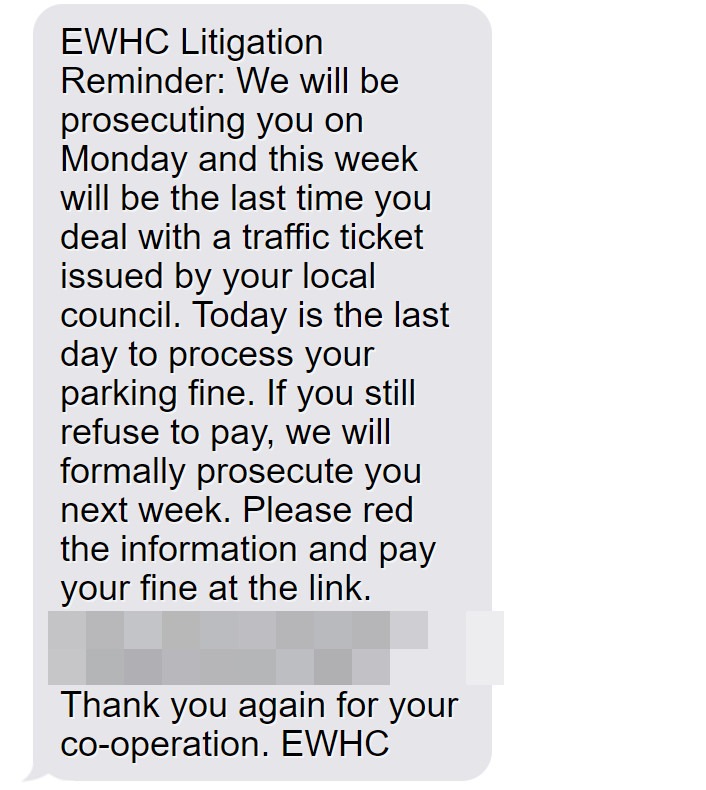
Here is how the text might look:
EWHC Litigation Reminder:
We will be prosecuting you on Monday and this week will be the last time you deal with a traffic ticket issued by your local council.
Today is the last day to process your parking fine. If you still refuse to pay, we will formally prosecute you next week. Please red the information and pay your fine at the link.
[scam site link]Thank you again for your co-operation.
EWHC
However, the URL actually leads to a sophisticated fake EWHC site that harvests entered bank and identity data. Once submitted, the scammers can steal money, open fraudulent accounts, and wreak havoc. These realistic legal threats dupe many into thinking they must comply. But learning the signs can help identify and evade this litigation scam.
How the EWHC Litigation Scam Texts Work
Here is an inside look at how scammers carry out the fraudulent EWHC legal threat text scam at each stage:
Step 1: Blast Out Mass Texts
The scam begins by blasting thousands of scam EWHC texts en masse to random phone numbers. Autodialing programs allow these to be sent rapidly and cheaply. The more texts fired out, the more potential victims get hooked.
The messages come from ever-changing disposable phone numbers and SIM cards. This prevents the scammers from being tracked or blocked. Each text follows similar threatening templates about unpaid tickets and imminent prosecution.
Step 2: Drive Engagement Through Links
The alarming texts include links where recipients can purportedly review their court proceedings and pay the fines being pursued. But the URLs actually redirect to fake EWHC litigation sites the scammers built.
Shortened links and misspelled or lookalike URLs like “ewch.co.uk” help disguise the bogus sites. Once clicked, victims land on convincing replicas of real traffic ticket settlement pages.
Step 3: Display Fake Ticketing Details
On the fraudulent sites, users see pending litigation records in their name for unpaid parking and driving infractions supposedly issued by local councils.
The ticket details cite real street names and locations pulled from IP addresses to seem credible. But they are fake violations randomly generated just for the scam.
Step 4: Collect Financial and Personal Data
After duping the user with the fake litigation records, the sites prompt visitors to enter payment and personal information to supposedly settle the fines and stop the court proceedings. This allows scammers to steal data.
The form collects bank account/card numbers, login credentials, addresses, licenses, and more. Victims hand it over believing they’re avoiding prosecution.
Step 5: Steal Money and Identities
With stolen financial and identity data, the crooks can now easily access accounts, take out loans in the victim’s name, or sell the info on the black market where cybercriminals trade such records.
Cloned debit cards funded by drained accounts also let scammers withdraw cash at ATMs and make fraudulent purchases online or in-store.
Step 6: Vanish Without a Trace
By the time victims learn it’s a scam, the fraudsters have deleted all traces of their fake sites and texts. The money stolen through the con is quickly laundered through crypto exchanges and overseas accounts. Victims are often left on the hook for any stolen funds.
Warning Signs of the Fake EWHC Legal Threats
Learning the common red flags can help identify and sidestep the fake litigation scam texts:
- Threats of prosecution over surprise tickets you have no knowledge of.
- Messages coming from unknown numbers not tied to official EWHC contacts.
- Links going to shady URLs not tied to .gov.uk sites.
- Ticket details that can’t be verified on EWHC’s official record sites.
- Requests for unnecessary personal and financial information.
- Usage of your location details pulled from your IP address.
- Pressure to immediately pay fines through the provided link.
Scrutinize any texts about impending legal action over surprise tickets. Genuine notices only come via postal mail.
What To Do if You Get a Suspicious EWHC Legal Threat Text
If you receive a questionable EWHC litigation text, take these actions:
- Avoid clicking on any links within the message itself. They likely lead to data-stealing phishing sites.
- Double check the sender’s number. EWHC only uses verified contacts easily confirmed through their website.
- Call EWHC directly to verify if there are truly any court proceedings or unpaid fines in your name.
- If you landed on a site already, inspect for legitimate EWHC URLs – they should end in .gov.uk.
- If you entered financial information, call your bank ASAP and monitor accounts for fraud.
- Report the texts to Action Fraud to assist authorities in combating these scams.
Remain wary of any alarming legal threats sent via text from unknown numbers. Verify tickets only through EWHC’s official communication channels.
FAQs: Avoiding the Fake EWHC Court Claim Text Scam
1. What are the fake EWHC court claim texts?
Scammers send fake texts threatening recipients with EWHC court claims over surprise unpaid tickets. They aim to steal data and money.
2. How does the EWHC court claim scam work?
Scammers text threats about unpaid council tickets leading to EWHC claims. The texts have links to fake EWHC sites stealing entered bank/personal data.
3. What details do the fake texts include?
Fake claim texts cite realistic but invented ticket details and threats of arrest, fees, or jail if unpaid. This creates urgency to click their link.
4. Are the EWHC court claim texts real?
No, any surprise EWHC texts regarding court claims over unpaid tickets are fraudulent. Ignore them.
5. What are signs of the EWHC court claim scam?
Red flags include unknown senders, threats demanding payment, inability to verify on EWHC’s site, requests for unnecessary personal/financial data.
6. What if I clicked the link in an EWHC claim text?
If you entered any information, call your bank to halt payments/check for fraud. Monitor your credit and accounts closely for misuse of data.
7. Should I pay fake EWHC claim texts to avoid court?
No, any payment to the scammers simply enables them to commit more fraud. The texts and claims are totally fake with no legal validity.
8. Can the scammers really take legal action?
No, scammers cannot pursue fake claims or impose any threatened consequences like arrest or fees, as they have no authority.
9. How can I report fake EWHC court claim texts?
You should report the scam texts to Action Fraud, the UK’s fraud and cybercrime reporting center.
10. How do I avoid the EWHC court claim scam?
Avoid unknown links/numbers, verify tickets with EWHC directly, never provide data from texts, and report suspicious messages.
Don’t Let Fake EWHC Warnings About Court Put You in the Hot Seat
As frightening text scams impersonating UK legal bodies proliferate, citizens need to stay vigilant for frauds. Getting duped into providing data or payment to EWHC impersonators can result in stolen funds, damaged credit, and long-lasting headaches. But awareness of common scam tactics can help residents steer clear of tricks and threats.
Remember, legitimate legal notices only come through postal mail, never surprise texts with shady links. Utilize diligence when evaluating any unsolicited messages. Check directly with EWHC through known contacts to verify claims. Avoiding traps set by scammers claiming to be EWHC helps keep innocent citizens safely out of the hot seat. Don’t let them fool you!

Join the discussion
0 commentsShare your experience or ask a question about this article.
Discussion
Start the conversation
Have a question or something useful to share? Add the first comment.