


You are preparing to rebuild a Windows computer after a suspected infection. Your documents have been copied, and the backup drive shows the expected filenames.
Before erasing the old installation, check whether those files need a separate encryption key. A successful copy is not the same as verified access.

Overview
Drive access and file decryption are different questions
Windows Encrypting File System, or EFS, protects individual files on NTFS storage. It is not interchangeable with BitLocker protection for an entire drive.
Opening a drive can therefore leave another access question unresolved. A file may still require the private key associated with its EFS encryption.
A certificate is not necessarily a usable key backup
A public certificate identifies a key relationship; the corresponding private key enables decryption. Preserving one without the other can leave an important gap.
Preserve the working state before an irreversible decision
If an old account still opens important documents, record that fact before approving a wipe. Arrange a safe preservation plan without treating the suspect computer as trustworthy.
- Identify which files actually require EFS decryption.
- Keep drive-unlock information separate from file-encryption credentials.
- Preserve the relevant existing private keys securely.
- Verify important copies before destroying the original environment.
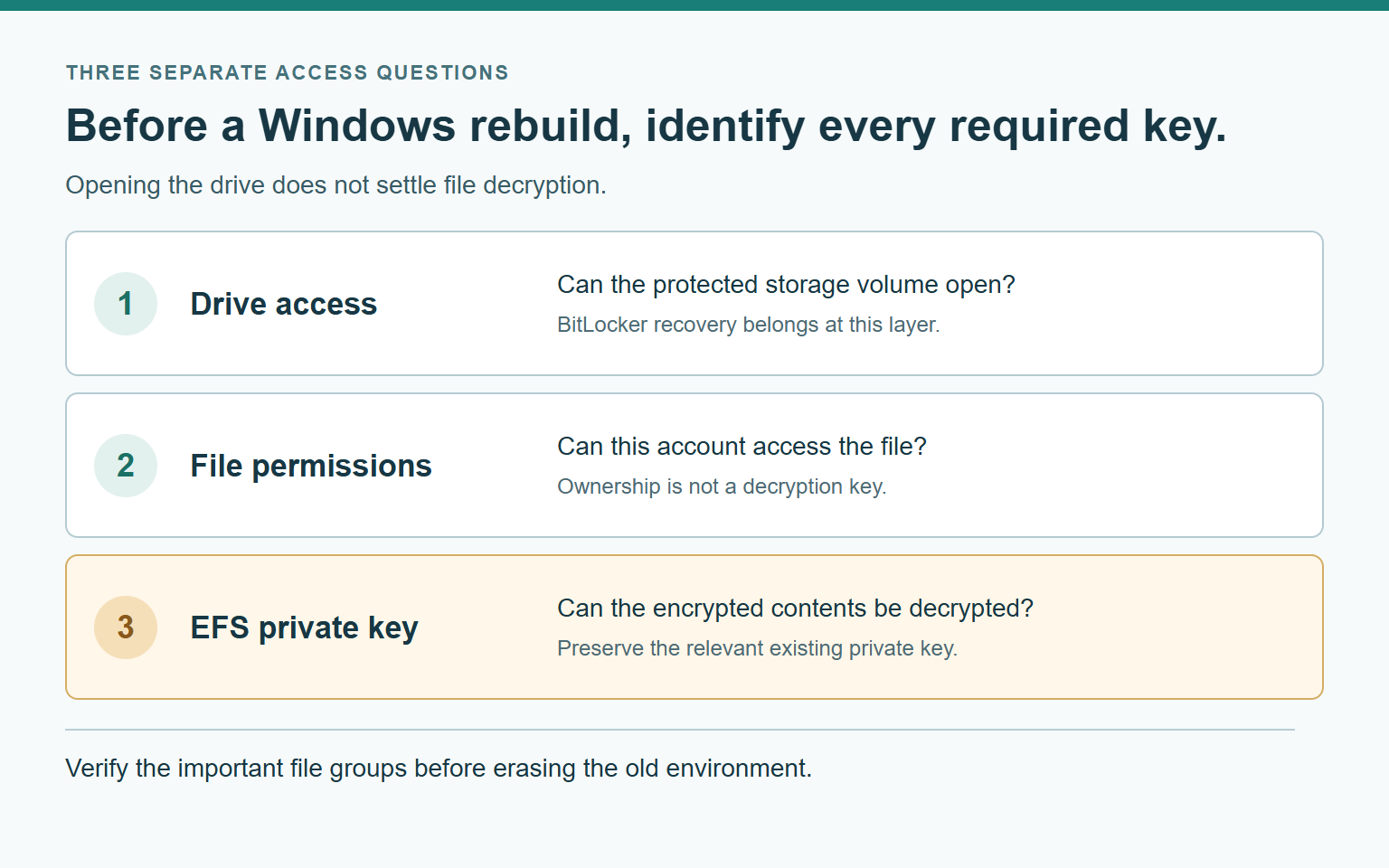
Three Layers of File Access
Think of access as three separate questions rather than one unlocked padlock. This model helps you describe the problem without trying increasingly destructive repairs.
The first question is whether the storage volume can be opened. Microsoft’s BitLocker recovery guidance describes its distinct 48-digit drive-unlock recovery key.
The second question concerns Windows access permissions. A folder listing, an account name, or administrator membership does not answer every question about encrypted file contents.
The third question concerns EFS decryption. Microsoft’s file-encryption documentation describes encryption as additional protection beyond ordinary file access controls.
These access layers can coexist on one device. Do not assume that solving the first visible obstacle automatically resolves every protection behind it.
| Observation | What it establishes | What remains unanswered |
|---|---|---|
| The encrypted drive opens after a recovery prompt. | The drive-unlock requirement has been satisfied for that access. | Selected EFS files may need their own decryption keys. |
| The account can list the folder and filenames. | The current environment can display those directory entries. | Displaying names does not establish readable document contents. |
| A known encrypted document opens in the original account. | That account currently has a working access route. | A new installation may not have the same credentials. |
| A backup operation finishes without a reported error. | The backup tool completed its stated operation successfully. | The restored files and necessary keys still need verification. |
The table is not a diagnostic verdict. Use each observation to choose the next question, not to declare a missing key or an infection automatically.
Make a File-Specific Inventory Before Changing Anything
Start with a small list of important documents and their locations. Use descriptions that make sense to you without exposing private filenames in public discussions.
Separate files that open normally from files that fail. Record the actual error and which account was being used when it occurred.
Do not classify every inaccessible file as EFS-encrypted. Application problems, missing storage, ordinary permissions, or damaged files can produce different access failures.
Microsoft’s EFS permissions explanation describes why access can fail despite apparently sufficient permissions. Its legacy interface examples are not current Windows navigation instructions.
For a file already identified as relevant, the current cipher documentation provides a read-only information option. The following is an illustrative path, not your actual filename.
cipher /c "C:\Example\KnownDocument.txt"The /c option displays information about an encrypted file. It does not export a private key or repair access by itself.
Use only your own known file path when appropriate, and preserve the resulting information privately. Do not add switches copied from an unrelated cleanup script.
If you cannot identify the file safely, stop at the inventory stage. A qualified administrator can assess the relevant account and encryption information without a blind permission rewrite.
Do not wipe the only working environment yet. First establish how important encrypted files and their existing decryption credentials will survive the rebuild.
Match the Existing Key to the Files That Matter
A familiar username is a label, not proof that an old cryptographic key has been restored. The same caution applies to an account with a matching photograph.
Similarly, finding a certificate somewhere in Windows does not establish that it belongs to the documents on your backup drive.
The cipher tool’s /y option reports the current certificate identifier. Its file-specific backup form, /x:efsfile, targets the user’s certificates used for that selected file.
Those are different questions: what is current, and what protected this document? Do not substitute the first answer when you need the second.
A useful handoff records the file group, relevant certificate identifier, and where its protected backup is held. It does not include the private key itself.
If several important file groups point to different credentials, preserve that distinction. Calling every export “my certificate” can hide a missing group until after the wipe.
Know What a Protected Key Export Contains
A certificate-only file and a private-key backup serve different purposes. The extension alone should not become your sole evidence that recovery is prepared.
The cipher documentation identifies a certificate-only .cer output separately from a .pfx containing a certificate and private key in its recovery-agent example.
Microsoft’s PFX export reference describes protection options and exportability requirements. A blocked export needs assessment, not a workaround that silently omits the required key.
Do not copy the reference page’s sample passwords into a real backup procedure. Your protection choices must fit the actual account, environment, and recovery plan.
Agree on a protected destination before an authorized export. A file saved only on the drive scheduled for erasure will not survive that erasure.
Keep the export’s protection information available through a separate secure route. A backup that nobody can unlock leaves the handoff incomplete.
Also consider confidentiality: anyone obtaining a usable private key may gain access to associated encrypted data. Do not upload it to a public checker or support forum.
When the computer is suspected of compromise, involve a qualified responder in the export plan. Making a new copy of a sensitive key introduces another item to protect.
A Copied Encrypted File Is Not a Decryption Test
Ask what the backup actually contains rather than inferring it from a folder name. Different backup methods can preserve different representations of the same document.
Microsoft’s encrypted-file backup documentation distinguishes raw encrypted streams from ordinary reads that provide plaintext when the required credentials are available.
That distinction creates two separate checks. Is the document recoverable from the backup, and what protection now applies to the recovered copy?
Do not assume a readable copy remains encrypted just because its original was protected. Conversely, preserved ciphertext is not a promise that its decryption credentials were preserved.
For an important collection, arrange a controlled verification of a known innocuous document in the intended trusted recovery environment. Do not launch unfamiliar programs or enable active content.
Record whether the actual contents were readable, not merely whether the file appeared in a directory. Retain the original until the relevant recovery questions are answered.
A successful sample concerns that sample and its access route. If another file group uses different credentials, test the group’s recovery assumptions separately.
Keep recovered plaintext appropriately protected against unauthorized access. Solving an access problem should not accidentally turn confidential documents into unrestricted copies on a shared drive.
Work Through a Concrete Pre-Wipe Example
Imagine two folders called Planning Notes and Archived Reports. These are fictional labels for a decision exercise, not a description of somebody’s actual computer.
The backup contains both folders, and their file counts match. Planning Notes opens in the intended recovery environment, while Archived Reports does not.
The useful next step is not another bulk copy. Record that the two groups have different observed outcomes and investigate the failed group’s access requirements.
Suppose the old account still opens Archived Reports. Preserve that information for the responder before removing the account or approving an irreversible rebuild.
Now suppose a protected key export exists, but nobody has checked which files it covers. Its existence answers a storage question, not the matching question.
Ask the responder to connect the evidence: this file group, this relevant key, this protected backup, and this verified recovery result.
The example also shows why a single success can mislead. One readable folder should not become an undocumented assumption about every encrypted document.
Use the same approach when deciding what can be erased. An unresolved group remains unresolved even when the rest of the recovery plan looks orderly.
If the responder says the backup is complete, ask which observation supports that statement. A file count, a key-export record, and a readable document are different answers.
Keep those answers on separate lines in your notes. That prevents a statement about copying from quietly becoming a statement about decryption.
When someone proposes erasing the old installation, return to the unresolved group. Ask what will remain if that final working access route disappears.
If the answer is only another assurance, postpone that irreversible step. A short delay for clarification is different from continuing normal work on the suspect computer.
Your Existing File Access and Preservation Options
The original account still opens important encrypted documents.
Pause irreversible changes and arrange secure preservation of the relevant existing keys. Record which documents work without treating that access as proof the computer is clean.
A protected key backup exists, but its coverage is uncertain.
Keep the original environment intact while a qualified person verifies the backup’s credentials and file coverage. Do not assume its filename establishes a successful recovery.
The original environment is gone and no matching key is known.
Preserve the remaining files and backups without modifying them repeatedly. Seek a qualified assessment of available recovery material rather than buying a promised encryption bypass.
What to Do Before Approving a Windows Rebuild
-
For a managed computer, contact your organization’s genuine support route before changing certificates or accounts. Its recovery arrangements may differ from those of a personal computer.
Microsoft’s recovery-agent explanation describes a separate private-key recovery path. Its historical defaults do not establish that your present organization has such an agent.
-
Ask whether an applicable recovery arrangement exists for the affected files. Do not assume every administrator can decrypt them simply because the account has elevated privileges.
-
Provide the affected file groups, error messages, account context, existing backups, and any relevant certificate identifiers. Keep secrets out of the initial ticket.
State whether the planned rebuild has already happened. That fact changes the available material and helps prevent advice based on an environment that no longer exists.
-
Agree on who will verify the preserved data before approving destructive work. Avoid a handoff in which everyone assumes somebody else already checked readability.
-
Request a clear record of the unresolved items. A brief list of remaining questions is more useful than an unsupported promise that everything will be recoverable.
Keep File Recovery Separate From Computer Trust
Opening an encrypted document demonstrates access to that document. It does not establish that malware was removed or that sensitive accounts remain secure.
Keep the suspect system out of unrelated sensitive work while its condition is assessed. Use a trusted device for communicating with responders when practical.
This file-preservation decision also does not require a bulk ownership change, offline password reset, format, or new encryption key. Those actions can change the situation before it is understood.
Do not experiment with other cipher options to make an error disappear. The same utility includes commands that modify encryption or erase unused disk space.
Once preservation is verified, follow the separately agreed recovery plan. Keep the records and protected key backups accessible to authorized people without leaving unnecessary copies behind.
Frequently Asked Questions
Does my BitLocker recovery key unlock EFS documents too?
It unlocks the protected drive, not every separate file-encryption relationship. An EFS-protected document may still require its matching private key afterward.
Will taking ownership decrypt an inaccessible EFS file?
Changing ownership does not supply a missing decryption key. Identify the actual access problem before rewriting permissions or assuming administrator status resolves encryption.
Is a certificate-only export enough before rebuilding?
Not when recovery requires the associated private key. Verify the export’s contents and protection through an appropriate process instead of relying on its name.
Can I create a new EFS key after reinstalling?
A new key does not establish access to files encrypted for an older key. Preserve the relevant existing credentials before destroying the old environment.
Does a successful backup message prove the documents will open?
No, it reports completion of the backup operation. Verify the important file groups and their required access material before erasing the only working copy.
What if I already wiped Windows and cannot find a key?
Preserve remaining files and backups for a qualified assessment. Do not accept a guaranteed bypass claim or modify the originals repeatedly while searching for help.
The Bottom Line
Before rebuilding Windows, separate drive access, file permissions, and EFS decryption. Preserve the relevant existing private keys rather than assuming one recovery credential answers every question.
Verify important copies in the intended recovery environment before approving erasure. File readability and computer trust remain separate decisions that need their own evidence.

Join the discussion
0 commentsShare your experience or ask a question about this article.
Community experiences
Did this happen to you?
Your experience could help someone recognize the same scam. Submit a private report for our team to review.
I experienced this tooReports are reviewed before publication. Sharing publicly is always your choice.
Discussion
Start the conversation
Have a question or something useful to share? Add the first comment.