

Have you received a suspicious text message recently about your Xbox account? If so, you’re not alone. Many users are reporting similar messages from unknown accounts claiming they want to buy Xbox accounts at a certain price.
The message typically reads something like this:
“Hello I checked your Xbox account Valvalue on Xboxcost.com and would like to buy it at that price DM on Instagram if you don’t like the value I might have a better offer”.
This might sound tempting at first, but let’s break down why this is a scam.
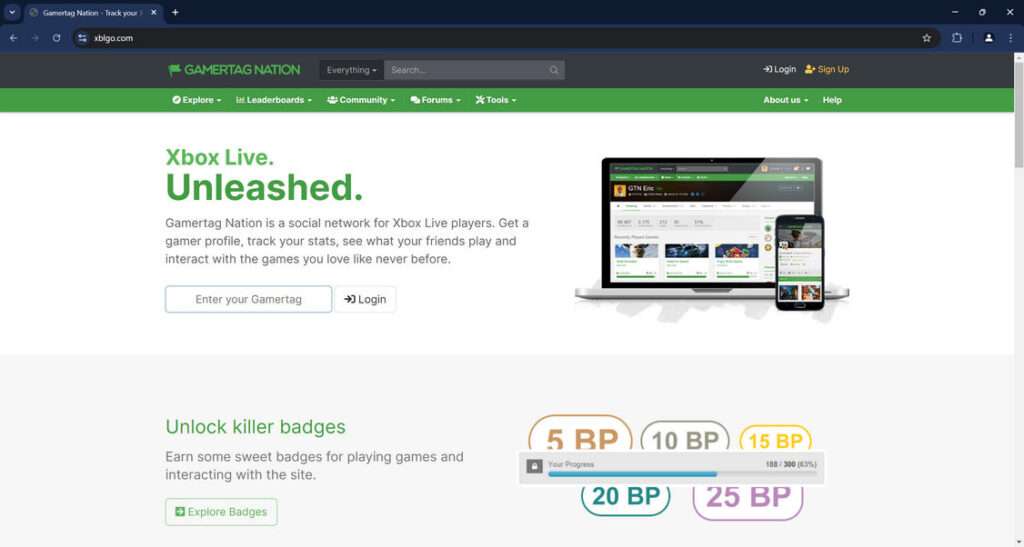
Overview of the Xblgo.com Scam
Xboxcost.com is a website that falsely claims to value Xbox accounts in order to steal login credentials and personal information from unsuspecting victims.
The scam operates by sending text messages to Xbox users containing a link to the Xboxcost.com website. The message claims that the recipient’s Xbox account has been valued and the sender wants to purchase it.
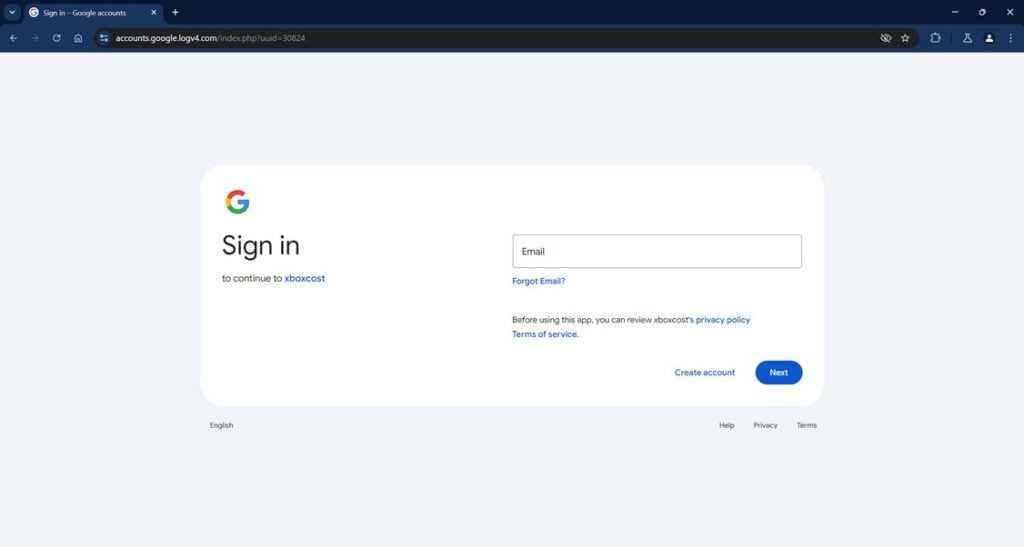
If the user visits the website and enters any information, they are redirected to a fake Google login page designed to steal credentials. With access to the victim’s email address and password, the scammers can then take over their Xbox account, email, and anything else connected to that Google account.
This fraudulent website is extremely concerning because many people don’t realize just how much personal data is linked to Xbox accounts. Email addresses, passwords, and even banking details in some cases are all at risk if your credentials are compromised through this scam.
How the Xboxcost.com Scam Works
Now that we’ve covered the major implications, it’s important to understand exactly how this scam operates at each step:
Step 1: Mass Text Messages Sent to Xbox Owners
The first step is mass text messaging. The scammers obtain gamertags and phone numbers from leaked databases and the dark web. Text messages are then sent en masse to those accounts.
The messages reference the recipient’s gamertag and claim the account is valued on Xboxcost.com. A link may be included to add legitimacy. The texts come from a variety of ever-changing phone numbers and accounts.
Step 2: Victims Tricked Into Visiting Xboxcost.com
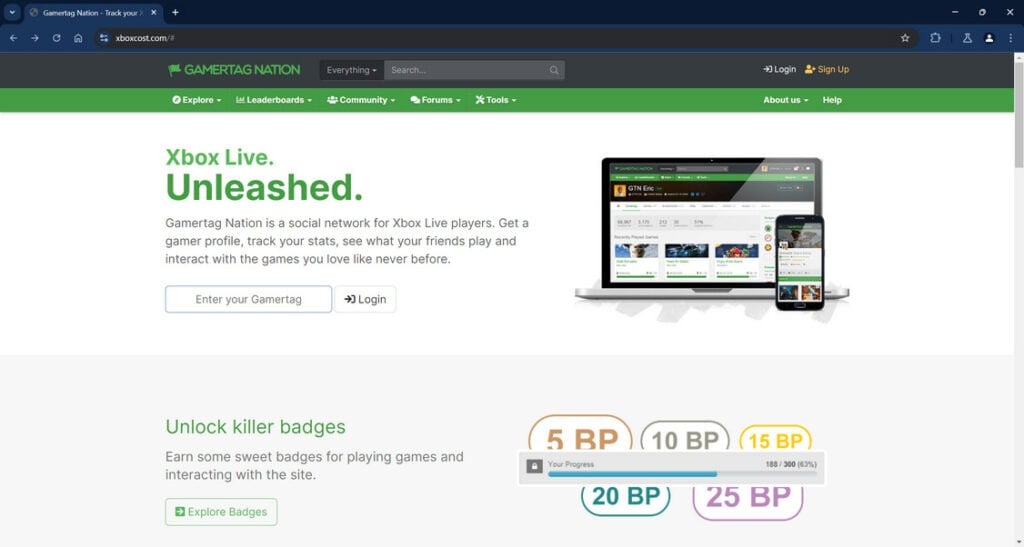
When an Xbox owner receives one of these messages, natural curiosity will cause some percentage to visit the Xboxcost.com website, especially if a high value is mentioned.
The site appears legitimate at first glance, claiming to offer Xbox account valuations. However, users have reported it’s non-functional beyond the initial homepage.
Step 3: Redirected to a Fake Google Login Page
When attempting to use the Xboxcost.com site, victims are redirected to an extremely convincing fake Google login page.
This is designed to phish and capture the user’s Google email and password when they attempt to log in. The page looks almost identical to the real thing.
Step 4: Credentials Harvested and Accounts Compromised
If a user enters their information into the fake login page, the scammers immediately have access to their Google account credentials.
In most cases, this account is connected to the victim’s Xbox account and email. With the credentials harvested, the scammers can now take over these accounts.
Any personal information, emails, payment details, or anything else connected is now in the criminals’ hands to exploit however they please.
Step 5: Removing Money, Reselling Accounts, Identity Theft
Once scammers have access to an Xbox account and connected email, the possibilities for exploitation are endless.
They can charge games and steal any stored payment information. Accounts can be sold for profit online. Emails provide access to even more accounts. Identities can be stolen.
The Xboxcost scam provides access to the building blocks for prolonged identity theft and financial fraud.
What to Do If You Are a Victim of the Xboxcost.com Scam
If you entered any information into the Xboxcost.com website and are worried your account may be compromised, here are the steps to take:
- Change your passwords – Immediately change your Google account password as well as any other accounts associated with that email. Enable 2-factor authentication if possible.
- Contact your bank – If you had any financial information or accounts connected to Xbox or the associated email, contact your bank to monitor for fraudulent charges and block suspicious activity. Cancel any credit cards that may be at risk.
- Secure your Xbox account – Log into your Xbox account and enable login approvals, change password, remove payment methods, and modify account email if needed.
- Scan your devices – Run antivirus scans on any PCs or laptops used to enter information into the fake login page. Also scan phones used for the messages.
- Contact Xbox support – Report compromised account and suspicious login activity to Xbox. Provide as many details as possible.
- Monitor accounts – Keep an eye on your Xbox account, email, and financial accounts for any suspicious activity indicating identity theft.
- Beware of any further contact – Scammers may reach out posing as Xbox support to extract more information. Do not communicate further with them.
- Report it – File reports with the FTC, FBI, and anywhere else applicable to get the scam website shut down.
Here is a detailed, SEO optimized FAQ section about the Xblgo.com scam:
Frequently Asked Questions about the Xblgo.com Scam
1. What is the Xblgo.com scam?
The Xblgo.com scam is a fraudulent website that sends text messages to Xbox owners claiming their accounts have been valued and someone wants to buy them. The messages contain links to Xblgo.com, which redirects to a fake Google login designed to steal credentials.
2. How does the Xblgo.com scam work?
The scammers first obtain Xbox gamertags and phone numbers from leaked databases. They text message owners claiming their account is valued on Xblgo.com and someone wants to purchase it. When users visit the site, they are redirected to a convincing fake Google login page. If users enter their credentials, the scammers gain access to their Xbox account, email, and anything else connected.
3. What are some examples of the scam messages?
The messages typically say something like “Hello I checked your Xbox account Valvalue on Xboxcost.com and would like to buy it at that price DM on Instagram if you don’t like the value I might have a better offer”. They reference the recipient’s gamertag and claim their account is valued on Xblgo.com.
4. What are the risks if I enter information into Xblgo.com?
Providing any credentials to Xblgo.com gives scammers access to your Xbox account, email address, and anything else connected to that account such as financial information. This enables them to steal identities, drain bank accounts, hack other accounts, and resell your gaming profiles.
5. What should I do if I entered my info into the site?
Immediately change any passwords that may be compromised, contact your bank about any linked financial accounts, secure your Xbox account, scan devices for malware, and monitor all accounts closely for suspicious activity. Avoid further communication with the scammers.
6. How can I identify similar gaming account scams?
Be wary of any unsolicited offers to purchase your gaming profiles out of the blue. Avoid clicking links in messages to unfamiliar account valuation sites. Beware of fake login pages for gaming platforms or email providers designed to steal credentials.
7. What should I do if I receive a scam offer about my Xbox account?
Do not click any links, provide any information, or engage with the sender. Report the messages and accounts to the platform being used. Delete the messages and block the accounts to prevent further contact. Avoid becoming a victim of account theft.
8. How can I protect my Xbox account from these scams?
Enable two-factor authentication on your Xbox account and the associated email address. Use unique secure passwords. Monitor your accounts closely for unauthorized access. Report any suspicious login activity immediately. Never enter credentials into unverified pages.
9. How can I get scam websites like Xblgo.com shut down?
Report the site, text messages, and associated accounts to authorities such as the FTC, FBI, Xbox security team, and social media platforms being abused. Provide as many details as possible to build a case against the scammers.
10. What is the bottom line on the Xblgo.com scam?
The bottom line is Xblgo.com is a fraudulent website that tries to steal Xbox account credentials through text messaging campaigns. Never enter any information, click links, or engage with these scams. Secure accounts and report malicious activity to protect yourself from identity and financial theft.
The Bottom Line
The Xboxcost.com scam preys on unsuspecting Xbox users by mass texting convincing offers to buy accounts. The messages lure victims to a fake website designed to steal credentials for email, Xbox accounts, and anything else connected to that Google account.
Anyone who entered information into the fraudulent Xboxcost site should take immediate action to lock down accounts before severe financial and identity theft damages occur. Learn to identify these warning signs of similar gaming account scams:
- Messages offering to buy your gaming account out of the blue
- Links to shady account valuation sites you’ve never heard of
- Sudden login issues or unrecognized activity after visiting the site
- Fake login pages mimicking Google, Xbox, Steam, etc. designed to phish credentials.
The bottom line is any unsolicited offers involving your gaming accounts are almost certainly a scam attempt. Report the messages and accounts, but never click on links, provide information, or engage further. Together we can shut down these criminal operations and enjoy gaming safely.








