

Imagine this: you’re going about your day when suddenly, your phone chimes with a new text message. It claims that your vehicle has used the FasTrak Express Lane and that you owe a small balance of just $7.99. But there’s a catch – if you don’t pay up immediately, you’ll be slapped with a whopping $79.90 in additional charges. Panic sets in, and you quickly click the link to settle your account. Little do you know, you’ve just fallen prey to the devious “Your Vehicle Has Used The FasTrak Express Lane” text scam.
In this comprehensive article, we’ll dive deep into the inner workings of this sophisticated phishing scheme. From uncovering the scammers’ tactics to learning what to do if you’ve become a victim, we’ll leave no stone unturned in our quest to keep you safe from this insidious scam. So buckle up and join us on this eye-opening journey – your financial well-being depends on it.
Scam Overview
The “Your Vehicle Has Used The FasTrak Express Lane” scam is a sophisticated phishing attempt that preys on unsuspecting motorists who use the FasTrak Express Lane system. Scammers send fraudulent text messages alleging that the recipient’s vehicle has incurred a toll balance, often citing a specific amount, such as $7.99. To add a sense of urgency, the message threatens significant additional charges, like $79.90, if the balance is not settled promptly.
To lend credibility to their claims, scammers include a link to a fake website designed to closely mimic the official FasTrak website. These fraudulent sites aim to deceive victims into disclosing sensitive personal and financial information, such as full names, addresses, phone numbers, email addresses, and credit card details.
The scam messages typically follow a similar pattern, with minor variations in the alleged toll amounts and additional charges. By using specific figures, scammers create a false sense of authenticity, making the recipient more likely to believe the message is legitimate.
Scammers exploit the trust people have in the FasTrak system, a widely used electronic toll collection system in California. By impersonating an official source, they aim to catch victims off guard, pressuring them to act quickly without thoroughly verifying the message or website’s legitimacy.
The ultimate goal of the scammers is to harvest as much personal and financial information as possible. This data can be used for various malicious purposes, such as identity theft, financial fraud, or selling the information to other criminals on the dark web.
The “Your Vehicle Has Used The FasTrak Express Lane” scam is particularly insidious because it targets a broad range of individuals, including those who may have recently used the FasTrak Express Lane and those who have not. By casting a wide net, scammers increase their chances of successfully deceiving victims.
Victims of this scam may only realize they’ve been deceived when they notice unauthorized charges on their credit card statements or receive alerts about suspicious activity on their accounts. By then, the scammers have already stolen their sensitive information, leaving victims to deal with the consequences of identity theft and financial fraud.
To protect yourself from falling victim to this scam, always be cautious when receiving unsolicited text messages claiming you owe money. Verify any alleged toll balances directly with the official FasTrak website (https://www.bayareafastrak.org/) or by contacting their customer service. Never click on links or provide personal information in response to suspicious messages, and be wary of any website that asks for sensitive data, especially if you accessed it through an unexpected text message.
How The Scam Works
The “Your Vehicle Has Used The FasTrak Express Lane” scam is a well-orchestrated, multi-step process designed to deceive victims into revealing their sensitive personal and financial information. Let’s take a closer look at how this scam typically unfolds:
Step 1: The Deceptive Text Message
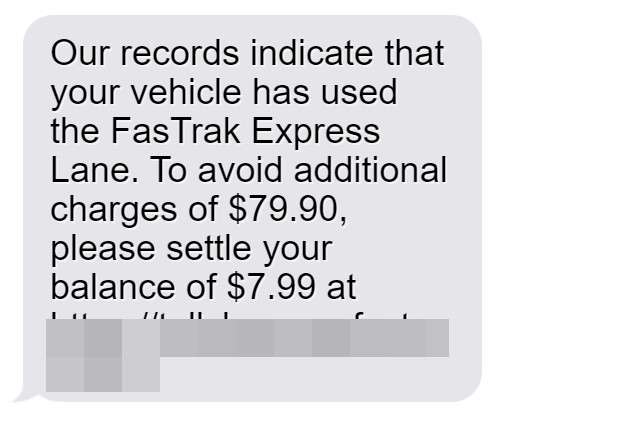
The scam begins when an individual receives an unsolicited text message claiming that their vehicle has used the FasTrak Express Lane and has an outstanding toll balance. The message often includes a specific amount, such as $7.99, and threatens significant additional charges, like $79.90, if the balance is not paid immediately. Here’s an example of such a scam message:
“Our records indicate that your vehicle has used the FasTrak Express Lane. To avoid additional charges of $79.90, please settle your balance of $7.99 at https://tollsbayareafastrak.com”
Step 2: Creating a False Sense of Urgency
Scammers craft their messages to create a sense of urgency, pressuring the recipient to act quickly without taking the time to verify the message’s legitimacy. By threatening substantial additional charges, they aim to induce panic and fear, hoping that the victim will click on the provided link without hesitation.
Step 3: Directing Victims to a Fake Website
The text message includes a link that the victim is instructed to visit to settle their alleged toll balance. This link leads to a fraudulent website carefully designed to mimic the appearance and functionality of the official FasTrak website. The fake site often incorporates convincing branding elements, logos, and color schemes to further deceive the victim into believing they are interacting with a legitimate toll collection service.
Step 4: Harvesting Personal and Financial Information
Once the victim lands on the scam website, they are prompted to enter a wide range of sensitive personal and financial information to resolve the supposed unpaid toll. This typically includes their full name, address, phone number, email address, and credit card details (card number, expiration date, and CVV). The scammers’ goal is to collect as much valuable information as possible.
Step 5: Exploiting the Stolen Data
After the victim submits their personal and financial information, the scammers have everything they need to engage in identity theft and financial fraud. They may use the stolen credit card details to make unauthorized purchases, open new accounts in the victim’s name, or sell the information on the dark web to other criminals who may use it for various malicious purposes.
Step 6: Covering Their Tracks
To avoid raising suspicion and maintain the appearance of legitimacy, the scammers may redirect the victim to the official FasTrak website after they submit their information. This tactic helps minimize the chances of the victim realizing they’ve been scammed and makes it more difficult for authorities to trace the scammers’ activities.
By understanding the step-by-step process of the “Your Vehicle Has Used The FasTrak Express Lane” scam, you can better protect yourself and others from falling victim to these deceptive tactics. Always be cautious of unsolicited messages, verify the legitimacy of any alleged toll balances directly with the official FasTrak website or customer service, and never provide sensitive information in response to suspicious requests.
What To Do If You’ve Fallen Victim To This Scam
If you believe you’ve fallen victim to the “Your Vehicle Has Used The FasTrak Express Lane” scam, it’s crucial to act quickly to minimize the potential damage to your finances and identity. Here are the essential steps you should take:
- Contact your credit card issuer immediately: Inform them that you’ve been a victim of a scam and that any charges related to the fraudulent website are unauthorized. Request that your card be canceled and a new one issued to prevent further misuse.
- Report the scam to the Federal Trade Commission (FTC): File a complaint with the FTC at ftc.gov/complaint, providing as much information about the scam as possible, including the text message, website URL, and any personal information you may have disclosed. Your report will help the FTC investigate and potentially prosecute the scammers behind the scheme.
- Place a fraud alert with the three major credit bureaus: Contact Equifax, Experian, and TransUnion to place a fraud alert on your credit report. This alert will notify you of any attempts to open new accounts in your name or make changes to your existing accounts, helping you detect any suspicious activity early on.
- Change your passwords: If you used the same password on the fraudulent website as you do for other online accounts, change those passwords immediately. This will prevent the scammers from gaining access to your sensitive information across multiple platforms.
- Monitor your accounts closely: Regularly review your credit card statements and bank account transactions for any suspicious activity or unauthorized charges. If you spot anything unusual, report it to your financial institution immediately to dispute the charges and prevent further damage.
- Consider placing a credit freeze: A credit freeze prevents anyone from opening new accounts in your name. While it may involve a small fee and require temporary lifting when you need to apply for credit, it provides an extra layer of protection against identity theft and financial fraud.
- Stay vigilant against future scams: Be cautious of any unsolicited messages or emails asking for personal information or payment. Always verify the legitimacy of such requests by contacting the organization directly through their official channels, such as their website or customer service number.
By following these steps, you can help minimize the impact of the “Your Vehicle Has Used The FasTrak Express Lane” scam and protect yourself from further harm. Remember, acting swiftly and reporting the scam to the proper authorities is crucial in preventing scammers from victimizing others in the future.
FasTrak Express Lane Text Scam: Frequently Asked Questions
Q1. What is the “Your Vehicle Has Used The FasTrak Express Lane” text scam?
A: The “Your Vehicle Has Used The FasTrak Express Lane” text scam is a phishing scheme in which scammers send deceptive text messages claiming that the recipient’s vehicle has incurred a toll balance on the FasTrak Express Lane system. The messages often include a small alleged balance, such as $7.99, and threaten significant additional charges, like $79.90, if the balance is not paid immediately.
Q2. How can I spot a scam text message about FasTrak Express Lane tolls?
A: Scam text messages about FasTrak Express Lane tolls often have the following red flags:
- They claim to be from “FasTrak” or “Bay Area FasTrak,” but are not sent from official FasTrak communication channels.
- They create a false sense of urgency by threatening substantial additional charges if the alleged balance is not settled promptly.
- They include suspicious links to websites that are not the official FasTrak website (https://www.bayareafastrak.org/).
Q3. What should I do if I receive a suspicious text message claiming my vehicle has used the FasTrak Express Lane?
A: If you receive a suspicious text message about a FasTrak Express Lane toll balance, take the following precautions:
- Do not click on any links provided in the message.
- Do not reply to the message or provide any personal or financial information.
- Verify any alleged toll balances directly with the official FasTrak website (https://www.bayareafastrak.org/) or by contacting their customer service.
- Report the scam text message to the Federal Trade Commission (FTC) at ftc.gov/complaint.
Q4. What can scammers do with my personal and financial information if I fall for the FasTrak Express Lane text scam?
A: If you provide your personal and financial information to scammers through a fraudulent website, they can exploit this data in various ways, such as:
- Making unauthorized purchases with your credit card information.
- Opening new accounts in your name, leading to identity theft.
- Selling your information on the dark web to other criminals.
Q5. What steps should I take if I’ve fallen victim to the “Your Vehicle Has Used The FasTrak Express Lane” text scam?
A: If you believe you’ve fallen victim to this scam, take the following actions:
- Contact your credit card issuer immediately to report the fraudulent charges and request a new card.
- Report the scam to the FTC at ftc.gov/complaint.
- Place a fraud alert with the three major credit bureaus (Equifax, Experian, and TransUnion).
- Change your passwords for any online accounts that may have been compromised.
- Monitor your accounts closely for suspicious activity and consider placing a credit freeze for added protection.
Q6. How can I protect myself from falling for the FasTrak Express Lane text scam in the future?
A: To safeguard yourself from this scam and similar phishing attempts, follow these tips:
- Be wary of unsolicited text messages claiming you owe money, especially if they create a false sense of urgency.
- Always verify the legitimacy of alleged toll balances directly with the official FasTrak website or customer service.
- Never click on links or provide personal information in response to suspicious messages.
- Keep your computer and mobile devices updated with the latest security software to help detect and prevent phishing attempts.
- Regularly monitor your credit reports and financial accounts for any suspicious activity.
By staying informed about the “Your Vehicle Has Used The FasTrak Express Lane” text scam and taking proactive measures to protect your personal and financial information, you can significantly reduce your risk of falling victim to this deceptive scheme.
The Bottom Line
The “Your Vehicle Has Used The FasTrak Express Lane” scam serves as a stark reminder of the importance of remaining vigilant in an increasingly digital world. As scammers continue to develop more sophisticated tactics to deceive unsuspecting individuals, it’s crucial to be cautious when receiving unsolicited messages claiming you owe money. Always take the time to verify the legitimacy of such requests by contacting the organization directly through their official channels.
If you do fall victim to this scam, remember that you’re not alone, and there are steps you can take to minimize the damage and protect yourself from further harm. By acting quickly, reporting the scam to the proper authorities, and staying informed about the latest scam tactics, you can help prevent scammers from victimizing others in the future.
Ultimately, the best defense against the “Your Vehicle Has Used The FasTrak Express Lane” scam and similar phishing attempts is a combination of awareness, caution, and decisive action when necessary. By staying informed and proactive, you can safeguard your personal and financial information from those who seek to exploit it for their own gain.

Join the discussion
0 commentsShare your experience or ask a question about this article.
Discussion
Start the conversation
Have a question or something useful to share? Add the first comment.