

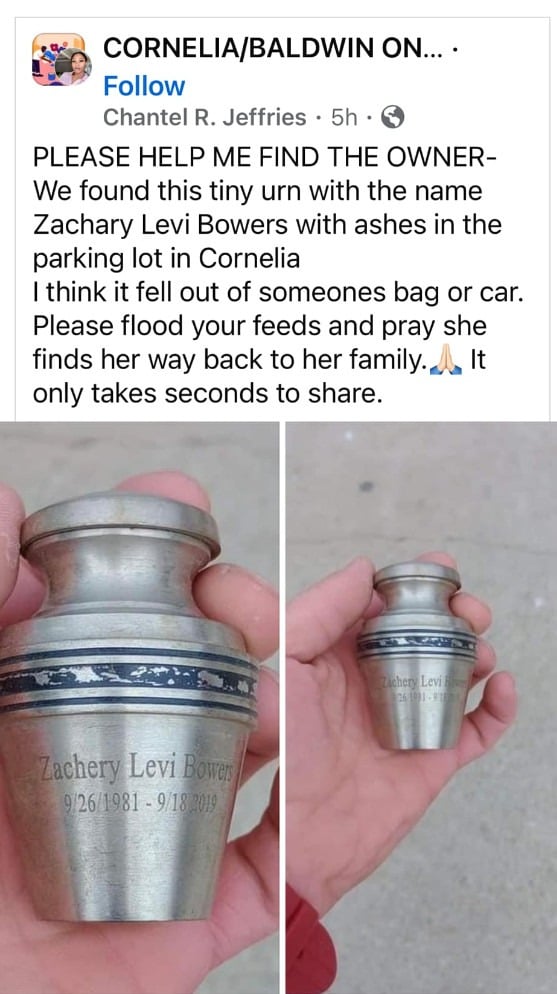
A viral Facebook post claiming to have found an urn containing the ashes of Zachary Levi Bowers is making the rounds, tugging at people’s heartstrings and urging them to share the post. But this is yet another calculated scam designed to exploit emotions for ulterior motives.
Scam Overview
The post in question shows a photo of a hand holding a small urn engraved with “Zachary Levi Bowers” and a caption claiming the urn was found in a parking lot in Pensacola, Florida. It implores people to “flood your feeds and pray she finds her way back to her family.”
At first glance, this seems like a benevolent attempt to reunite someone’s loved one’s ashes. But Zachary Levi Bowers tragically died in 2019, as documented on his memorial Facebook page created by his family. This reveals the viral post to be an outright scam, using Zachary’s name and death illegitimately to fuel shares.
This scam follows a common formula used by shady Facebook pages to go viral:
- Tugs at people’s heartstrings with an emotional story
- Urges shares to reunite a lost loved one/pet
- Lacks key details or credible sources
- Uses fake accounts to initiate and proliferate scam posts
The goal is to tap into human compassion to gain clicks, shares, and traction. But behind the heartwarming facade lies cynical motives.
How the Scam Works
The scammers use sophisticated psychological tactics to propagate this viral scam:
1. Post on Emotional Topics
By claiming to have found the ashes of someone’s loved one, the post pulls at people’s heartstrings. The notion of reuniting the deceased’s remains with their family is sentimental enough to inspire shares.
2. Make it Urgent
Language like “flood your feeds” conveys urgency, scaring people into rapid shares before fact-checking. This urgency gets the post in front of more people faster.
3. Encourage Mindless Sharing
Saying “It only takes seconds to share” discourages critical thinking and makes it seem like a mindless, altruistic act to share the post.
4. Use Fake Accounts
The scam originates and spreads between fake accounts, often using AI-generated profile photos. This deceives people into thinking many real accounts are sharing the post.
5. Edit the Post Later
Once viral, the scammers can edit the post to include malicious links or switch the narrative entirely while retaining all the shares and visibility.
6. Profit from the Viral Reach
With a viral post, the scammers now have a captive audience of thousands to leverage in various illegal ways, like phishing links and advertising scams.
What To Do If You Shared This Scam Post
- Delete the Post
Act quickly to delete the scam post from your Facebook feed. This stops the spread to more of your connections. The sooner it’s down, the fewer people will see it on your profile.
- Edit The Post to Warn Others
If you can’t fully delete the post, edit it to include a warning. Explain clearly why it is a scam and advise your friends not to share it further. Ask them to delete if they also shared it already.
- Report the Scam to Facebook
Use Facebook’s reporting tools to flag both the scam post itself and the account that created it. This helps Facebook identify and shut down these scams faster. Report it as a fraudulent, spam or fake account.
- Make a Post About the Scam
To reach people who may have already seen your scam share, make a new post explaining you unfortunately fell for a scam. Explain why it’s fake and what to look out for in posts urging urgent shares.
- Turn Off Sharing Abilities Temporarily
Consider temporarily disabling your ability to post or share content. This prevents you from spreading any other scams during this time.
- Adjust Your Sharing Settings & Habits
Going forward, tweak your sharing settings and habits to be more vigilant about scams. For example, disable auto-sharing to timeline and add friction like requiring preview before posting.
- Warn Your Community Privately
Use direct messages to inform friends and family that you mistakenly spread a scam. This helps counteract the scam even if they see it from others.
- Use Fact Checking Sites Frequently
Refer to fact checking sites like Snopes more often to verify odd stories before sharing them. This improves your scam radar for next time.
- Learn to Identify Red Flags
Study up on common patterns and red flags in viral scams. Knowledge is power to avoid falling for the same psychological tricks again. Stay skeptical.
You can counteract the scam you spread and prevent repeating this mistake. Stay vigilant!
Frequently Asked Questions About the Zachary Levi Bowers Ashes Facebook Scam
1. What is the Zachary Levi Bowers ashes Facebook scam?
The Zachary Levi Bowers ashes Facebook scam is a viral hoax post that shows a photo of an urn purportedly containing the ashes of Zachary Levi Bowers. The post claims the urn was found in a parking lot in Pensacola, Florida and implores people to share the post so the ashes can be reunited with Zachary’s family. However, Zachary tragically passed away in 2019, so this is a calculated scam intended to go viral by exploiting emotions.
2. How can I identify this ashes Facebook scam?
Warning signs of this scam include:
- Claims to have found an urn with ashes of a specific deceased person
- Uses urgent language like “flood your feeds” to coerce quick shares
- Encourages sharing without fact-checking
- Originated and spread via fake accounts
- Photo shows an urn that could belong to anyone
- Deceased person is searchable online, revealing scam
3. Who is behind the Zachary Levi Bowers ashes scam?
This scam is propagated by scammers using fake Facebook accounts to pose as benevolent finders of the urn. Their goal is to create viral content by exploiting compassion and urgency. The real source is untraceable, with accounts often deactivated after the scam spreads.
4. How does the Zachary Levi Bowers ashes Facebook scam work?
The scammers use psychological tactics to manufacture virality:
- Tugging at heartstrings with a story about reuniting deceased ashes
- Conveying urgency to share without thinking
- Encouraging mindless sharing as if it’s risk-free
- Using fake accounts to initiate and share the post
- Gaining massive reach then editing the post for malicious intents
5. Why do scammers create this ashes Facebook hoax?
The ultimate goal is to amass a viral post that reaches thousands, which they leverage for harmful purposes like:
- Generating ad revenue
- Spreading malware and phishing links
- Building fake follower counts
- Selling account data
- Promoting shady products and services
The emotional hook is just a means to gain shares rapidly.
6. What should I do if I shared the Zachary Bowers urn scam?
If you shared this scam, immediately:
- Delete the post to halt the spread
- Edit any remaining posts to mark them as a scam
- Report the scam post and account to Facebook
- Warn your friends and followers
- Review your sharing habits to avoid repeating this
7. How can I avoid ashes Facebook scams in the future?
- Be skeptical of any viral post urging urgent shares
- Verify stories on fact checking sites before sharing
- Look for scam red flags like no credible sources
- Disable auto-sharing to timeline
- Add friction before sharing, like requiring preview
- Use your best judgment before spreading potential scams
Stay vigilant and don’t fall for emotionally manipulative viral posts in the future. Verify before you share!
The Bottom Line
The Zachary Levi Bowers ashes post exemplifies how scammers prey on human emotion and psychology to create viral scams. Be skeptical of any post urging urgent shares, even if it tugs at your heartstrings. Verify before you share, and don’t spread content from untrustworthy sources.
With vigilance and healthy skepticism, we can recognize these viral emotional scams before they achieve their manipulative aims. Don’t let them fool you into fueling their shady tactics and misleading vulnerable people.

Join the discussion
0 commentsShare your experience or ask a question about this article.
Discussion
Start the conversation
Have a question or something useful to share? Add the first comment.