


1EaT4PAt6Ck1C9k1feBJ8qgneBNzJxHz3y is a Bitcoin wallet address that is associated with email scams that try to trick you into thinking that your computer or phone is infected with malware and then threaten to make your data public. Contrary to the claims in the email, you haven’t been hacked (or at least, that’s not what prompted this email) and this is nothing more than a scam that tries to trick you into sending Bitcoins to 1EaT4PAt6Ck1C9k1feBJ8qgneBNzJxHz3y.
Here are a few email scams that use the 1EaT4PAt6Ck1C9k1feBJ8qgneBNzJxHz3y Bitcoin wallet.
Hello! I have got some bad news for you. Two months ago, I have received access to all electronic devices you use for browsing the internet. … If you don’t believe that I really got access to your email box, here is some persuasive evidence. Your password at the time when this email was hacked: [edited] Now I am going to reveal to you how it happened: I created a fake website of your email service (edited) and sent you an invitation for authorization. … Recently, I have figured out that you are a big fan of porn and enjoy watching “very specific hardcore movies”. … I have included the films you were watching while masturbating. Rest assured that I can easily send this interesting video to all your contacts, friends, relatives or simply post it on the web with just one click of mouse. … I offer you a deal: You transfer 1450 USD in Bitcoin equivalent to me and I once the payment is received, I will immediately delete all the evidence against you. I have been working on you and your files for two months by now, and trust me, this was just a chicken feed for me! If you don’t know how to purchase and send Bitcoins, then you can simply use any search engine (Google is just fine) for assistance.
So, here is my Bitcoin wallet: 1EaT4PAt6Ck1C9k1feBJ8qgneBNzJxHz3y I give you 48 hours to send me money. Please don’t respond to my email, since it makes no sense. I have created this letter in your email, and the reply address I have obtained from a single email database. … I see all your chats, wiretap your calls and spy on you.
Likewise, If I ever find out that you told anybody about this letter – the video will be immediately shared on web! As soon as you open this letter, I will receive an automatic notification and start the countdown right away. Good luck, and wish you never get a phishing like this again in future!
Hi. I have bad news for you!
24.08.2022-On this day, I hacked your device’s operating system and got full access to your account. I have been watching you closely for a long time.
I installed a virus on your system that allows me to control all your devices. The virus software gives me access to all the controllers of your devices (microphone, video camera, keyboard, display). I have uploaded all your information, data, photos, browsing history to my servers. I have access to all your messengers, social networks, email, sync, chat history and contact list.
I learned a lot about you!
I thought what can I do with this data… I recently came up with an interesting idea: to create a video clip in which you masturbate in one part of the screen and watch a porn site in the other, such videos are now at the peak of popularity! What happened amazed me!
With one click, I can send this video to all your friends via email, social networks and instant messengers. I can also publish access to all your emails and instant messengers that you use. In addition, I found a lot of interesting things that I was able to publish on the Internet and send to friends.
If you don’t want me to do it, send me 1250 $ (US dollar) in my bitcoin wallet. My BTC address: 1EaT4PAt6Ck1C9k1feBJ8qgneBNzJxHz3y If you do not know how to replenish such a wallet, use the Google search engine. There is nothing difficult in this. As soon as funds arrive, I will see this and immediately remove all this garbage. After that we will forget each other. I also promise to deactivate and remove all malware from your devices. Trust me, I keep my word. It’s a fair deal and the price is pretty low considering I’ve been checking your profile and traffic for a while.
I give exactly two days (48 hours) from the moment of opening this letter for payment. After this period, if I do not receive the specified amount from you, I will send everyone access to your accounts and visited sites, personal data, and edited videos without warning. Remember: I do not make mistakes, I do not advise you to joke with me, I have many opportunities. There’s no point complaining about me because they can’t find me. Formatting the drive or destroying the device won’t help because I already have your data. It makes no sense to write back to me – I do not write from personal mail and do not look at the answers.
Good luck and don’t get angry! Everyone has their own job, you just got unlucky today.
P.S. In the future, I recommend that you follow the safety rules on the Internet and do not visit dubious sites
The above emails and anything they claim is just a scam to try and scare you into paying the ransom. If you have received this type of email, we recommend deleting it and do not send Bitcoin to 1EaT4PAt6Ck1C9k1feBJ8qgneBNzJxHz3y.
Is the 1EaT4PAt6Ck1C9k1feBJ8qgneBNzJxHz3y email real?
No, and don’t panic. The 1EaT4PAt6Ck1C9k1feBJ8qgneBNzJxHz3y email is a scam that tries to trick you into thinking that your device or email has been hacked, then demands payment, or else they will send compromising information -such as images of you captured through your web camera or your pornographic browsing history – to all your friends and family. And in classic ransomware fashion, there’s typically a ticking clock. Giving users a short time limit to deliver the payment is social engineering at its finest.
Threats, intimidation, and high-pressure tactics are classic signs of a scam.
As you can imagine, the 1EaT4PAt6Ck1C9k1feBJ8qgneBNzJxHz3y extortion email and anything it states is just a scam to try and scare you into paying the ransom.
They have my password! How did they get my password?
To make the threats more credible, the scammers may include one of your passwords in this email. The scammers have your password from sites that were hacked, and in this case, likely matched up to a database of emails and stolen passwords and sent this scam out to potentially millions of people. You can check if your email or password was compromised in a data breach on Haveibeenpwned.
If the password emailed to you is one that you still use, in any context whatsoever, stop using it and change it NOW. It’s also recommended that you enable two-factor authentication for your email and online accounts whenever that is an option.
Should I pay the ransom?
You should not send any Bitcoin to 1EaT4PAt6Ck1C9k1feBJ8qgneBNzJxHz3y. If you pay the ransom, you’re not only losing money but you’re encouraging the scammers to continue phishing other people.
Delete the 1EaT4PAt6Ck1C9k1feBJ8qgneBNzJxHz3y email, and under no circumstances pay these cybercriminals a penny/dime/bitcoin.
What should I do now?
We recommend that you ignore any email asking to send Bitcoin to 1EaT4PAt6Ck1C9k1feBJ8qgneBNzJxHz3y and delete it from your Inbox.
If you have downloaded any attachments or clicked on any links from the 1EaT4PAt6Ck1C9k1feBJ8qgneBNzJxHz3y email, or if you suspect that your computer might be infected with malware, you can follow the below steps to scan your device for malware with Malwarebytes and remove it for free.
Check if you’re device is infected with malware
The 1EaT4PAt6Ck1C9k1feBJ8qgneBNzJxHz3y emails may contain malware within the attachments or links that appear in the body of the email. By interacting with the malware — for example, opening or downloading an attachment that contains a malicious payload — the user may unknowingly infect their device or network, enabling attackers to gain access to protected applications and data.
To check your computer or phone for Trojans, browser hijackers, or other malware and remove them for free, you run a scan with Malwarebytes Free.
Malwarebytes runs on Windows, Mac, and Android. Click the tab below for the device you want to scan, then follow the steps to remove any malware it finds.
Scan Your Computer with Malwarebytes for Windows
Malwarebytes is one of the most popular and trusted anti-malware tools for Windows — and it’s completely free for removing infections. It catches threats that many antivirus programs miss, including adware, browser hijackers, and trojans. Follow the steps below to scan your PC and remove what Malwarebytes finds.
Download Malwarebytes
Click the button below to download the latest version of Malwarebytes for Windows from the official source. The free version is all you need — it will scan your computer and remove adware, browser hijackers, and other malicious software at no cost.
Download MalwarebytesOfficial installer for Windows 11 and 10. Your download starts right away.Want real-time protection? See Malwarebytes Premium Malwarebytes Free for WindowsScans and removes malware at no cost
-
Install Malwarebytes
When the download finishes, open your Downloads folder and double-click the MBSetup file. If Windows shows a User Account Control pop-up, click “Yes” to allow the installation.
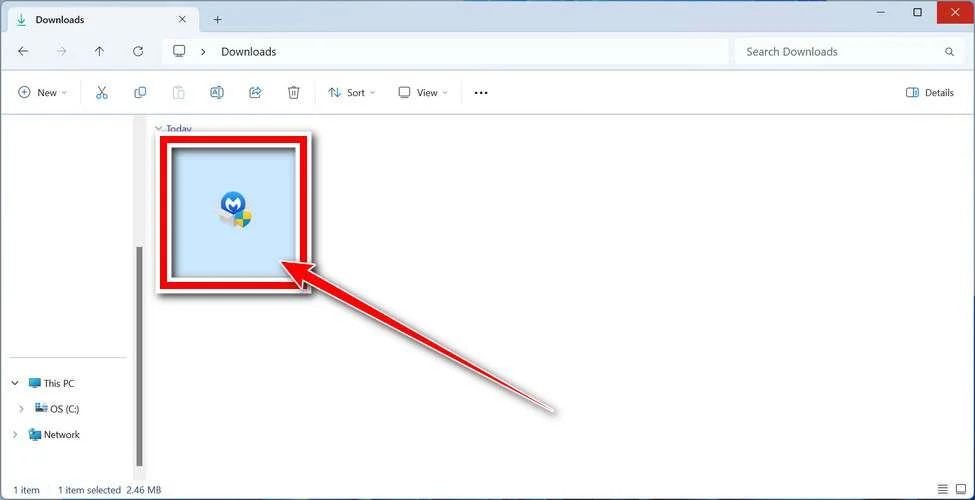
Follow the On-Screen Prompts to Install Malwarebytes
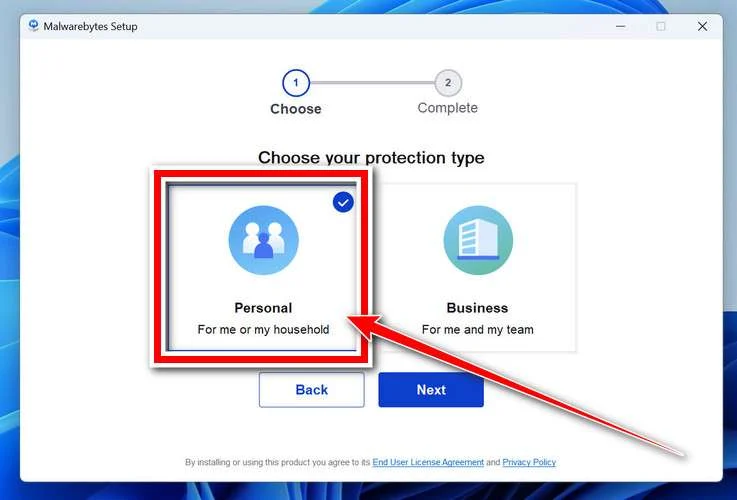
The setup wizard will walk you through a few quick screens:
-
Choose where you’re installing the program — “Personal Computer” or “Work Computer” — then click Next.
-
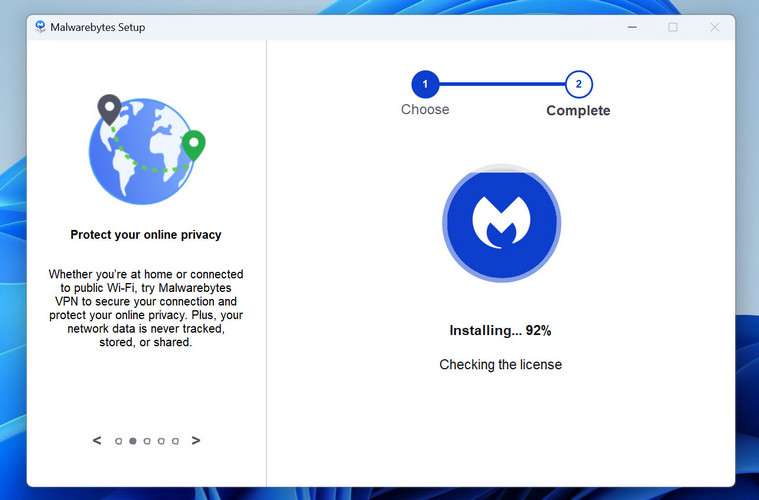
Malwarebytes will now install on your device. This usually takes under a minute.
-
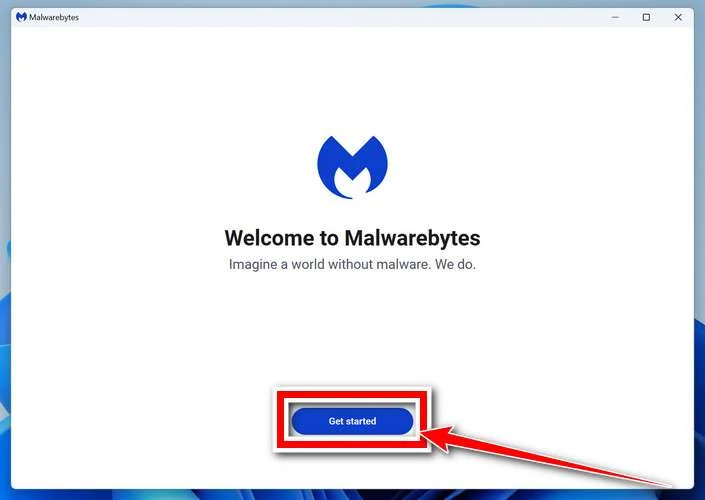
When installation is complete, the “Welcome to Malwarebytes” screen will open automatically.
-
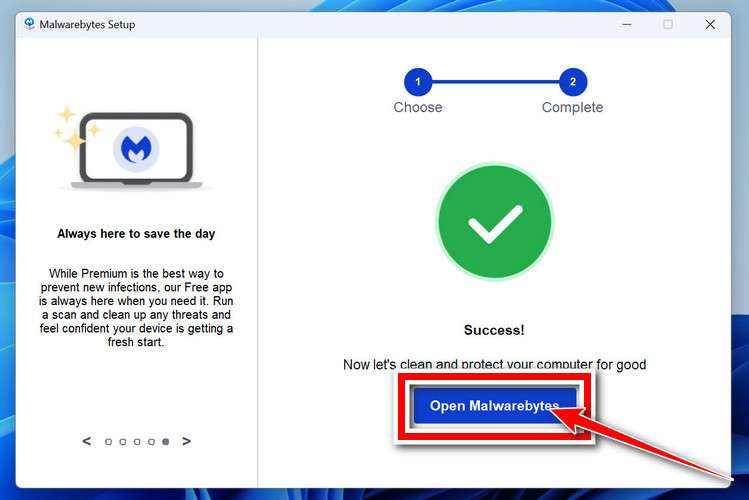
On the final screen, click Open Malwarebytes to launch the program.
-
Optional: Check for rootkits with a Custom Scan
You don’t need to change any settings for a normal scan. The standard Threat Scan in the next step is enough for most problems, so you can go straight to it.
If you also want to check for rootkits, use a Custom Scan. In current versions of Malwarebytes, rootkit scanning is only available there:
- On the Scanner tile, click the three-dot menu and select Advanced Scan.
- Choose Custom Scan. In its options, check Scan for rootkits.
- Select your system drive (usually C:\) as the location to scan, then start the scan. It takes longer than a Threat Scan.
- When it finishes, review and quarantine the results as described in the steps below.
Rootkit scanning isn’t available on Windows devices with ARM processors.
Start the Scan
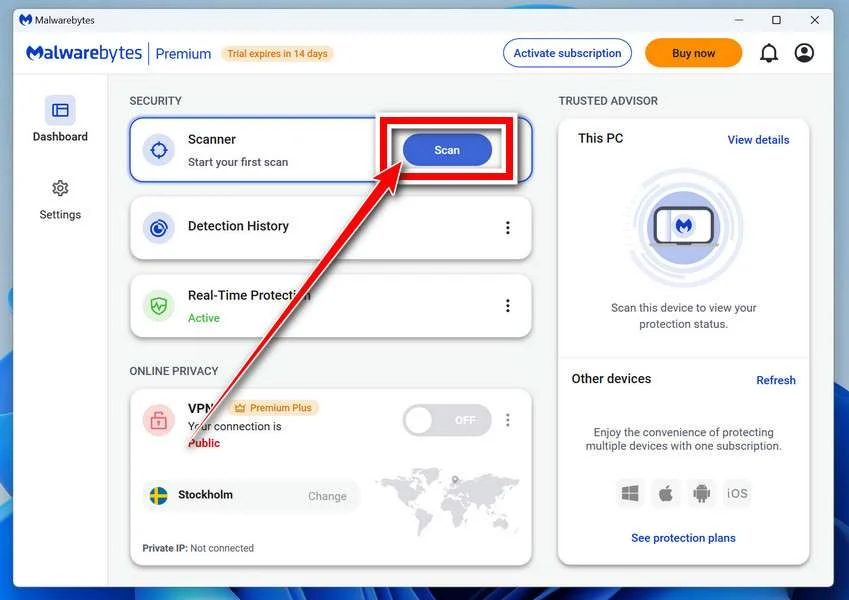
Click the blue Scan button. Malwarebytes will automatically update its virus database and start checking your computer for malware.
-
Wait for the Scan to Finish
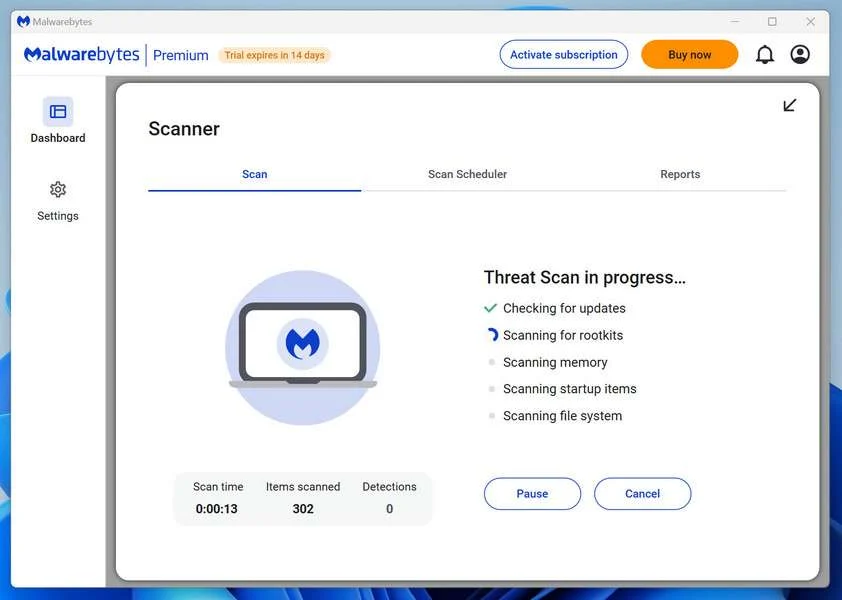
The scan checks your entire system for browser hijackers and other malicious programs, so it can take 5 to 20 minutes depending on your computer. Feel free to do something else — just check back occasionally to see the progress.
-
Quarantine the Detected Threats
When the scan is done, you’ll see a list of everything Malwarebytes found — malware, adware, and potentially unwanted programs. Click the “Quarantine” button to remove all of them at once.
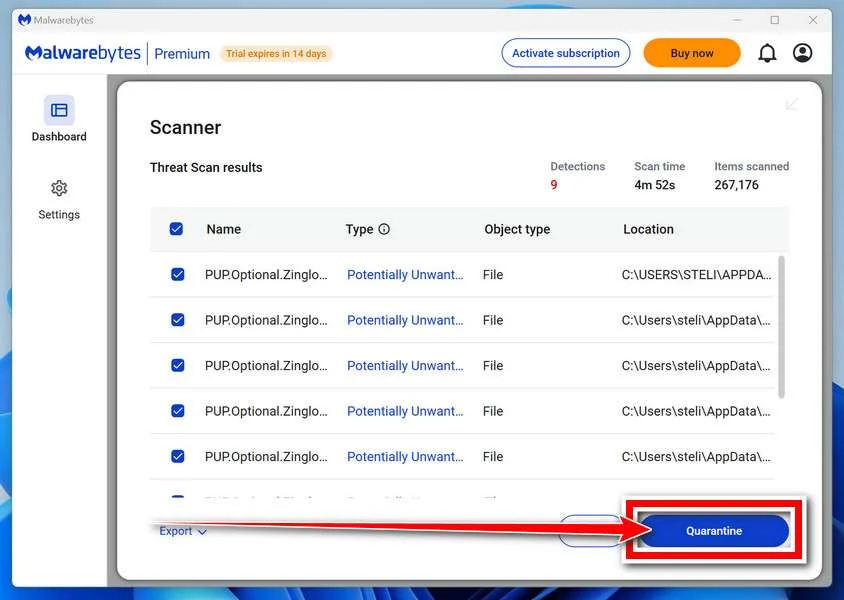
Malwarebytes will now remove the malicious files and registry entries and move them safely into quarantine.
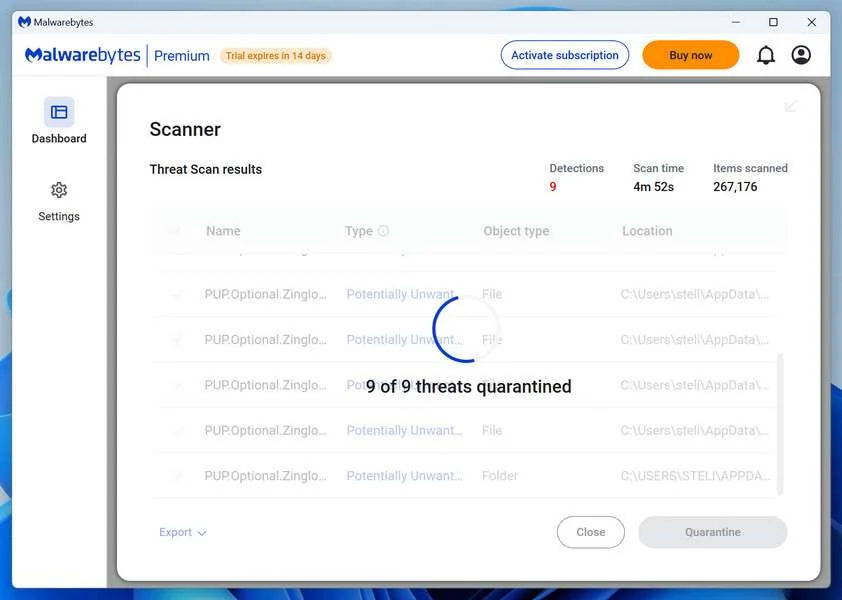
-
Restart Your Computer
Some threats can only be fully removed after a reboot. If Malwarebytes asks you to restart, click Yes. Once you’re logged back in, Malwarebytes has finished removing the threats it found.
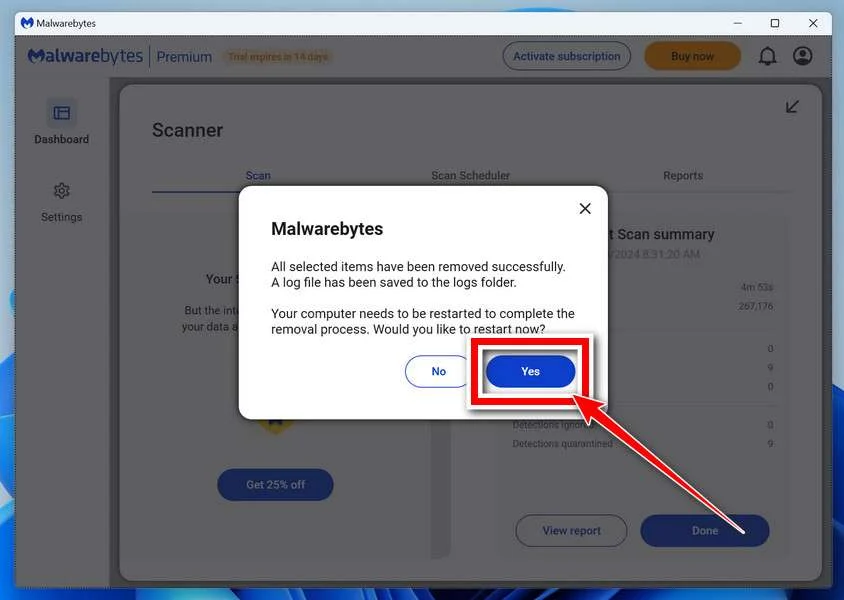
When the scan is done, check whether the problems you noticed have stopped. If they continue, see the options below.
If you are still having problems with your computer after completing these instructions, then please follow one of the steps:
- Run a computer scan with ESET Online Scanner
- Ask for help in our Windows Malware Removal Help & Support forum.
Scan Your Mac with Malwarebytes for Mac
Malwarebytes for Mac is a free on-demand scanner that removes the malware other security software tends to miss — adware, browser hijackers, and unwanted programs included. Cleaning an infected Mac with Malwarebytes has always been completely free, and it’s our go-to recommendation. Follow the steps below to scan your Mac and remove what Malwarebytes finds.
-
Download Malwarebytes for Mac
Click the button below to download the latest version of Malwarebytes for Mac.
Download MalwarebytesOfficial installer for macOS. Your download starts right away.Want real-time protection? See Malwarebytes PremiumMalwarebytes Free for MacScans and removes malware at no cost -
Open the Malwarebytes setup file
When the download finishes, open your Downloads folder and double-click the setup file to begin the installation.
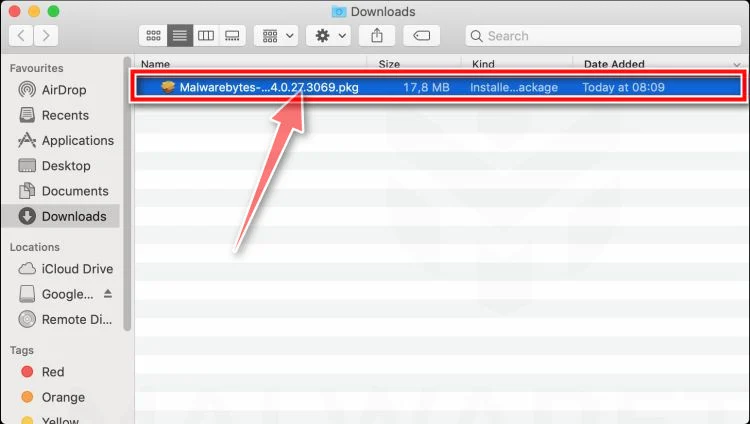
-
Follow the On-Screen Prompts to Install Malwarebytes
The Malwarebytes for Mac Installer will guide you through a few quick screens. Click “Continue” and keep following the prompts until the installation completes.
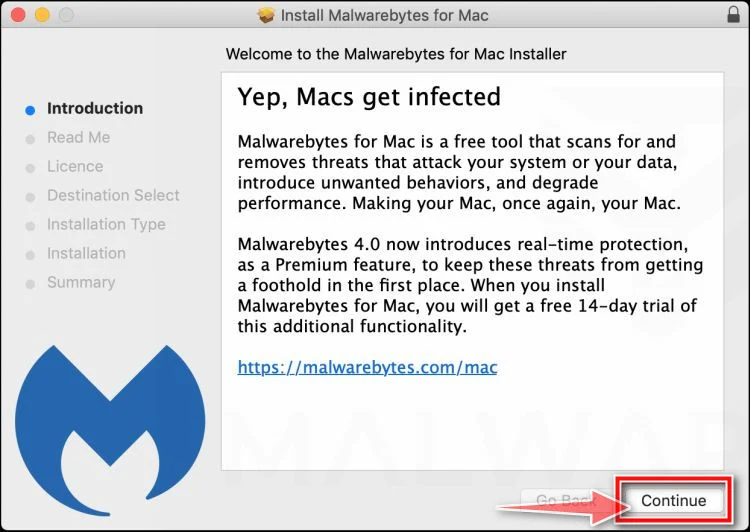
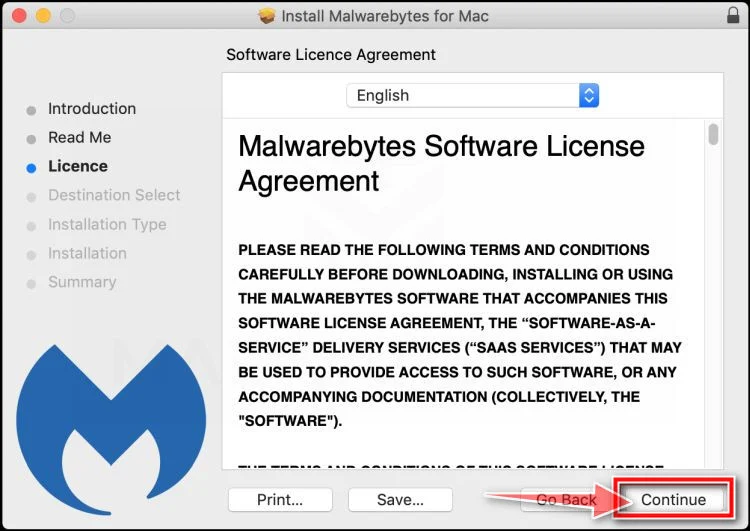
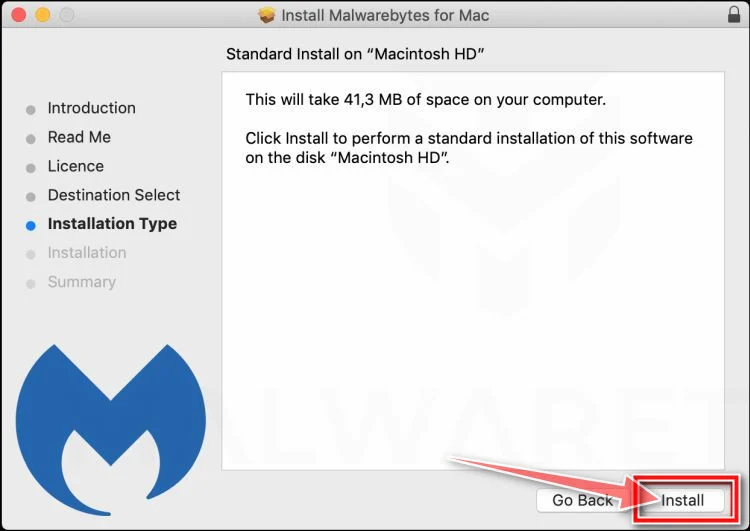
When the installation is complete, Malwarebytes opens to the Welcome to Malwarebytes screen. Click “Get started“.
Malwarebytes needs Full Disk Access to check your whole Mac. When it asks, open System Settings > Privacy & Security > Full Disk Access, turn on Malwarebytes (it may be listed as Malwarebytes Protection), and confirm with your password or Touch ID. Then return to Malwarebytes. On macOS Monterey and earlier, this setting is in System Preferences > Security & Privacy > Privacy.
-
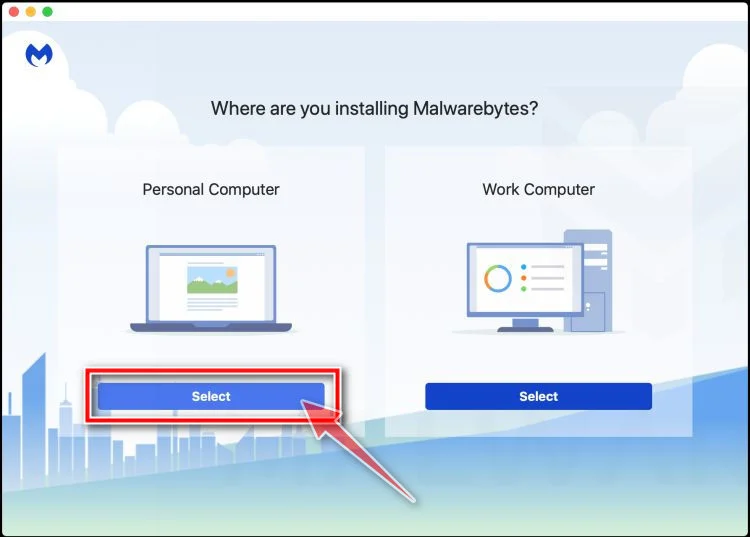
Select “Personal Computer” or “Work Computer”
Malwarebytes will ask what type of computer you’re installing it on. Click either Personal Computer or Work Computer, whichever applies.
-
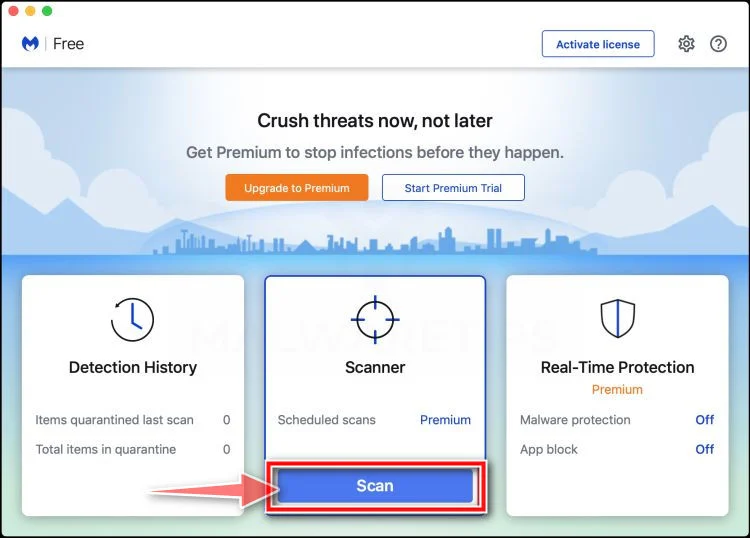
Start the Scan
Click the “Scan” button. Malwarebytes will automatically update its detection database and begin checking your Mac for malware.
-
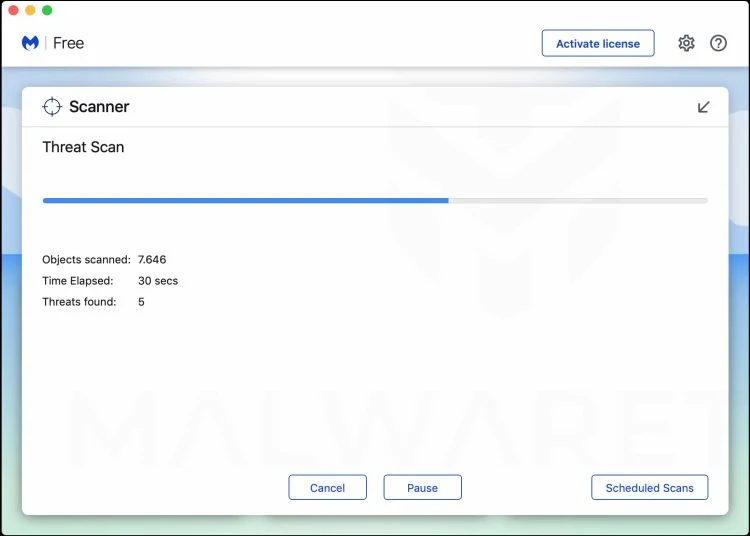
Wait for the Scan to Finish
Malwarebytes will scan your Mac for adware, browser hijackers, and other malicious programs. This can take a few minutes, so feel free to do something else — just check back occasionally to see the progress.
-
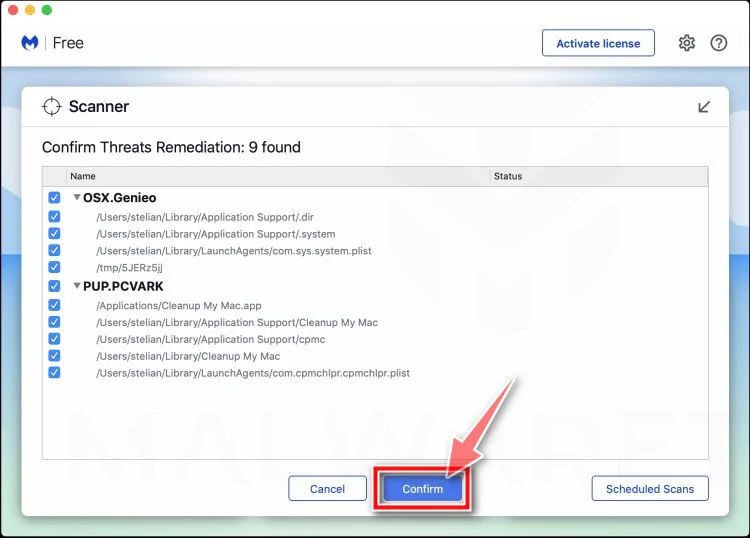
Quarantine the Detected Threats
When the scan is done, you’ll see a list of everything Malwarebytes found. Click the “Quarantine” button to remove all the threats at once.
-
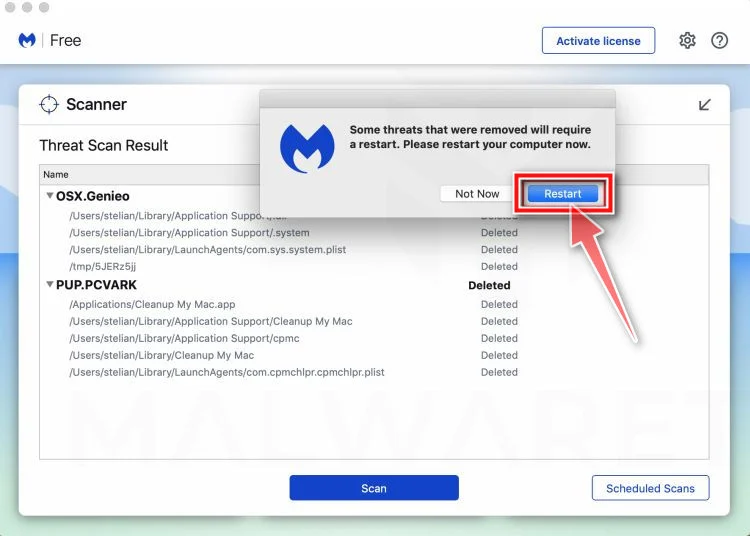
Restart Your Mac
Malwarebytes will now remove all the malicious files it found. Some threats can only be fully removed after a reboot — if Malwarebytes asks you to restart, allow it. Once you’re logged back in, check whether the problems you noticed have stopped. If they come back, save the scan report and ask for help in our forum.
If the problems you noticed continue after the scan, see the options below.
If you are still experiencing problems while trying to remove a malicious program from your computer, please ask for help in our Mac Malware Removal Help & Support forum.
Scan Your Phone with Malwarebytes for Android
Malwarebytes for Android scans your phone or tablet for malware, adware, and potentially unwanted apps. The free version scans only when you start a scan. Real-time protection, which checks apps automatically, is part of the paid Premium version.
-
Download Malwarebytes for Android.
You can download Malwarebytes for Android by clicking the link below.
Get Malwarebytes for AndroidOpens Google Play in a new tab.Want real-time protection? See Malwarebytes Premium for AndroidMalwarebytes for AndroidScans your phone and removes malware at no cost -
Install Malwarebytes for Android on your phone.
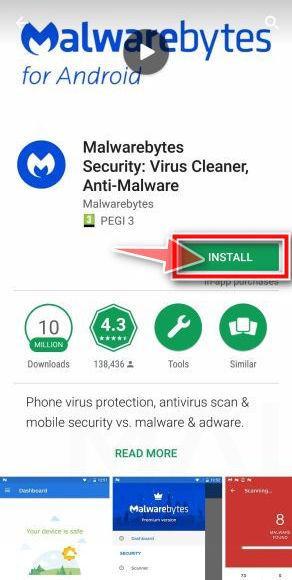
In the Google Play Store, tap “Install” to install Malwarebytes for Android on your device.
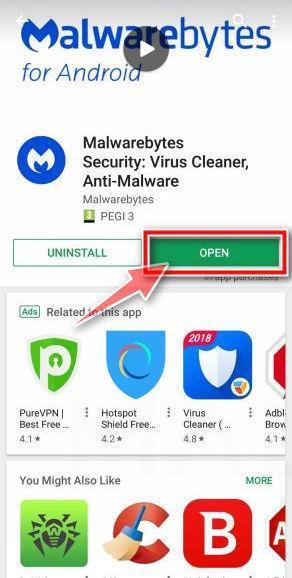
When the installation process has finished, tap “Open” to begin using Malwarebytes for Android. You can also open Malwarebytes by tapping on its icon in your phone menu or home screen.
-
Follow the on-screen prompts to complete the setup process
When Malwarebytes opens, it walks you through a short setup. Tap Get started and follow the prompts. If you see an offer for a trial or a paid plan, read it before you accept. You can skip it and keep using the free scanner.
Malwarebytes will ask for permission to access the files on your phone so it can scan them. Tap Allow, or turn on the permission in the Android screen that opens, then return to Malwarebytes.
-
Run a scan with Malwarebytes for Android
On the main screen, tap Scan now. In some versions, you open the menu, tap Scanner, and then tap Run a scan.
-
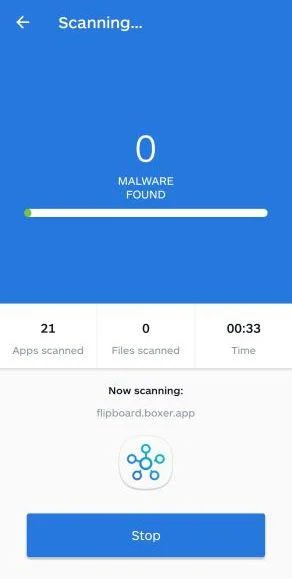
Wait for the Malwarebytes scan to complete.
Malwarebytes will now start scanning your phone for adware and other malicious apps. This process can take a few minutes, so we suggest you do something else and periodically check on the status of the scan to see when it is finished.
-
Remove the detected apps.
When the scan has been completed, you will see a list of the threats that Malwarebytes for Android has detected. Next to each detected item, tap the menu icon (three dots), then choose to uninstall the app or delete the file. Android then asks you to confirm. Tap OK or Uninstall to remove the app.
-
Restart your phone.
When the detected apps are removed, restart your phone if Malwarebytes asks you to. Then check whether the problems you noticed have stopped.
If the problems you noticed continue after the scan, see the options below.
If you are still having problems with your phone after completing these instructions, then please follow one of the steps:
- Ask for help in our Mobile Malware Removal Help & Support forum.
- Only as a last resort, reset your phone to factory settings. Read the warning below first.
- Back up your photos, videos, files, and messages, for example to your Google account or a computer.
- Make sure you know your Google account email and password. The phone asks for them after the reset. If you changed the password recently, Google recommends waiting 24 hours before you reset.
- On a Samsung phone, also make sure you know your Samsung account password.
- If you use an authenticator app for two-step verification, move your accounts to another device or save your backup codes first.

Join the discussion
0 commentsShare your experience or ask a question about this article.
Community experiences
Did this happen to you?
Your experience could help someone recognize the same scam. Submit a private report for our team to review.
I experienced this tooReports are reviewed before publication. Sharing publicly is always your choice.
Discussion
Start the conversation
Have a question or something useful to share? Add the first comment.