

A tantalizing offer for a PlayStation 5 console at a ridiculous $3 shipping fee has rapidly spread across Instagram, Facebook and YouTube. But our investigation uncovered how this unbelievable deal is a fraudulent recurring billing scheme designed to siphon financial data and money from victims.
By hijacking trusted retailer branding like Walmart, Amazon and Costco, scammers have crafted an elaborate ruse promising near-free PS5 consoles, exploiting continued scarcity and high demand. Even savvy shoppers are falling prey, lured by polished phishing techniques abusing household names. In this exposé, we reveal how to identify these seasonal PS5 scams on social platforms, avoid their financial traps, and protect your wallet. Don’t let dreams of dirt-cheap PlayStation 5 consoles steal your hard-earned cash.
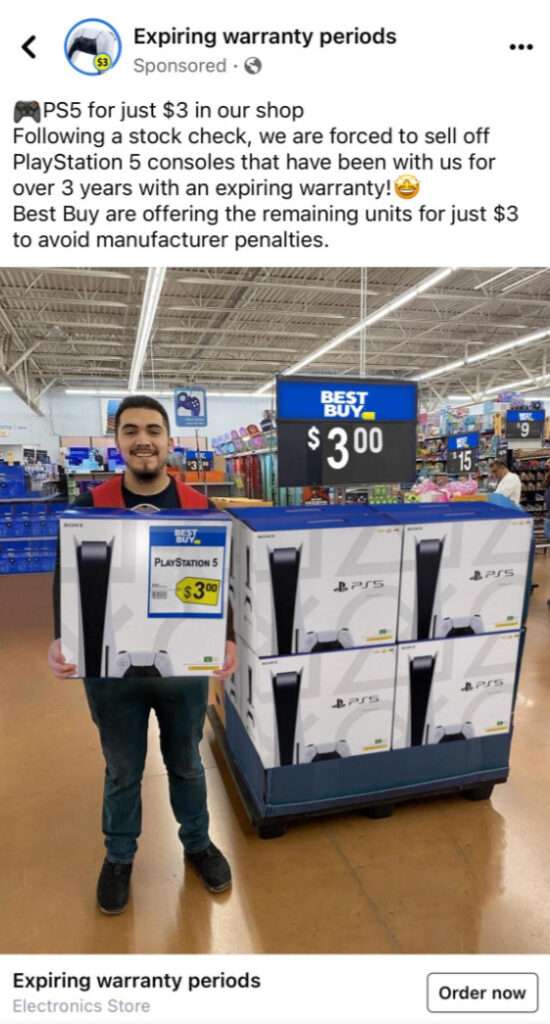
Scam Overview
A prolific subscription scam campaign currently spreading across Instagram, Facebook, YouTube and other platforms promises PlayStation 5 consoles available for a ludicrous $1.99, $9.90, $7.65 or $3 shipping fee. This unbelievable viral bait aims to secure users’ financial and personal data for illicit recurring credit card billing.

By funneling victims through polished phishing websites impersonating trusted retailers like Costco, Walmart, Amazon and more, scammers operating these schemes manage to regularly compromise sensitive information enabling subscription extraction. Recurring unauthorized charges ranging from $100 to $250 per month per victim are rapidly drained from compromised accounts.
These criminal enterprises rely heavily on hijacking the brand recognition of major retailers and leveraging continued scarcity of PS5 consoles to drive engagement to their scam checkout pages. Specific deceptive techniques include:
- Fabricating promotional posts claiming special early access to holiday PS5 inventory for just $3 shipping
- Mocking up phishing order pages mimicking the real checkout flows of Costco, Walmart, Amazon and other retailers using their logos
- Promising $500+ PlayStation 5 consoles are attainable for just a $3 shipping fee
- Burying terms and recurring billing authorization disclaimers in tiny unreadable text on checkout pages
- Integrating fake Norton, McAfee and Comodo security seals to instill credibility in their scam sites
- Making PS5 bundle images unclickable so users cannot cross-reference against actual retailer pricing
- Manufacturing fake 5-star reviews and phony customer photos to falsely signal social proof
- Auto-checking boxed disclosures that terms were read and agreed to in order to bill victims unaware
- Providing fake customer service numbers and contacts unable to cancel or refund the fraudulent charges
No legitimate retailers would ever offer $500 consoles for $3. And no real Best Buy, Costco, Walmart or Amazon stores would hide egregious unexpected subscription fees in fine print. By scrutinizing these and other universal phishing techniques, social media users can avoid being deceived by even the most elaborate PlayStation 5 promotions. Exercising skepticism and vigilance is paramount when protecting sensitive payment data and identity information from compromise.
By fully grasping the sheer depth of manipulation and deception central to these unbelievable $4 PS5 deals, we can inoculate ourselves against falling into their financial traps. Preventative awareness of phishing scams is essential to sidestep increasingly sophisticated social media fraud.
How the Viral $3 PlayStation 5 Scam Ensnares Victims
While variations exist across the multitude of fraudulent $3 PlayStation 5 campaigns active online, the core phishing techniques they leverage to ensnare victims follow very similar sequences of manipulation. Here is a comprehensive breakdown of the deception funnel these PS5 scammers utilize:
Step 1: Post Viral Social Media Content Promising Unbelievable Pricing
- Scammers run sponsored ads on Facebook, Instagram, YouTube and TikTok promoting the $3 PS5 deal.
- Posts integrate stolen logos of Walmart, Target, Costco and top retailers to boost perceived legitimacy.
- Messaging touts “clearance sales,” “limited inventory,” and “flash deals” to create false urgency around the bogus low pricing.
Step 2: Direct Users to Sophisticated Phishing Store Websites
- Clicking these viral posts sends users to recently created fake retailer websites controlled by scammers.
- High production value mimics real Costco, Walmart, Best Buy checkout flows with corporate colors, branding and web layouts.
- Fake Norton, TrustE, and McAfee seals aim to reassure visitors of the site’s security and credibility.
Step 3: Capture Users’ Payment Information Through Deceptive Order Forms
- Polished checkout forms prompt users to input credit card, billing, and identity information expecting a single small charge.
- Fake customer reviews, help desks numbers, and live chat bots further lower guards before submitting data.
- User-friendly flows auto-check disclosures and pre-fill information to progress visitors into completion quicker.
Step 4: Ensnare Victims in Undisclosed Recurring Subscription Fees
- After users input information presuming authorization of just a ~$3 charge, the financial bleeding begins.
- Without consent, $100 to $250 in monthly subscription fees rapidly drain from cards on file.
- Mandatory membership fees unrelated to any PS5 purchase are outlined only in miniscule fine print notices avoided by most users.
Step 5: Never Fulfill on the Advertised PlayStation 5 Console
- Despite ads displaying PS5 inventory ready to ship, no actual consoles are delivered to victims.
- All console images and descriptions are fabricated purely to drive urgency around the false $3 bargain.
- The sole objective is harvesting users’ financial information, not fulfilling any product orders.
Step 6: Make Cancelling Impossible and Refunds Unattainable
- Fake customer support contacts on scam sites are unresponsive to cancellation requests.
- Banks frequently won’t refund since users technically submitted their information willingly initially.
- With no viable options left, victims usually must entirely close compromised accounts to avoid continual unauthorized charges.
By illuminating the sheer depth and intricacy of manipulation underlying these viral $3 PS5 cons, users can be informed to identify and avoid falling prey. Never trust social media pricing that seems too good to be true, no matter how legitimate accompanying websites and advertising may appear. Employing vigilance and proactive prevention is our best defense.
How to Spot This Scam on Social Media
How to Identify the Viral $1.99 PS5 Scam on Facebook
- Ads promoting 90% off PS5 consoles or similar too good to be true savings like “Blowout Sale!”
- Posts using enticing limited time slogans like “Clearance Sale,” “Going Out of Business,” “Today Only”
- Stolen product images from other sites or stock photo libraries to advertise inventory
- Comments disabled on the Facebook ads to prevent warnings from real users
- Upon clicking, the ad goes to a site created very recently that impersonates a real retailer
- Published by page with generic name like “Deals Factory,” no follower history and zero engagement
How to Spot the $1.99 PlayStation Scam on Instagram
- Influencer promotions for retailer liquidation sales with 90%+ PS5 savings
- Shoppable posts linking to the phishing site using slogans like “Limited Time Offer!”
- Fabulous deals advertised through stolen photos and fake AI-generated video clips
- No tags, mentions, or links citing the original source of stolen console images
- Link in bio goes to an imposter site mimicking a trusted store with polished branding
- Account has zero posts before the scam, very recent creation date, and no engagement history
Identifying the Viral $1.99 PlayStation Con on TikTok
- Videos promising warehouse pricing like 90% off PS5 consoles due to “store closure”
- High production clips with enticing text overlays like “Blowout Sale, Today Only!”
- Fake conversations acting excited about buying PS5 bundles for under $5 shipping
- Links in comments and bios route to elegant scam websites pretending to sell desired consoles
- Brand new accounts created the same week as the videos specifically to promote the phishing links
- Zero engagement or authentic content from the account besides the quick video ads for the unbelievable PS5 deal
What to Do If You Fell Victim to the Viral $3 PS5 Scam
If you already submitted payment information through a fake $3 PS5 website disguised as a legitimate retailer, promptly take these steps:
- Contact your credit card provider immediately to report fraudulent charges from the scammer. Demand they block any future billing.
- Check statements closely over upcoming weeks to spot recurring subscription fees and rapidly dispute each instance.
- Monitor your credit reports at AnnualCreditReport.com to catch any unauthorized accounts opened using your data.
- Call the scam company at provided contacts to attempt canceling the account and request refunds, although success is unlikely.
- Follow up continually with your bank to re-dispute monthly fees, emphasizing you never consented to subscriptions or recurring charges.
- Prepare to request a new card number or close the account entirely if the scammer persists in attempting unauthorized billings.
- Report the seller to PayPal or Amazon if applicable for fraud investigation and recovery assistance.
- File complaints with the FTC, state attorney general, and FBI IC3 documenting losses and deceptive phishing techniques used.
- Post details about the scam publicly to warn others from falling victim and reduce the scammers’ reach.
- Enroll in credit monitoring to protect identity and financial data after it was compromised via phishing.
Frequently Asked Questions About the $3 PS5 Subscription Scam
1. What exactly is the $3 PlayStation 5 scam?
The $3 PS5 scam is a viral social media campaign utilizing fake promotions and websites to deceive users into providing payment info under the pretense of a one-time shipping fee. In reality, this compromises financial data for recurring billing fraud.
2. How does the $3 PS5 subscription scam work?
Scammers promote $500 PS5 consoles available for just $3 shipping on Instagram and Facebook. Users submit payment details expecting only a small single charge but are enrolled in expensive monthly subscriptions without consent.
3. What are some common red flags of the $3 PS5 scam?
Red flags include unbelievable low pricing, recently registered domains, fraudulent security badges, pre-checked forms, and disclosures about hidden fees buried in tiny unreadable text.
4. Are retailers like Amazon and Walmart actually affiliated with this scam?
No. Scammers impersonate major retailers by using their logos and brand names without any permission or involvement from the companies.
5. Where can I report the $3 PS5 subscription scam?
Report to your bank, credit card company, FTC, state attorney general, IC3.gov, social media platforms, and retailers whose branding was stolen for the scam.
6. What should I do if I submitted my information to a $3 PS5 scam site?
Promptly contact your card provider to report fraudulent charges, block the seller from future billing, closely monitor statements for recurrences, and prepare to request a new card number.
7. How can I get a refund after falling for the $3 PS5 scam?
Unfortunately, refunds are very difficult since you originally submitted your information willingly. Escalate urgently with your bank emphasizing lack of consent for recurring fees.
8. How can I cancel unwanted PS5 subscription charges from the $3 scam?
Call provided scam contacts demanding cancellation, but likely no workable avenue exists. Proactively cancel the compromised card/account to prevent further unauthorized billing.
9. Could I actually get a discounted PS5 console from this $3 scam?
Highly doubtful. The $3 PS5 ads and sites are purely phishing ploys. No consoles or products are actually shipped out to victims.
10. How can I avoid viral subscription scams like the PS5 $3 trap?
Carefully scrutinize unbelievable prices and exaggerated savings claims. Vet site legitimacy thoroughly and read all terms before ever providing payment information.
The Bottom Line
The viral $3 PlayStation 5 deal preying on social media users is a prime example of unbelievable bargain offers being too good to be true. By exploiting product scarcity and trusted retailer names, scammers coerce consumers into compromising sensitive personal and financial information that enables subscription fee extraction.
With vigilance and recognizing common retail scam red flags, we can avoid entrapment when these fraudulent promotions spread through social feeds. Scrutiny of deceitful viral posts helps safeguard our wallets and identities from ambitious phishing ploys hoping to financially exploit users through dreams of discounted hot products. Staying cautious and preventing data compromise are crucial to counter these endless schemes.

Join the discussion
0 commentsShare your experience or ask a question about this article.
Discussion
Start the conversation
Have a question or something useful to share? Add the first comment.