

Too good to be true? That’s because it is.
Viral social media ads are offering a chance to score “free” Dell Inspiron laptops worth hundreds just for answering a few questions. Tech enthusiasts take the bait – it’s a premium laptop for nothing but moments of your time. But hidden in the fine print lies an elaborate scam ready to hijack your wallet.
The scammers cite different phony reasons across platforms for gifting away the iconic laptops. On Instagram it’s excess inventory. On YouTube it’s minor defects. On TikTok it’s labeling errors. But it’s all an intricate fraud exploiting trust in the Dell brand.
This extensive guide blows the lid off the fake Dell giveaway designed to prey on the brand’s loyal fans. We’ll unpack how they use clever social engineering and deceit across Facebook, Instagram and more to profit off your data. Once you understand their tricks, you can avoid getting played.
Dell makes tech treasured by generations of computer users…which is exactly why scammers impersonate the company. But with knowledge, we can fight back against fraudsters trying to profit off Dell’s reputation.
Ready to protect your personal and financial information? Let’s expose these scammers at their own game.
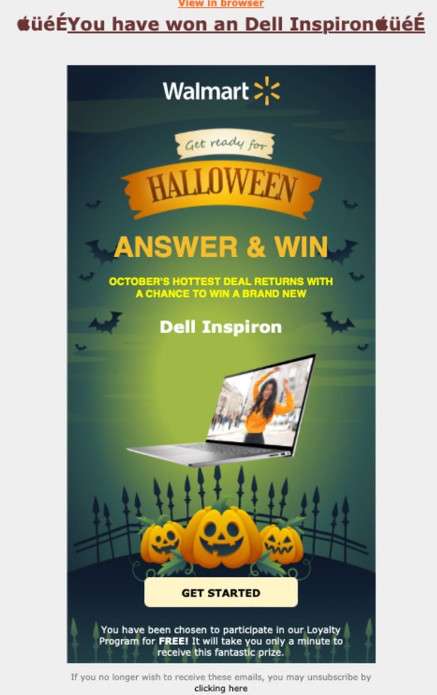
Overview of the Elaborate Dell Laptop Giveaway Scam on Social Media
A sophisticated scam promotion is circulating widely on social media platforms like Facebook, Instagram, YouTube and TikTok. Using Dell’s branding without consent, it claims to offer free Dell Inspiron laptops worth over $500. But it is simply an elaborate ruse designed to harvest users’ personal information and credit card details through phishing techniques and clever social engineering.
The scam starts with flashy video ads and fake posts targeting social media users, especially men under 40. Using Dell’s logos, fonts and imagery illegally, the scam ads tempt viewers by claiming Dell is gifting free laptops due to reasons like excess inventory, minor cosmetic defects or labeling errors during manufacturing.
Trying to create viral interest, the ads urge users to click through to claim their “free” laptop by completing just a few survey questions or meeting basic eligibility criteria. Phrases like “Hurry, limited supply!” “Check if you’re eligible!” and “Act fast – laptops going quick!” portray an exclusive opportunity that plays on fear of missing out.
Once users click the link, they are funnelled through a series of elaborate phishing websites designed to mimic Dell’s real branding and domains. These sites feature false claims of a special “Loyalty Program” giveaway, fake reviews from “past winners” receiving their free laptops, and an online questionnaire to “validate eligibility” for the promised prize.
In reality, the survey questions are only collecting personal information and email addresses for malicious use in identity theft and resale on the dark web. No “free” laptops actually exist.
After completing the phishing questionnaire, users are shown rigged animations falsely claiming they were “selected” as a winner for the Dell giveaway. But it’s just another deception. There was never any lottery, drawing or selection process – every person who completes the survey is shown the fake “winner” screens.
The scam then redirects to even more fraudulent websites masquerading as certified Dell dealers or affiliates. These fake retail sites ask for users’ credit card information under the guise of a small $9.90 shipping and handling fee required to receive the “won” laptop.
In their excitement, some users miss the fine print revealing they are actually being signed up for expensive monthly subscription plans without consent. These recurring credit card charges are nearly impossible to cancel once initiated, as the scammers make it extremely difficult to contact them or process refunds.
This intricate social media scam combines phishing techniques, fake claims, rigged interactions, and hidden billing practices to profit off the iconic Dell brand. By recognizing their deceitful tactics, sharing awareness and reporting fake promotions, we can shut down these fraudsters trying to exploit loyal Dell customers for financial gain.
How the Elaborate Dell Laptop Giveaway Scam Operates on Social Media
The operators behind this scam put much planning into making their promotions seem authentic, interactive and exclusive in order to deceive social media users. Here is an in-depth look at how they execute the scam across multiple platforms:
1. Crafting the Bait
The scam begins with high-quality videos and images promoting the fake giveaway. They invest heavily in production and social media advertising to mimic a legitimate brand campaign. Various “too good to be true” narratives around the gifted laptops are tested across platforms to determine which scam approach resonates most with target audiences.
On Facebook, they target men under 30 by claiming excess inventory needs clearing. On Instagram, they cite minor cosmetic defects that prevent the laptops from being sold normally. Over on TikTok, they blame labeling mistakes that means the laptops cannot be properly accounted for. The reasons change, but the scam remains the same.
2. Launching the Campaigns
The polished giveaway ads are launched simultaneously across Facebook, Instagram, YouTube, Twitter and TikTok. They leverage each platform’s advertising tools to micro-target users who show an interest in tech and laptop deals. Ads receive millions of impressions and are optimized to earn high clickthrough rates from interested users.
3. Building the Funnels
Each ad click sends users down a funnel designed to harvest maximum information while making the scam appear legit. The landing pages feature fake interfaces mimicking Dell’s website, showing countdown timers and limited prizes to create urgency. Next come the phishing questionnaires pretending to verify eligibility to win the laptop. All progress designed to lower skepticism.
4. Ensuring Virality
The pages integrate real-time social proof like fake visitor and chat counter widgets to imply others are participating. Fake comments from “recent winners” boost legitimacy. Share buttons increase virality as unsuspecting users spread the ads through their own networks on social media.
5. Faking Interaction
After users complete the phishing forms, rigged animations simulate prize drawings, building excitement and the illusion of an interactive brand experience. In reality, the animations are completely predetermined. Everyone “wins” the laptop to keep them moving through the funnel.
6. Going In for the “Kill”
The scam reaches its conclusion by getting users to a final phishing page collecting their credit card info by promising to ship the “won” laptop after a small $9.90 processing fee. No laptops ever ship, but recurring monthly subscription fees start getting charged to victims unless they quickly notice and cancel. Check your statements!
What to Do if You Suspect You’ve Fallen Victim to the Scam
If you shared any sensitive information or payment details with a suspicious Dell giveaway promotion, here are important steps to take right away:
- Contact Your Credit Card Company Immediately Call your credit card provider and inform them you believe your card details were entered into a phishing scam. Request that any current or future charges from the linked websites/companies be blocked.
- Monitor Your Statements Keep vigilant watch on your statements for any signs of recurring subscription fees or unauthorized transactions. Dispute anything suspicious.
- Change Account Passwords Reset passwords for any online accounts that use the same credentials as those entered on the phishing sites. Use a password manager to ensure unique, complex credentials.
- Contact the FTC File a complaint with the Federal Trade Commission (FTC) about the Dell scam at ReportFraud.ftc.gov. This helps authorities track and shut down scams.
- Inform Social Networks Report any scam ads or fake accounts to the social platforms they appeared on. Shutting down their profiles damages their fraud operations.
- Contact Dell Directly Dell may pursue legal action on scam sites misappropriating their brands and logos without consent. Contact them via Dell.com to provide evidence.
- Warning Others Post on social media and forums to create awareness about the scam and help prevent others from being victimized. Share key details on how to recognize these fraudulent giveaways.
Frequently Asked Questions About the Fake Dell Laptop Social Media Giveaways
1. How can I recognize these fraudulent Dell laptop ads and promotions?
Be skeptical of remarkable claims like free high-value laptops for completing basic questions. Viral giveaways requiring any payment are always scams. Dell and authorized sellers would never gift laptops for pennies.
2. What false narratives do the scam ads use across TikTok, Facebook etc.?
The ads cite excess inventory, minor cosmetic defects, labeling errors and misleading prices as phony reasons for gifting expensive Inspiron laptops worth hundreds. This is complete fabrication.
3. What deceitful techniques convince people the giveaways are real?
They use Dell’s branding without consent, fake endorsements, rigged animations showing you “won,” and false urgency through countdowns and limited prizes.
4. What happens after you click on one of the scam’s social media ads?
You are directed through a series of phishing websites designed to harvest your personal and payment information through surveys and fake order forms.
5. How does providing your credit card result in unexpected recurring fees?
Hidden terms sign you up for expensive monthly subscriptions without consent. A small shipping fee is charged immediately, followed by huge recurring charges.
6. What should raise red flags about these Dell “freebie” offers?
No business gifts away products worth hundreds for pennies or for completing basic questions. If it seems too good to be true, it always is.
7. How much do authentic Dell Inspiron laptops retail for?
The real Inspiron models targeted in these scams cost between $400 – $800 from authorized Dell dealers, not a few dollars.
8. What precautions can I take to avoid falling victim to one of these scams?
Verify social media ads via Dell’s real website and contacts. Never submit payment information or personal data without scrutinizing the claims.
9. What should I do if I already provided my information to a fake Dell giveaway site?
Immediately contact your credit card company to report fraudulent charges. Monitor closely for hidden subscription fees. Change account passwords.
10. How can I help stop these fraudulent Dell laptop giveaways on social media?
Report fake ads and sites. Spread awareness to protect others. Dell pursues legal action – you can contact them with evidence.
The Bottom Line on the Fake Dell Laptop Giveaways Exploiting Social Media
Skilled scammers will continue developing new ways to leverage the reach of social platforms and exploit public trust in brands like Dell. But through education and vigilance, consumers have the power to recognize deceitful tactics being used and shut down these frauds permanently.
There’s no shortcut to getting your hands on one of Dell’s expertly-engineered laptops. If an offer appears too good be true, it almost certainly is. But by arming yourself with the right information, you can help protect both your own finances and the reputation of a brand so treasured by computer enthusiasts worldwide.
The next time you see unbelievable claims in your social feed promising free Dell laptops, remember – they want something far more valuable from you. Outsmart them by spotting the scam before it’s too late. Don’t let them play you.

Join the discussion
0 commentsShare your experience or ask a question about this article.
Discussion
Start the conversation
Have a question or something useful to share? Add the first comment.