

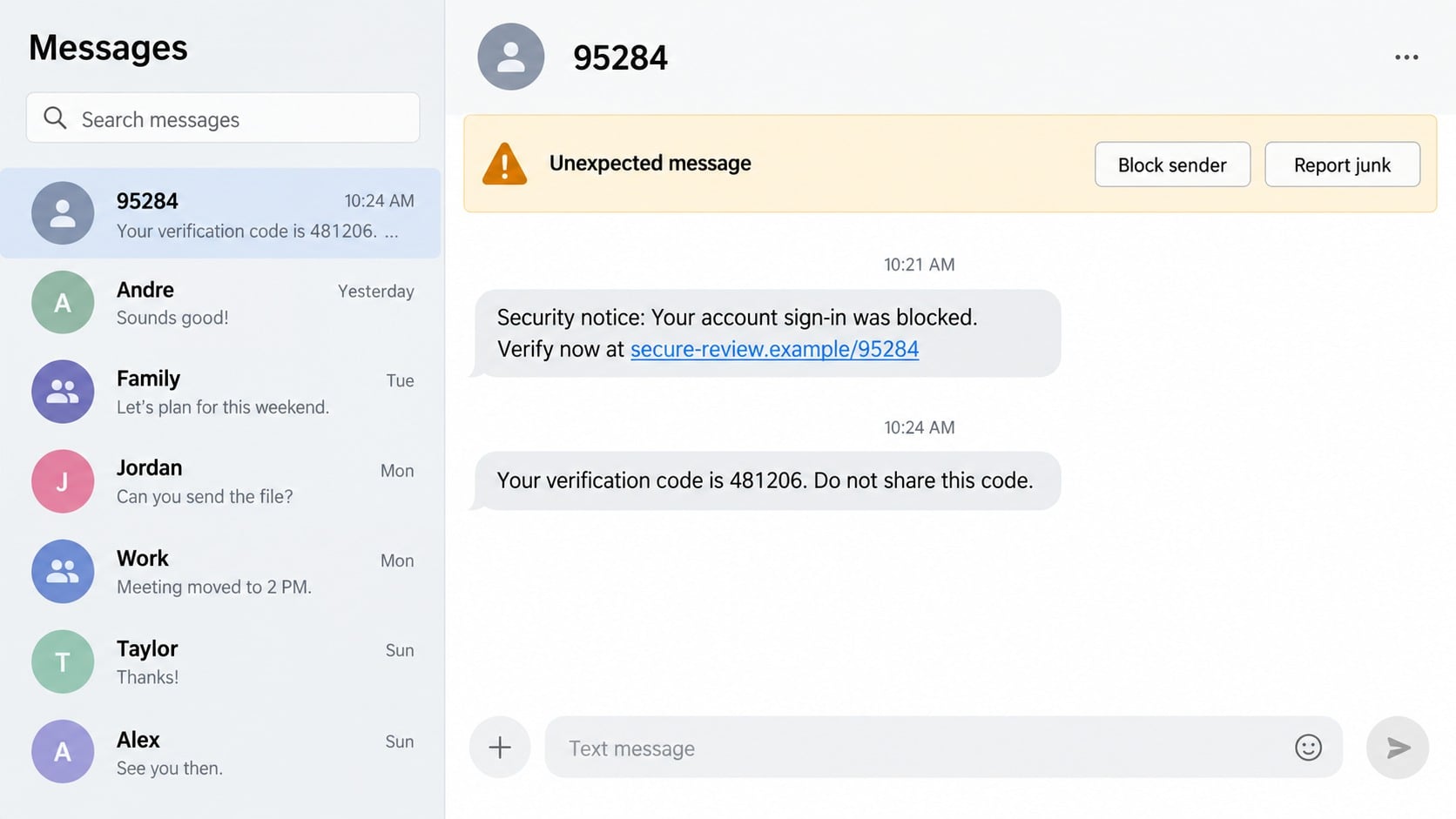
A text from the five-digit number 95284 may contain a sign-in code, an account warning, or a link that expects an immediate response. The short sender looks more official than an ordinary mobile number, which can make the message difficult to judge.
The number alone is not enough to declare every message fraudulent. What matters is whether you requested the code, recognize the service, and can verify the alert without using the link or callback details in the text.
Overview
What a message from 95284 may contain
Short codes are five- or six-digit senders used for automated alerts, authentication codes, marketing, and service notifications. A 95284 message can look like a bank warning, delivery notice, password-reset code, subscription alert, or account-security message.
A legitimate short-code text usually makes sense in context. You just signed in, requested a code, changed an account setting, or knowingly subscribed to messages from the named organization.
An unexpected alert deserves caution when it asks you to click a link, call an unfamiliar number, reply with personal information, or share the verification code with someone.
Why 95284 is not proof of a single sender
A short code can be used by a messaging provider on behalf of different campaigns, and sender information shown by a device is not a substitute for verifying the organization named in the message.
The displayed number may also be copied into screenshots, emails, or follow-up conversations to create credibility. Even when the first code is genuine, a scammer can trigger it by attempting to enter your account with a leaked password.
Do not label the code itself as permanently malicious without carrier or provider evidence. Judge each message by its timing, content, destination, and relationship to an action you initiated.
Signs that the short-code alert is dangerous
- You did not request the login, password reset, purchase, or delivery update.
- The message creates a deadline of only a few minutes.
- A shortened or unrelated domain is used instead of the organization’s official website.
- The text asks for a password, card number, Social Security number, or recovery phrase.
- A caller asks you to read back the code sent from 95284.
- You are told to move money or buy gift cards to secure an account.
- The named company cannot find the alert when contacted independently.
- Replying produces more pressure rather than a normal opt-out confirmation.
The FTC’s guidance on spam text messages recommends avoiding unexpected links and forwarding suspicious texts to 7726 (SPAM).
How the 95284 Scam Text Works
Step 1: The message arrives without useful context
The recipient sees a security notice, one-time code, or claim that an account was blocked. The text may not clearly identify which account, or it may name a service the recipient uses frequently.
Broad wording allows the same campaign to reach many people. A small number will happen to have an account with the impersonated company and assume the warning is relevant.
The five-digit sender adds an appearance of automation. That presentation can lower the skepticism people apply to an unknown ten-digit number.
Step 2: Fear or curiosity pushes the recipient toward a link
The text may report a blocked login, suspicious purchase, failed payment, or delivery problem. It then offers a link as the fastest way to prevent loss.
Shortened links and mobile screens can conceal the true destination. A domain may include security, verify, or account words while having no connection to the named company.
Do not test the link to see where it goes. Open the official application or type the known website address into a new browser window.
Step 3: A lookalike form requests credentials
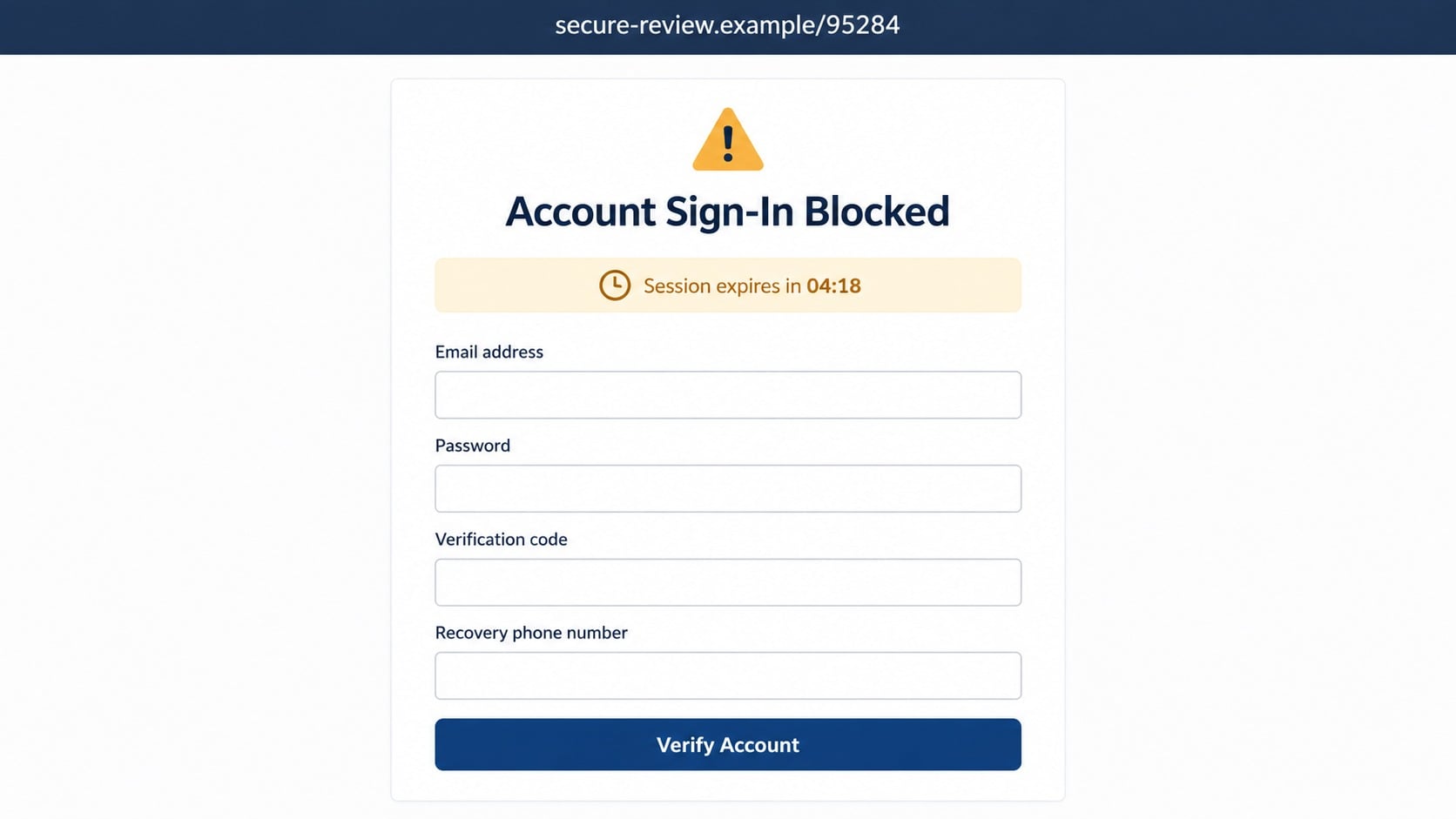
The destination imitates an account login or fraud-review page. It may request an email address, password, card information, recovery phone number, or government identifier.
A countdown claims the session will expire. The timer exists to shorten the moment in which the recipient might inspect the domain or contact the real company.
Information entered on the page is sent to the operator, even if the form later displays an error. Repeated error messages can collect multiple passwords or payment cards.
Step 4: A real verification code may be triggered
With a username and password, the attacker attempts to sign in to the genuine service. That attempt causes a legitimate one-time code to arrive by text.
The phishing page immediately asks for the code, or a caller says it is needed to cancel the suspicious activity. Entering or reading it can complete the attacker’s login.
The code message often warns not to share it. Treat that sentence literally, including when the requester claims to work in security or fraud prevention.
Step 5: The account is taken over or used for payment fraud
Once inside, the attacker can change recovery details, view personal information, place orders, add a digital wallet, or send messages to contacts.
If banking details were collected, the scam can move into unauthorized transfers or card purchases. An attacker may ask for additional codes as each new action triggers another security check.
Some fake pages instead install an application or configuration profile. That software can collect more data or display persistent fraudulent alerts.
Step 6: Follow-up calls exploit the original alert
A person may call shortly after the text and refer to the code or supposed incident. Because the victim has just seen a security message, the call appears connected and timely.
The caller can impersonate a bank, retailer, or account provider and ask the victim to move money for protection. The short-code text becomes supporting theater for the telephone scam.
If the victim resists, another caller may pose as a supervisor. End the contact and reach the organization through its official application or published support number.
Unexpected Code or Active Account Attack?
An unsolicited verification code can mean someone typed your phone number by mistake. It can also mean an attacker already knows a username and password and has reached the multifactor step.
Do not approve any login prompt. Visit the account directly, change a reused or exposed password, and review recent sessions and recovery information.
If the message identifies no service, do not begin guessing by opening links. Monitor important accounts and secure email first because email access can be used to reset many other services.
Company, Address, and Fulfillment Checks
The short code is not the legal company name
Identify the organization named in the text and compare it with the service you actually use. A numeric sender does not establish ownership or responsibility.
The linked domain reveals the real destination
Read the registered domain, not the words placed before or after it. Security-themed wording cannot turn an unrelated domain into an official account portal.
Support must verify the alert outside the message
Use a bookmarked site, official application, statement, or published telephone number. Do not rely on the link or callback number being investigated.
The requested action must match a real service event
A legitimate code should correspond to something you initiated. If there is no matching login, purchase, delivery, or subscription event, treat the request as unverified.
How to Check a 95284 Message Safely
- Do not reply, follow the link, or call a number inside the text.
- Write down the named company and the action the message claims occurred.
- Open the company’s official application from your normal app list.
- Review security alerts, orders, payments, and active login sessions.
- Change the password if an unrecognized login attempt is visible.
- Report the message through your phone and forward it to 7726.
Replying STOP is appropriate for a marketing program you knowingly joined. With an obvious phishing message, do not engage because a response can confirm that your number is active.
Keep a screenshot before blocking when the message is connected to an account intrusion or financial loss. The full text, time, link, and sender help an investigator understand the sequence.
Common Stories Hidden Behind an Unexpected Short Code
A password reset you did not request
The message may contain only a code and a warning not to share it. That can mean someone already knows the account identifier and has started the reset process.
Open the service directly, review security activity, and replace an exposed password. Do not type the code into a page reached from another unexpected message.
A fake bank transaction review
The text claims a purchase was declined and asks you to call or follow a link. The sender may omit the bank name so the recipient supplies it during the conversation.
Check the account through the normal banking application. A real transaction alert should correspond to visible activity and remain reviewable through an independently obtained support channel.
A package problem with a small fee
Delivery-themed texts say an address is incomplete or postage is due. A small redelivery payment lowers resistance, while the fake form captures enough card data for larger unauthorized use.
Use the carrier’s own tracking page and enter the number manually. A generic message without a valid shipment connected to you should be deleted and reported.
A caller asking for the code
Someone may telephone immediately and claim to be investigating the alert. They can sound credible because they know a code was just delivered to your number.
The timing proves only that the caller triggered an automated action. Hang up, refuse to share the code, and contact the organization through information you already trust.
Why Short Codes Can Feel Safer Than They Are
Consumers often associate short codes with banks, delivery companies, healthcare systems, and multifactor authentication. That history gives the format a level of trust that an ordinary unknown number may not receive.
Scammers exploit the association in several ways. They can send phishing through other messaging routes, create screenshots that show a short code, or cause a legitimate service to deliver a real code during an account attack.
The safest rule is contextual rather than numerical. Expected codes should follow an action you just performed inside a trusted service. Unexpected codes are warnings to inspect the account, not invitations to continue through a supplied link.
Keep legitimate alerts enabled after the incident. Turning off every security message can remove an early warning, while stronger passwords and carefully reviewed notifications make those alerts more useful.
What to Do if You Have Fallen Victim to This Scam
- Secure the affected account directly. Open the official app or website yourself, change the password, remove unknown sessions, and restore recovery email and phone details.
- Protect the email account first when several services are involved. Email controls password resets. Choose a unique password, inspect forwarding rules, and enable strong multifactor authentication.
- Tell the financial institution about exposed payment data. Lock cards, dispute unfamiliar transactions, and explain whether you entered a code or approved a login notification.
- Replace compromised authentication. Generate new backup codes, remove unfamiliar authenticator devices, and ask the mobile carrier about a port-out lock if phone service changed unexpectedly.
- Remove anything installed by the page. Delete unknown applications, browser extensions, and configuration profiles. Run a complete Malwarebytes scan when a file or program was downloaded.
- Preserve the message chain. Capture the 95284 sender, timestamps, link, phishing form, verification codes, calls, and transaction notices before deleting the conversation.
- Report the text. Forward it to 7726, use the device’s report-junk control, and submit financial or identity theft details through ReportFraud.ftc.gov.
- Add web filtering for future attempts. AdGuard can block many known phishing and malicious advertising destinations. It cannot determine whether every short-code message is genuine.
- Watch for impersonated recovery support. Do not pay anyone who contacts you unexpectedly and promises to restore the account or retrieve money.
Frequently Asked Questions
Is every text from 95284 a scam?
No. A short code may carry legitimate automated messages. Verify whether the text matches an action you initiated and a service you recognize.
Why did I receive a code I never requested?
Someone may have entered your number by mistake, or an attacker may be trying to access an account. Do not share the code and review the account directly.
Can a scammer send a genuine verification code?
A scammer can trigger the real service to send one by attempting a login or reset. The code is genuine, but the person requesting it is not authorized.
Should I reply STOP to 95284?
Use STOP only for a legitimate messaging program you recognize. For phishing, avoid replying, report the message, and block the sender.
What if I clicked the link but entered nothing?
Close the page and clear the tab. Risk is lower if nothing was downloaded or submitted, but inspect the device and watch the relevant accounts.
Can blocking 95284 stop legitimate codes?
Yes, blocking a shared or legitimate short code could prevent expected messages. Report the specific suspicious text and contact the service if needed codes stop arriving.
The Bottom Line
A 95284 scam text cannot be identified by the five-digit sender alone. Context, destination, requested information, and independent account records determine whether the message is trustworthy.
Never share an unexpected code or use a security link from the text. Open the real service yourself, secure the account, and report messages that try to turn urgency into access.

Join the discussion
0 commentsShare your experience or ask a question about this article.
Discussion
Start the conversation
Have a question or something useful to share? Add the first comment.