

A disturbing new trend has emerged on Facebook, targeting page administrators and business owners with messages that appear to be from “Meta Infringement Copyrights.” These alerts warn users that they have allegedly violated copyright laws and that their pages will be deleted within 24 hours unless they file an appeal. The notices often mimic official Meta branding, making them appear authentic. However, these messages are not legitimate. They are part of a sophisticated phishing scam designed to trick users into giving up their login credentials.
This article unpacks every aspect of the scam—how it works, who it targets, what to do if you’re a victim, and most importantly, how to protect yourself from falling prey to it.
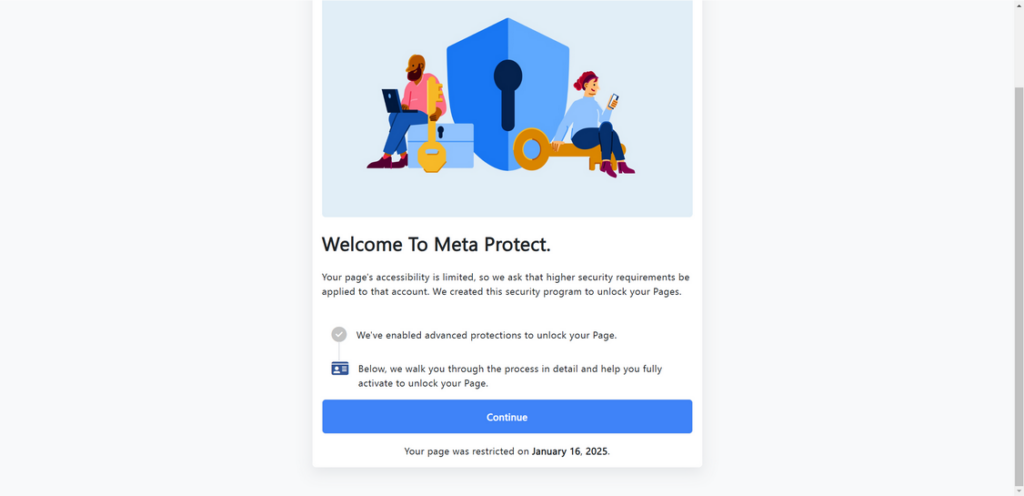
Scam Overview: Understanding the Meta Infringement Copyrights Scam
The “Meta Infringement Copyrights” scam is a highly orchestrated phishing scheme that aims to hijack Facebook pages. These attacks are increasingly targeting small business owners, content creators, influencers, and marketers—anyone who uses Facebook as a platform for professional or promotional purposes.
What the Scam Looks Like
The scam can reach users in several deceptive forms:
- Direct messages via Facebook Messenger from accounts impersonating Meta
- Comments on posts, especially on business or promotional content
- Emails that closely resemble official Meta or Facebook notifications
These messages commonly claim:
- Your content or page has violated copyright regulations
- You must appeal within 24 hours to avoid permanent page deletion
- You are being investigated by Meta for multiple violations
The presentation of these messages is convincing. They often include:
- Meta’s logo and brand colors
- Legal language and terms like “Digital Millennium Copyright Act (DMCA)”
- Links to what appears to be Meta’s support or appeal center
- Fake case numbers or incident IDs
Psychological Tactics Used
The scam works by exploiting specific psychological triggers:
- Fear: Users panic when told their content could be deleted.
- Urgency: Deadlines like “24 hours left” push users to act without thinking.
- Authority Bias: Using Meta’s branding gives the message perceived legitimacy.
- Technical Illiteracy: Many users aren’t aware of how Meta actually handles copyright claims.
Who Is Being Targeted
Scammers are not indiscriminate. They strategically go after:
- Admins of Facebook Pages with significant followers
- Businesses that run paid ads
- Creators monetizing content via Facebook or Instagram
- Non-profits and organizations with engaged audiences
Even verified accounts have been targeted. The common denominator is a dependency on Facebook as a critical business or communication channel.
Variations in the Scam Message
The core structure remains the same, but names and terminology vary. You might encounter versions using labels like:
- Meta Copyright Safety Team
- Facebook Legal Department
- Digital Rights Management Center
Each version uses slightly different wording, but all direct users to phishing sites.
Why It’s So Dangerous
Once control of a page is lost, the damage can be extensive:
- The page may be deleted or renamed.
- Followers can be sent malicious messages or links.
- The scammer might run ads using your payment information.
- Your brand’s reputation can be destroyed in a matter of hours.
- Recovering access is complex and not always successful.
Scammers may also target other admins or use the compromised account as a launch point for further phishing attacks, creating a ripple effect.
How the Scam Works: Step-by-Step Breakdown
Understanding the inner workings of the scam is vital for prevention. Here is a comprehensive breakdown of how these attacks unfold from start to finish.
Step 1: The Fake Alert
The process begins when the scammer sends you a message through Messenger, a comment on your post, or an email. The message includes threatening language such as:
- “Your page has breached Meta copyright standards.”
- “Final warning: Appeal now or face permanent suspension.”
- “You are in violation of international copyright law.”
These communications include a link that seems to lead to Meta’s support or legal center.
Step 2: The Phishing Site Setup
Clicking the link takes you to a fake website designed to mimic Meta’s appeal platform. Common features include:
- Meta branding and UI styles
- Copyright violation form fields
- Use of HTTPS and convincing URLs (e.g.,
metaupport-appeals.org)
You are prompted to:
- Enter your email and Facebook password
- Submit your phone number and backup email
- Enter a 2FA code if enabled
All information is captured in real time and transmitted to the scammer.
Step 3: Account Takeover Begins
With access to your credentials, the attacker immediately:
- Logs into your account
- Changes passwords and recovery settings
- Removes you and other legitimate admins from your Page
- Gains full control over your Facebook presence
Within minutes, they may also attempt to access associated Instagram or WhatsApp accounts.
Step 4: Page Rebranding and Exploitation
Once they control your page, scammers act swiftly to monetize it:
- Rename the page and remove its history
- Post scam promotions, usually crypto-related or fake giveaways
- Message your followers with links to additional phishing sites
- Launch ad campaigns using your saved credit card or PayPal
In some cases, pages are bundled with others and sold on underground forums.
Step 5: Using the Page as a Phishing Tool
The now-compromised page becomes part of a broader operation:
- Commenting spam on other pages
- Direct messaging fans or customers
- Spreading additional phishing messages
This expands the scam’s reach and makes recovery even more difficult.
What To Do If You Have Fallen Victim to This Scam
If you’ve clicked the link or submitted any login details, take these immediate steps to contain the damage and attempt recovery.
1. Change Your Password Immediately
- Go to Facebook Settings > Security and Login > Change Password
- Create a new, strong password not used on other sites
2. Enable or Reset Two-Factor Authentication (2FA)
- Use an authentication app like Google Authenticator
- Update your recovery codes and settings
3. Visit Facebook’s Hacked Account Portal
- Go to https://www.facebook.com/hacked
- Follow the prompts to report unauthorized access
4. End Unrecognized Sessions
- In Security Settings, review “Where You’re Logged In”
- Log out of all unknown sessions immediately
5. Remove Malicious Admins
- If you still have access, remove any admins you don’t recognize
- Reassign trustworthy admins only
6. Revoke Suspicious App Access
- Go to Settings > Security > Business Integrations
- Remove unfamiliar apps or integrations
7. Notify Your Audience
- Post a message explaining the situation
- Warn followers not to engage with recent posts or messages
8. Contact Facebook Business Support
- Through Meta Business Suite or Help Center
- Submit ID verification and ownership proof
9. Review Billing and Ad Accounts
- Check for unauthorized charges in Ads Manager
- Pause all active ads if necessary
10. Run Malware Scans
- Use a reputable antivirus software to check your devices
- Remove any detected malware or keyloggers
11. Update Passwords on Other Platforms
- Especially those using the same or similar credentials
- Use unique passwords for every platform going forward
12. Train Your Team or Partners
- Educate them about phishing red flags
- Implement internal procedures for reviewing suspicious messages
Frequently Asked Questions (FAQ)
How can I tell if a Facebook copyright infringement notice is fake?
Real copyright notices from Meta will appear in your Support Inbox—not as direct messages, public comments, or emails from suspicious addresses. If the message includes urgent threats, strange URLs, or asks for your login credentials, it’s likely a scam.
Does Meta ever send direct messages or comments about copyright violations?
No. Meta does not communicate copyright issues via Facebook Messenger or post comments on your content. Official notifications are only delivered through your Facebook Support Inbox or an email from a verified Meta domain.
What happens if I enter my credentials into a phishing site?
Once scammers obtain your credentials, they can immediately access your account, change passwords, remove admin privileges, and hijack your Facebook page. They may also attempt to access associated accounts like Instagram or your Facebook Ads Manager.
Can my business page be recovered after a takeover?
It is possible but not guaranteed. Prompt action is essential. You must report the hack through Facebook’s official recovery tools and provide proof of identity and ownership. Recovery time varies depending on the case and Meta’s response.
Are there any warning signs before the scam escalates?
Yes. Common red flags include:
- Messages with excessive urgency (“your page will be deleted in 24 hours”)
- Links to domains that are not clearly associated with facebook.com or meta.com
- Misspellings or strange phrasing in the message
- Requests for 2FA codes or personal login details
Will enabling two-factor authentication prevent this scam?
While not foolproof, 2FA significantly improves your security. It adds a layer of protection, making it harder for scammers to access your account—even if they obtain your password.
Can scammers access my financial information?
If your payment methods are saved in Facebook Ads Manager or linked to your Business account, scammers could run unauthorized ads using those credentials. Always check your billing and pause ads immediately if you suspect a breach.
Why are Facebook business pages being targeted?
Business and creator pages often have:
- A large following
- Active ad accounts with saved payment methods
- Strong community engagement
This makes them valuable assets for scammers looking to run further fraud operations or resell the page.
What should I do if a follower receives strange messages from my page?
Advise them not to click on any links and to report the message to Facebook. Issue a public notice on all platforms explaining that your page was compromised and urging caution.
How can I report a scam impersonating Meta?
Use the “Report a Problem” feature within Facebook or visit the Facebook Phishing Form. Provide screenshots, links, and details to help Meta investigate.
The Bottom Line
The “Meta Infringement Copyrights” scam is a rapidly spreading and deeply damaging phishing operation. Its sophistication lies in its use of fear, urgency, and authentic-looking Meta branding to lure even cautious users into handing over sensitive login information.
Falling for this scam can lead to total loss of a Facebook page, financial fraud, and significant reputational harm. But the good news is that with awareness, fast action, and proper digital hygiene, you can prevent becoming a victim.
Stay cautious, scrutinize every alert, and never enter credentials into a site unless you’re 100% sure of its legitimacy. Education and vigilance remain your most effective tools against digital fraud.

Join the discussion
0 commentsShare your experience or ask a question about this article.
Discussion
Start the conversation
Have a question or something useful to share? Add the first comment.