

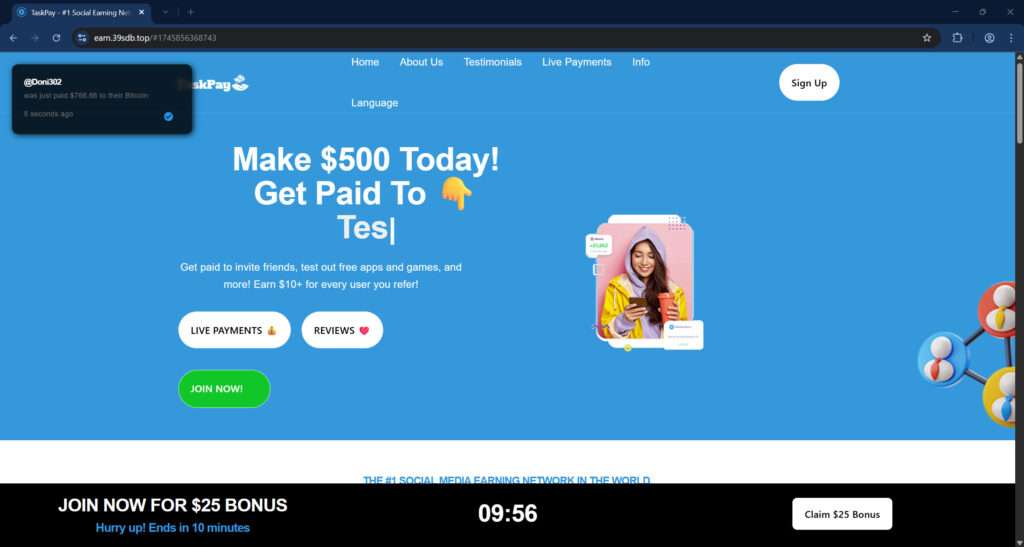
You’ve probably seen TaskPay offering a $25 sign-up bonus and claiming you can earn hundreds just by referring friends or completing simple tasks. Sounds exciting, right? But is it actually real or just another trick to waste your time? Many websites use the same template — one example being earn.39sdb.top — and they all lead to the same trap. If you’re curious whether TaskPay is a genuine opportunity or just another scam preying on people’s hopes, keep reading.
Scam Overview: What Is TaskPay and Why It’s a Scam
At first glance, TaskPay and its clones seem like dream jobs. They offer easy money by downloading apps, inviting friends, or completing surveys. You might even see “live payments” pop-ups flashing across the screen, boasting users getting paid hundreds to their Cash App or Bitcoin wallets. This fake social proof is meant to lure you in.
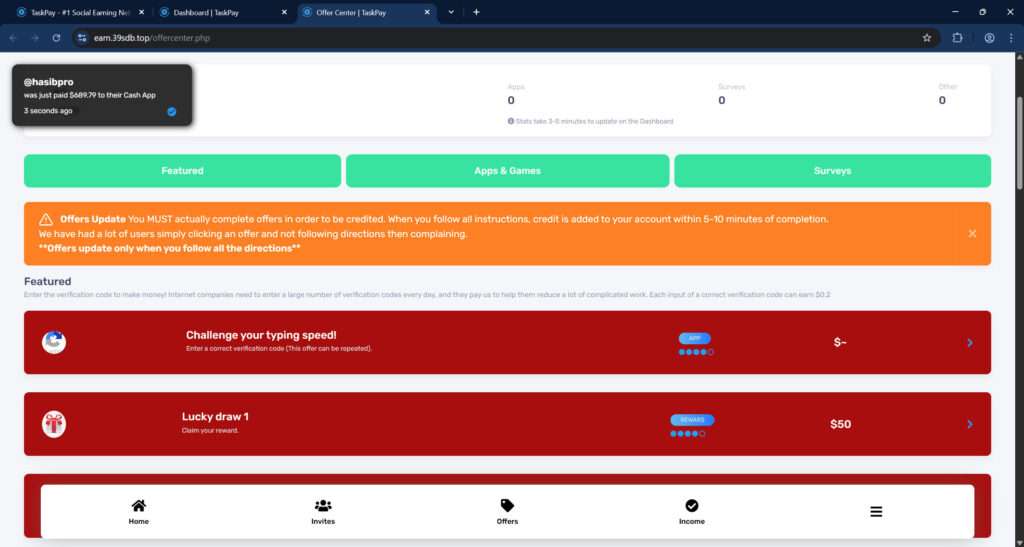
The moment you sign up, you’re enticed by a “$25 bonus” just for joining. Then, you’re promised even more rewards for completing simple offers or inviting others. Here’s where the trap is set.
These platforms are not paying users at all. Instead, they profit when users perform tasks like downloading apps, filling out surveys, or inviting friends. Every click and download earns them real money from advertising partners or CPA (cost-per-action) networks. However, they never intend to share the profits with you.
The “live payments” and “reviews” are fabricated to boost credibility. The usernames, payment amounts, and timestamps are automatically generated. There is no verification or real user payout behind them.
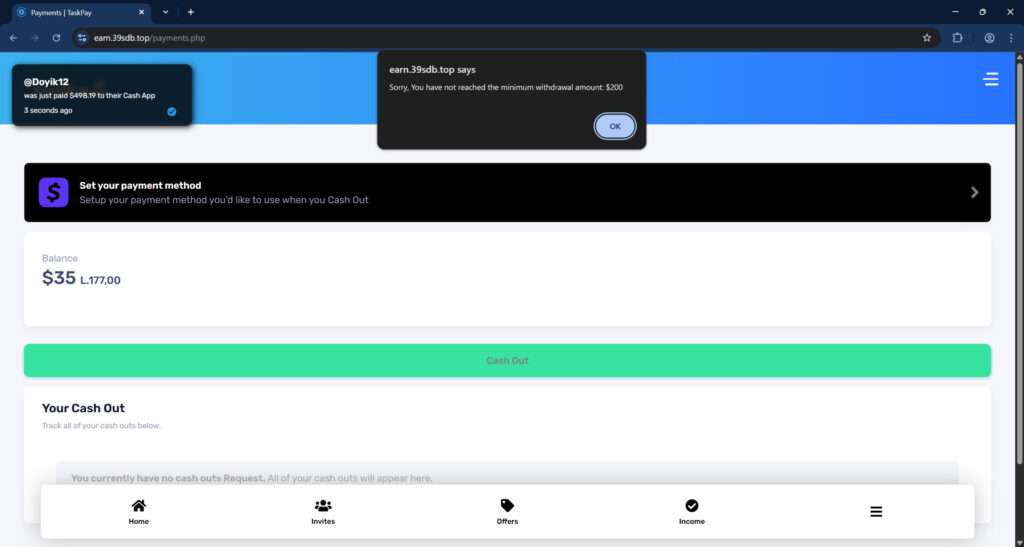
Additionally, you’ll notice that when you try to cash out your earnings, you’re hit with frustrating obstacles. A common one? “You must reach a $200 minimum withdrawal.” Until you hit this number, you can’t access any money — and even if you do, you’ll find another excuse blocking your payout.
Common tactics include:
- Minimum cashout thresholds you can’t realistically reach.
- Extra “verification tasks” that require even more effort without reward.
- Fake “support” teams that ignore your messages.
- Sudden account bans right before you qualify for payment.
Not only do they waste your time, but they often collect sensitive personal information under the guise of payment processing, putting you at further risk.
Sites Similar to TaskPay
Scam networks often copy-paste the TaskPay model under different names. They operate for a few months, harvest as much data and free labor as possible, and then vanish. Some examples include:
- EarnBigRewards.top
- FastTaskEarnings.pro
- CashFlowCenter.co
- QuickEarnz.net
These scams share identical layouts, promises, and dirty tricks.
Key takeaway: If it sounds too good to be true, especially on a new, unverified site, it probably is.
How The Scam Works (Step-by-Step Breakdown)
Understanding the mechanics of the TaskPay scam can help you spot and avoid it in the future. Here’s the detailed breakdown:
Step 1: Bait with Easy Money
When you land on a site like earn.39sdb.top, you’re immediately promised big earnings for minimal effort. Phrases like “Make $500 today!” or “Get $10 per referral!” are plastered everywhere.
Step 2: Instant “Bonus” to Hook You
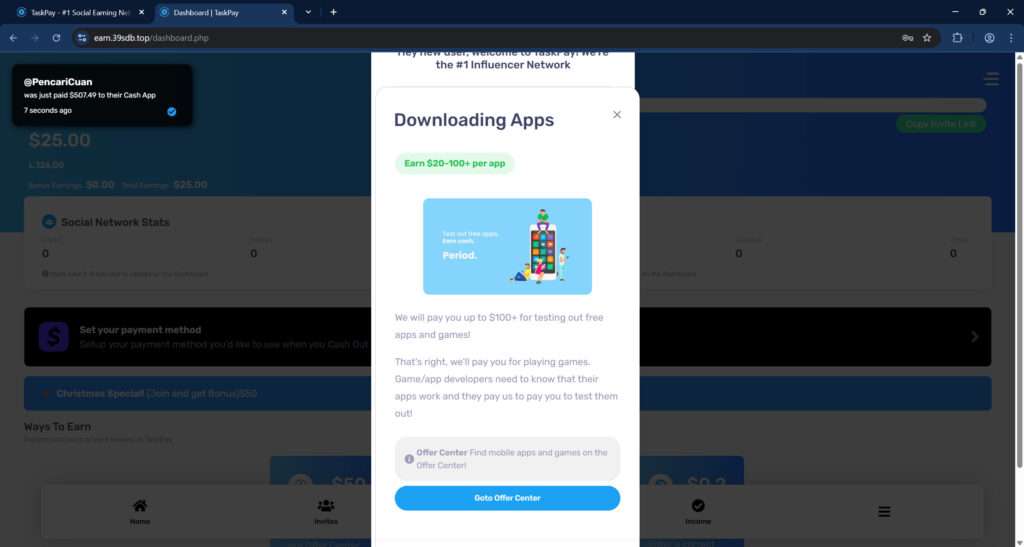
You’re granted a $25 sign-up bonus. This creates a powerful psychological hook known as “sunk cost fallacy.” You’ve already “earned” money — so it feels logical to keep going.
Step 3: Perform “Tasks” to Earn
You’re given a variety of tasks:
- Download apps
- Play mobile games
- Fill out surveys
- Share your referral link on social media
Each task shows a tempting payout ($10, $20, even $100+). However, your “account balance” is just numbers on a screen — not real money.
Step 4: Promote the Scam for Them
Referral bonuses encourage you to invite friends and family. This extends their scam network rapidly, reaching fresh victims without additional marketing expenses.
Step 5: Hit the “Minimum Cashout” Wall
Once your “earnings” total $35, $50, or even $150, you’ll attempt to cash out. Here’s where the deception deepens.
You’ll be met with messages like:
- “You must reach $200 before withdrawing.”
- “Complete more tasks to verify your account.”
- “Payments are processed within 30 business days.”
Step 6: Additional Exploitation
Desperate to reach the payout threshold, users often:
- Complete even more tasks.
- Hand over more personal information.
- Invite more friends.
The scammers milk as much free labor and data as possible at this stage.
Step 7: Permanent Lockout
When you finally “qualify” for cashout, one of two things usually happens:
- Your account is “suspended for suspicious activity.”
- Your cashout request is “under review” indefinitely.
No money is ever sent.
Meanwhile, the scam operators have already profited. They received commissions from advertisers or collected valuable user data to sell.
What to Do If You Have Fallen Victim to This Scam
If you’ve interacted with TaskPay or any similar site, act quickly:
- Stop using the site immediately.
- Don’t complete any more tasks.
- Don’t refer any more friends.
- Change your passwords.
- If you used the same email/password elsewhere, change them across all accounts.
- Enable two-factor authentication (2FA).
- Secure your accounts with an extra layer of protection.
- Monitor your financial accounts.
- Watch for any unauthorized activity.
- Report suspicious transactions to your bank or payment app (e.g., Cash App, PayPal).
- Report the scam website.
- File a complaint with the FTC (Federal Trade Commission).
- Report to IC3 (Internet Crime Complaint Center).
- Warn others on platforms like Trustpilot, Reddit, or scam reporting websites.
- Scan your device for malware.
- Some of these scam sites prompt downloads that can contain viruses.
- Educate your friends and family.
- If you invited others, let them know about the scam immediately so they can take protective action too.
- Stay skeptical of similar offers.
- Free money offers are almost always scams unless they come from official, reputable sources.
Frequently Asked Questions (FAQ) About the TaskPay Scam
Is TaskPay a legitimate website?
No, TaskPay is not a legitimate website. It falsely promises users large payouts for completing simple tasks or referring friends, but it never actually pays. Users are often required to complete endless offers or provide personal information without receiving any real earnings.
How can I tell if a site like TaskPay is a scam?
Common signs include unrealistic earning promises (like $500 per day), a required minimum payout amount that is hard to reach, flashy payment notifications from unknown users, and websites hosted on strange or unprofessional domain names like “earn.39sdb.top.”
Why do scammers create websites like TaskPay?
Scammers create these websites to gather personal information, generate advertising revenue from offers and app downloads, and sometimes even steal payment account details. Their goal is to profit while giving users false hope of earning money.
What happens if I give my information to TaskPay?
If you provide personal information to TaskPay, you could be exposing yourself to identity theft, phishing scams, spam, and even potential financial fraud. It is important to monitor your accounts and change your passwords immediately if you have shared sensitive details.
Can I actually withdraw money from TaskPay?
No, you cannot. Even after reaching the so-called “minimum withdrawal amount,” users are met with excuses, errors, or endless additional requirements designed to prevent them from ever receiving payment.
What should I do if I have fallen victim to TaskPay?
If you have shared personal or financial information with TaskPay, take the following steps immediately:
- Change your passwords for any accounts you linked.
- Monitor your bank accounts and credit cards for unusual activity.
- Report the scam to your local consumer protection agency or online fraud reporting service.
- Warn others by posting reviews or sharing your experience online to prevent them from falling for the same scam.
Are there any real ways to make money online?
Yes, there are legitimate methods such as freelance work, remote customer service jobs, affiliate marketing, and online tutoring. However, real opportunities require effort, skills, and time. Always research a platform thoroughly before investing your time or personal information.
Why do some people claim they got paid on TaskPay?
The “payment proofs” shown on sites like TaskPay are usually fake. They are fabricated notifications designed to trick new users into believing the platform is legitimate. In reality, no real user has successfully cashed out from these types of scam websites.
The Bottom Line
TaskPay and its clones, such as earn.39sdb.top, promise easy riches but deliver nothing but wasted time, stolen data, and frustration. Their playbook is predictable: lure users with fake earnings, exploit their labor and personal information, then vanish without paying a cent.
Real online earnings take work, patience, and legitimate platforms — not flashy promises and shady websites.
If you’ve been affected by a site like TaskPay, don’t blame yourself. Scammers are very good at what they do. Learn from the experience, share what you’ve learned with others, and move forward smarter and stronger.
Always remember: If something online sounds too good to be true, it probably is.








