

A search for free Robux can lead through several nearly identical names before you even reach a working page. That makes knowing where you landed important.
Rbxreal.click, ClaimRBX, and Bloxclaim need separate answers. Here is what their pages actually offer, which conditions matter, and how to protect your Roblox account.
Overview
Similar Names Do Not Mean the Same Service
Rbxreal.click is unavailable. ClaimRBX.gg operates an offerwall rewards service. An archived Bloxclaim.com page directs visitors to Discord to claim a supposed Robux reward.
Those are different situations. Treating every name as one generator hides the conditions readers need to understand before spending time or sharing information.
- Rbxreal.click: The domain currently has registry hold and deletion-related statuses, and its website does not load.
- ClaimRBX.gg: Users earn points through advertiser offers, with withdrawal requirements and separate privacy policies.
- Bloxclaim.com: Its archived promotion asks visitors to continue on Discord, rather than showing an official Roblox redemption process.
A Rewards Balance Is Not Spendable Robux
A number on a third-party dashboard belongs to that service. It becomes useful only when a genuine transfer reaches your Roblox account and clears applicable processing.
Before completing tasks, establish the minimum withdrawal, transfer method, deductions, eligibility rules, and what happens when an advertiser rejects an offer.
The Account-Safety Rule Never Changes
Your public username identifies your profile. Your password, verification codes, recovery codes, and session cookies can give someone control over it.
Never hand over those secrets for a reward. Roblox’s account-safety guidance explains why keeping them private matters.
What Happened to Rbxreal.click and Bloxclaim?
Rbxreal.click does not currently provide a usable offer or support page. Its registry record lists server hold, redemption period, and pending deletion statuses.
Do not keep refreshing it, pay someone to reactivate a reward, or trust a replacement link sent privately. An unavailable domain cannot validate a promised balance.
Domain registrations can change hands. The current record is not a reliable way to identify who operated an earlier promotion.
Bloxclaim.com is also unavailable. A January 2025 archived page advertises a free Robux reward and tells visitors to join a Discord server.
A Discord invitation is not a Roblox payout receipt. Once a conversation leaves the original page, impersonators can also introduce new links and demands.
Current evidence does not establish common ownership among these three names or independently verify ClaimRBX payouts. Missing pages also cannot support precise claims about their old task flows.
How Free Robux Offers Move From a Promise to a Payout
Step 1: The Offer Makes Earning Look Immediate
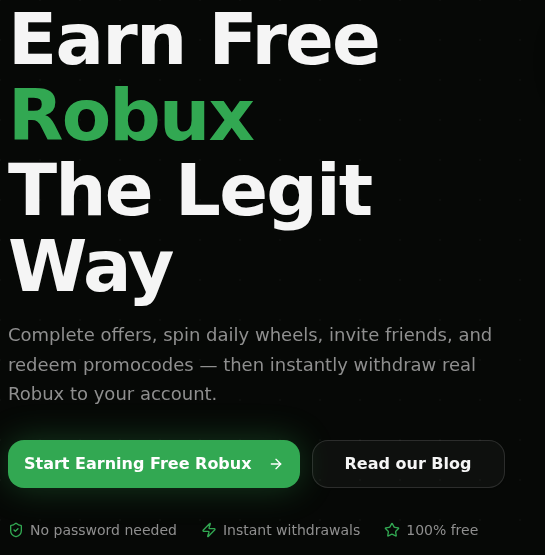
ClaimRBX’s homepage invites visitors to complete offers, use daily features, and invite friends, then “instantly withdraw real Robux to your account.”
The page displays a sample balance of 2,450 Robux points. That illustration is part of the sales presentation, not a balance earned by the person reading it.
It also promotes password-free participation. That removes one obvious concern, but it does not answer how much work earns a usable reward.
Step 2: Advertiser Tasks Create a Separate Set of Conditions
ClaimRBX explains that advertisers fund rewards when users complete offers. Its terms identify providers including Torox, CPX Research, Lootably, and TimeWall.
These can involve surveys, app downloads, or video viewing. Each provider controls its own eligibility, tracking, and data practices.
Read the complete task before starting. Check whether credit requires reaching a game level, remaining subscribed, making a purchase, or meeting a time limit.
Those are conditions to check on the particular offer, not assumptions that every ClaimRBX task requires payment. Save the original instructions before they disappear.
A completed action and a credited action are not always identical. If tracking fails, repeating more offers can increase the time lost without resolving the first dispute.
Step 3: Withdrawal Rules Decide Whether the Points Can Move
ClaimRBX’s withdrawal guide states a minimum of 10 Robux. It also requires ownership of a Roblox experience and an offer completed within the previous seven days.
That recent-offer requirement matters. A balance sitting untouched does not necessarily mean a withdrawal remains available whenever the user returns.
The guide describes purchases of a game pass or private server associated with the user’s experience. This is a proposed transfer arrangement, not currency generated from nothing.
It states a 30% platform deduction, leaving about 70 Robux from a 100-Robux withdrawal. Compare the amount arriving, not just the larger dashboard number.
Step 4: Processing and Roblox Availability Are Different
ClaimRBX says withdrawals usually process within minutes but can take up to 24 hours. Its terms separately exclude guaranteed fulfillment and fixed point values.
Roblox’s experience-pass guidance says sales proceeds enter pending status before they become available. A processed purchase is not necessarily immediately spendable currency.
Check Roblox’s own transaction history for an actual sale and pending proceeds. A third-party success message alone is insufficient.
If nothing appears, collect the withdrawal identifier and ask support about that transaction. Do not accept an unexpected fee as the automatic solution.
Step 5: A Dispute Can Spread Across Several Services
A missing offer credit may involve the advertiser, offerwall, and rewards site. Each may ask for dates, screenshots, and completion records.
ClaimRBX’s terms allow reward availability and values to change. They also describe point forfeiture for prohibited activity, including automated participation and multiple-account abuse.
This makes recordkeeping important before a dispute, not after. A screenshot of the promise and task conditions is more useful than remembering the original number.
Stop adding work when the existing balance cannot be explained. Time already spent is not a reason to accept progressively more demanding instructions.
ClaimRBX Rules, Privacy, and Support
Who Is Offering the Reward?
ClaimRBX identifies itself as independent from Roblox. Its website says it is not affiliated with, endorsed by, or sponsored by Roblox Corporation.
Roblox imagery, familiar currency symbols, and an avatar lookup do not turn an independent rewards page into an official Roblox service.
A parent comparing a child’s open tabs should check the exact domain. ClaimRBX.gg, Rbxreal.click, Bloxclaim.com, and a lookalike login address are not interchangeable.
Age Restrictions Apply Before the First Task
The ClaimRBX terms require users to be at least 13. Users aged 13 to 18 need permission from a parent or legal guardian.
That permission should include reading advertiser requirements, not simply approving a website with colorful Roblox graphics.
If a task needs information a child should not provide, skip it. Never invent an age or submit a parent’s details to get through screening.
Free Participation Still Involves Personal Data
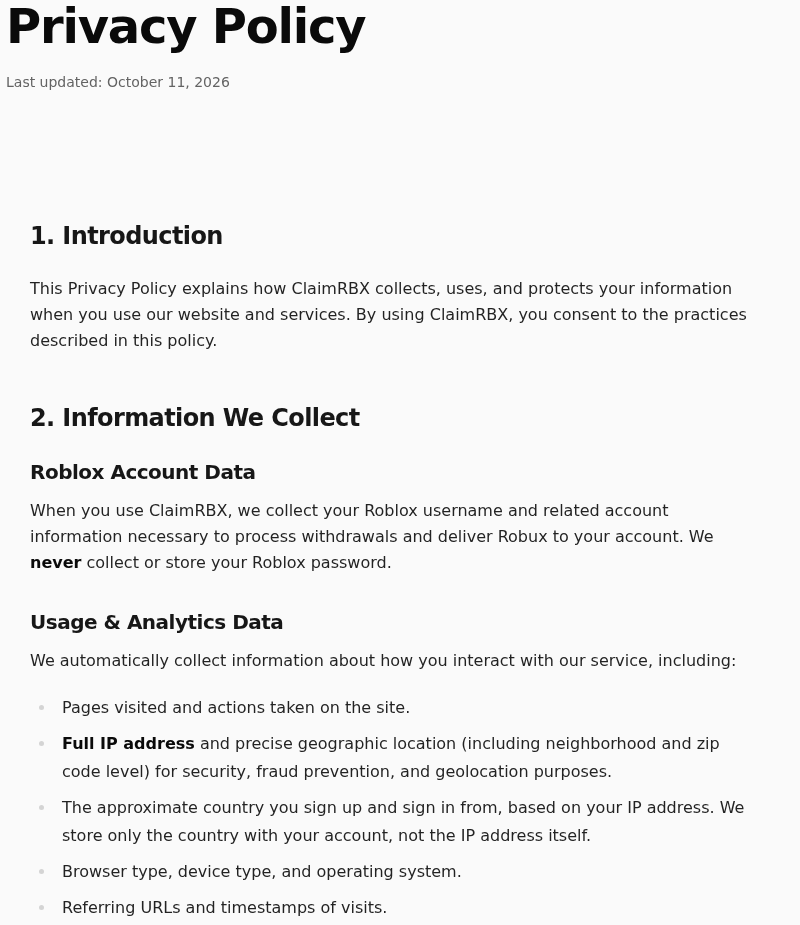
ClaimRBX’s privacy policy lists the Roblox username, device and browsing information, full IP address, and IP-derived location information.
It describes sharing full IP addresses with advertising partners for fraud screening and location-based advertising. Offerwall providers collect information under their own policies.
The policy also distinguishes account-country records from security logs, which can retain IP addresses for up to 12 months.
This is a substantial exchange for a small reward. An IP-derived location is not the same as confirmed GPS tracking, but the privacy implications remain relevant.
Before responding to surveys, consider whether the information requested is proportionate. A Robux incentive does not make sensitive questions harmless.
Use Support to Resolve a Specific Record
The contact page lists contact@claimrbx.gg. It asks users with credit problems for their username, offerwall and offer, expected amount, dates, and screenshots.
Send only what identifies the disputed task. Do not attach passwords, authentication codes, full payment-card details, or account cookies.
For privacy requests, its policy describes account-data deletion within 30 days of a verified request. Transaction records may remain for up to 24 months.
Keep a copy of the request and response. Closing a rewards account does not automatically erase records held separately by every advertiser.
Real Rewards, Fake Generators, and Lookalike Names
A generator claims it can create currency or unlock an arbitrary balance. An advertiser-funded rewards service claims to pay from revenue earned through tasks.
That distinction matters. Being technically capable of transferring Robux does not guarantee a particular service’s reliability, while a dashboard animation cannot establish a transfer at all.
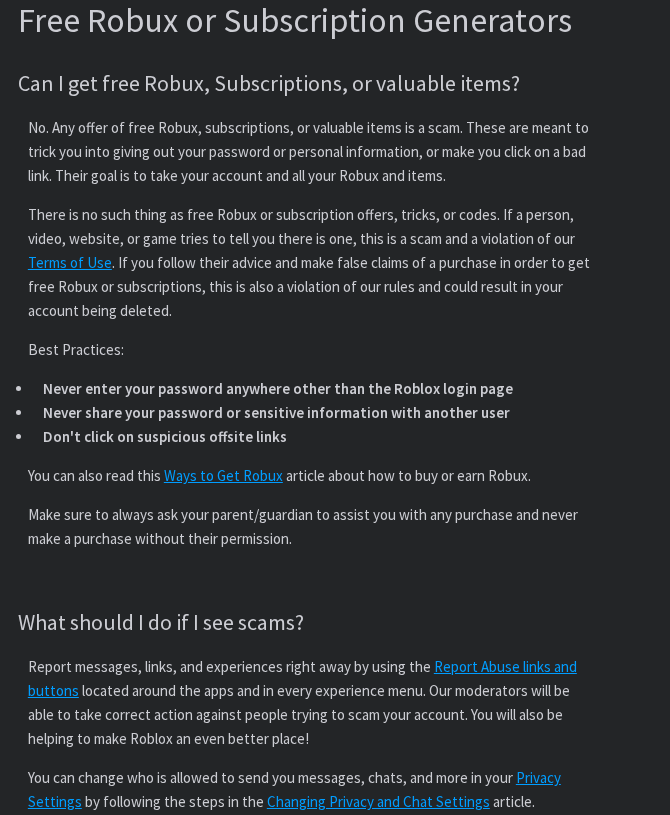
Roblox’s warning about free Robux generators specifically rejects supposed generators, tricks, and codes promising free currency.
There are also legitimate promotional routes. Microsoft Rewards describes redeeming eligible points for Roblox digital cards, subject to availability and program rules.
That official program does not endorse an unrelated site using similar language. Verify the actual issuer rather than accepting a logo as permission.
MalwareTips also covers the Bloxclaim 5,000-Robux promotion and the broader Roblox 5,000-Robux giveaway pitch.
Our separate 5020.pro report addresses another free-Robux destination. Compare the exact promise and destination rather than assuming similarly named pages share an operator.
Walk away when a supposed reward requires your Roblox password, a session cookie, a security-code screenshot, remote access, or payment to unlock an existing balance.
Never paste scripts into the browser console to verify an account. A reward does not require surrendering the controls that protect your account.
Decide Whether an Offer Is Worth Your Time
Set a limit before beginning. Compare the expected usable reward with the effort required, rather than treating every new task as progress toward something already earned.
A task that needs several days of game play is different from a short survey. A paid trial adds cancellation responsibilities and a potential financial cost.
Write down the completion deadline, promised credit, advertiser name, and proof the provider accepts. Keep the same record if the displayed requirements later change.
For downloads, read the app’s permissions and publisher information. Do not disable security software or install a browser extension solely because an offer promises extra points.
A parent can offer a simpler comparison: a known-value official gift card versus an uncertain amount earned through advertising tasks. Both time and personal information have value.
Choose the option you can explain before starting. If the conditions remain unclear, leaving is a sensible decision, not abandoning money you already own.
What to Do if You Used a Free Robux Offer
Identify exactly what you shared. Save the website address, offer instructions, screenshots, and relevant messages. Separate a public username from passwords or payment information.
If you only read the page or entered your public username, that alone does not give someone control of your Roblox account.
Secure exposed login information promptly. Open Roblox directly, change an exposed or reused password, review signed-in sessions, and enable two-step verification.
Protect the linked email account as well. Never approve a login request or give a recovery code to someone claiming to help release Robux.
Check transactions inside Roblox. Look for an actual purchase, pending proceeds, or an unauthorized transaction. Record what appears and when.
For missing offer credit, contact the relevant provider and rewards service with the task record. Avoid completing additional tasks simply to reopen the same complaint.
Review any paid offer separately. Find the merchant’s receipt and subscription terms. Cancel unwanted renewals through the actual merchant or platform, and retain confirmation.
If a charge was unauthorized or the merchant will not resolve it, contact your payment provider promptly. Explain the specific transaction accurately.
Remove unwanted downloads and permissions. Uninstall an unfamiliar extension or app installed for the offer. Revoke notification permissions that are producing unwanted messages.
Use Malwarebytes if an installation or continuing symptoms suggest unwanted software. The device-specific guide below applies to that exposure, not merely visiting a rewards page.
AdGuard can reduce exposure to deceptive advertising. An ad blocker does not authenticate offers, recover a password, or guarantee reward delivery.
Report impersonation and account abuse. Use Roblox’s own reporting tools for malicious messages or experiences, and the hosting platform’s tools for deceptive advertisements.
For a lost account, use Roblox Support reached from the official website. Do not pay a stranger offering recovery through a private message.
Help a child disengage without blame. Explain that a progress bar can encourage more tasks even when no usable reward arrives.
Review privacy choices together. Do not erase a device merely because a child opened a page; seek device-specific help if unwanted software remains.
Is Your Device Infected? Run a Free Malware Scan
Slow performance, constant pop-ups, or strange behavior? These are classic signs of a malware infection. The fastest way to find out is to scan your device with Malwarebytes Free — one of the most trusted malware removal tools available.
The free version detects and removes the most common threats, including:
- Adware — the cause of those annoying pop-ups
- Browser hijackers — unwanted redirects and changed homepages
- Trojans and spyware — hidden programs stealing your data
- Potentially unwanted programs (PUPs) — software you never asked for
👉 Select your device below — Windows, Mac, or Android — then follow the simple steps to download Malwarebytes, scan your system, and remove any threats it finds. The scan usually takes 5 to 20 minutes.
Run a Malware Scan with Malwarebytes for Windows
Malwarebytes is one of the most popular and trusted anti-malware tools for Windows — and it’s completely free for removing infections. It catches threats that many antivirus programs miss, including adware, browser hijackers, and trojans. Follow the steps below to scan and clean your PC in just a few minutes.
Download Malwarebytes
Click the button below to download the latest version of Malwarebytes for Windows from the official source. The free version is all you need — it will scan your computer and remove adware, browser hijackers, and other malicious software at no cost.
Download MalwarebytesOfficial installer for Windows 11 and 10. Your download starts right away.Want real-time protection? See Malwarebytes Premium Malwarebytes Free for WindowsScans and removes malware at no cost
-
Install Malwarebytes
When the download finishes, open your Downloads folder and double-click the MBSetup file. If Windows shows a User Account Control pop-up, click “Yes” to allow the installation.

Follow the On-Screen Prompts to Install Malwarebytes
The setup wizard will walk you through a few quick screens:
-
Choose where you’re installing the program — “Personal Computer” or “Work Computer” — then click Next.

-
Malwarebytes will now install on your device. This usually takes under a minute.

-
When installation is complete, the “Welcome to Malwarebytes” screen will open automatically.

-
On the final screen, click Open Malwarebytes to launch the program.

-
Enable “Scan for Rootkits”
Before scanning, turn on rootkit detection so Malwarebytes can find even the most hidden threats. Click the Settings gear icon on the left side of the screen.

In the settings menu, find “Scan for rootkits” and click the toggle so it turns blue.

Done? Click “Dashboard” in the left pane to return to the main screen.
Start the Scan
Click the blue Scan button. Malwarebytes will automatically update its virus database and start checking your computer for malware.

-
Wait for the Scan to Finish
The scan checks your entire system for browser hijackers and other malicious programs, so it can take 5 to 20 minutes depending on your computer. Feel free to do something else — just check back occasionally to see the progress.

-
Quarantine the Detected Threats
When the scan is done, you’ll see a list of everything Malwarebytes found — malware, adware, and potentially unwanted programs. Click the “Quarantine” button to remove all of them at once.

Malwarebytes will now remove the malicious files and registry entries and move them safely into quarantine.

-
Restart Your Computer
Some threats can only be fully removed after a reboot. If Malwarebytes asks you to restart, click Yes. Once you’re logged back in, Malwarebytes has finished removing the threats it found.

That’s it — your Windows PC is now clean of trojans, adware, and other malware, and should be back to running smoothly.
If you are still having problems with your computer after completing these instructions, then please follow one of the steps:
- Run a computer scan with ESET Online Scanner
- Ask for help in our Windows Malware Removal Help & Support forum.
Run a Malware Scan with Malwarebytes for Mac
Malwarebytes for Mac is a free on-demand scanner that removes the malware other security software tends to miss — adware, browser hijackers, and unwanted programs included. Cleaning an infected Mac with Malwarebytes has always been completely free, and it’s our go-to recommendation. Follow the steps below to scan and clean your Mac in just a few minutes.
-
Download Malwarebytes for Mac
Click the button below to download the latest version of Malwarebytes for Mac.
Download MalwarebytesOfficial installer for macOS. Your download starts right away.Want real-time protection? See Malwarebytes PremiumMalwarebytes Free for MacScans and removes malware at no cost -
Open the Malwarebytes setup file
When the download finishes, open your Downloads folder and double-click the setup file to begin the installation.

-
Follow the On-Screen Prompts to Install Malwarebytes
The Malwarebytes for Mac Installer will guide you through a few quick screens. Click “Continue” and keep following the prompts until the installation completes.



When the installation is complete, Malwarebytes opens to the Welcome to Malwarebytes screen. Click “Get started“.
-
Select “Personal Computer” or “Work Computer”
Malwarebytes will ask what type of computer you’re installing it on. Click either Personal Computer or Work Computer, whichever applies.

-
Start the Scan
Click the “Scan” button. Malwarebytes will automatically update its detection database and begin checking your Mac for malware.

-
Wait for the Scan to Finish
Malwarebytes will scan your Mac for adware, browser hijackers, and other malicious programs. This can take a few minutes, so feel free to do something else — just check back occasionally to see the progress.

-
Quarantine the Detected Threats
When the scan is done, you’ll see a list of everything Malwarebytes found. Click the “Quarantine” button to remove all the threats at once.

-
Restart Your Mac
Malwarebytes will now remove all the malicious files it found. Some threats can only be fully removed after a reboot — if Malwarebytes asks you to restart, allow it. Once you’re logged back in, your Mac is clean.

That’s it — your Mac is now free of adware, rogue browser extensions, and other potentially harmful software.
If you are still experiencing problems while trying to remove a malicious program from your computer, please ask for help in our Mac Malware Removal Help & Support forum.
Run a Malware Scan with Malwarebytes for Android
Malwarebytes for Android automatically detects and removes dangerous threats like malware and ransomware so you don’t have to worry about your most-used device being compromised. Aggressive detection of adware and potentially unwanted programs keeps your Android phone or tablet running smooth.
-
Download Malwarebytes for Android.
You can download Malwarebytes for Android by clicking the link below.
Get Malwarebytes for AndroidOpens Google Play in a new tab.Want real-time protection? See Malwarebytes Premium for AndroidMalwarebytes for AndroidScans your phone and removes malware at no cost -
Install Malwarebytes for Android on your phone.
In the Google Play Store, tap “Install” to install Malwarebytes for Android on your device.

When the installation process has finished, tap “Open” to begin using Malwarebytes for Android. You can also open Malwarebytes by tapping on its icon in your phone menu or home screen.

-
Follow the on-screen prompts to complete the setup process
When Malwarebytes will open, you will see the Malwarebytes Setup Wizard which will guide you through a series of permissions and other setup options.
This is the first of two screens that explain the difference between the Premium and Free versions. Swipe this screen to continue.
Tap on “Got it” to proceed to the next step.
Malwarebytes for Android will now ask for a set of permissions that are required to scan your device and protect it from malware. Tap on “Give permission” to continue.
Tap on “Allow” to permit Malwarebytes to access the files on your phone.
-
Update database and run a scan with Malwarebytes for Android
You will now be prompted to update the Malwarebytes database and run a full system scan.

Click on “Update database” to update the Malwarebytes for Android definitions to the latest version, then click on “Run full scan” to perform a system scan.

-
Wait for the Malwarebytes scan to complete.
Malwarebytes will now start scanning your phone for adware and other malicious apps. This process can take a few minutes, so we suggest you do something else and periodically check on the status of the scan to see when it is finished.

-
Click on “Remove Selected”.
When the scan has been completed, you will be presented with a screen showing the malware infections that Malwarebytes for Android has detected. To remove the malicious apps that Malwarebytes has found, tap on the “Remove Selected” button.

-
Restart your phone.
Malwarebytes for Android will now remove all the malicious apps that it has found. To complete the malware removal process, Malwarebytes may ask you to restart your device.
That’s it — your Android phone is now clean — no more malicious apps, adware, or browser redirects.
If you are still having problems with your phone after completing these instructions, then please follow one of the steps:
- Restore your phone to factory settings by going to Settings > General management > Reset > Factory data reset.
- Ask for help in our Mobile Malware Removal Help & Support forum.
Stay Protected: Block Ads and Malicious Sites
Now that your device is clean, keep it that way. Most infections start with a malicious ad or a fake download button — so blocking them at the source is your best defense.
We recommend AdGuard, which blocks malicious ads, phishing pages, and dangerous redirects before they can reach you.
👉 Download AdGuard and browse safely
Frequently Asked Questions
Is Rbxreal.click Still Working?
No usable website currently loads. Its registry record includes hold and deletion-related statuses. Do not send money or credentials to someone claiming to restore a reward.
Is ClaimRBX the Same as Rbxreal.click?
They are separate domains with different available evidence. ClaimRBX.gg describes an advertiser-funded offerwall service. Similar names do not establish a shared operator or identical payout practices.
How Does ClaimRBX Say It Pays Robux?
Its guide describes purchases of users’ game passes or private servers, subject to eligibility and deductions. Roblox can hold sale proceeds pending before they become spendable.
Why Might a ClaimRBX Withdrawal Be Unavailable?
The published guide requires a minimum balance, ownership of an experience, and a recent completed offer. Ask support about the specific requirement instead of guessing through more tasks.
Is Bloxclaim an Official Roblox Giveaway?
The archived Bloxclaim.com page leads to a Discord invitation. That is not an official Roblox redemption page. Do not share account secrets with people offering to finish verification.
Can Someone Steal My Account With Just My Username?
A public username alone is not a password. The danger increases if you disclose login secrets, approve an unauthorized session, install harmful software, or change recovery settings.
The Bottom Line
Do not pursue a reward through unavailable Rbxreal.click or a stranger’s replacement link. A Discord invitation and a displayed balance are not proof of Robux delivered.
ClaimRBX is a different proposition: advertiser tasks, data sharing, eligibility rules, and a conditional transfer. Do not mistake that arrangement for effortless currency or guaranteed instant payment.
Use established official purchasing or reward channels instead. If you already responded, protect whatever information you exposed and resolve any actual charge or missing credit separately.

Join the discussion
0 commentsShare your experience or ask a question about this article.
Discussion
Start the conversation
Have a question or something useful to share? Add the first comment.