BloxFrop Roblox Scam – How the “Free 5,000 Robux” Trap Works
Written by: Thomas Orsolya
Published on:
It only takes one click.
A Discord message. A “Roblox anniversary” page. A big button promising 5,000 Robux if you follow a couple of simple steps.
At first, it feels harmless, almost too easy. The kind of offer you want to believe is real, especially when it looks polished and everyone seems to be doing it.
But there is a reason links like BloxFrop.com spread so fast, and it has nothing to do with Roblox being generous.
Before you join the server, before you complete the tasks, it helps to know what you are actually stepping into.
Scam Overview
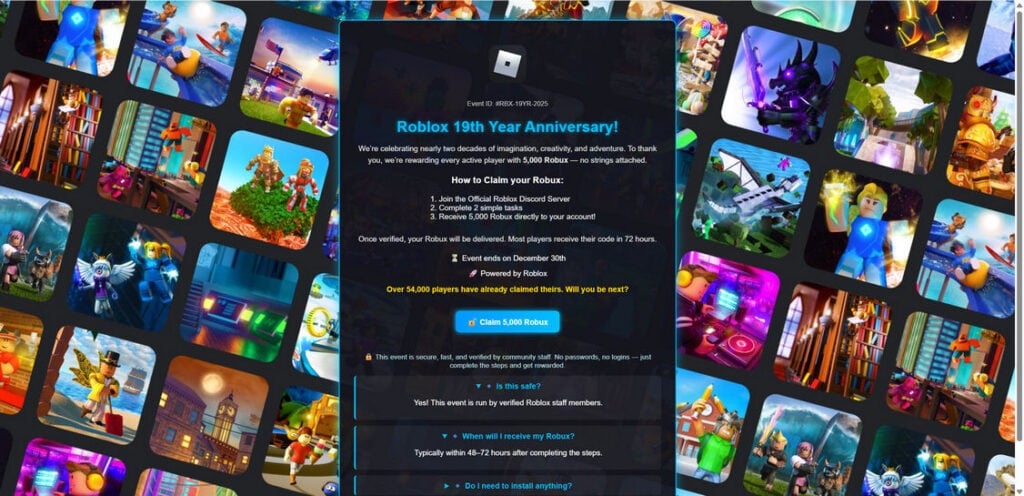
BloxFrop.com presents itself as a promotional Roblox giveaway, framed around a celebratory event. The landing page uses a “Roblox 19th Year Anniversary” theme, an “Event ID,” and a limited-time deadline to make the offer feel official and time-sensitive. It claims that “every active player” can receive 5,000 Robux, often with language like “no strings attached.”
On the surface, the pitch looks clean and straightforward:
Join an “Official Roblox Discord Server”
Complete “2 simple tasks”
Receive 5,000 Robux “directly” to your account
Expect delivery in 48 to 72 hours
Hurry, because the “event” ends on a specific date
That flow matters, because it mirrors how legitimate promotions feel. Real brands often do run limited campaigns. Real communities do use Discord. Real giveaways do have steps. The scam works by taking normal internet behavior and twisting it just enough to steer people into a trap.
The biggest problem: Roblox does not give away Robux like this
Roblox’s own support documentation is blunt about “free Robux” offers. Roblox states that offers of free Robux, memberships, or valuable items are scams designed to trick users into giving out passwords or personal information, or to get them to click malicious links.
Roblox also explains that legitimate promotions are announced through official channels such as the Roblox blog, the Notifications tab in Messages, or banners on the Roblox site. If a giveaway is not coming from those places, you should treat it as untrusted by default.
BloxFrop.com leans into the opposite approach: it tries to “borrow” Roblox’s legitimacy through branding and buzzwords, while moving the user off-platform into Discord and third-party sites where Roblox has no control.
Why the Discord step is a red flag, not proof
One of the most effective psychological tricks in this scam is social proof.
When users click through, they are often pushed to join a Discord server that looks large and active. In the screenshots associated with this campaign, the Discord invite page shows thousands online and tens of thousands of members. That is meant to quiet your doubts: “This must be real if it has 96,000 members.”
But big Discord numbers do not prove legitimacy.
Scammers inflate Discord servers in several ways:
Compromised accounts get used to invite more victims
Bots join to make the server look “alive”
Users join and leave quickly, but the server keeps pushing invites
Multiple scam pages funnel into the same server, so it grows fast
Discord itself publishes guidance on protecting yourself from scams on the platform, because scam links and social engineering are a persistent problem in large communities.
In other words, “Join our Discord” is not a safety feature. It is the mechanism that helps the scam spread.
What BloxFrop.com is really selling
BloxFrop.com is not selling Robux. It is selling your attention and your actions.
These campaigns are typically built around affiliate marketing and “CPA offers” (cost per action). The scammer gets paid when a victim:
Fills out a survey
Installs an app and opens it
Signs up for a trial subscription
Subscribes to SMS services
Registers an account on a partner site
Watches ads or completes a “sponsor” offer
The promise of 5,000 Robux is the hook that gets people to do those actions willingly.
You can see this intent in the structure of the BloxFrop.com page itself. It claims there are “2 simple tasks,” but also hints that you may need to “install” something and that “all steps are inside the Discord server.” That vagueness is not accidental. It allows the operators to swap tasks and redirect destinations at any time.
Today it might be surveys. Tomorrow it might be an “account verification” bot. Next week it might be a page that asks for email, phone number, or more.
Why this scam targets Roblox players so effectively
Roblox is a perfect target for this kind of operation, and scammers know it.
The audience skews young A large portion of Roblox’s user base is under 18, and many players are under 13. Younger users are more likely to trust exciting offers and less likely to recognize long-running scam patterns.
Robux creates urgency Robux is not just a fun currency. It is social status in many Roblox friend groups. Skins, accessories, game passes, and limited items feel important, which makes “free Robux” offers emotionally powerful.
The scam matches how kids already communicate Discord is where a lot of Roblox communities organize, chat, and share links. The scam does not need to introduce a new platform. It just abuses one that is already part of the culture.
It is hard for parents to spot quickly To an adult, a “Roblox anniversary giveaway” page can look like any other marketing site. The danger is not always obvious until the child is already deep into the steps.
Common claims and why they are designed to mislead
BloxFrop.com and similar Roblox giveaway scams often repeat the same set of claims because they work.
“No passwords, no logins”
This is meant to lower your guard.
Roblox warns users not to share passwords, cookies, 2-step verification codes, or backup codes, and notes that employees will never ask for that information. Scammers know players have heard “never share your password,” so they avoid asking for it directly.
Instead, they may push you into:
Fake “verification” flows
Third-party bots requesting access
Pages that imitate official logins
“Connect your account” prompts that are not what they seem
“Verified by community staff”
This is not a meaningful credential. “Community staff” is not the same as Roblox staff, and scammers use that phrase because it sounds official while remaining vague.
“Over 54,000 players have already claimed”
Numbers like this are easy to fake. They are used to create the feeling that you are late, and that you should hurry.
“Event ends on December 30th”
Deadlines create pressure. Pressure reduces careful thinking. Scammers love countdowns and expiring offers because they push people to act before they verify.
The real risks are bigger than “wasted time”
Some people assume free Robux scams are mostly harmless, like a prank that wastes a few minutes. Sometimes that is true.
But these campaigns often carry real risk:
Account theft attempts (Roblox and Discord)
Malware or unwanted software from “required installs”
Subscription traps that charge a card after a “free trial”
Data harvesting from surveys and forms
Spam spreading to friends after an account is compromised
Roblox explicitly notes that the goal of these scams is to take your account, along with any Robux and items tied to it.
That is why it is worth treating BloxFrop.com as more than “just another fake giveaway.” The danger is not only the lie. The danger is the funnel.
How The Scam Works
BloxFrop.com follows a predictable pattern that shows up across many Roblox giveaway scams. The details can change day to day, but the structure is consistent because it is profitable.
Below is the step-by-step breakdown, with the most common variations you may see.
Step 1: The bait reaches you where you already hang out
Most victims do not find BloxFrop.com by typing it into a browser.
They get pulled in through:
Discord DMs from a “friend” who was already compromised
Discord servers where someone posts a giveaway link
TikTok, YouTube Shorts, or Reels claiming “Roblox is giving everyone 5,000 Robux”
YouTube comments filled with copy-pasted “proof” messages
Search results for terms like “free Robux,” “Roblox Robux code,” or “Roblox anniversary Robux”
The scam does not need to convince everyone. It only needs a small percentage of curious clicks, because the funnel makes money from actions, not from trust.
Step 2: The landing page looks clean and “official enough”
Once you land on BloxFrop.com, the page does a lot of subtle work:
Uses the Roblox name and visual style
Frames the offer as a celebration or holiday event
Shows an event ID and a specific end date
Claims large numbers of people already participating
Promises a clear payout: 5,000 Robux
This is the “credibility layer.”
It does not need to be perfect. It only needs to feel plausible for 10 seconds.
It also includes language meant to disarm skepticism, such as “no passwords” and “no logins,” while still pushing you into an external process controlled by the scammers.
Step 3: The big button triggers the funnel
The call to action is usually something like “Claim 5,000 Robux.”
That click is the moment you stop being a reader and become a lead.
From here, several things can happen depending on the variant:
You are redirected to a Discord invite
You are shown a “choose your platform” step
You are asked for your Roblox username
You are pushed into a “verification” page that looks like a progress tracker
Scammers test variations constantly. They keep what converts and discard what does not.
Step 4: You are pushed into Discord, where the scam is easier to run
One of the most common BloxFrop.com flows is:
Join the Discord server
Follow instructions posted in a channel
Complete “2 tasks” to “verify”
Wait 48 to 72 hours
Why Discord?
Because Discord gives scammers:
A live place to post new links as old ones get blocked
A way to DM users directly with more pressure
A “community” vibe that makes victims feel safe
Automation through bots that handle thousands of users
Discord also has an invite system that makes it easy to onboard people quickly, which is why scams often rely on invite links.
Step 5: The “verification” step is where the real danger begins
This is the step that changes everything.
The scam needs you to do something measurable, because the scammer is paid for measurable actions.
Here are common “verification” methods used in Robux giveaway scams:
A) Survey and offer walls
You are told to complete a short survey, then another, then another.
Typical tactics:
“Complete 1 offer to unlock your code”
“Just confirm you are not a bot”
Fake progress bars that jump to 90% and then stall
Messages implying your Robux is “processing” but needs “final verification”
This is often where subscription traps appear. The “offer” is a free trial that quietly converts into a paid subscription unless you cancel fast.
B) App installs and “sponsor tasks”
You are told to install a mobile app, open it for 30 seconds, and create an account.
This is a common affiliate offer model. The scammer can get paid $1 to $10 (sometimes more) per install or registration, depending on the sponsor and country.
The victim gets nothing except more steps.
C) Discord bot “verification” and fake account linking
Some servers instruct users to click a bot link and “verify” their Roblox account.
This can turn into:
A fake Roblox login page designed to steal credentials
A cookie or session theft attempt
A prompt to enter a code that the attacker can use
A request for personal details disguised as “verification”
Roblox specifically warns users not to share cookies or security codes, not just passwords. That matters because many modern scams aim for session access, not just raw credentials.
D) “Authorize this app” traps
Another pattern is asking users to authorize an app or bot.
This does not always look like “give us your password.” Instead, it can look like a normal permission screen.
If you ever see a prompt asking you to authorize something you do not recognize, treat it as dangerous until proven otherwise. Discord’s own guidance for compromised accounts includes reviewing Authorized Apps and removing anything unwanted.
Step 6: The “reward” is always delayed, vague, and just out of reach
Notice how BloxFrop.com talks about delivery:
“Most players receive their code in 72 hours”
“Typically within 48 to 72 hours”
That delay is a feature, not a bug.
It buys time for:
More tasks to be pushed at the user
More links to be clicked
More installs and surveys to be completed
The victim to stop asking questions immediately
If a scam promised instant Robux and failed, people would report it faster. A delay creates just enough uncertainty to keep victims waiting instead of warning others.
Step 7: If an account gets compromised, the scam spreads automatically
When a Roblox or Discord account is compromised, scammers often use it for distribution:
Sending the same “free Robux” link to friends
Posting in servers the victim is a member of
Repeating the cycle and scaling the funnel
This is why parents sometimes see the link coming from a familiar name and assume it is safe. It is not.
It is simply a trusted account being used as a delivery vehicle.
Step 8: The scam survives by constantly changing small details
Even if a specific domain gets reported or blocked, the operators can shift quickly:
New domain name, same design
New Discord invite, same server
New “event” theme, same funnel
New tasks, same affiliate offers
That is why it is more useful to learn the pattern than to memorize one URL.
If you understand the funnel, you can spot the next version immediately.
Step 9: The red flags you can use to identify this scam in seconds
If you want a fast mental checklist, here it is.
Be suspicious if you see:
Free Robux claims from a site that is not Roblox
A promise of a large amount like 5,000 Robux for “simple tasks”
A forced “Join Discord to claim” step
Countdown timers, expiring dates, or “limited codes”
Claims like “verified by community staff”
Instructions that move you across multiple websites
Surveys, app installs, or free trials as “verification”
Any request to log in outside Roblox, or to “link” your account
Roblox’s stance is clear: offers of free Robux are scams, and their goal is account theft or harmful links.
If you remember one thing, make it this: Robux does not come from random giveaway sites.
What To Do If You Have Fallen Victim to This Scam
If you clicked BloxFrop.com, joined the Discord server, completed tasks, or entered any information, do not panic. Most people can lock things down quickly if they act early.
Use the steps below like a checklist. Even if you only did part of the scam flow, it is worth taking the steps that apply.
Stop the flow immediately Close the site and leave the Discord server. Do not complete more “tasks,” even if you feel you are “almost done.” That feeling is exactly what the scam is designed to trigger.
If you downloaded anything, treat your device as at risk
Uninstall anything you installed for the “verification” step
Run a full malware scan using a trusted security tool
Update your operating system and browser
Reboot your device after cleanup
If the scam tried to push you into odd copy-paste commands or “fix steps,” stop. That is a common malware trick in other Discord-based attacks.
Secure your Roblox account right away Do these even if you think “I never typed my password.”
Change your Roblox password to a new, unique one
Enable Roblox 2-Step Verification (2SV)
Make sure your email is verified and truly yours (not someone else’s)
Review security-related settings and recent activity where available
Roblox’s account safety guidance specifically warns never to share passwords, cookies, 2SV codes, or backup codes, and notes that official promotions come through Roblox channels.
If you cannot access your Roblox account, contact Roblox Support quickly Roblox’s help documentation notes that if your account was compromised, you should contact support, and there can be time limitations for certain recovery help.
When contacting support, include:
Your username
The email attached to the account
The approximate time you noticed the issue
What you clicked and what happened (briefly, clearly)
Secure your Discord account too Even if the scam was “about Robux,” Discord is often the spread mechanism.
Change your Discord password
Enable multi-factor authentication
Review Authorized Apps and remove anything unfamiliar
Check your account email for any “email changed” alerts
Warn friends not to trust recent links sent from your account
Check for subscription charges if you completed offers or trials If you entered card details, PayPal, Apple Pay, Google Pay, or phone number for SMS offers:
Check your bank and card statements for new charges
Cancel trials immediately through the original provider
If needed, contact your bank to block future charges
Save screenshots of confirmation pages and emails
This step matters because affiliate offer scams often monetize through recurring billing.
Report the scam where it happened Reporting helps protect other users and can get links or servers taken down faster.
Report messages and users inside Discord using Discord’s reporting flow
If your account was compromised, follow Discord’s guidance for hacked accounts and submit a support request if needed
Report the website in your browser (most browsers allow reporting deceptive sites)
Document what happened (keep it simple) Take screenshots of:
The BloxFrop.com page you saw
The Discord server name and invite screen
The instructions you were given
Any offer pages you were redirected to
Any emails or receipts you received
This evidence can help support teams, banks, and platforms understand the scam.
Have a calm, direct conversation if a child was involved If this happened to a child, the goal is not shame. Shame makes kids hide mistakes next time.
Instead:
Explain that scams often look fun and official on purpose
Set a rule: Robux only comes from Roblox or trusted gift cards
Encourage them to ask you before clicking giveaway links
Help them understand “verification tasks” are often traps
Learn the safe alternatives so the temptation is lower next time Scams thrive when the safe path feels harder.
Safe ways to get Robux include:
Buying Robux directly through Roblox
Roblox gift cards from reputable retailers
Legitimate Roblox Premium benefits
Official promotions announced through Roblox channels
If a site claims it can generate Robux or give it away for simple tasks, Roblox’s guidance is clear: it is a scam.
Is Your Device Infected? Run a Free Malware Scan
Slow performance, constant pop-ups, or strange behavior? These are classic signs of a malware infection. The fastest way to find out is to scan your device with Malwarebytes Anti-Malware Free — one of the most trusted malware removal tools available.
The free version detects and removes the most common threats, including:
Adware — the cause of those annoying pop-ups
Browser hijackers — unwanted redirects and changed homepages
Trojans and spyware — hidden programs stealing your data
Potentially unwanted programs (PUPs) — software you never asked for
👉 Select your device below — Windows, Mac, or Android — then follow the simple steps to download Malwarebytes, scan your system, and remove any threats it finds. The whole process takes about 5 minutes.
Malwarebytes for WindowsMalwarebytes for MacMalwarebytes for Android
Run a Malware Scan with Malwarebytes for Windows
Malwarebytes is one of the most popular and trusted anti-malware tools for Windows — and it’s completely free for removing infections. It catches threats that many antivirus programs miss, including adware, browser hijackers, and trojans. Follow the steps below to scan and clean your PC in just a few minutes.
Download Malwarebytes
Click the button below to download the latest version of Malwarebytes for Windows from the official source. The free version is all you need — it will scan your computer and remove adware, browser hijackers, and other malicious software at no cost.
(The link opens in a new page where your download will start)
Install Malwarebytes
When the download finishes, open your Downloads folder and double-click the MBSetup file. If Windows shows a User Account Control pop-up, click “Yes” to allow the installation.
Follow the On-Screen Prompts to Install Malwarebytes
The setup wizard will walk you through a few quick screens:
Choose where you’re installing the program — “Personal Computer” or “Work Computer” — then click Next.
Malwarebytes will now install on your device. This usually takes under a minute.
When installation is complete, the “Welcome to Malwarebytes” screen will open automatically.
On the final screen, click Open Malwarebytes to launch the program.
Enable “Scan for Rootkits”
Before scanning, turn on rootkit detection so Malwarebytes can find even the most hidden threats. Click the Settings gear icon on the left side of the screen.
In the settings menu, find “Scan for rootkits” and click the toggle so it turns blue.
Done? Click “Dashboard” in the left pane to return to the main screen.
Start the Scan
Click the blue Scan button. Malwarebytes will automatically update its virus database and start checking your computer for malware.
Wait for the Scan to Finish
The scan checks your entire system for browser hijackers and other malicious programs, so it can take several minutes. Feel free to do something else — just check back occasionally to see the progress.
Quarantine the Detected Threats
When the scan is done, you’ll see a list of everything Malwarebytes found — malware, adware, and potentially unwanted programs. Click the “Quarantine” button to remove all of them at once.
Malwarebytes will now remove the malicious files and registry entries and move them safely into quarantine.
Restart Your Computer
Some threats can only be fully removed after a reboot. If Malwarebytes asks you to restart, click Yes. Once you’re logged back in, your PC is clean and you can continue with the next steps in this guide.
When the scan finishes, click Quarantine to remove everything Malwarebytes found. That’s it — your Windows PC is now clean of trojans, adware, and other malware, and should be back to running smoothly.
If your current antivirus allowed this malicious program on your computer, you may want to consider purchasing Malwarebytes Premium to protect against these types of threats in the future. If you are still having problems with your computer after completing these instructions, then please follow one of the steps:
Malwarebytes for Mac is a free on-demand scanner that removes the malware other security software tends to miss — adware, browser hijackers, and unwanted programs included. Cleaning an infected Mac with Malwarebytes has always been completely free, and it’s our go-to recommendation. Follow the steps below to scan and clean your Mac in just a few minutes.
Download Malwarebytes for Mac
Click the button below to download the latest version of Malwarebytes for Mac.
When the download finishes, open your Downloads folder and double-click the setup file to begin the installation.
Follow the On-Screen Prompts to Install Malwarebytes
The Malwarebytes for Mac Installer will guide you through a few quick screens. Click “Continue” and keep following the prompts until the installation completes.
When the installation is complete, Malwarebytes opens to the Welcome to Malwarebytes screen. Click “Get started“.
Select “Personal Computer” or “Work Computer”
Malwarebytes will ask what type of computer you’re installing it on. Click either Personal Computer or Work Computer, whichever applies.
Start the Scan
Click the “Scan” button. Malwarebytes will automatically update its detection database and begin checking your Mac for malware.
Wait for the Scan to Finish
Malwarebytes will scan your Mac for adware, browser hijackers, and other malicious programs. This can take a few minutes, so feel free to do something else — just check back occasionally to see the progress.
Quarantine the Detected Threats
When the scan is done, you’ll see a list of everything Malwarebytes found. Click the “Quarantine” button to remove all the threats at once.
Restart Your Mac
Malwarebytes will now remove all the malicious files it found. Some threats can only be fully removed after a reboot — if Malwarebytes asks you to restart, allow it. Once you’re logged back in, your Mac is clean.
Once the scan is done, remove every threat it detected. Your Mac is now free of adware, rogue browser extensions, and other potentially harmful software.
If your current antivirus allowed a malicious program on your computer, you might want to consider purchasing the full-featured version of Malwarebytes Anti-Malware to protect against these types of threats in the future. If you are still experiencing problems while trying to remove a malicious program from your computer, please ask for help in our Mac Malware Removal Help & Support forum.
Run a Malware Scan with Malwarebytes for Android
Malwarebytes for Android automatically detects and removes dangerous threats like malware and ransomware so you don’t have to worry about your most-used device being compromised. Aggressive detection of adware and potentially unwanted programs keeps your Android phone or tablet running smooth.
Download Malwarebytes for Android.
You can download Malwarebytes for Android by clicking the link below.
In the Google Play Store, tap “Install” to install Malwarebytes for Android on your device.
When the installation process has finished, tap “Open” to begin using Malwarebytes for Android. You can also open Malwarebytes by tapping on its icon in your phone menu or home screen.
Follow the on-screen prompts to complete the setup process
When Malwarebytes will open, you will see the Malwarebytes Setup Wizard which will guide you through a series of permissions and other setup options. This is the first of two screens that explain the difference between the Premium and Free versions. Swipe this screen to continue. Tap on “Got it” to proceed to the next step. Malwarebytes for Android will now ask for a set of permissions that are required to scan your device and protect it from malware. Tap on “Give permission” to continue. Tap on “Allow” to permit Malwarebytes to access the files on your phone.
Update database and run a scan with Malwarebytes for Android
You will now be prompted to update the Malwarebytes database and run a full system scan.
Click on “Update database” to update the Malwarebytes for Android definitions to the latest version, then click on “Run full scan” to perform a system scan.
Wait for the Malwarebytes scan to complete.
Malwarebytes will now start scanning your phone for adware and other malicious apps. This process can take a few minutes, so we suggest you do something else and periodically check on the status of the scan to see when it is finished.
Click on “Remove Selected”.
When the scan has been completed, you will be presented with a screen showing the malware infections that Malwarebytes for Android has detected. To remove the malicious apps that Malwarebytes has found, tap on the “Remove Selected” button.
Restart your phone.
Malwarebytes for Android will now remove all the malicious apps that it has found. To complete the malware removal process, Malwarebytes may ask you to restart your device.
After the scan, tap Remove Selected to delete all detected threats. Your Android phone is now clean — no more malicious apps, adware, or browser redirects.
If your current antivirus allowed a malicious app on your phone, you may want to consider purchasing the full-featured version of Malwarebytes to protect against these types of threats in the future. If you are still having problems with your phone after completing these instructions, then please follow one of the steps:
Restore your phone to factory settings by going to Settings > General management > Reset > Factory data reset.
Now that your device is clean, keep it that way. Most infections start with a malicious ad or a fake download button — so blocking them at the source is your best defense.
We recommend AdGuard, which blocks malicious ads, phishing pages, and dangerous redirects before they can reach you.
BloxFrop.com is built to look like a friendly Roblox giveaway, but the structure tells the real story: promise 5,000 Robux, push victims into Discord, then monetize them through tasks, redirects, surveys, installs, and sometimes subscription traps.
If you see this link in a DM or a server, the safest move is simple: do not engage, do not “verify,” and do not chase the reward. Close it, report it, and lock down your accounts if you already interacted with it.
Robux is valuable, and that is exactly why scammers keep building new ways to fake it. The good news is that once you recognize the pattern, the next version becomes much easier to spot.
FAQ
Is BloxFrop.com legit or a scam?
BloxFrop.com is a scam. It uses the “free Robux” giveaway hook to push visitors into tasks, redirects, and third-party offers that benefit the operators, not Roblox players.
Can Roblox really give you 5,000 Robux for joining a Discord server?
No. Roblox does not distribute Robux through random Discord servers or third-party “claim” sites. Legit Roblox promotions are announced through official Roblox channels, not through outside “verification steps.”
I entered my Roblox username only. Am I in danger?
Entering only a username is lower risk than sharing a password, but it is not risk-free. Scammers can use usernames to target you with phishing, fake support messages, or impersonation attempts. Secure your account anyway.
I did the tasks but never got Robux. Will it arrive later?
No. Delays like “48 to 72 hours” are commonly used to keep victims engaged. If you completed tasks and did not receive Robux, it is extremely unlikely you ever will.
Why does the scam ask you to complete surveys or install apps?
Because that is how they make money. Many of these campaigns are affiliate funnels where the operator gets paid when users complete offers, install apps, sign up for trials, or submit personal data.
Can these “task sites” charge me money?
Yes. Some offers are subscription traps. You may be asked to enter card details for a “free trial,” or to confirm via SMS, which can lead to recurring charges. Check your bank and app subscriptions if you completed offers.
Does joining the Discord server compromise my account?
Joining a server alone usually does not compromise your account, but it increases your exposure to scam bots, phishing links, and “verification” prompts. The real risk starts when you click bot links, authorize apps, scan QR codes to log in, or enter credentials.
What if I logged into a Roblox page linked from the Discord server?
Assume your credentials may be stolen. Change your Roblox password immediately, enable 2-step verification, and review security settings. If you cannot access your account, contact Roblox Support as soon as possible.
What if I authorized a Discord app or bot during verification?
Remove it. Go to Discord settings, review Authorized Apps, and revoke anything you do not recognize. Then change your Discord password and enable multi-factor authentication.
Could my computer or phone get infected from this?
It can, especially if the scam pushed you to download software, install browser extensions, or run anything outside normal app stores. Uninstall anything you installed for the “verification” and run a full security scan.
Why do these scams keep changing domains and names?
To avoid takedowns and filters. When one domain gets reported, operators register a new one and reuse the same design, Discord funnel, and offer links.
How can I tell a real Roblox promotion from a fake one?
Use these quick checks:
It is announced on official Roblox channels (Roblox site notifications, official blog, or official Roblox-owned pages)
It does not require third-party “verification tasks”
It does not redirect you across multiple unrelated sites
It never asks for passwords, codes, cookies, or account linking through unknown services
What should I do if my child clicked BloxFrop.com?
Stay calm and focus on prevention, not blame. Secure Roblox and Discord accounts, check for installs or subscriptions, and set a simple rule: no Robux links from DMs, Discord, TikTok, or “claim” sites. If unsure, ask an adult before clicking.
10 Rules to Avoid Online Scams
Here are 10 practical safety rules to help you avoid malware, online shopping scams, crypto scams, and other online fraud. Each tip includes a quick “if you already got hit” action.
Stop and verify before you click, log in, download, or pay.
Most scams win by creating urgency. Verify using a trusted method: type the website address yourself, use the official app, or call a known number (not the one in the message).
If you already clicked: close the page, do not enter passwords, and run a malware scan.
Keep your operating system, browser, and apps updated.
Updates patch security holes used by malware and malicious ads. Turn on automatic updates where possible.
If you saw a scary “update now” pop-up: close it and update only through your device settings or the official app store.
Use layered protection: antivirus plus an ad blocker.
Antivirus helps block malware. An ad blocker reduces scam redirects, phishing pages, and malvertising.
If your browser is acting weird: remove unknown extensions, reset the browser, then run a full scan.
Install apps, software, and extensions only from official sources.
Avoid cracked software, “keygens,” and random downloads. During installs, choose Custom/Advanced and decline bundled offers you do not recognize.
If you already installed something suspicious: uninstall it, restart, and scan again.
Treat links and attachments as untrusted by default.
Phishing often impersonates delivery services, banks, and popular brands. If it is unexpected, do not open attachments or log in through the message.
If you entered credentials: change the password immediately and enable 2FA.
Shop safely: research the store, then pay with protection.
Be cautious with brand-new stores, “closing sale” stories, and prices that make no sense. Prefer credit cards or PayPal for dispute options. Avoid wire transfers, gift cards, and crypto payments.
If you already paid: contact your card issuer or PayPal quickly to dispute the transaction.
Crypto rule: never pay a “fee” to withdraw or recover money.
Common patterns include fake profits, then “tax,” “gas,” or “verification” fees. Another is a “recovery agent” who demands upfront crypto.
If you already sent crypto: stop paying, save evidence (wallet addresses, TXIDs, chats), and report the scam to the platform used.
Secure your accounts with unique passwords and 2FA (start with email).
Use a password manager and unique passwords for every account. Enable 2FA using an authenticator app when possible.
If you suspect an account takeover: change passwords, sign out of all devices, and review recent logins and recovery settings.
Back up important files and keep one backup offline.
Backups protect you from ransomware and device failure. Keep at least one backup on an external drive that is not always connected.
If you suspect infection: do not connect backup drives until the system is clean.
If you think you are a victim: stop losses, document evidence, and escalate fast.
Move quickly. Speed matters for disputes, account recovery, and limiting damage.
Stop payments and contact: do not send more money or respond to the scammer.
Call your bank or card issuer: block transactions, replace the card if needed, and start a dispute or chargeback.
Secure your email first: change the email password, enable 2FA, and remove unfamiliar recovery options.
Secure other accounts: change passwords, enable 2FA, and log out of all sessions.
Scan your device: remove suspicious apps or extensions, then run a full malware scan.
Save evidence: screenshots, emails, order pages, tracking pages, wallet addresses, TXIDs, and chat logs.
Report it: to the payment provider, marketplace, social platform, exchange, or wallet service involved.
These rules are intentionally simple. Most online losses happen when decisions are rushed. Slow down, verify independently, and use payment methods and account controls that give you recourse.
Thomas is an expert at uncovering scams and providing in-depth reporting on cyber threats and online fraud. As an editor, he is dedicated to keeping readers informed on the latest developments in cybersecurity and tech.