

A request to upload homeowners insurance documents can feel suspicious when it arrives unexpectedly or directs you to a website you do not recognize. MyCoverageInfo.com is a legitimate insurance-verification portal used by mortgage servicers, but you should still confirm that the request is connected to your own loan before sharing policy details.
The safest approach is to treat the domain and the message as two separate things. This guide explains why lenders collect this information, what a genuine request should contain, how to verify it through your mortgage account and how to spot phishing messages that imitate a real service.
Overview
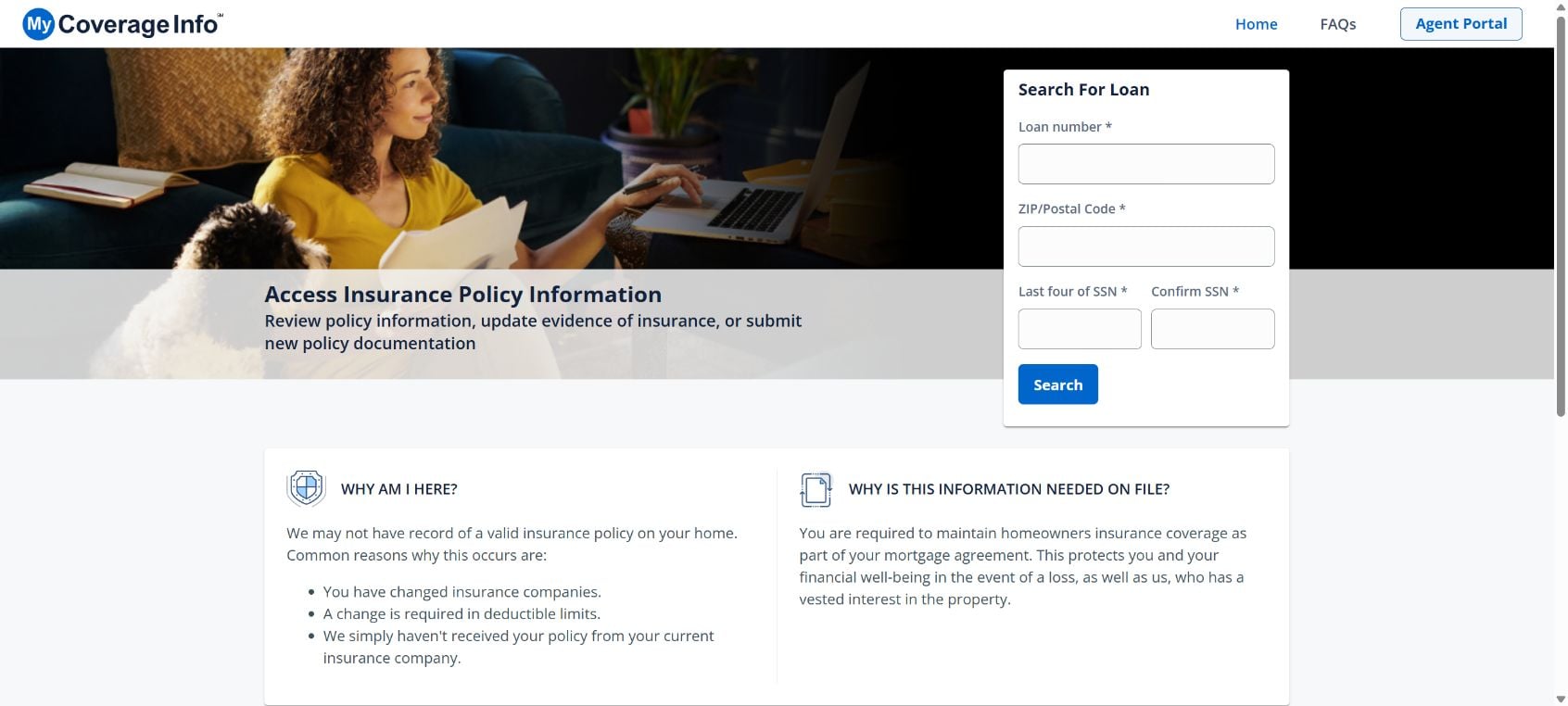
If a letter, email or mortgage statement tells you to visit MyCoverageInfo.com, the request can feel suspicious. It asks for insurance details connected to one of your largest financial accounts, and many borrowers do not recognize the name. The short answer is that MyCoverageInfo.com is a legitimate insurance-tracking portal used by participating mortgage lenders and loan servicers.
The portal helps a lender confirm that a mortgaged home has the insurance coverage required by the loan agreement. A notice may be triggered after you change insurers, renew a policy, update a deductible, refinance, or when your insurer’s proof of coverage does not reach the servicer. It can also be caused by a simple mismatch in the name, loan number or property address.
The request is not automatically a sign that your policy has been canceled. It means the lender’s records may be incomplete or do not match the required coverage. The site lets a borrower or insurance agent upload policy documents and update carrier information so the lender can review the file.
You should still verify the notice before uploading anything. Criminals copy real company names and real web addresses in phishing messages, then replace the button or phone number with one they control. A genuine portal does not make every email bearing its logo genuine. The safest route is to contact your mortgage servicer through the number on your latest statement or by signing in through the lender’s official website.
Do not ignore a verified insurance request. If the lender cannot confirm acceptable coverage, it may purchase lender-placed or force-placed insurance and charge the premium to your loan. That coverage is often more expensive and may protect the lender’s financial interest without giving you the same protection as a normal homeowners policy.
Treat the process as document verification, not an emergency payment demand. Confirm the request with the servicer, type the website address manually, and ask your insurance agent to send the evidence when possible. You should not need to buy a new policy from an unknown caller or pay through gift cards, cryptocurrency or a payment app.
What MyCoverageInfo.com is
MyCoverageInfo.com is an online portal that supports insurance tracking for participating lenders and servicers. It provides a way to look up a loan, submit evidence of insurance and correct policy information. The site is associated with insurance-services infrastructure rather than a random policy seller.
Why your mortgage lender tracks insurance
A home secures the mortgage debt. If it is damaged and uninsured, both the homeowner and lender face a major loss. Mortgage agreements therefore require continuous hazard or homeowners coverage, with the lender normally listed in the policy’s mortgagee clause.
How a Legitimate MyCoverageInfo Notice Works
Step 1: The lender receives incomplete or mismatched policy data
The servicer may not receive the renewal declaration, or a document may contain an old loan number, former insurer, different property format or incorrect mortgagee clause. Automated systems can flag the account even when you paid your premium on time.
Step 2: A notice is sent to the borrower
The letter or email explains that proof of insurance is missing or needs updating. It may identify the lender, property and loan reference. A real notice should match an account you actually have and should be confirmable by the lender using contact information you obtain independently.
Step 3: You verify the request with the loan servicer
Before following a link, call the number printed on your mortgage statement or sign in through the official lender website. Ask whether the insurance record is incomplete and whether MyCoverageInfo is the approved submission portal for your loan.
Step 4: Policy evidence is submitted
You or your insurance agent can provide a declarations page, binder or other requested evidence. Use only the fields required for the coverage review. There is normally no reason to send passwords, full banking credentials or a one-time login code.
Step 5: The lender reviews and updates the account
The servicer checks the carrier, effective dates, property address, coverage amount, deductible and mortgagee information. If something is still missing, it may request a corrected document rather than immediately closing the issue.
Step 6: Lender-placed insurance is avoided or removed
Once acceptable coverage is confirmed, the lender should stop the placement process. If lender-placed coverage was already added, valid proof showing overlapping dates may support cancellation and a premium adjustment. Follow up until the account reflects the correction.
Why You May Have Received the Notice
- You changed insurance companies or agents.
- Your policy renewed but the new declarations page did not reach the lender.
- The insurer used an outdated mortgagee address or loan number.
- Your deductible or coverage amount falls outside the loan requirements.
- The property address, borrower name or policy number does not match the lender’s records.
- A policy was canceled, rewritten or briefly lapsed.
- Your loan was transferred to a new servicer and documents did not transfer cleanly.
- The notice is a phishing copy that was never sent by your lender.
How to Tell a Real MyCoverageInfo Request From Phishing
Check the request against your real mortgage account
A genuine request should concern a property and lender relationship you recognize. Do not confirm details to an unsolicited caller. Open your lender’s portal separately and look for the same insurance warning.
Inspect the destination, not just the displayed words
A button can say MyCoverageInfo.com while opening a different domain. Type the address manually or use the route confirmed by your servicer. Be cautious of misspellings, extra words, unusual subdomains and shortened links.
Watch for demands unrelated to insurance evidence
The normal task is to document an existing policy. A request for gift cards, cryptocurrency, wire transfers, remote access, email passwords or one-time banking codes is not part of that process.
- Legitimate: the lender independently confirms the portal and the notice matches your mortgage.
- Suspicious: the sender creates a same-day crisis, threatens arrest or asks you to keep the request secret.
- Legitimate: the requested document is an insurance declarations page or similar proof.
- Suspicious: the link opens a lookalike domain or asks for unrelated financial credentials.
What to Do After Receiving a MyCoverageInfo Notice
- Locate your latest mortgage statement. Use the servicer phone number or official account portal shown there.
- Ask whether the notice is genuine. Confirm the exact document needed and the approved submission method.
- Contact your insurance agent. Agents regularly provide evidence of insurance and can correct the mortgagee clause.
- Submit only the requested policy document. Remove unrelated pages if they contain unnecessary private information.
- Save confirmation. Keep the upload receipt, email, case number and a copy of the document.
- Check the account again. Make sure the insurance warning clears and no lender-placed premium remains.
What to Do If You Used a Fake MyCoverageInfo Page
If you uploaded only an insurance document
Contact your insurer and loan servicer, explain where the file was sent and ask them to flag the account. The document can contain your address, policy number and lender details, which may support targeted follow-up scams.
If you shared a password or security code
Change the password immediately on the real service, sign out unknown sessions and enable multi-factor authentication. If the password was reused, change it everywhere else, starting with email and financial accounts.
If you paid money or disclosed banking information
Call the bank or card issuer using the number on the card or statement. Ask to secure the account and review whether the transaction can be stopped. Preserve the fake URL, messages, receipts and phone numbers for a fraud report.
If your lender added force-placed insurance
Do not assume the charge will disappear automatically. Provide proof of continuous coverage, request a written review and check future statements for the adjustment. Your insurance agent can help document the effective dates.
Frequently Asked Questions
Is MyCoverageInfo.com a scam?
The official MyCoverageInfo.com portal is legitimate and is used for insurance verification. However, phishing messages can imitate it, so confirm each notice with your mortgage servicer before submitting documents.
Does the notice mean my homeowners policy is canceled?
Not necessarily. It may mean the lender has not received acceptable evidence. Verify your policy status directly with the insurance carrier and then correct the lender’s records.
Can my insurance agent handle the request?
Usually, yes. An agent can provide a declarations page and correct the mortgagee information. Confirm the submission route with your servicer first.
The Bottom Line
MyCoverageInfo.com is a real insurance-verification portal, but every unexpected request still deserves independent confirmation. Call your mortgage servicer through a trusted number, submit only the necessary policy evidence and follow up until the account is corrected. Never let a copied logo or urgent email replace that verification step.








