

The email does not promise a windfall. It presents a small administrative problem: your online tax profile needs attention, and a button will put things right.
The Government Gateway email scam makes that task feel familiar. Before updating anything, check whether you are entering the service through a route you actually trust.
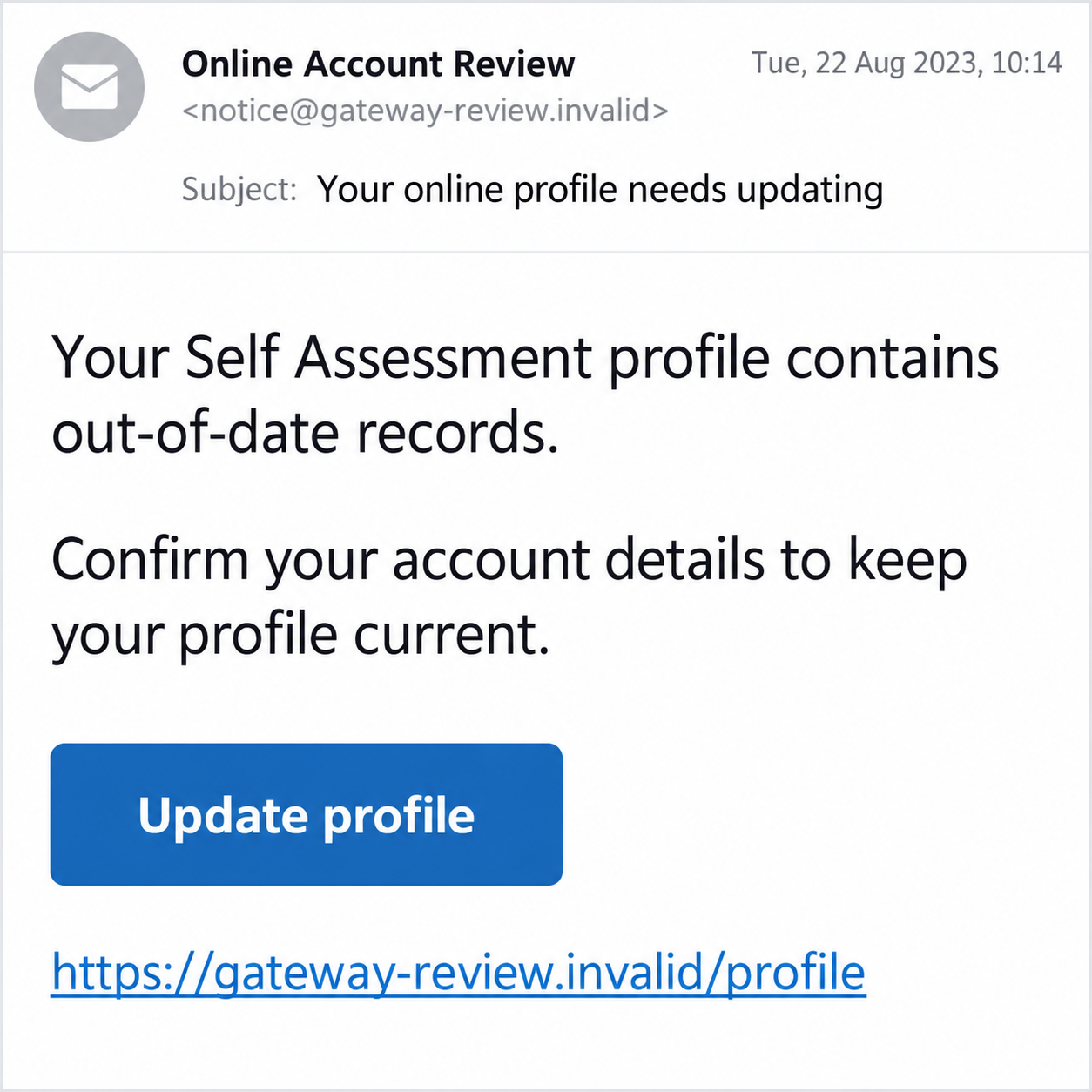
Overview
The profile update is a reason to collect sign-in details
The documented scam uses an outdated-record or Self Assessment profile claim to steer people toward an unverified login. The requested account maintenance supplies the excuse.
Government Gateway is a genuine sign-in service. The fraud is the imitation notice and credential-collection route, not the existence of a tax account or legitimate updates.
The historical email warning discussed here dates to August 2023. We have not captured a new campaign or tested a currently circulating login page.
Its lesson remains useful: a message cannot authenticate the website that it chooses for you. A copied service name does not establish who receives your password.
Real HMRC sign-in options have changed since that example
HMRC’s current sign-in guidance describes Government Gateway and GOV.UK One Login. They are not interchangeable credentials, and rollout does not happen identically for everyone.
Government Gateway uses a user ID and password. GOV.UK One Login uses an email address and password. The genuine service guides you to the appropriate option.
A real One Login prompt is not automatically suspicious. Nor should an unsolicited email persuade you to create a second identity or abandon working sign-in details.
Start with GOV.UK or the HMRC app independently. That lets you check the actual service without accepting the email’s explanation of what has changed.
Verify the task before supplying the account keys
- Open the official tax service without using the email’s button.
- Check whether your account shows a relevant message or required action.
- Keep your sign-in password and access codes out of email replies.
- Distinguish the suspicious invitation from actual account activity.
- Report exposed credentials or unauthorized changes through HMRC’s verified route.
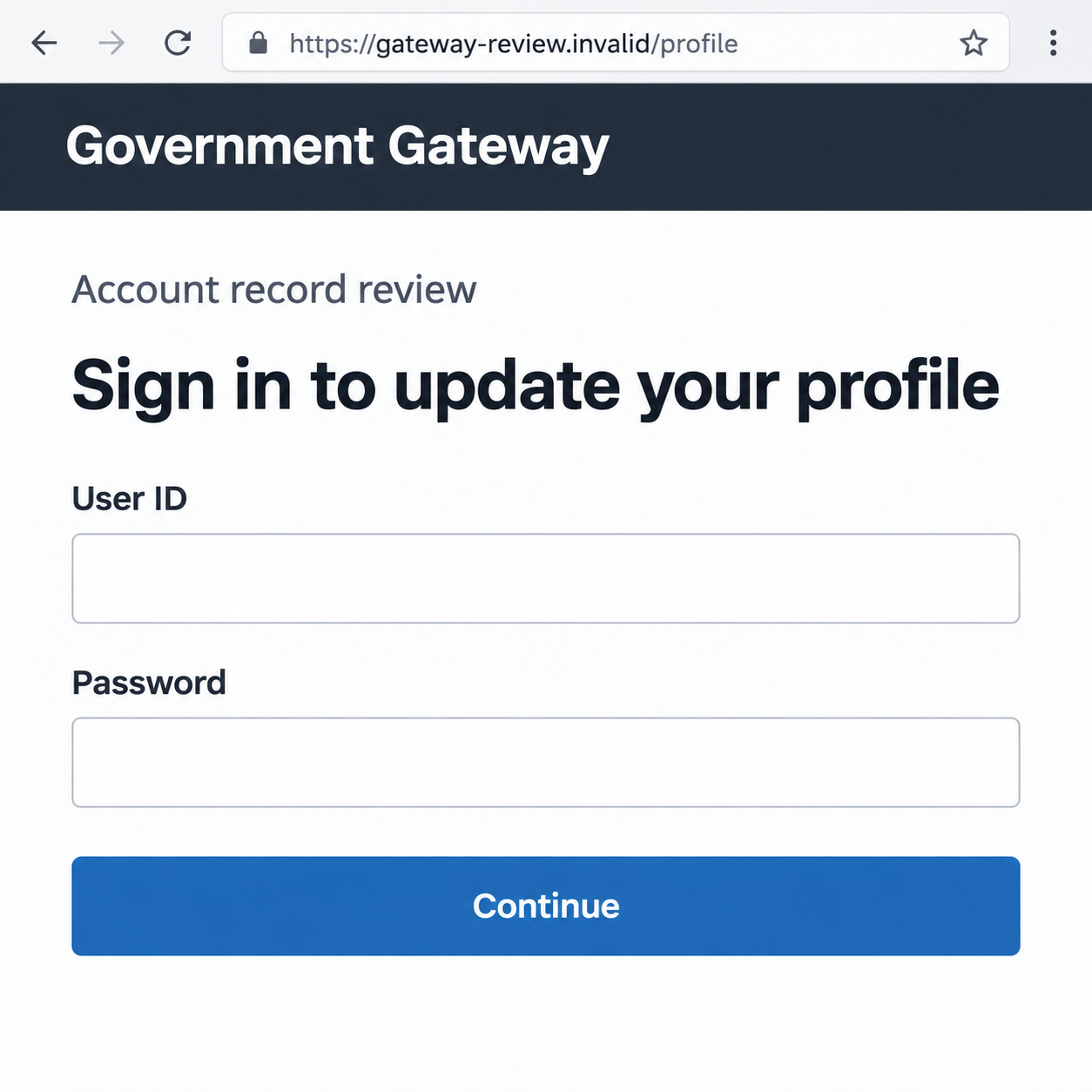
The images are fictional interface examples with nonfunctional addresses. They demonstrate the notice and login stages without showing a genuine government page or personal account.
Why an Outdated-Record Notice Can Be Persuasive
It sounds like paperwork you might genuinely need to do
Tax accounts involve addresses, contact details, returns, and other records. A message about updating a profile can resemble the ordinary work of keeping those details correct.
You may also have received genuine reminders or recently dealt with an account problem. The scam does not need to know that history to benefit from it.
The email leaves you to connect its vague claim with your own circumstances. That connection can feel convincing even when the sender provides no authentic reference.
Ask which record supposedly needs correction. Do not hand over a password simply to find out what the message means.
The button makes checking and fixing look like the same action
A convenient link can appear to answer both questions: whether there is a problem and how to resolve it. That convenience keeps verification inside the sender’s chosen route.
Separate those decisions. First establish the real account situation; then make any necessary update through the verified service.
Even a professionally written message can direct you elsewhere. Spelling and design are weak tests compared with how you reached the account.
If there is a genuine deadline, it should be handled through authentic records or independently reached support. A rushed email is not the authority for that deadline.
How the Government Gateway Email Scam Works
Step 1: The email identifies a supposed profile problem
The opening refers to records being outdated or an online Self Assessment profile needing attention. It asks the reader to treat that statement as an official finding.
A tax-related subject can feel important even when the wording is broad. The recipient may worry that ignoring it could affect access or an existing obligation.
A sender name, copied signature, or familiar government term does not establish the message’s origin. The same labels can be used outside the genuine service.
Keep the email for reporting if necessary, but do not reply with an account reference or password. You can investigate the real matter separately.
Step 2: The update button introduces a different sign-in route
The reader is directed to a page presented as the place to fix the record. The page may borrow familiar government design and authentication language.
Read the destination, not just the button. Words such as gateway, profile, tax, or government inside a web address do not establish ownership.
A browser padlock is not an endorsement of the page’s account-collection request. It cannot tell you whether that page belongs to HMRC.
Use a saved official bookmark, GOV.UK, or the genuine HMRC app instead. A page reached independently is a stronger starting point than the email’s promise.
Step 3: A fake login asks for the account credentials
The form may request a Government Gateway user ID and password. At that point, an administrative claim has become a request for information that can support account access.
Do not dismiss the risk because the form asks for a user ID rather than an email. Different services use different identifiers, and either can be valuable.
If an email-address login appears instead, verify which real service you should be using. A legitimate authentication change does not make an unrelated collection page safe.
The following invented screen illustrates a credential request. Its fields are empty, its address cannot function, and it is not the official Government Gateway sign-in.
Step 4: An additional access code may extend the request
A phishing flow can also request a code received from a genuine service. Its arrival does not prove that the page asking for it is genuine.
Read what the notification says the code is for. An access attempt you did not initiate is different from an account update you chose inside a trusted session.
Do not relay codes to a caller or put them into the email’s page to finish a supposed correction. Stop and reach the actual service again.
This is a possible escalation, not a finding that the historical email captured every authentication factor. Your response should reflect the details you actually supplied.
Step 5: A reassuring confirmation can hide the unfinished security problem
The page might say the profile was updated or send you to a genuine website afterward. Neither outcome validates the place where your credentials were entered.
If someone obtained account access, they may attempt unauthorized changes. That possibility requires review, but a suspicious message alone does not prove a tax record was altered.
Check the real account for activity and contact HMRC when necessary. Do not let a success message from the imitation page end the investigation.
A later email claiming another profile issue should be assessed independently too. Repeated contact is not evidence that the original update succeeded.
Government Gateway and One Login: Use the Real Route
Keep existing credentials matched to their service
HMRC tells established users to continue with their applicable sign-in details. A One Login account used for another government service does not automatically replace a Gateway account.
You do not need to resolve that distinction with the email sender. Begin with the official HMRC sign-in page and follow the options it presents.
A confusing login screen is a reason to consult verified help, not to try several passwords on a stranger’s form.
Do not mistake a genuine transition for proof of the email
HMRC’s One Login guidance describes a phased change and possible identity verification. A legitimate development can be borrowed as a phishing explanation.
The existence of that development does not authenticate every message mentioning it. Verify the action through the official service you opened yourself.
Equally, do not label an independently reached official identity check fraudulent simply because it asks for documents. Origin, purpose, and process all matter.
Check the specific contact rather than banning all tax emails
HMRC publishes examples of genuine contact. Real reminders and correspondence exist, so the fact that an email arrived is not the whole test.
A displayed address that looks correct is still not sufficient authentication. Verify the particular matter without using the sender’s login or support link.
If the claim is about a refund rather than record maintenance, the related HMRC refund-text warning explains that different hook.
When a Suspicious Email Becomes an Account Incident
Look for concrete changes, not just anxiety
Unrequested access codes, loss of sign-in access, altered tax records, or unfamiliar HMRC correspondence can help identify an actual account-security issue.
Write down what changed and when. This gives support a useful chronology and helps separate the phishing invitation from events inside the genuine account.
You do not need to prove the attacker’s identity before seeking help. Report the unexplained activity without making accusations based on an email signature.
Use the current account-security reporting process
HMRC’s suspicious-activity guide describes the security console and an alternative reporting form. Agent accounts have additional authentication requirements.
Follow the route that applies to your access and role. Reporting a copied email and reporting unauthorized account activity are related but different tasks.
If your accountant or agent manages the account, involve them through an established channel. Do not forward login details to a new contact claiming to assist.
What to Do if You Have Fallen Victim to This Scam
-
Stop using the profile-update link. Do not enter another credential, upload a document, or approve a code to finish the task.
Save the original message and any destination address already visible. Avoid reopening the questionable page solely to produce more evidence.
-
Secure the affected government account independently. Open the real HMRC service and change the exposed password if you still have access.
Use the proper recovery route if access has been lost. Do not create substitute sign-in details because the phishing sender says the old ones have expired.
-
Review actual tax-account activity. Look for unfamiliar changes, notifications, access attempts, or correspondence and record the dates.
Report concerning activity through HMRC’s current security process. A password change does not automatically reverse records or requests an intruder may have altered.
-
Replace reused passwords and protect recovery channels. If the same password was used elsewhere, update those accounts through their own genuine services.
Pay particular attention to the email account used for recovery. Review its sign-in activity and recovery contacts if there is evidence it was affected.
-
Tell the bank about separate financial exposure. This is especially important if you entered card or bank details or approved a payment after the login request.
Explain those actions precisely rather than assuming a Government Gateway disclosure itself proves a bank transfer. Ask what protection or dispute steps apply.
Do not move money to an account supplied by a caller offering to help HMRC resolve the incident.
-
Report the email through HMRC’s verified phishing route. Its current reporting guidance gives phishing@hmrc.gov.uk for suspicious emails.
Describe the types of information disclosed, not the actual password or complete personal identifiers in the report email. Keep account-incident and phishing-report references together.
-
Investigate a device only when technical exposure warrants it. Check unexpected downloads, installed programs, browser permissions, or continuing redirects associated with the link.
Malwarebytes can help inspect suspicious software. AdGuard can reduce harmful advertising and known scam destinations, but neither restores a tax account or validates an update.
For a managed work device, ask your IT team before making changes. Receiving the notice alone is not proof that malware was installed.
-
Reject follow-up verification and recovery fees. An unsolicited adviser may reuse the profile story to ask for more credentials or payment.
Continue with official services you reached yourself. Keep genuine tax obligations on track while treating the account-security matter as a separate problem.
Frequently Asked Questions
Is Government Gateway a fake service?
No. It is a genuine sign-in route. The scam uses an imitation profile-update notice or login page to obtain credentials without verified authority.
Does every HMRC profile reminder mean fraud?
No. Genuine contact and record maintenance exist. Check the specific action through an independently opened official account rather than the email’s button.
Should I replace Government Gateway with One Login immediately?
Follow the current official service’s instructions for your account. A phased transition does not authorize an unexpected email to choose your sign-in route.
Can a real access code arrive during a phishing attempt?
Yes, a genuine service can send a code for an action someone else initiated. Its arrival does not authenticate the webpage or caller asking you to disclose it.
What if I opened the page but submitted nothing?
Close it and review any separate download or permission change. Viewing a page without submitting credentials does not establish that your tax account was taken over.
Where do I report changes inside my HMRC account?
Use HMRC’s suspicious-activity guide, including the account security console or its alternative form. Reach that guidance through GOV.UK, not a follow-up email.
The Bottom Line
The Government Gateway email scam turns a plausible maintenance task into an unverified login. An outdated-profile claim does not establish who should receive your credentials.
Open HMRC independently and use the sign-in route appropriate to your account. If details were exposed, secure access and review the real records, not the imitation confirmation.

Join the discussion
0 commentsShare your experience or ask a question about this article.
Discussion
Start the conversation
Have a question or something useful to share? Add the first comment.