

A text message says HMRC has good news: a tax refund is waiting, but the claim must be completed before tonight. The amount is specific, the link looks official at a glance, and the deadline leaves little time to think.
The HMRC tax refund text scam turns a welcome payment into a route toward identity theft and card fraud. One careful check of the web address can change how the entire message looks.
Overview
What the fake HMRC refund message says
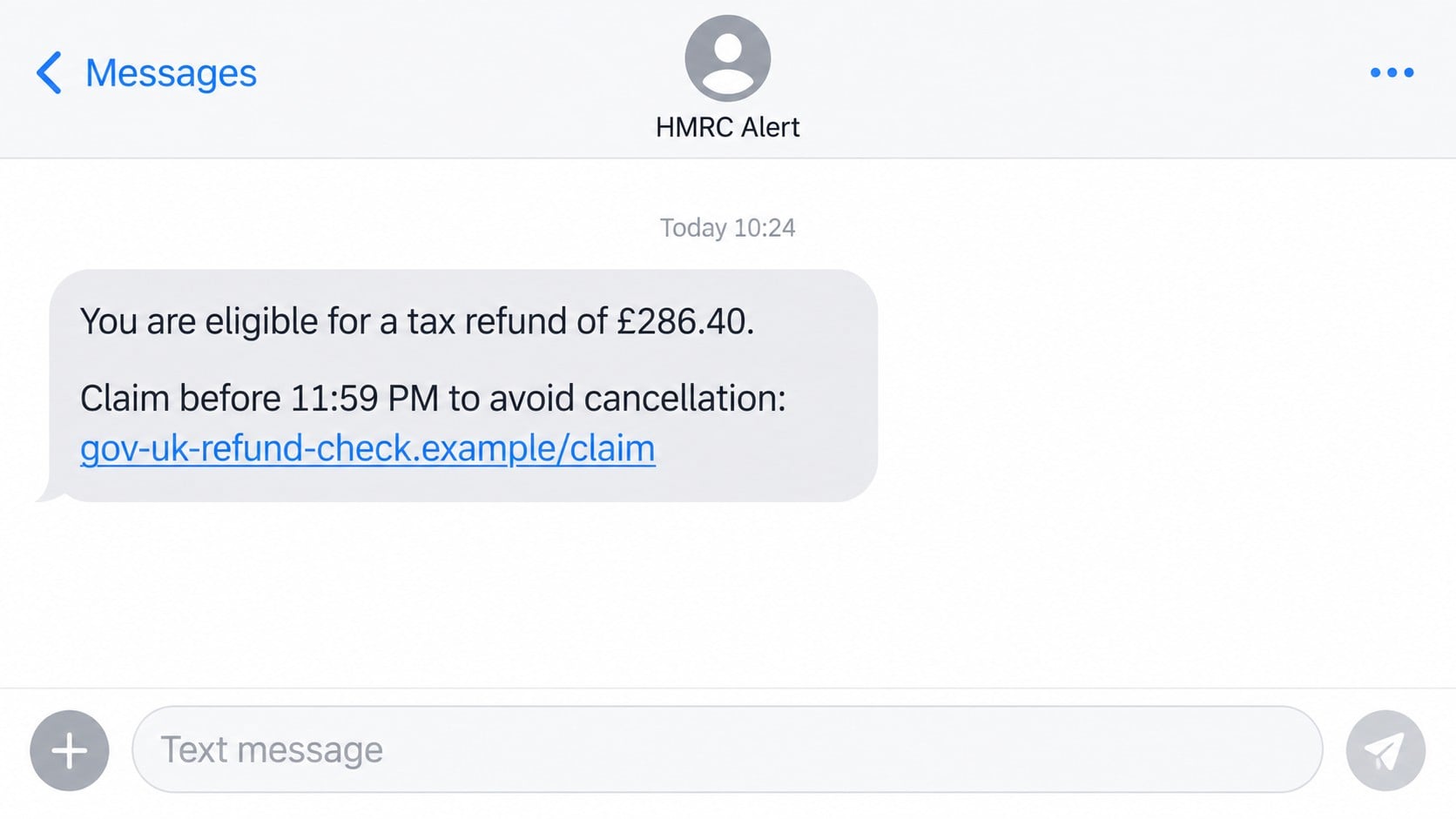
The text claims the recipient is eligible for a tax return, rebate, or refund. It may show an amount such as £286.40 and provide a link that appears to contain words including GOV, UK, HMRC, tax, refund, or claim.
A deadline is added to make the benefit feel temporary. The message may say the refund expires tonight, the claim is pending, or the recipient must confirm banking information before the payment can be released.
- An unexpected tax refund or rebate announcement
- A link that imitates government wording
- A short claim deadline or cancellation warning
- A page requesting identity and National Insurance details
- Bank card fields supposedly needed to receive money
- A small verification payment or one-time code request
The real domain is hidden inside a government-looking address
A fraudulent address can include “gov.uk” as part of a longer domain without being controlled by the UK government. For example, gov-uk-refund-check.example is not GOV.UK, just as gov.uk-tax-refund.com is not a page under gov.uk.
The registered domain is read immediately before the first slash. Extra words, hyphens, subdomains, and lock icons do not change who owns it.
A valid HTTPS certificate only encrypts the connection to that site. It does not mean HMRC approved the page or that the people receiving the form are trustworthy.
The promised refund is bait for valuable personal data
The first form may request a name, address, date of birth, email, phone number, National Insurance number, or Government Gateway credentials. A second screen often asks where to “deposit” the refund.
Card numbers, expiration dates, security codes, and bank details can be used for unauthorized transactions. Government login details can support tax-account takeover, fraudulent claims, or identity theft.
HMRC’s official guidance says not to open links or reply to a text that offers a tax refund in exchange for personal or financial information. Suspicious texts can be forwarded to 60599.
Why a Tax Refund Is Such an Effective Hook
The message offers relief instead of threatening punishment
Many phishing texts use fear, but a refund uses hope. The recipient may already be thinking about bills, tax season, or a recently submitted return, so the payment feels timely.
The positive news lowers suspicion. A person who would question a penalty may click quickly when the message appears to return money.
A precise amount makes the claim look calculated
An amount such as £286.40 seems more like the result of a tax calculation than a round prize. The number is usually part of the template and does not prove that the sender knows anything about the recipient’s tax record.
Scammers can rotate the amount and deadline while keeping the same page. The story is designed to fit many people, not to explain a real assessment.
The victim expects to provide bank details for payment
Because a refund must go somewhere, financial fields can appear logical. The scam exploits that expectation by asking for far more information than is necessary and collecting it on an unrelated domain.
HMRC already has established processes for legitimate repayments. A surprise text is not a safe place to rebuild your identity and banking profile from scratch.
How the HMRC Tax Refund Text Scam Works
Step 1: A bulk text impersonates an HMRC alert
The message can come from an ordinary mobile number, a spoofed sender name, or a short code. It claims HMRC has approved a refund and supplies a link to claim it.
The sender may know the recipient’s name, but personalization is not proof. Names and phone numbers are widely available through marketing lists, public records, compromised accounts, and data breaches.
Some campaigns arrive near tax deadlines because the timing increases credibility. Others are sent throughout the year and rely on the fact that many people have some interaction with HMRC.
Step 2: Urgency turns the link into the apparent solution
The refund is said to expire within hours or return to the Treasury if it is not claimed. A countdown may continue on the landing page, even though reloading the site resets it.
This manufactured limit discourages the recipient from opening the HMRC app, checking a Personal Tax Account, or asking for advice. The scammer wants the decision made inside the message.
A real tax entitlement does not become genuine because a timer is running. Close the text and verify the account independently.
Step 3: The phishing page copies government design cues
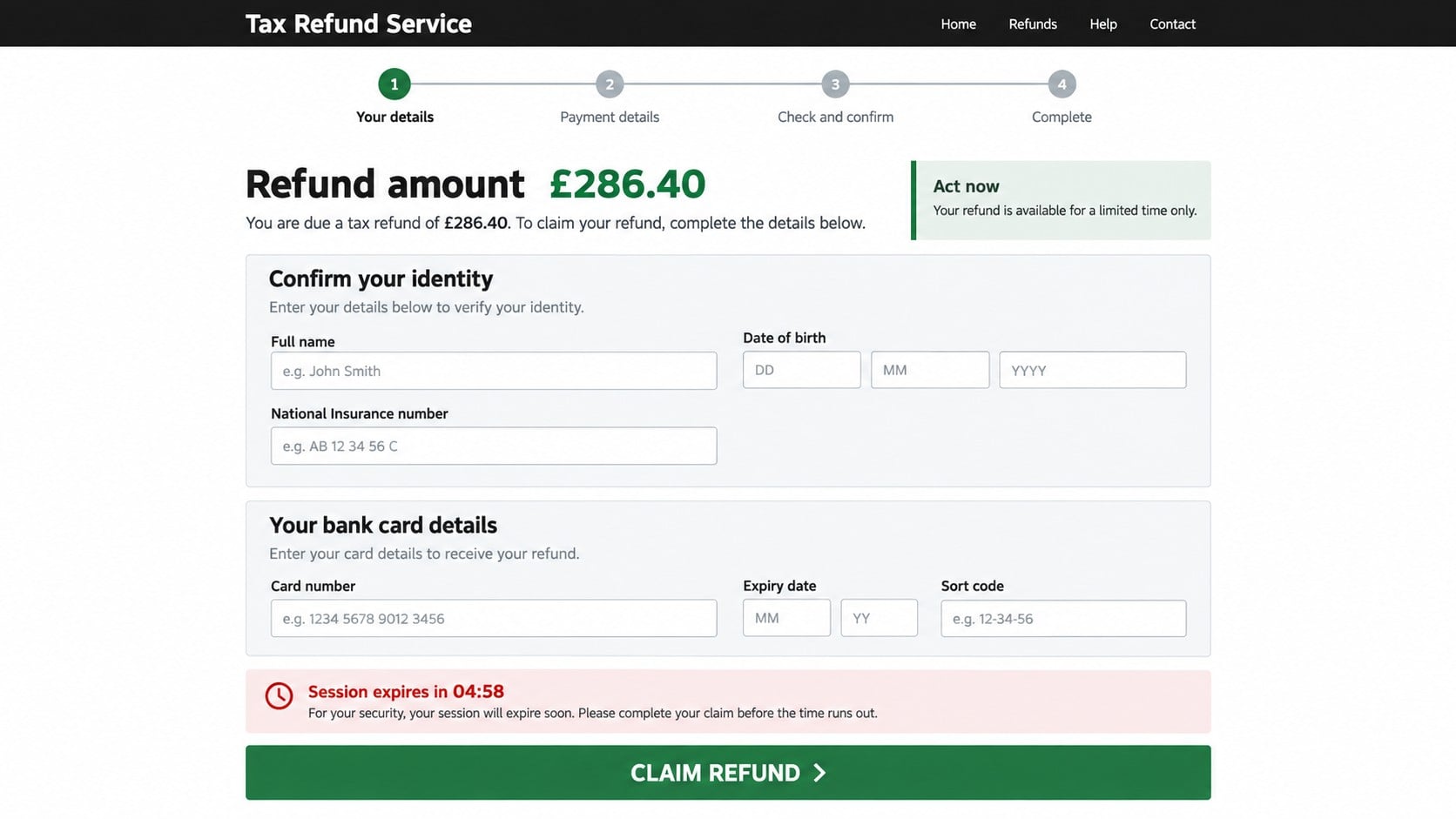
The page may use a black header, green buttons, plain typography, and formal language associated with public services. These visual choices are easy to imitate.
Look at the domain before reading the page. GOV.UK services use addresses under gov.uk, while a hyphenated phrase ending in another domain is controlled elsewhere.
The official HMRC phishing examples show that fraudsters routinely imitate refund messages and misleading websites.
Step 4: Identity questions build a complete victim profile
The form can request the victim’s full name, home address, date of birth, National Insurance number, email, and mobile number. Each page looks like another stage of eligibility verification.
That information can support new-account fraud, password recovery attempts, convincing telephone impersonation, or later messages that include enough correct data to feel official.
If Government Gateway credentials are requested, the risk becomes immediate account takeover. No refund page reached from an unsolicited text should receive those details.
Step 5: Bank details are collected under the excuse of repayment
The next screen asks for a card number, expiration date, security code, sort code, account number, or online-banking credentials. It may claim the card verifies the bank account that will receive the refund.
A card security code is used to authorize purchases, not to receive a tax refund. Asking for it is a strong signal that the page is preparing unauthorized payments.
Some sites attempt a small charge to “confirm” the card. The amount can be followed by larger transactions or used to test whether stolen details are active.
Step 6: A one-time code authorizes the real fraud
If the criminal enters the stolen card or login details into a genuine service, the bank may send a verification code. The phishing page immediately asks the victim to type it.
The page may describe the code as confirmation of the refund, but it can approve a purchase, add a card to a wallet, reset a password, or complete a sign-in.
Read every bank alert carefully. If it describes a transaction or login you did not initiate, deny it and contact the institution using its official number.
Step 7: The page displays success while criminals use the data
A final screen may say the refund will arrive within three to five working days. That delay gives the attacker time before the victim realizes no payment is coming.
The site can redirect to GOV.UK after submission, making the journey appear normal. A legitimate destination at the end does not authenticate the form that collected the information.
Follow-up calls may claim a problem with the refund. Because the caller knows the submitted details, the second approach can sound more convincing than the first.
Company, Address, and Fulfillment Checks
The HMRC name is being impersonated
A message can display “HMRC Alert” without coming from HM Revenue & Customs. The identity must be verified through a genuine HMRC account or a contact route listed on GOV.UK.
Do not ask the sender to prove itself. Every reply keeps the conversation inside the scammer’s channel.
The domain matters more than the page design
A tax-refund site should be examined from right to left before the first slash. Words placed before an unrelated ending do not turn that domain into gov.uk.
Scammers frequently change domains after one is blocked. Searching only for a single old address can miss the same campaign operating under a new name.
Support cannot be verified through the suspicious text
Phone numbers, chat buttons, and email addresses on the phishing page are controlled by the same operation. A helpful reply from them does not independently validate the refund.
Use GOV.UK to locate the correct HMRC contact for your tax issue. Type the address or use a saved official app rather than returning through the message.
A genuine repayment appears through official records
A legitimate refund has a reason, tax period, account record, and established payment route. The recipient should be able to confirm it without surrendering card security data to a new website.
If no refund appears in the official account, the text has not created one. Delete it after reporting and continue monitoring for identity misuse.
How to Tell a Fake Tax Refund Link From GOV.UK
- Genuine government services use a domain ending in gov.uk.
- gov.uk placed inside a longer non-government domain is not enough.
- Hyphens do not create an official government address.
- A padlock shows encryption, not ownership or honesty.
- A countdown is a pressure device, not proof of a deadline.
- Card security codes and login codes are not needed to send a refund.
- An unexpected text should be verified in a separate session.
HMRC sometimes sends texts, so the presence of a message is not the only test. The content, request, domain, and independent account record must agree.
The agency says it will not announce a tax rebate by text and ask for personal or payment information. That rule is more reliable than the sender name on your screen.
What to Do if You Have Fallen Victim to This Scam
- Exit the imitation tax service immediately. Leave it without entering another code or detail. Do not call a number shown there or in a follow-up message.
- Contact the bank immediately. Use the number on the card or the bank’s official app. Explain exactly which card, account, security code, and one-time code you disclosed, then ask about blocking transactions and replacing the card.
- Secure your HMRC account. Type gov.uk yourself and review sign-in details, contact information, tax records, and recent activity. Report suspicious account activity through the official HMRC process.
- Change exposed passwords. Start with email and Government Gateway or GOV.UK One Login. Use unique passwords, enable multi-factor authentication, and sign out sessions you do not recognize.
- Report the text to HMRC. Forward it to 60599. Suspicious emails can go to phishing@hmrc.gov.uk. After reporting, delete the message so it is not clicked later.
- Respond to identity theft risk. If you shared a National Insurance number, date of birth, address, or identity document, contact the appropriate UK fraud-reporting and credit-reference services and monitor accounts carefully.
- Run Malwarebytes if anything downloaded. A full scan can identify malicious files or software delivered by a fake refund page. Remove confirmed threats before using the device for sensitive password changes.
- Use AdGuard to reduce repeat phishing exposure. Its filters can block many known malicious domains, deceptive advertising connections, and tracking requests. It cannot secure an HMRC account after credentials were submitted.
- Save evidence. Keep the text, sender number, time, full domain, screenshots, bank alerts, transaction identifiers, and any follow-up calls. Do not preserve the live link by opening it again.
- Expect a second approach. Criminals may pose as HMRC, a bank, police, or a recovery service. End unexpected contact and call the institution back through an independently verified number.
Frequently Asked Questions
Does HMRC ever send text messages?
Yes, HMRC uses texts in limited circumstances, but it says it will not offer a refund by text in exchange for personal or financial details. Verify messages through GOV.UK.
Is a link containing gov.uk automatically genuine?
No. The registered domain must actually end in gov.uk. A phrase such as gov-uk placed before another ending can be registered by someone else.
Why would a refund form ask for my card security code?
It should not. The code helps authorize card payments. It is not needed to deposit a legitimate tax repayment and is a major phishing warning.
What if I clicked the link but submitted nothing?
Close the page, remove any download, and scan if the site opened or installed a file. Verify your HMRC account independently and report the text.
Can the sender name HMRC be spoofed?
Yes. Sender IDs and phone numbers can be manipulated. A familiar name at the top of a message does not prove who sent it.
Where should I check whether a tax refund is real?
Use your official Personal Tax Account, the HMRC app, or a contact path you found on GOV.UK. Do not start from the unsolicited text.
The Bottom Line
The HMRC tax refund text scam offers money to pull the recipient onto a fake claim page. The requested identity, card, bank, and verification details are worth far more to criminals than the invented refund.
Do not claim tax money through an unexpected link. Open GOV.UK independently, verify the account, and forward suspicious refund texts to 60599 before deleting them.

Join the discussion
0 commentsShare your experience or ask a question about this article.
Discussion
Start the conversation
Have a question or something useful to share? Add the first comment.