

A receipt lands in your inbox for electronic gift cards you never bought. The message says PayPal charged $65, then places a convenient cancellation link exactly where a worried customer expects to find it.
The GCSpread PayPal gift card receipt scam is built around that moment of panic. The purchase is not the real problem, but the action the email wants you to take can create one.
Overview
What the fake GCSpread receipt claims
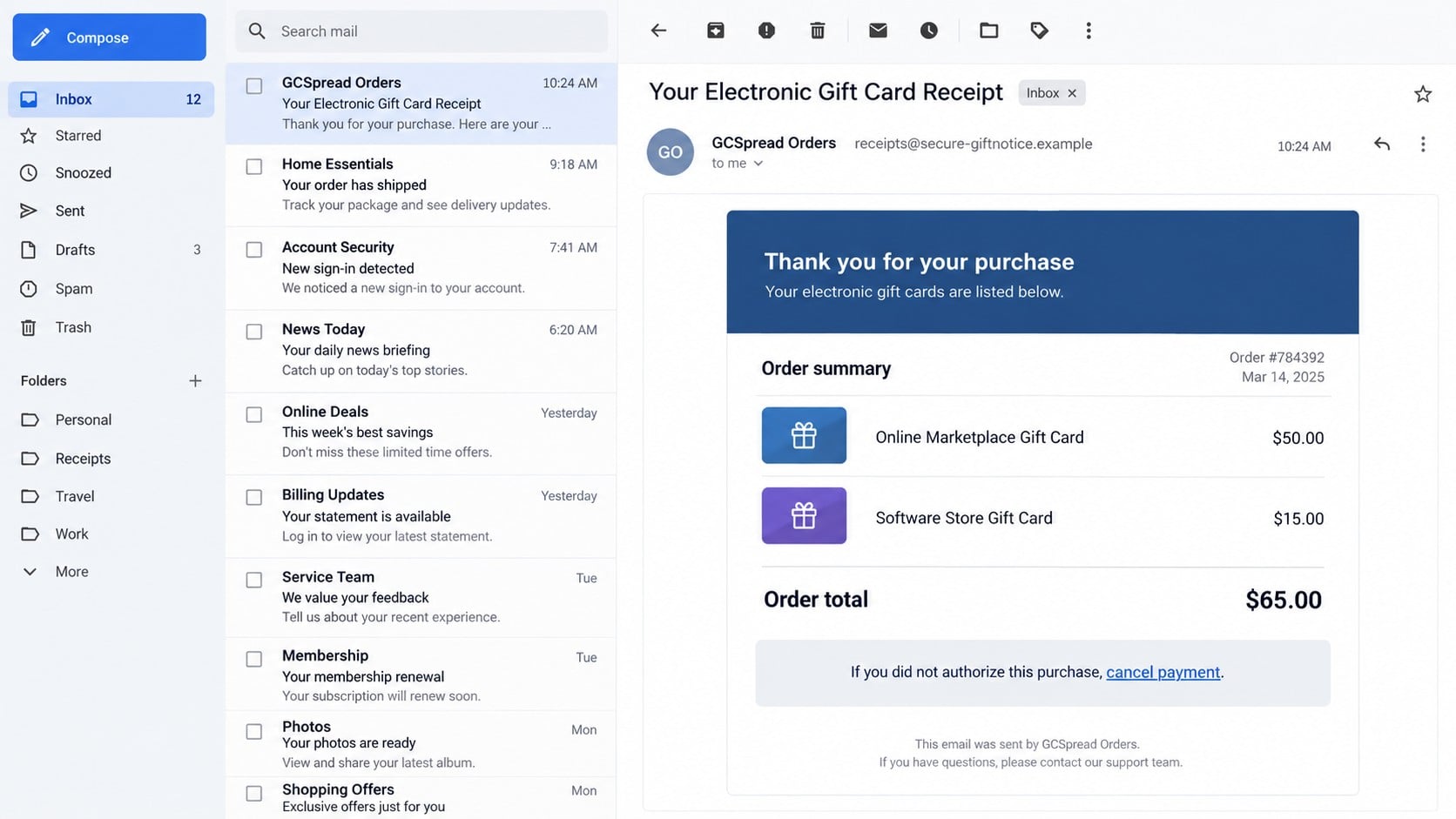
The email presents itself as confirmation of a gift card order processed through PayPal. One known version listed a $50 online marketplace card and a $15 software-store card, creating a believable $65 total.
The recipient is told the payment can be canceled by clicking a link. That reassurance is the lure. The scammer expects the reader to react to the unfamiliar transaction before checking the real account.
- An unexpected electronic gift card purchase
- A merchant name such as GCSpread or Gift Card Spread
- A precise order number, date, and total
- A warning that the PayPal account was charged
- A cancellation or dispute link inside the message
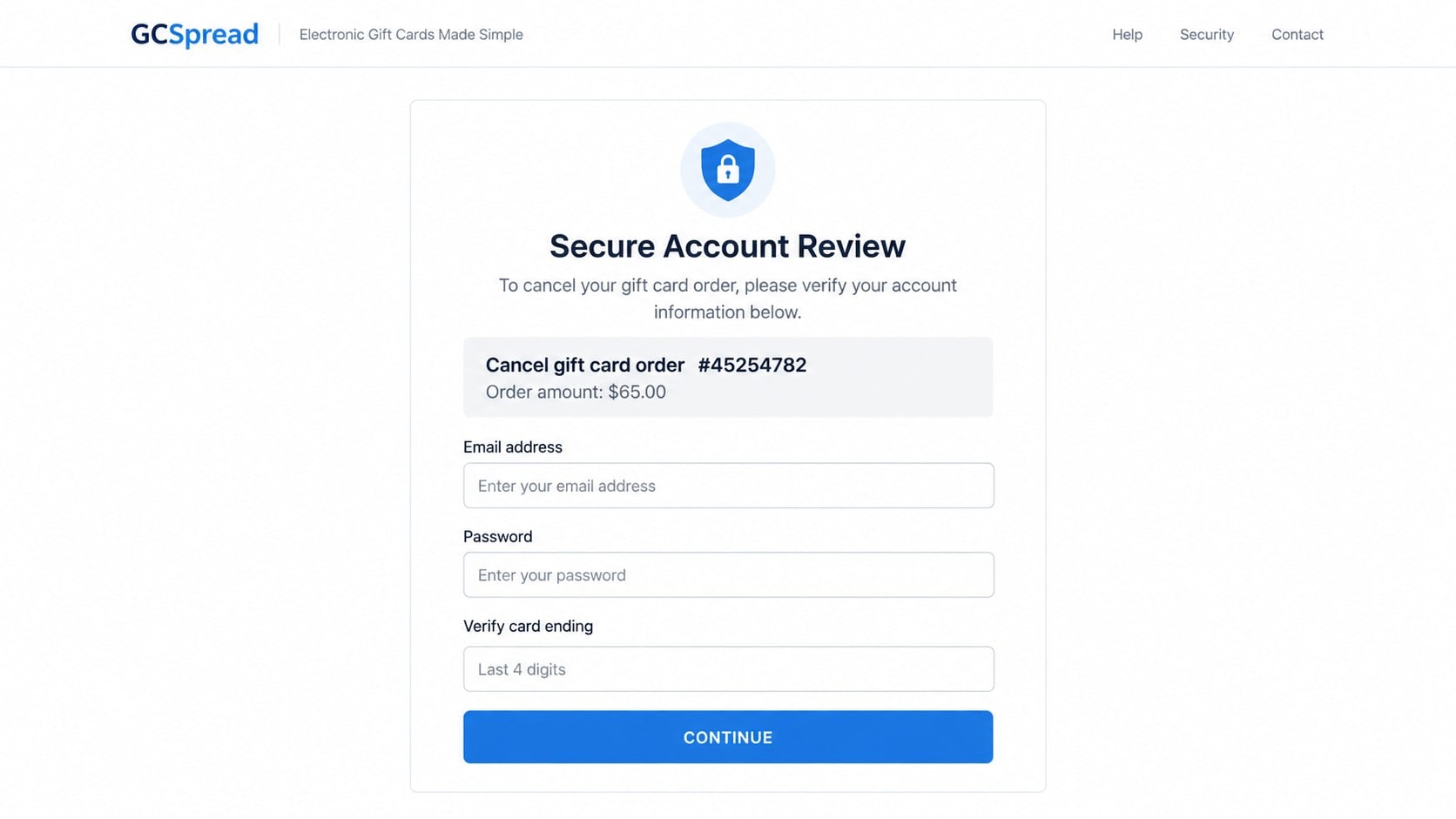
- A fake sign-in page that asks for credentials and card details
Why gift cards make the story feel urgent
Electronic gift cards can be delivered and redeemed quickly. A reader who sees an unauthorized order may believe every minute matters, so the safest-looking option appears to be the cancellation link.
The message may include familiar product names, a Chicago address, a support number, or a merchant-style footer. Those details make the email look like a transaction record without proving that any order exists.
A scammer does not need to charge the account before sending the email. The fake receipt can be sent to thousands of addresses, with the same order details shown to every recipient.
What the criminals are actually trying to steal
The link can lead to a PayPal lookalike page that captures the email address and password. A second screen may request a card number, billing address, phone number, security code, or one-time verification code.
Some variants replace the link with a telephone number. The caller may be persuaded to install remote-access software, share a security code, or accept a fake refund that turns into a larger payment.
The real PayPal account is the place to verify the purchase. Open the official app or type paypal.com yourself, then check Activity without using anything in the suspicious message.
The Receipt Is Designed to Trigger a Fast Mistake
The message starts with a completed purchase
A completed charge feels more dangerous than a failed login. The reader is pushed past curiosity and into damage control, which reduces the chance that the sender, domain, and link destination will be examined.
Gift cards also suggest that the money may disappear immediately. That detail gives the cancellation button an artificial deadline even when the real PayPal account shows no transaction.
Transaction details substitute for authentication
Order numbers, item tables, timestamps, prices, and support information are easy to invent. Their purpose is to resemble the structure of an automated receipt, not to prove a connection with PayPal or a merchant.
A logo is also not authentication. Images can be copied, while the visible sender name can be changed. The domain after the @ symbol and the real link destination deserve more attention than the design.
The cancel link reverses normal security behavior
People are often warned to dispute unfamiliar activity quickly. The scam turns that good instinct against them by placing a fraudulent dispute path inside the alarming message.
PayPal advises customers to ignore unfamiliar requests, avoid numbers included in them, and use official support channels. Suspicious messages can be forwarded to phishing@paypal.com and then deleted.
How the GCSpread PayPal Gift Card Receipt Scam Works
Step 1: A mass phishing email imitates a purchase receipt
The campaign begins with an email subject such as “Your Electronic Gift Card Receipt” or “Transaction Receipt.” The sender name may display PayPal, GCSpread Orders, Gift Card Spread, or a generic service team.
The underlying sender often comes from an unrelated or newly created domain. In older examples, even the word PayPal was altered with a similar-looking letter to fool a quick glance.
The message can arrive in any mailbox because it is not generated from the recipient’s account. Receiving it does not mean PayPal, a bank card, or the listed gift card merchant has been breached.
Step 2: A believable order table creates a false fact
The email lists digital products, individual prices, quantity, order date, and a $65 total. A neat table gives the claim the visual weight of a real invoice.
Scammers choose amounts that are upsetting but not absurd. A smaller charge can look more plausible than a $4,000 purchase and may attract readers who would dismiss a larger number immediately.
Addresses, telephone numbers, and merchant names can be copied from real businesses. A true detail placed inside a fraudulent email does not make the message genuine.
Step 3: The cancellation link opens a lookalike page
The link text may say “cancel payment,” “report this transaction,” or “secure your account.” Hovering over it on a computer can reveal a domain unrelated to paypal.com, but shortened and redirecting links may conceal the final destination.
A padlock does not prove the page is safe. Phishing sites can use HTTPS, valid certificates, and professional design while sending every submitted field to the attacker.
The safest method is not to inspect the suspicious page more deeply. Close it and navigate independently to the official PayPal app or website.
Step 4: The first form captures the PayPal login
The lookalike site asks for the email address and password. It may display an error after the first submission so the victim enters the password again, giving the attacker two versions to try.
Once the credentials are submitted, criminals can attempt to sign in to the real account. Reused passwords may also give access to email, shopping, or financial services.
The official PayPal phishing guide recommends typing the address directly and warns that urgency, suspicious URLs, and requests for sensitive data are common signs of fake messages.
Step 5: A verification screen gathers financial identity data
After the login, another form can ask for a card number, expiration date, security code, billing address, phone number, date of birth, or Social Security number. It may claim the data is needed to reverse the order.
A criminal can use that combination for unauthorized purchases, account recovery attempts, identity theft, or convincing follow-up calls. The fake receipt becomes much more costly than the invented $65 charge.
If a one-time code arrives, the page or a caller may ask the victim to repeat it. That code can authorize a real sign-in or password reset. Never give it to anyone who contacted you unexpectedly.
Step 6: The victim is redirected to hide the theft
After collecting the data, the site may show a success message or redirect to the genuine PayPal homepage. The normal page makes it appear that the cancellation worked.
The victim may stop investigating because no error is visible. Meanwhile, the attacker can change account settings, add a device, attempt payments, or use the stolen email password to intercept alerts.
A redirect to a legitimate site does not erase what happened on the previous domain. If any information was entered, treat it as compromised.
Step 7: Follow-up contact expands the scam
A telephone variant may claim that a refund was issued incorrectly. The caller asks for remote access, tells the victim to move money, or says gift cards are needed to return an accidental overpayment.
Another message may claim that the cancellation failed and demand more verification. Criminals can use the data already collected to sound informed and personal.
Do not continue through a number or reply address supplied by the suspect email. Use PayPal’s official contact page and the number printed on the bank card.
Company, Address, and Fulfillment Checks
The merchant name does not prove a transaction
GCSpread, Gift Card Spread, or another merchant label can be typed into any email template. Confirm the transaction ID and amount inside the real PayPal Activity page, not through the message.
If nothing appears in the account, there is nothing to cancel through the email. Mark the message as phishing and preserve it only if needed for a report.
The listed address may be copied from a real business
A street address in a footer is not evidence that the sender occupies it or authorized the message. Scammers copy public contact details because readers often treat a precise address as proof.
Compare the merchant information shown in PayPal with the email. Do not mail identity documents, cards, or payments to an address taken from a suspicious receipt.
Support in the email leads back to the scam
A phone number or cancellation link inside the message keeps the victim inside the attacker’s controlled path. The person answering may know the exact fake order because every target received the same template.
Real support should be reached through the PayPal app, paypal.com, or contact information you found independently. Do not let a caller transfer you to a supposed bank agent.
Digital fulfillment leaves a trace in the real account
An actual PayPal payment produces account activity with a transaction ID, merchant details, status, funding source, and dispute options. An email alone is not a financial record.
If a real unauthorized transaction exists, use the Resolution Center. If the order exists only in the email, clicking its fulfillment or cancellation path creates risk without resolving anything.
How to Check the Receipt Safely
- Do not click the cancellation link or call the listed number.
- Open the PayPal app from your device or type paypal.com yourself.
- Review Activity for the exact $65 amount and merchant.
- Check the Message Center for any genuine account notice.
- Inspect the funding card independently for a matching charge.
- Forward the suspicious email to phishing@paypal.com.
- Delete it after preserving headers if you plan to report the domain.
Do not reply to test whether the sender is real. A response confirms that your mailbox is active and can invite more tailored attacks.
The PayPal scam information page specifically warns about fake payment confirmations and requests that push people toward a phone number or urgent action.
What to Do if You Have Fallen Victim to This Scam
- Leave the fraudulent account-review page. Do not submit another form, approve a code, install software, or call a second number offered as security support.
- Change the PayPal password from a clean route. Open the official app or type the site address yourself. Choose a unique password and sign out devices or sessions you do not recognize.
- Secure the email account next. Change a reused or exposed email password, enable multi-factor authentication, check forwarding rules, review recovery addresses, and remove unfamiliar app access.
- Contact PayPal through official support. Review Activity, payment methods, addresses, devices, and account settings. Report any real unauthorized transaction through the Resolution Center.
- Call the card issuer. If you entered card details, ask for replacement and describe any unauthorized attempts. Use the number printed on the card, not one from the receipt.
- Reject unexpected verification prompts. Deny login approvals and never share one-time codes. Save screenshots of alerts because they may show when and where attackers tried to enter.
- Run Malwarebytes on the affected device. A full scan is especially important if the page downloaded a file, requested an extension, or persuaded you to install remote-access software. Remove confirmed threats before changing more passwords.
- Use AdGuard to reduce repeat exposure. Its filtering can block many known phishing pages, malicious advertising requests, and tracking domains. It cannot recover credentials already submitted.
- Document and report the campaign. Save the email as a file with headers, the sender, destination domain, time, form fields, and any payment attempts. Forward it to PayPal and report financial loss to the FTC.
- Watch for secondary scams. Ignore callers who claim to be investigators, recovery specialists, or refund departments and demand payment. Contact institutions through independently verified channels.
Frequently Asked Questions
Was my PayPal account charged $65 by GCSpread?
Not because the email says so. Open the real PayPal Activity page and check the funding card. If neither shows the transaction, the receipt is only a phishing lure.
Is GCSpread the same company as PayPal?
No. The receipt uses a supposed merchant name while implying that PayPal processed the charge. A merchant label does not make the sender part of PayPal.
Can I safely hover over the cancel link?
Hovering may reveal a destination on a computer, but it is not necessary. Shorteners and redirects can conceal later pages. Verify the transaction inside PayPal instead.
What if I clicked but entered no information?
Close the page, clear any download it triggered, and scan the device if anything opened or installed. Check PayPal and email security alerts as a precaution.
Why did the email know my name or address?
Personal details can come from public records, old purchases, marketing lists, or data breaches. Correct information makes a message more persuasive but does not authenticate the sender.
Should I call the support number in the receipt?
No. Use PayPal’s official app or contact page. A number in a false receipt can connect directly to a scammer trained to continue the same story.
The Bottom Line
The GCSpread PayPal gift card receipt scam invents a $65 purchase so the cancellation link feels safe and urgent. Its real target is the login, card data, verification code, or remote access requested next.
Never resolve an unexpected PayPal charge through the message that announced it. Open the real account independently, check Activity, and report the email without giving its sender another opportunity to guide you.

Join the discussion
0 commentsShare your experience or ask a question about this article.
Discussion
Start the conversation
Have a question or something useful to share? Add the first comment.