

A bank manager says money was sent to the wrong account and urgently needs your help reversing it. The attached PDF looks like transaction paperwork, but its link leads to credential theft.
This is a confirmed phishing campaign. Union Bank of the Philippines is a real institution, but it did not send the message and has no involvement in the scam.
Overview
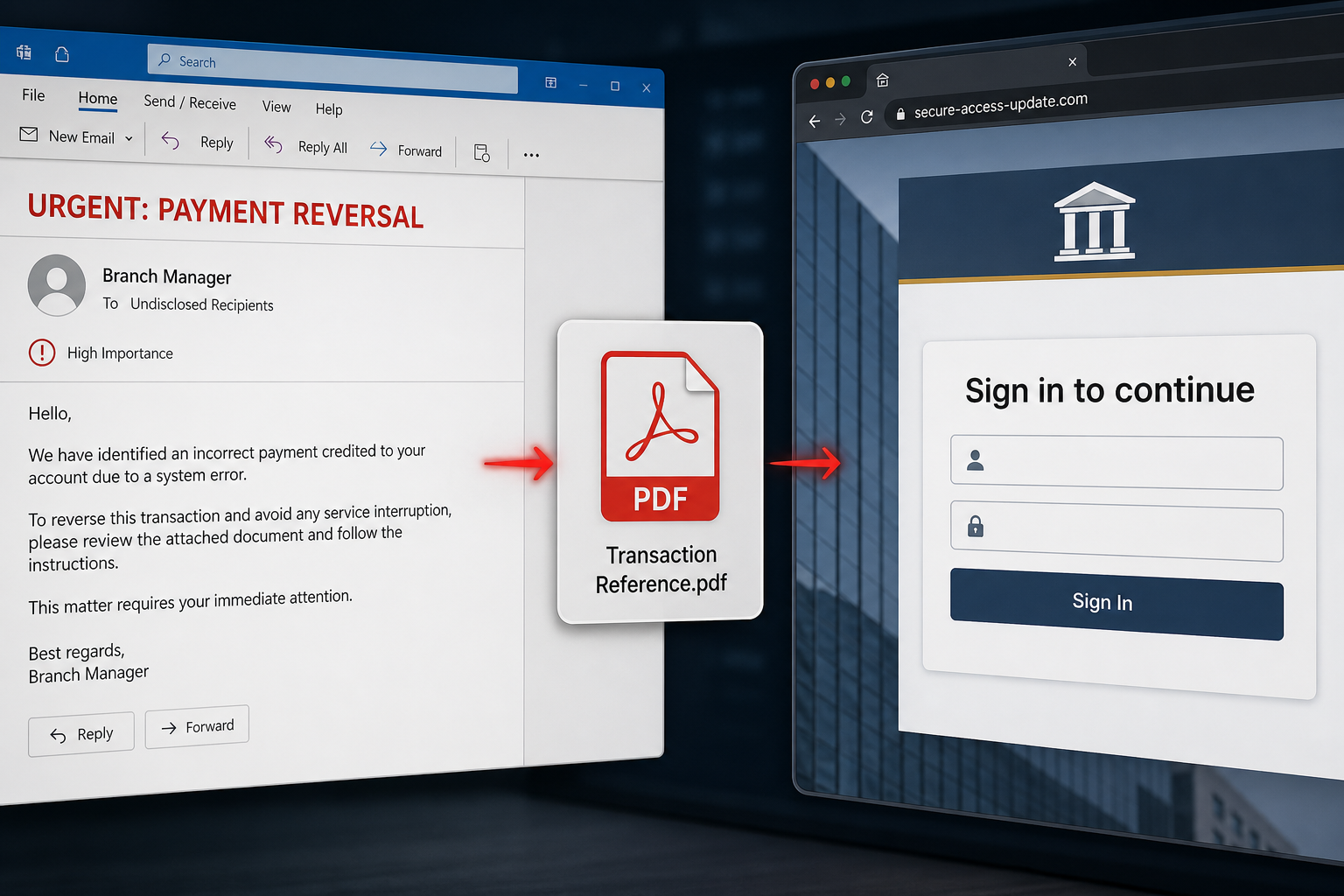
The Misdirected Payment Email Scam is disguised as a professional request from a branch manager at Union Bank of the Philippines. It claims that a payment was accidentally sent to an account handled by the recipient’s branch and asks whether the recipient is the correct person to arrange a reversal.
One version uses the subject “URGENT: Request for Payment Reversal – Transaction Reference Enclosed.” The sender says the attached PDF contains a transfer reference number and asks for immediate assistance. Financial language and a senior job title create pressure to respond before checking the message.
The PDF is not a legitimate bank document. It contains a link to a phishing website designed to imitate an email provider’s sign-in page. The attachment acts as an extra layer between the email and the fake login, making the final destination less obvious to security filters and cautious recipients.
Credentials entered on the page go to the scammers. With access to the mailbox, criminals can read private messages, reset linked accounts, impersonate the victim and send more convincing fraud from a trusted address.
The real sender address uses a domain unrelated to Union Bank. Display names, signatures, phone numbers and bank titles are just text that criminals can copy. A legitimate institution does not become responsible because scammers borrowed its identity.
Reading the message does not compromise an account. Opening the PDF alone is also different from submitting a password. The serious risk begins when the embedded link is followed, credentials are entered or an unexpected file is downloaded and executed.
How the Misdirected Payment Scam Works
Step 1: A bank official appears to contact the recipient
The email presents its sender as a branch manager and asks whether the recipient oversees payment reversals. This flattering, role-specific question makes the request feel like legitimate business correspondence.
Step 2: A financial error creates urgency
The sender claims money reached the wrong account and must be reversed quickly. The victim is encouraged to focus on preventing loss rather than verifying the sender.
Step 3: The transaction details are hidden inside a PDF
Instead of including a verifiable reference in the message, the scam instructs the recipient to open an attachment. The PDF provides a professional-looking bridge to the attacker’s website.
Step 4: The PDF link opens a counterfeit login
The linked page imitates an email service and asks the victim to sign in. A bank transaction document has no legitimate reason to request the recipient’s mailbox password.
Step 5: The stolen mailbox is abused
Attackers can search for invoices, payment conversations and reset emails. They may create hidden forwarding rules, monitor replies or impersonate the victim to coworkers and customers.
Step 6: A second fraud begins
Once criminals understand the victim’s relationships and payment routines, they can redirect invoices, request urgent transfers or target additional employees using genuine conversation history.
Red Flags in the Fake Payment Email
- An unexpected reversal request: there is no matching transaction or established banking conversation.
- Urgent financial pressure: the subject and message demand immediate help.
- A sender domain unrelated to the bank: the display name is not the real address.
- Transaction details hidden in an attachment: the PDF is used to lead the victim elsewhere.
- A generic or awkward introduction: the sender does not clearly establish why the recipient was chosen.
- A login request after opening the PDF: the destination asks for email credentials instead of displaying transaction information.
- Unverified contact details: phone numbers and signatures inside the message can belong to the scammers.
How to Verify a Payment-Reversal Request
Do not reply to the email or use its phone number. Contact the bank through the number printed on a genuine statement, the official mobile app or the institution’s independently typed website.
- Check whether the transaction exists in the real business records.
- Ask the finance team whether it recognizes the sender or payment.
- Inspect the sender’s complete email address and domain.
- Verify the supposed branch manager through an official bank directory.
- Open no attachment until the request is independently confirmed.
- Send suspected messages to the organization’s security or fraud team.
What to Do If You Received the Email
If you only read the message
Delete it or report it as phishing. Reading the email does not reveal a password and does not require a device reset.
If you opened the PDF but did not click its link
Close the file and delete it. A normal PDF containing only a link does not steal credentials by itself, although keeping the PDF reader updated remains important.
If you opened the phishing page but entered nothing
Close the tab and review the browser’s downloads. Remove anything the site attempted to download. No password change is normally required when nothing was submitted.
If you entered your email password
Treat the mailbox as compromised and secure it from a clean device before the attackers establish persistence.
- Change the email password immediately. Use a unique replacement.
- Sign out all active sessions. Remove unfamiliar devices and browser sessions.
- Enable multi-factor authentication. Prefer an authenticator app or security key.
- Check forwarding rules and filters. Remove rules that copy or hide messages.
- Review recovery methods and app passwords. Delete anything you did not add.
- Inspect sent, deleted and archived folders. Warn contacts about messages sent in your name.
- Reset reused passwords. Prioritize banking, cloud storage, work and social accounts.
If this is a business mailbox
Notify IT and the finance team immediately. Administrators should review login history, OAuth grants, mailbox rules and payment conversations. Customers or vendors may need a warning if the compromised address was used for invoice fraud.
If money was transferred
Contact the bank’s fraud department immediately using an official number. Ask whether the transfer can be recalled or frozen, preserve all messages and report the incident to the appropriate authorities.
Frequently Asked Questions
Did Union Bank of the Philippines send this email?
No. The campaign impersonates the bank, but the sender’s domain is unrelated and the attached PDF leads to phishing.
Is the PDF itself malware?
The observed PDF is used to carry a phishing link. Its primary purpose is to open a fake login page rather than directly install malware.
Can opening the fake login page steal my password automatically?
The page normally needs the victim to enter credentials. Close it without submitting information and check that no file was downloaded.
Why do scammers use a PDF?
A PDF can make the request appear official, hide the true destination from the email preview and persuade the victim to complete an extra step without examining the link.
The Bottom Line
The Misdirected Payment email is a credential-phishing trap wrapped in urgent banking language. The branch-manager identity, transaction story and PDF are props. Verify financial requests independently and secure the mailbox immediately if a password was entered.
