

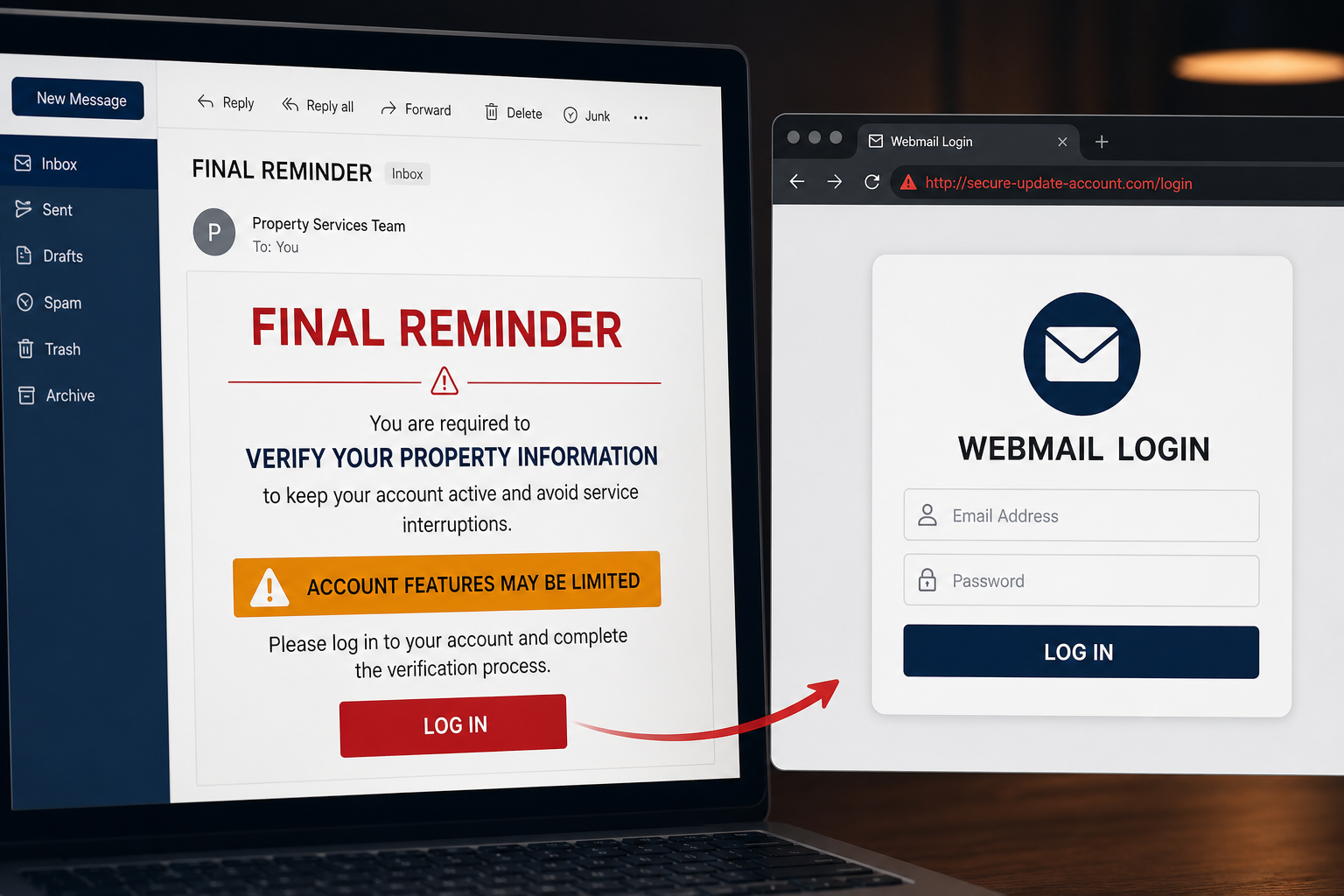
A final reminder says an error was detected in your mailbox and asks you to verify your property information. That strange phrase is not a new email-security feature—it is part of a phishing message.
The Log in button opens a generic counterfeit webmail page. Any email address and password entered there are collected by the attackers.
Overview
The Verify Your Email Property Information scam is a credential-phishing email disguised as a final account-security reminder. It claims that an error was detected in the recipient’s mailbox and that account information must be reviewed immediately.
The subject has appeared as Final Reminder Action required: Verify your Account information. Inside, however, the message switches to Verify your property information. That mismatch is a useful sign that generic wording has been copied or assembled carelessly.
The email warns that some account features may be temporarily limited if the recipient does not log in. Its button leads to a generic Webmail Login page hosted on habitatcyprus[.]com.
That domain is not an email provider. It is a legitimate website that was compromised and misused to host the phishing form. The website owner and genuine mail services are not responsible for the scam.
Anything typed into the form can be captured by the attackers. With an email password, they can search private messages, reset linked accounts and send new scams from a trusted address.
The word property is not a normal term for verifying a personal mailbox. Together with the switch between account information and property information, it suggests a generic template that was poorly adapted for this campaign. The compromised website can make the link look less obviously malicious than a newly registered random domain, but it still has no authority to process webmail credentials. The correct login page belongs to the recipient’s actual provider.
- Uses a Final Reminder subject to create urgency
- Claims a vague mailbox error was detected
- Switches between account information and property information
- Threatens temporary limits on unspecified features
- Sends the user to a generic external webmail login
Is the Verify Your Email Property Information Message Real?
No. This specific email is a confirmed phishing scam. A genuine provider would not ask users to repair a mailbox error by signing in through habitatcyprus.com or another unrelated website.
The safest check is simple: open your normal webmail app or type the provider’s address yourself. If the account has a real security problem, it will be visible there.
How the Final Reminder Phishing Scam Works
Step 1: The subject claims this is the last warning
Final Reminder suggests earlier notices were missed and that the recipient has little time left. It creates pressure without proving any previous message existed.
Step 2: A vague mailbox error is introduced
The email does not explain what failed, when it happened or which service detected it. Ambiguous language allows the same template to target many providers.
Step 3: Feature restrictions threaten inconvenience
The message says parts of the account may be limited. Because it never names those features, the recipient cannot verify the claim without clicking.
Step 4: Log in opens a compromised third-party site
The button leads away from the real provider. Using a compromised legitimate website can make the destination look less suspicious to basic filters, but it does not make the login form safe.
Step 5: The generic webmail form captures credentials
The page requests an email address and password. It does not need to perfectly imitate one provider because many users are accustomed to simple hosted-webmail screens.
Step 6: The stolen account enables follow-up attacks
Criminals can read conversations, intercept password resets and send phishing from the victim’s real address. Contacts may trust those messages more than the original campaign.
Red Flags in the Property Information Email
- The subject and body disagree about what must be verified
- Property information has no clear connection to mailbox security
- The provider and affected account features are not properly identified
- The message uses generic copyright and confidentiality text
- The Log in button points to habitatcyprus[.]com or another unrelated domain
- The landing page asks for webmail credentials outside the official service
What to Do If You Received the Email
- Do not click Log in or use the unsubscribe link
- Open webmail through the official app or a saved bookmark
- Check the account’s security and notification center
- Report the message to your provider or IT team
- Delete it after reporting
What to Do If You Entered Your Credentials
- Change the email password immediately from a clean device
- Sign out of every session and remove unfamiliar connected apps
- Enable multi-factor authentication
- Review recovery details and recent login locations
- Delete unauthorized forwarding rules and inbox filters
- Check sent, deleted and archived folders
- Warn contacts if the account sent unexpected messages
- Change any other account using the same password
If you entered financial or identity information
Contact the bank or relevant institution immediately. Preserve the email and screenshots, monitor accounts closely and follow the institution’s fraud-recovery instructions.
If you only visited the page
Close it and clear its cookies. Do not download anything. If no credentials were submitted and no file was opened, the password was not provided through the form.
Why a Compromised Legitimate Site Is Still Dangerous
A familiar-looking or long-established domain can be hacked and used to host content it never intended to serve. Reputation alone is not enough when the site has no relationship to your email provider.
Always evaluate the complete domain and the context. A property, travel or business website should not be collecting credentials for an unrelated webmail account.
Frequently Asked Questions
What does email property information mean?
Nothing specific in this campaign. The phrase is vague phishing language and likely results from a poorly adapted template.
Is habitatcyprus.com running the scam?
The site was compromised and misused to host the form. Its presence in the link does not make the site’s legitimate owner responsible for the phishing campaign.
Can reading the message steal my password?
No. The credential theft happens when information is entered on the linked page. Avoid all links and report the email.
The Bottom Line
The Verify Your Email Property Information message is a confirmed phishing scam. Its final-reminder pressure, vague mailbox error and mismatched wording lead to a counterfeit webmail login.
Do not use the email’s Log in button. Open your provider directly, and if you submitted credentials, change the password and revoke access before the mailbox is abused.
