

A mail-server notice says infrastructure upgrades have triggered mandatory account re-verification. The 48-hour deadline makes the request feel official, but the link goes to a password-stealing page.
The message is not a routine maintenance alert. It is a confirmed phishing campaign that adapts its fake login screen to match the recipient’s email provider.
Overview
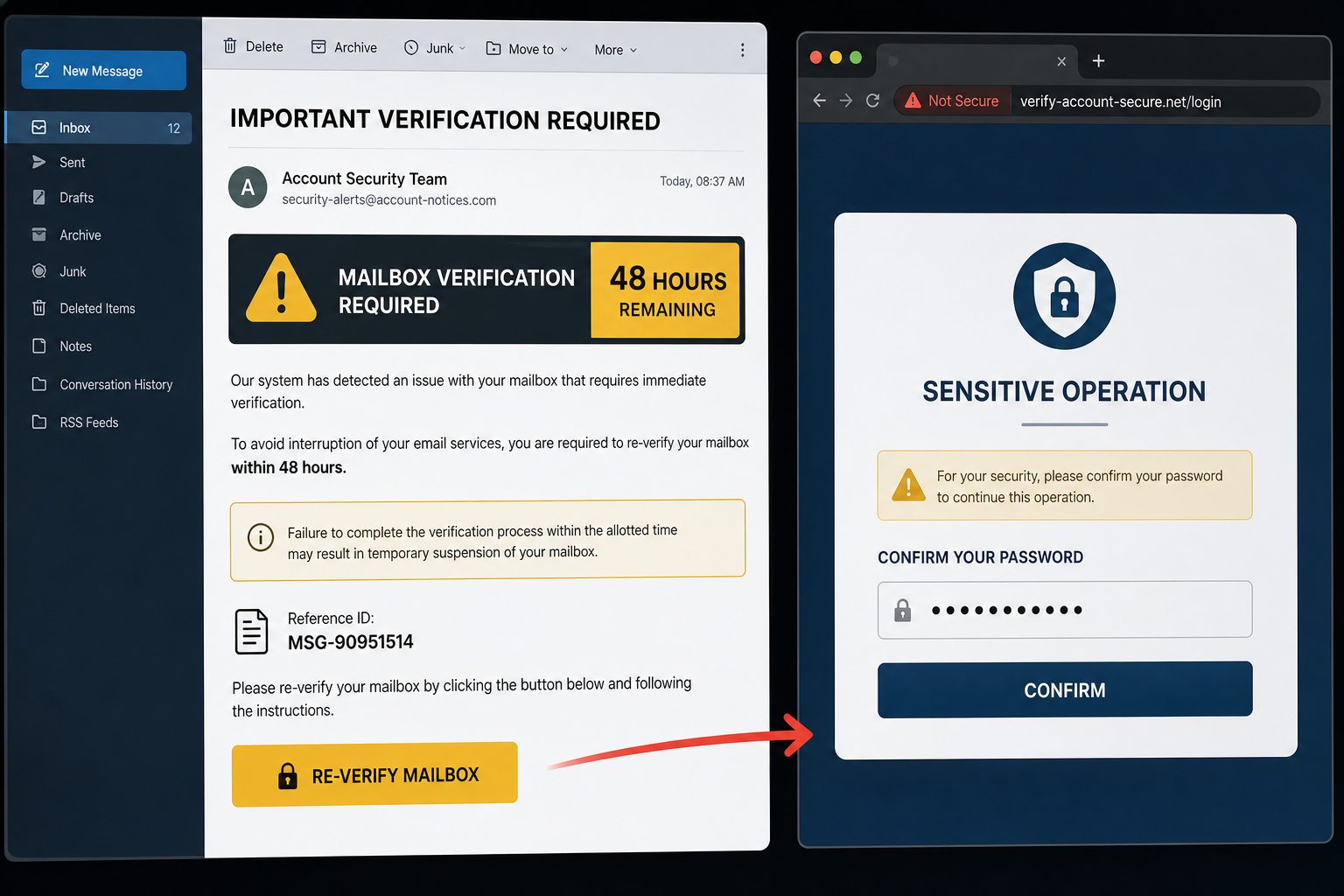
The Email Account Requires Re-Verification scam impersonates an automated mail-server notification. It claims that recent infrastructure upgrades caused a monitoring system to flag the recipient’s account for identity confirmation.
The email warns that the mailbox may be temporarily suspended unless verification is completed within 48 hours. It may use the subject IMPORTANT VERIFICATION REQUIRED FOR [recipient’s email address] and reference MSG-90951514.
Its Re-Verify Mailbox button leads to basichtmlvideotutorials[.]com, which is unrelated to the recipient’s provider. The phishing page examines the email domain and chooses an imitation login screen that matches the expected service.
A recipient using Zoho, for example, may see a Zoho-style identity page saying a sensitive operation requires password confirmation. Zoho and other imitated providers are not involved in the campaign.
Credentials entered on the page are sent to criminals. The 48-hour warning does not protect the account; it is pressure designed to stop the user from checking the domain or contacting support.
The message may include the recipient’s full email address, but that is not proof of account access. Addresses are collected from old data leaks, public websites, marketing databases and earlier phishing lists. The reference number serves the same theatrical purpose: it makes a mass-produced email resemble a tracked support case. Neither detail changes the key fact that the button opens a domain with no connection to the named mail provider.
- Claims infrastructure upgrades require re-verification
- Threatens temporary suspension within 48 hours
- Uses a personalized subject and account field
- Includes the reference MSG-90951514 to appear traceable
- Adapts the fake login to the recipient’s provider
Is the Re-Verification Email Legitimate?
No. This message is a confirmed credential-phishing scam. Legitimate providers do not send users to basichtmlvideotutorials.com or another unrelated domain to confirm a mailbox password.
If a real account requires attention, the same notice should appear after you sign in through the official app or website. Open that service independently rather than using Re-Verify Mailbox.
How the 48-Hour Re-Verification Scam Works
Step 1: The email invents a maintenance requirement
Infrastructure upgrades are technical and difficult for most recipients to verify. The vague explanation gives the scam a plausible reason for asking everyone to sign in again.
Step 2: A 48-hour deadline creates urgency
Temporary suspension sounds disruptive but reversible, which makes the threat believable. The recipient is encouraged to act quickly rather than ask an administrator.
Step 3: Personal details make the email feel targeted
The subject may include the recipient’s address, account name and service. This information can come from public records or a leaked mailing list.
Step 4: The link opens an unrelated domain
The destination does not belong to the actual mail provider. The attacker relies on the page design to distract from the address bar.
Step 5: The page imitates the expected provider
Provider-specific branding and phrases such as sensitive operation make the password prompt feel like a normal security checkpoint.
Step 6: The mailbox is hijacked
Stolen credentials can be used to read private mail, reset other accounts, add forwarding rules and impersonate the victim to colleagues or customers.
Red Flags in the Re-Verification Notice
- No provider-specific maintenance announcement can be found in the real account
- The message uses a generic automated-system identity
- A strict deadline is paired with a vague infrastructure explanation
- The button destination is basichtmlvideotutorials[.]com or another unrelated site
- The page requests a password outside the provider’s official domain
- The email says the request can be ignored while simultaneously threatening suspension
What to Do If You Received the Email
- Do not click Re-Verify Mailbox
- Sign in through the provider’s official app or bookmarked website
- Check the provider’s service-status or maintenance page
- Ask your IT team through a known internal channel
- Report and delete the phishing message
What to Do If You Entered Your Password
- Change the password immediately on the provider’s real website
- Revoke all active sessions and unfamiliar app connections
- Enable multi-factor authentication
- Confirm the recovery address and phone number
- Inspect recent sign-ins, forwarding rules and inbox filters
- Review sent and deleted mail for unauthorized activity
- Tell your IT team or contacts if messages were sent from the account
- Replace the password on other accounts where it was reused
If you clicked but did not enter anything
Close the page and report the email. Clear the site’s cookies and do not open any file it offers. If nothing was submitted or downloaded, the password was not captured through that form.
How to Verify a Real Re-Authentication Request
- Open the service directly instead of following the email link
- Check whether the exact alert appears inside the authenticated account
- Compare the destination with the provider’s official domain
- Use a password manager, which should refuse to autofill on the phishing site
- Contact support using details from the official website
Frequently Asked Questions
Will the account be suspended after 48 hours?
Not because you ignored this scam. The deadline is fabricated. Verify account status inside the real service.
Why does the page look like my provider?
The phishing site can choose a template based on the domain in your email address. Matching colors and wording do not make the domain legitimate.
Is Zoho responsible for the fake page?
No. Zoho is one of the providers that can be impersonated. The external phishing domain is not part of its service.
The Bottom Line
The 48-hour re-verification notice is a confirmed phishing trap. Its infrastructure-upgrade story, reference number and provider-themed page exist to collect mailbox passwords.
Ignore the email link and check the account directly. If you entered credentials, change them immediately, end active sessions and examine the mailbox for hidden access.

Join the discussion
0 commentsShare your experience or ask a question about this article.
Discussion
Start the conversation
Have a question or something useful to share? Add the first comment.