

The difference between fomo.family and fomoo.family is a single letter. On the fake site, that one letter can be the difference between downloading an app and emptying a crypto wallet.
Fomoo.family copied the legitimate platform’s appearance, replaced its normal call to action with “Connect wallet” and used the approval flow as the entry point for a cryptocurrency drainer.
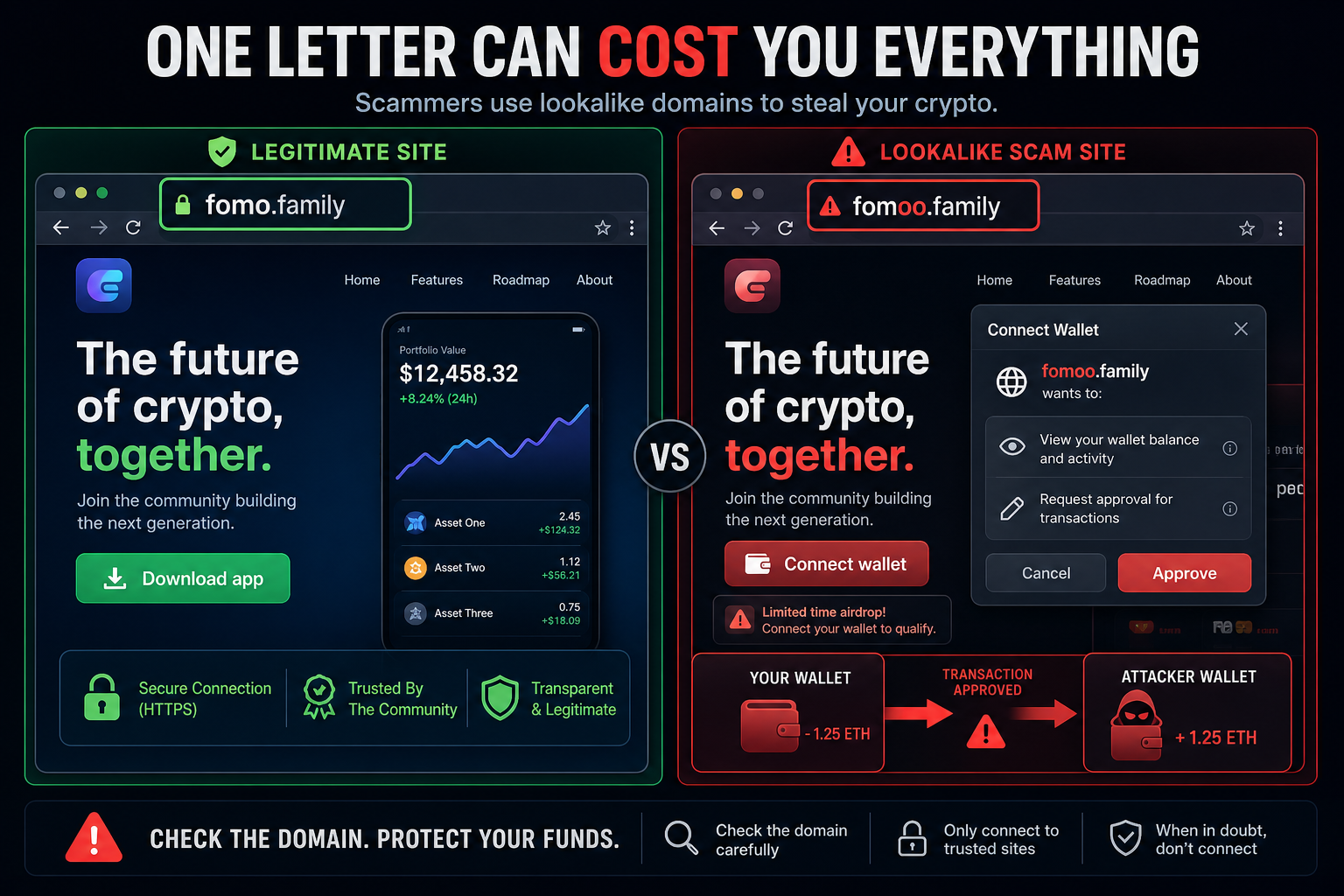
Fake Fomo Trading Platform Scam Overview
The fake Fomo trading platform operated at fomoo[.]family, a typosquatted address that inserted a second letter “o” into the legitimate domain fomo[.]family. That tiny edit is easy to miss in a social post, shortened link, mobile browser or fast-moving crypto conversation.
The imitation copied the legitimate site’s logo, layout and tagline closely enough to create immediate familiarity. The most important difference was functional: the real platform presented a “Download app” action, while the clone replaced it with “Connect wallet”. The copied design was camouflage for a completely different transaction.
Selecting the fake wallet button opened a connection dialog with many familiar wallet names, including MetaMask, Trust Wallet, OKX, Binance, Bitget, Rabby and WalletConnect. A long list creates the impression of broad compatibility and legitimacy, but a website can display brand names and wallet buttons without permission from any of those providers.
The dangerous stage begins after the connection request. A wallet drainer presents a signature or token-approval transaction that gives a malicious contract permission to move assets. The prompt may be described as verification, authentication, rewards eligibility or account activation. Once approved, automated transactions can transfer valuable tokens to attacker-controlled addresses within seconds.
Blockchain transfers are generally irreversible. There is no bank chargeback that can simply cancel a confirmed token transfer, and recovering assets from an unknown criminal address is rarely possible. The user remains in control until they approve the malicious request, which is why the site spends so much effort making that approval look routine.
The fraudulent domain was no longer resolving during a direct check, but an offline page is not a safety certificate. Scam domains frequently disappear after being reported and return under new spellings, subdomains or campaign links. The durable lesson is to verify the exact domain and understand every wallet permission before signing, not to memorize one expired address.
How the Fomoo.family Wallet Drainer Scam Works
Step 1: A promotion sends users to a lookalike domain
Victims may encounter the link in a fake social profile, X or Telegram post, malicious advertisement, compromised website or direct message. The promotion can promise trading features, an airdrop or early access.
The domain is written to resemble a known project. On a small screen, the extra “o” can blend into the rest of the address.
Step 2: The clone copies the real platform’s visual identity
Familiar colors, headings and layout reduce hesitation. Visitors feel they have reached a product they recognize even though the website is controlled by someone else.
A copied interface proves only that the scammer can reproduce public web content. It does not establish ownership or authorization.
Step 3: Download app becomes Connect wallet
The fake site changes the legitimate page’s expected action. Instead of directing visitors to official software, it asks them to connect a wallet immediately.
A wallet connection is not automatically theft, but there is no credible reason to grant permissions to a domain whose identity has not been verified.
Step 4: Familiar wallet choices lower suspicion
The dialog shows numerous well-known wallets and connection methods. This can make the popup look like standard Web3 infrastructure.
The wallet provider does not endorse every site that can trigger its connection window. The destination domain and transaction details remain the user’s responsibility.
Step 5: A malicious approval is disguised as verification
The visitor is asked to sign a message or approve a contract. Broad token allowances, operator permissions or unfamiliar contract calls can give the drainer access to assets.
Labels on the website are not the transaction. The details shown inside the wallet are the authoritative request and should be read carefully.
Step 6: Automated transfers empty valuable assets
After approval, the drainer identifies tokens it can move and submits transfers to addresses controlled by the scammer. High-value assets may be targeted first.
The fake site may display an error or loading animation while the transactions complete. Closing the page after signing does not revoke an allowance already recorded on-chain.
How to Tell the Real Fomo Site From the Fake
- The legitimate address is fomo.family; the known clone used fomoo.family with an extra “o”.
- The legitimate page offered Download app, while the clone pushed Connect wallet.
- A promotional link should match the project’s official domain character for character.
- A wallet prompt that requests token approvals is different from a simple site login.
- Copied logos, design and social proof can all be reproduced by an impersonator.
- An urgent reward or airdrop is not a reason to ignore a domain mismatch.
- The number of supported wallets does not authenticate the website.
What to Do If You Visited but Did Not Connect
Close the page and remove the link from bookmarks or messages. If no wallet was connected, no phrase or key was entered and no transaction was signed, the drainer should not have authority to move assets.
Review browser downloads and extensions if the page asked you to install anything. A crypto site should never need your seed phrase, private key or a browser extension downloaded from an unofficial file host.
What to Do If You Connected or Approved a Transaction
- Open the wallet’s activity and identify exactly which signatures, approvals and transfers were submitted.
- Use a reputable approval-management tool reached independently to revoke malicious token allowances on each affected network.
- Move remaining valuable assets to a fresh wallet if a dangerous approval, exposed seed phrase or unauthorized transfer is confirmed.
- Use a clean device and a seed phrase that has never been shared with the compromised wallet or site.
- Check every supported blockchain; a campaign may request permissions on more than one network.
- Disconnect the fake site from the wallet’s connected-app list, while remembering that disconnecting alone does not revoke on-chain approvals.
- Report the domain, receiving addresses and transaction hashes to the wallet provider, exchange and relevant abuse channels.
If a seed phrase or private key was entered anywhere, revoking approvals is not enough. The secret itself is compromised, so the safe response is to create a new wallet and transfer remaining assets before the attacker does.
How to Avoid Lookalike Crypto Sites
- Bookmark the official project site after verifying it through several independent channels.
- Read domains from right to left and look for extra letters, substitutions and deceptive subdomains.
- Use a separate low-value wallet for unfamiliar decentralized applications.
- Reject unlimited token allowances unless they are understood and genuinely necessary.
- Read the wallet’s simulation and permission summary before approving.
- Never enter a seed phrase into a webpage for support, verification, migration or rewards.
- Treat promoted social posts and direct messages as discovery leads, not proof of authenticity.
Frequently Asked Questions
Is fomoo.family the official Fomo trading platform?
No. The known fraudulent address used an extra “o” and imitated fomo.family. Its Connect wallet flow was designed to expose visitors to a crypto drainer.
Can connecting a wallet alone steal funds?
A basic connection usually reveals the public address but does not transfer assets. Theft typically follows a malicious signature or contract approval. Because prompts can be confusing, reject any request you do not fully understand.
Will disconnecting the site cancel an approval?
Not necessarily. Removing a connected site can end a browser session, but token permissions recorded on-chain remain until they are revoked or otherwise changed.
The Bottom Line
Fomoo.family was not a harmless clone or an alternative Fomo address. It copied a legitimate platform and changed the page’s purpose from downloading an app to authorizing wallet access.
Verify every character in the domain, reject unexplained approvals and act immediately if you signed. In wallet-drainer attacks, a few seconds of checking can protect assets that a blockchain transfer will not return.
