

A “Migration Action Required” email says your mailbox transfer failed and must be reviewed. The migration is invented; the login page behind the button is built to steal your email password.
The campaign impersonates Webmail Support or cPanel, uses a fake service deadline and sends recipients to an unrelated EdgeOne-hosted address rather than their real hosting control panel.
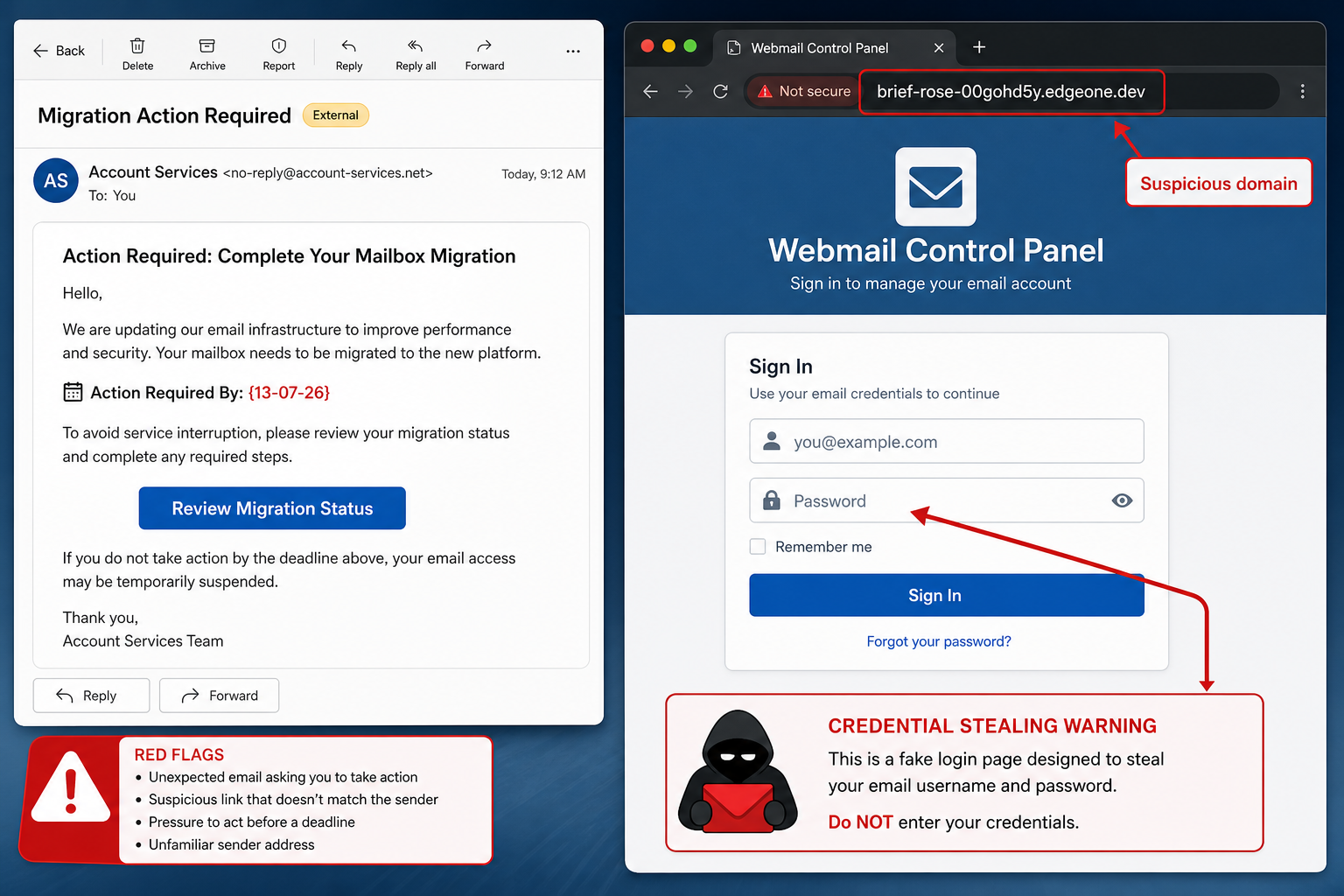
Migration Action Required Email Scam Overview
The Migration Action Required email is a credential-phishing message aimed at website owners, employees and anyone who manages mail through a hosting control panel. One observed subject line was “Panel Migration Review”. The message says a mailbox migration is stalled, failed or on hold and warns that the recipient must review its status to avoid disruption.
A button labeled “Review Migration Status” opens a fake cPanel-style login page hosted at brief-rose-00gohd5y[.]edgeone[.]dev. That address is not the recipient’s normal mail domain and does not become trustworthy because the page copies a webmail logo, color scheme or familiar sign-in form.
Any email address and password entered into the page are sent to the phishers. They can then open the mailbox, read private conversations, search for invoices or identity documents, impersonate the owner and request password resets for other services. A work mailbox can also provide a credible position from which to send payment fraud to colleagues and customers.
The email uses hosting language because a migration is technical enough to feel urgent and difficult for many recipients to verify. It may include a ticket ID such as #FEjYfIGXHVbQA9L and a postal address in Covina to look formal. Random identifiers and a real-looking address do not prove that a support case exists.
Editing mistakes expose the template. The observed message left an unresolved date placeholder, {13-07-26}, and included the phrase “If ou have already…”. Those errors show that the email was assembled in bulk, but a polished version without typos would still be fraudulent because its domain and credential request do not match the claimed service.
cPanel and the legitimate mail provider are not involved in this message. Never sign in from an unsolicited migration alert. Open the hosting account through a saved bookmark or type the known control-panel address yourself, then check whether an actual maintenance notice or support ticket appears.
How the Migration Action Required Phishing Scam Works
Step 1: The email invents a failed mailbox migration
The message says a background upgrade cannot finish without the recipient’s action. This makes the request feel like a technical requirement rather than an ordinary password check.
The recipient may worry about losing incoming messages or access to business communications, creating exactly the urgency the attacker wants.
Step 2: Support language and a ticket ID add credibility
Webmail Support, cPanel terminology and a random case number make the email resemble a hosting notification. A footer address may be added to look corporate.
These elements are plain text that anyone can copy. Authentication comes from the verified service and domain, not from formatting.
Step 3: A deadline pressures the recipient to click
The sender warns that the migration is on hold or that service may be interrupted. The date placeholder may be customized in later versions of the campaign.
A real provider should also display planned maintenance inside the customer account and offer support through independently published channels.
Step 4: Review Migration Status opens a fake login
The button leads away from the victim’s mail host to an edgeone.dev subdomain. The page imitates a control-panel sign-in and may prefill the email address to appear personalized.
Check the browser address before entering anything. Branding inside the page cannot override an unrelated hostname.
Step 5: Credentials are captured
When the victim submits the form, the username and password are delivered to the attacker. The page may show an error or redirect to the real service to hide what happened.
A failed login after submission is not reassurance. It may simply mean the phishing kit has already stored the credentials.
Step 6: The mailbox is used for wider fraud
The attacker can read messages, create forwarding rules and reset accounts linked to the email address. Business conversations provide names, writing styles and payment context for convincing impersonation.
The compromised mailbox may send more phishing from a trusted address, turning one stolen password into a larger breach.
Red Flags in the Migration Email
- The recipient did not request or receive prior notice of a mailbox migration.
- The login opens on brief-rose-00gohd5y.edgeone.dev rather than the known hosting domain.
- The email creates a threat of interruption to force quick action.
- An unresolved {13-07-26} placeholder appears in the message.
- The phrase “If ou have already” reveals poor bulk-template editing.
- A random ticket ID is shown without a matching case inside the real customer portal.
- The sender asks for a password through a link delivered in an unsolicited email.
Typos are helpful clues, but domain verification is stronger. An attacker can correct every spelling error while still sending the victim to the same credential-stealing form.
What to Do If You Received the Email
- Do not click Review Migration Status, reply to the sender or open unexpected attachments.
- Open the hosting or webmail service from a trusted bookmark and check notices inside the account.
- Contact the provider through a number or support portal published on its real website.
- Report the message as phishing and, in a workplace, send it to the security team as an attachment.
- Block the sender only after reporting; sender addresses can be forged or changed.
- Delete the message once any evidence needed for investigation has been preserved.
What to Do If You Entered Your Password
Use a known-clean device and go directly to the real mail or hosting service. Change the password immediately. If the same password was used elsewhere, replace it on every affected account with a unique one.
- Sign out all active sessions and revoke unfamiliar devices or app passwords.
- Enable multi-factor authentication and verify that the recovery email and phone are unchanged.
- Inspect mailbox forwarding, inbox rules, delegates and automatic replies.
- Check Sent, Deleted and Draft folders for messages you did not create.
- Review hosting users, FTP accounts, API tokens and website administrator accounts.
- Warn contacts if the mailbox sent unusual links, payment requests or file shares.
- Monitor financial conversations and verify any changed payment instructions by telephone.
If the stolen mailbox controls password resets for other services, secure those services next. Start with banking, cloud storage, domain registrars, payroll and administrator accounts because they can amplify the damage.
How to Check a Mailbox Migration Notice Safely
Log in through the same address you normally use. Look for an announcement, maintenance banner or open support ticket. If nothing appears, contact the provider from that portal and quote the email’s claimed case number without following its links.
Organizations should publish a known support route and tell users when migrations are planned. Unexpected credential requests become much easier to reject when the normal change process is clear.
How to Prevent Webmail Credential Theft
- Use a password manager; it will not automatically fill credentials on a mismatched domain.
- Enable phishing-resistant multi-factor authentication where available.
- Bookmark the real webmail and hosting control-panel addresses.
- Review external forwarding rules and login activity regularly.
- Do not reuse the mailbox password on websites or personal accounts.
- Teach staff to report maintenance messages that arrive outside the normal support process.
- Protect domain registrar and hosting accounts with separate credentials and recovery methods.
Frequently Asked Questions
Is the Migration Action Required email from cPanel?
No. The campaign impersonates cPanel or Webmail Support. Its button sends recipients to an unrelated edgeone.dev subdomain that captures credentials.
Did opening the email compromise my mailbox?
Simply viewing the message is usually not enough. The main risk begins when the link is followed and credentials are submitted. Running a downloaded file would require a separate malware response.
Why would attackers want an ordinary email account?
A mailbox can reset other accounts, reveal financial discussions and let criminals impersonate a trusted person. Even an account without sensitive-looking mail can be valuable for sending further phishing.
The Bottom Line
The Migration Action Required email is not a routine hosting notice. Its invented failure and fake control-panel page are a direct attempt to capture an email password.
Ignore the button, verify through the real account and change credentials immediately if they were entered. Securing the mailbox quickly can prevent a single phishing form from becoming a broader account takeover.
Here are signs that this email is a scam, even though it looks like it comes from a company you know — and even uses the company’s logo in the header:- A generic greeting is used in place of a name (eg. “customer,” “account holder,” or “dear”).
- The sender’s email address is not associated with a legitimate domain name
- The email invites you to click on a link to resolve an issue. Most reputable organizations will not ask users to disclose sensitive information (e.g. credit card numbers) by clicking on a link.
- There is a time limit or uncharacteristic sense of urgency
- Poor grammar, spelling, and sentence structure may hint that an email is not from a reputable source.
