

An email carrying the ASIC name can land at exactly the moment a business owner expects an annual review or registration renewal. That timing makes a false invoice much easier to mistake for an ordinary compliance notice.
ASIC is a real Australian government regulator. The danger comes from criminals and misleading third parties that imitate its branding, copy public business details, and turn a routine administrative task into an urgent demand for money or information.
Overview
ASIC scam emails, text messages, calls, and imposter websites target companies, business-name holders, investors, and people who have already lost money to another fraud. The Australian Securities and Investments Commission is used as a badge of authority, not because it sent the communication.
The most common business version claims that a business name must be renewed or a company annual review fee is overdue. The message can quote a real business name, address, Australian Business Number, or registration date collected from public records.
Another version promises to recover money lost to an investment, cryptocurrency platform, or online trading scheme. The supposed ASIC officer says funds have been located but a tax, bond, insurance payment, administrative fee, or wallet transfer is required before the assets can be released.
Scammers also misuse ASIC’s name in social media ads and investment groups. A fake website may display an ASIC logo, Australian Financial Services licence number, company registration, or certificate to make an unlicensed investment look government-approved.
ASIC’s official scam guidance confirms that criminals impersonate the regulator through emails, texts, calls, and websites. ASIC does regulate companies and financial services, but registration does not mean the regulator endorses an investment. A real company number can also be copied from an unrelated business and placed on a fraudulent site.
There is an additional grey area involving unsolicited commercial renewal services. ASIC warns about unsolicited renewal and review notices from third-party providers that may charge a service fee on top of the ASIC fee. Such a provider must not create the false impression that its offer is an ASIC invoice.
A notice can therefore be fraudulent, misleading, or simply an expensive optional service. The safest response is the same in all three situations: do not pay through the message. Log in to ASIC Connect or the Company Officeholder Portal independently and check whether anything is actually due.
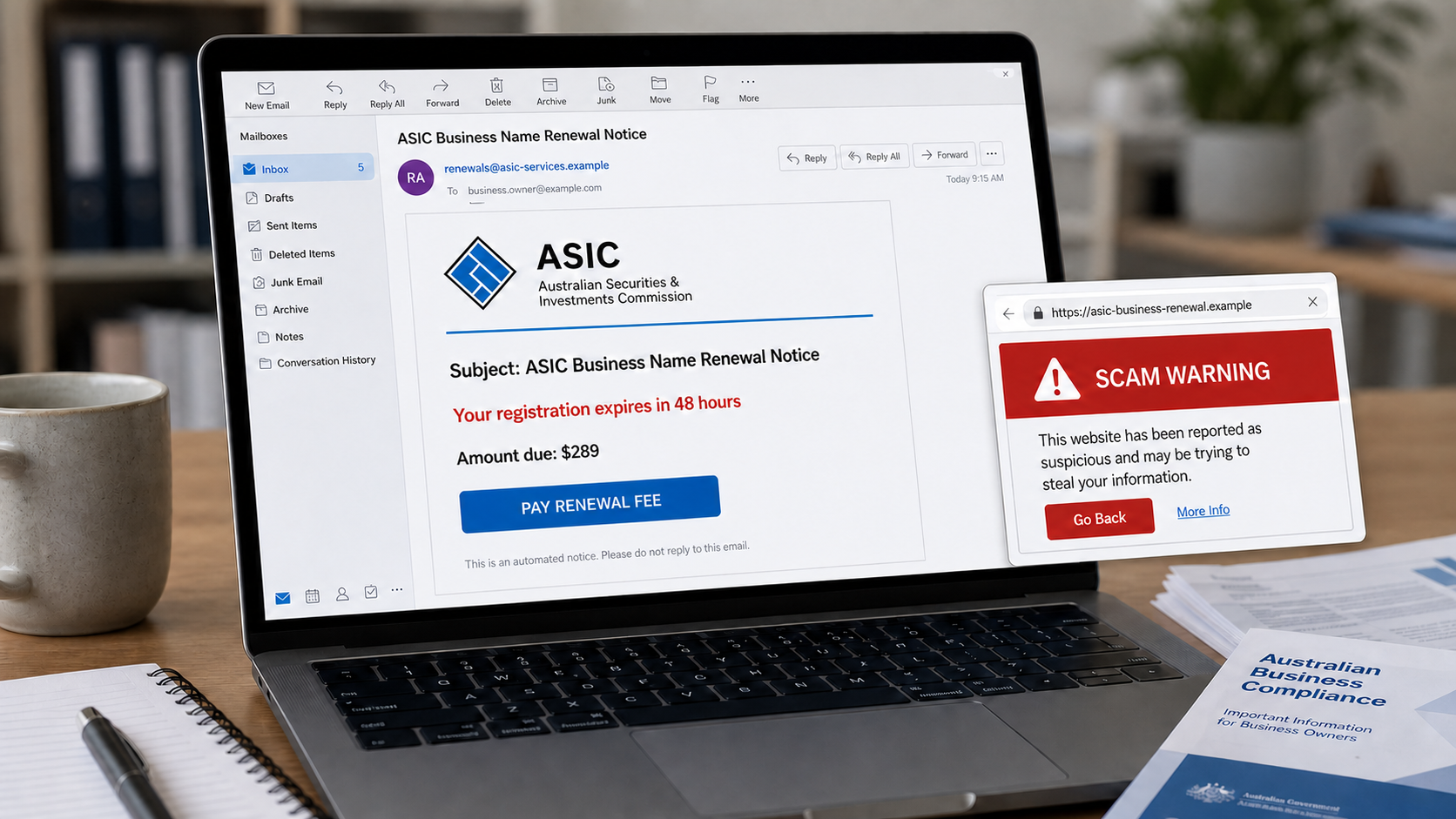
What a fake ASIC renewal email may say
Subject: ASIC Business Name Renewal Notice
Your business registration is due to expire within 48 hours. Failure to renew may result in suspension and additional penalties.
Amount due: $289
Select Pay Renewal Fee to keep your business name active.
The fee, deadline, and threat vary. The sender may attach an invoice, provide bank-account details, or place a button over a phishing link. A professional layout and correct company information do not prove the message came from ASIC.
What an ASIC recovery scam may say
Australian Securities and Investments Commission
Our investigation has identified digital assets held in your name. A refundable security bond of $4,850 is required before the recovered balance can be released.
Reply to your assigned recovery officer within 24 hours to avoid forfeiture.
That story is false. ASIC has warned that it does not collect payments to release recovered funds or assets and does not ask people to pay in cryptocurrency or stablecoins for that purpose.
Common variations of the email, text, or call
- “Your ASIC business name expires in 48 hours”
- “Company annual review invoice is now overdue”
- “ASIC Connect account requires immediate verification”
- “Pay a discounted renewal fee before midnight”
- “Funds recovered from your investment are ready for release”
- “A refundable insurance bond is required”
- “Pay tax in advance to unlock your crypto assets”
- “ASIC has approved this high-return trading opportunity”
- “Join our ASIC-certified investment group on WhatsApp”
- “Your compensation file will close if you do not respond”
- “Confirm your bank details to receive an ASIC refund”
- “Download the attached renewal letter or compliance certificate”
How to distinguish a genuine notice
Official ASIC email addresses end in @asic.gov.au. That is a useful first check, but the visible display name is not enough. Expand the sender details and inspect the complete address.
A genuine renewal reminder should correspond with a real registration and due date visible inside the official portal. ASIC advises business-name holders to check the public register and their ASIC account rather than relying on an unsolicited notice.
Official fees are published on ASIC’s website. A message that hides the breakdown between an ASIC fee and a private service charge may be an optional third-party offer presented in a misleading way.
ASIC does not cold-call to promote investments, endorse a trading course, guarantee a return, request payment to recover lost assets, or ask for card and banking details by email or telephone.
A link may contain “asic” while belonging to a completely different owner. In a web address such as asic.renewal-alert.example, the site belongs to example. The trusted word on the left does not change the registered domain.
Warning signs that deserve immediate caution
- A deadline that does not match the portal. Scammers use 24-hour or 48-hour threats to prevent independent checking.
- A fee paid to an individual or unfamiliar company. The bank-account name, crypto wallet, or payment processor does not match an official ASIC transaction.
- Promises to recover money. A regulator does not ask a previous scam victim to pay a fee so that funds can be released.
- Messaging-app migration. A supposed officer moves the conversation to Telegram, WhatsApp, Signal, or a private investment group.
- Remote-access requests. The caller asks the victim to install AnyDesk, TeamViewer, or another screen-control tool.
- Secret payment instructions. The victim is told not to contact a bank, accountant, lawyer, or family member.
- Attachments with macros or executables. A renewal document should not require software installation or security changes.
How The Operation Works
1. Public business information is collected
Company registers contain useful public information. Scammers and aggressive marketers can collect names, addresses, registration details, officer names, and renewal timing without breaching the target’s account.
When those real details appear in a letter or email, the recipient may assume the sender must have access to a government system. In reality, personalization can come from public data.
2. The message imitates routine administration
Business owners already expect annual statements, renewals, invoices, and compliance reminders. The scam is designed to blend into that paperwork rather than look like an extraordinary prize.
The subject may use words such as “final notice,” “renewal,” “annual review,” “compliance,” or “registration expiry.” A reference number and payment table add a false sense of formality.
3. Urgency replaces verification
The notice threatens deregistration, late fees, loss of a business name, or legal consequences if payment is not made quickly. A recovery scam threatens that located funds will be frozen or forfeited.
These consequences are framed to sound irreversible. The operator wants the recipient to pay first and verify later, when the bank transfer, card transaction, or cryptocurrency payment may already be difficult to recover.
4. The victim is directed away from official systems
A button can open a cloned payment portal. An attached invoice can list unrelated bank details. A caller can instruct the victim to use a cryptocurrency exchange or transfer money to a “custodial” account.
The fake page may copy government colors, accessibility menus, privacy links, and an ASIC logo. HTTPS only encrypts the connection to that site. It does not show that ASIC owns it.
5. Payment and identity data are harvested
A renewal form can request card details, billing address, phone number, director information, and an ASIC account login. The victim believes these are routine fields needed to complete the transaction.
In a recovery scheme, the operator may request identity documents and bank statements under the pretext of anti-money-laundering checks. Those documents can later support identity fraud or highly targeted follow-up scams.
6. A second fee follows the first
Recovery scams rarely stop after one payment. Once the victim pays a release fee, another obstacle appears, such as tax, currency conversion, insurance, legal certification, wallet gas, or an international-transfer charge.
The previously paid amount becomes leverage. The victim may send more because walking away would mean accepting the first loss. The promised recovered funds never arrive.
7. Stolen trust is used for investment fraud
Another branch starts with a social ad or direct message promoting an ASIC-approved opportunity. The operator copies a licence number from a real firm and shows fake account profits inside a trading dashboard.
Early withdrawals may be allowed to build confidence. Larger deposits are then blocked behind invented taxes and compliance fees. ASIC registration is presented as a guarantee even though the regulator does not endorse individual investments.
8. Malware may be delivered through the paperwork
A fake renewal letter can contain a link or attachment that downloads malware. The file may be described as a secure invoice, annual statement, or compliance form.
Opening a normal PDF is different from enabling macros, running a program, or installing a browser extension. Any document that asks you to weaken security settings or launch an unexpected executable should be closed immediately.
Why an optional renewal service can still be misleading
Not every unsolicited renewal notice is a criminal phishing attempt. Some come from private providers offering to perform a task a business could complete directly through ASIC.
The issue is presentation. ASIC says an independent provider must make clear that it is not ASIC, distinguish its service fee from the government fee, and explain that the communication is an offer rather than an invoice that must be paid.
If a private notice obscures those facts, do not assume payment is mandatory. Compare the fee and due date inside the official portal before choosing whether any third-party service is useful.
What To Do If You Responded to an ASIC Impostor
- Stop all contact and payments. Do not send an additional fee to release, insure, tax, or recover money. Block the sender and preserve the conversation.
- Contact your bank immediately. Explain that the transaction resulted from impersonation fraud. Ask whether a transfer can be recalled, a card replaced, or pending payments stopped.
- Verify your real ASIC record independently. Open ASIC Connect or the Company Officeholder Portal through the official website. Check registration dates, outstanding tasks, recent lodgements, and contact details.
- Secure exposed credentials. If you entered a password on the fake page, change it through the official service and anywhere else it was reused. Enable multifactor authentication where available.
- Protect the email account. Review sign-ins, forwarding rules, sent mail, deleted alerts, recovery addresses, and connected applications. Email access can let an attacker reset business and financial accounts.
- Respond to identity-document exposure. If you sent a driver’s licence, passport, bank statement, or company records, contact the relevant issuing body and an identity-support service for country-specific protective steps.
- Remove remote-access software. Disconnect the device from the internet if the caller still has control, uninstall the remote tool, run a complete security scan, and change important passwords from another trusted device.
- Check for changed business details. Review ASIC records and banking permissions for unfamiliar addresses, officers, agents, payees, or account changes.
- Save evidence. Keep emails with full headers, text messages, URLs, invoices, bank details, wallet addresses, transaction IDs, names used by the caller, and screenshots of the fake site.
- Report the impersonation. Notify ASIC through its official online enquiry process and report the fraud to Scamwatch and the appropriate cybercrime channel. Businesses should also alert affected staff, accountants, and suppliers.
If you paid an optional third-party renewal provider rather than a criminal, review the service terms and invoice carefully. Ask for a cancellation or refund in writing if the offer was presented misleadingly, and seek advice from an Australian consumer-protection service if the provider refuses.
Be cautious of anyone who contacts you after a report and promises guaranteed recovery for a fee. Government agencies, banks, and legitimate investigators do not need cryptocurrency or gift cards to open a case.
The Bottom Line
ASIC scam emails and texts succeed because they wrap fraud in familiar business administration and government authority. They may demand a fake renewal fee, steal an account login, deliver malware, promote an “approved” investment, or charge money to release funds that do not exist.
Do not make the decision inside the message. Check the sender, open ASIC’s official portal independently, compare the fee and due date, and remember that ASIC does not endorse investments or request payment to recover lost assets. If you already responded, contact your financial institution quickly and secure every account or document you exposed.








