

A polished memo says your policy case has been reviewed and completed. One final task remains: open the documents and accept the changes before the HR and Finance Office closes the case.
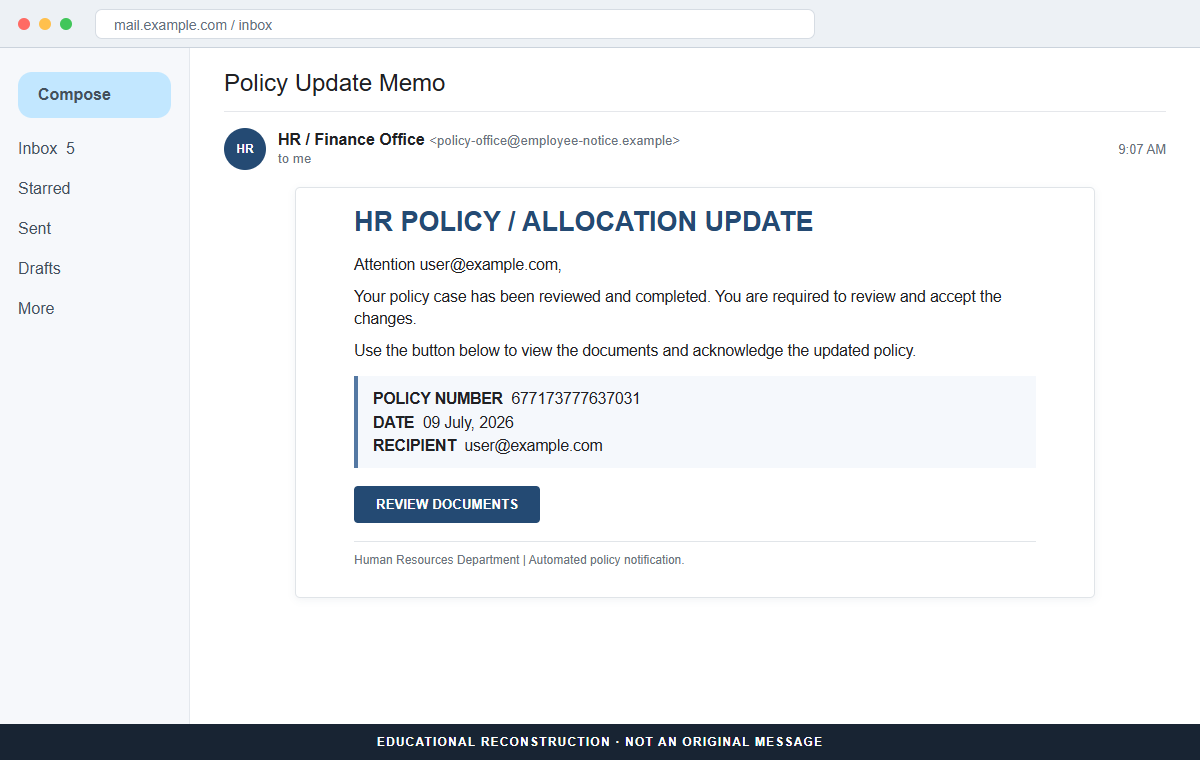
The HR Policy Allocation Update email scam is not a workplace policy notice. Its Review Documents button leads away from the employer's normal systems and toward a copied login built to collect employee credentials.
A policy number, date, recipient field, and department signature make the message feel personal. Those details are printed inside the email and do not prove that HR created a case or assigned anything to the recipient.
The safest response is to leave the message untouched and ask HR through the company directory. A real policy change should also appear in the official intranet or employee portal without requiring an unexpected email link.
Overview
The message imitates an internal HR memo
The subject says Policy Update Memo, while the heading announces HR POLICY/ALLOCATION UPDATE.
The body claims the recipient's policy case was reviewed and now requires acceptance, but it never explains what policy changed or why the employee has a case.
Generic corporate language is useful to scammers because it can fit benefits, compensation, leave, training, or departmental allocation. Curiosity fills the gap that a legitimate notice would explain.
Reference fields create false administrative authority
The email displays policy number 677173777637031, the date July 9, 2026, a recipient address, and HR/FINANCE OFFICE as the sender.
A long number looks like a database record even when it was inserted into every copy of the campaign.
A genuine case should be searchable inside the employer's system and connected to a named policy, owner, effective date, and contact. The email provides a button instead of a verifiable record.
The document button leads to credential theft
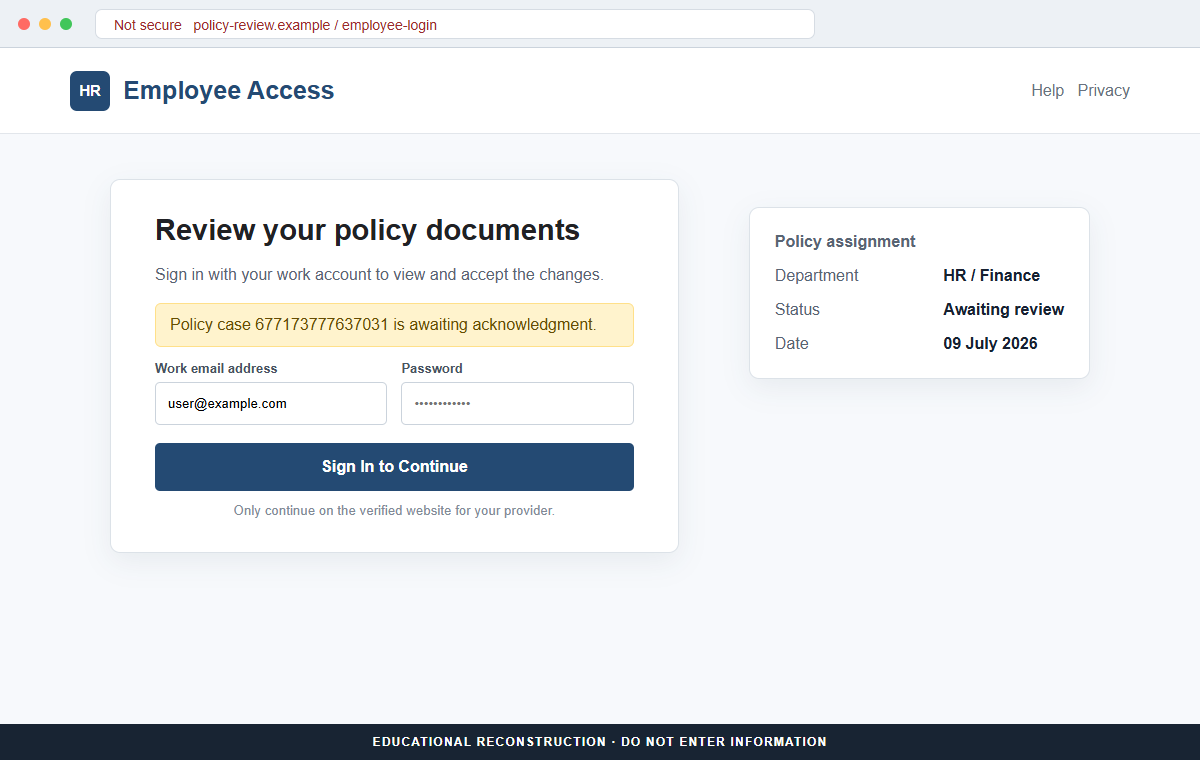
Review Documents is framed as the only route for reading and accepting the changes. The linked page can imitate Microsoft 365, a webmail service, or a company single sign-on screen and ask for the employee's current password.
Stolen workplace credentials can expose email, cloud documents, contacts, payroll tools, and password-reset messages. They can also help criminals send more convincing requests from a real company account.
- The subject is Policy Update Memo.
- The heading uses HR POLICY/ALLOCATION UPDATE.
- The email says a policy case was reviewed and completed.
- Policy number 677173777637031 is displayed.
- HR/FINANCE OFFICE appears as the sending department.
- The recipient is told to review and accept changes.
- A Review Documents button is the only practical action.
- The employer's actual portal shows no matching assignment.
Why an Unexplained HR Policy Update Gets Clicked
Employees are accustomed to mandatory acknowledgments. Codes of conduct, benefit elections, expense rules, security training, and annual handbooks often require a recorded acceptance, so the basic task sounds familiar.
The message also joins HR and Finance in one label. That combination suggests the change may affect salary, benefits, or eligibility, even though the body avoids making a specific claim that could be checked.
A recipient may worry that ignoring the memo will be recorded as noncompliance. The email never states a clear penalty, but the words required and accept are enough to make delay feel risky.
Remote and hybrid work make a generic portal plausible. Employees regularly move between identity providers, document-signing tools, benefits sites, and company applications, which gives a copied sign-in page more opportunities to look familiar.
The strongest clue is the missing business context. Real HR communications identify the policy, effective date, responsible contact, and where the same item can be found after an independent login.
How a Real HR Policy Assignment Can Be Confirmed
Open the employee portal from a saved bookmark or company intranet. Check assigned tasks, policy acknowledgments, notifications, and recent documents without using anything from the email.
Contact HR through the staff directory or an established ticketing system. Provide the claimed policy number and date, but do not forward credentials, one-time codes, or identity documents to a reply address from the message.
Inspect the full sender address and the button destination. A familiar display name can hide an external mailbox, compromised vendor account, or unrelated website that has no connection to the employer.
A legitimate single sign-on page should use the exact identity domain employees already know. Password managers often refuse to autofill on copied domains, which is a useful warning rather than an inconvenience to bypass.
Workplace phishing can lead to business email compromise. Once attackers control a real account, they may study internal conversations and send payment, payroll, or file-sharing requests that are harder for coworkers to recognize.
How the HR Policy Allocation Update Email Scam Works
Step 1: A corporate-looking memo reaches the employee
The email resembles a routine administrative notification rather than a dramatic security alert. Its formal heading and restrained layout are meant to blend into a busy work inbox.
The sender name may contain HR, Finance, Administration, or the employer's name. Only the underlying address can show where the message actually originated.
Step 2: A vague policy case creates curiosity
The recipient is told that a case was reviewed and completed, yet the affected policy is never named. The employee clicks to learn what supposedly changed.
Vagueness also makes the lure reusable across different companies and roles. Scammers do not need to know which benefits or policies the target actually has.
Step 3: Administrative details make the assignment feel recorded
A long policy number, a current-looking date, and the recipient's email address create the appearance of a personalized workflow. These values can be inserted automatically from a mailing list.
The details prove only that the sender knew where to deliver the message. They do not show that the employer's HR database contains the case.
Step 4: Review Documents opens an external page
The button can pass the recipient's email address into the URL and display it on the next screen. Seeing the correct address may feel like confirmation that the portal recognizes the employee.
In reality, the address was already available to the sender. A prefilled username is not evidence that the page is connected to a company directory.
Step 5: A copied sign-in requests the work password
The destination may imitate Microsoft, Google Workspace, webmail, or a generic employee portal. It claims authentication is needed before the confidential policy can be viewed.
The page can use HTTPS and still be fraudulent. The decisive check is the registered domain, not the padlock, logo, background photo, or recipient name.
Step 6: The credentials are submitted to the attacker
After the employee enters a password, the page may show an error and request it again. A second attempt helps the operator capture a corrected password if the first contained a typing mistake.
The visitor may then be redirected to a real login or blank document. That ending is designed to make the failed task look like an ordinary portal problem.
Step 7: The compromised account supports wider workplace fraud
Attackers can read email, search cloud files, add forwarding rules, and learn how the company approves payments or employee changes. They may impersonate the victim from the genuine mailbox.
If the same password was reused, automated login attempts can reach personal email, payroll, collaboration tools, and other services before the employee realizes what happened.
Company and Checkout Checks
Identify the real policy owner
Ask HR which team issued the change and where it appears in the official portal. A named owner should be able to explain the policy, audience, effective date, and acknowledgment requirement.
Do not rely on the reply address or telephone details in the suspicious message. Use the company directory or a known internal channel.
Check the sender and destination domains
Expand the sender address and preview the Review Documents link without opening it. Look for misspellings, unrelated hosting services, URL shorteners, and domains that merely contain the employer's name.
A third-party HR platform may be legitimate, but its use should already be documented by the employer and reachable from the intranet.
Look for the same task independently
Sign in through the usual employee portal and inspect outstanding tasks and policy notices. A genuine mandatory acknowledgment should not exist only behind one unsolicited email button.
If no assignment appears, capture the message and ask IT to investigate before anyone tests the link.
Preserve evidence for the security team
Report the email with full headers and record whether the page was opened, credentials were entered, or a file was downloaded. Precise timing helps responders inspect sign-ins and revoke sessions.
Security staff can also search for matching messages across the organization and block the sender or destination before more employees interact with it.
Warning Signs to Check Before You Act
- An HR case appears without any earlier conversation.
- The changed policy is never named.
- HR and Finance are combined into a generic office label.
- A long policy number cannot be found in the employee portal.
- The message uses required and accept without explaining the impact.
- The sender address is outside the employer's known domains.
- Review Documents is the only way to see the supposed change.
- The destination domain differs from the normal identity provider.
- The login page already displays the recipient's email address.
- The password manager does not recognize the page.
- HR cannot confirm the assignment.
- The page shows an error after a password is submitted.
A real policy update is not a secret that exists only behind an unexpected button. Confirm the assignment inside the employee portal and with a known HR contact before entering any workplace credentials.
What to Do if You Have Fallen Victim to This Scam
- Change the exposed password immediately. Open your employer's saved HR portal, company intranet, or identity-provider sign-in page through a saved bookmark or its official application, not through the HR policy allocation update message. The password entered during that hr-policy message should never be used again. Give every affected service a different replacement.
- Harden the account targeted by the HR policy message. The password entered during that hr-policy message should never be used again. Give every affected service a different replacement. Check whether this hr-policy case led to new recovery or authentication methods. Remove anything unfamiliar before enabling stronger MFA.
- End the access created through the HR policy message. Review persistent access after this hr-policy case, not only the password. Cancel unfamiliar sessions, OAuth grants, applications, and mail clients. This closes tokens that can survive a simple reset.
- Review the mailbox for changes connected with the HR policy message. Remove unknown forwarding addresses, delegates, inbox rules, filters, and automatic replies. The mailbox history surrounding that hr-policy message may expose attacker activity. Inspect sent mail, deleted items, trash, and recovery messages.
- Protect the wider account chain. Prioritize work email, payroll, benefits, and shared company files. The mailbox involved in this hr-policy phishing attempt may unlock other accounts through reset links. Change those credentials before an intruder does.
- Contact HR and IT through an established channel. Tell the security team exactly what was opened or entered, including the time and device. Ask HR to confirm that no policy acceptance, payroll update, benefit change, or identity document was submitted under your account.
- Check the device used to open the HR policy message. Use Malwarebytes after this hr-policy phishing attempt whenever an attachment or browser add-on was opened. Review installed software before returning to banking or email.
- Reduce the chance of reopening a related page. AdGuard or another reputable DNS and content blocker may stop known phishing hosts and malicious advertisements tied to the HR policy message. Keep checking destination addresses after this hr-policy incident. New campaign domains can appear faster than blocklists update.
- Report the phishing message. Use the mail provider's Report Phishing control and notify your employer's HR, IT security, and payroll teams. Keep the original headers for that hr-policy message, not only a cropped screenshot. Administrators can use them to trace and block related messages.
- Warn HR, the security team, and coworkers through a separate channel. Explain that the HR policy message may have exposed the account and ask them to distrust recent file shares, password requests, invoices, payment changes, or urgent replies until the timeline is confirmed.
- Expect follow-up fraud based on the HR policy message. Anyone citing that hr-policy message while promising recovery must be verified independently. A demand for money first is a warning sign. Seek support for this hr-policy case through known channels. A provider or incident responder verified for this hr-policy case is safer than an unsolicited fixer.
Frequently Asked Questions
Is the HR Policy Allocation Update email legitimate?
No. The documented campaign uses a fake policy assignment and a Review Documents button to lead employees toward a credential-stealing login.
Does the policy number prove the case is real?
No. Any number can be printed in an email. It matters only if the employer's official portal or HR team can find and explain the same record.
Why would scammers want a work email password?
A work account can expose internal messages, cloud files, contacts, payroll tools, and trusted access that supports business email compromise.
What if I opened the page but entered nothing?
Close it, report the email, and tell IT what happened. If nothing was submitted or downloaded, credential theft is less likely, but the destination should still be blocked.
What if I entered my workplace password?
Change it through the real identity portal, notify IT immediately, revoke sessions, inspect account rules, and replace the password anywhere it was reused.
How should HR send a real policy update?
The notice should name the policy and owner, use an approved channel, and provide an independently accessible task inside the employee portal or intranet.
The Bottom Line
The HR Policy Allocation Update email scam turns a familiar workplace chore into a credential trap. A policy number and department label make the memo look organized, but they do not connect it to the employer's systems.
Open the employee portal independently and ask HR through the company directory. If the assignment cannot be found there, do not use the email's Review Documents button.
If credentials were entered, involve IT immediately. Fast password changes, session revocation, and mailbox review can stop one stolen login from becoming a wider company incident.








