

A new purchase order is waiting in WeTransfer. The message says the document needs review and approval, a perfectly ordinary request for someone who handles sales, procurement, or vendor accounts.
The WeTransfer Purchase Order email scam copies the rhythm of a file-sharing notification but sends the recipient to a fake sign-in. The promised order is simply the reason given for collecting a business email password.
The lure is effective because an unexpected order can look valuable rather than threatening. A salesperson may click quickly to avoid missing a customer, while an accounts team may assume a colleague already discussed the request.
WeTransfer itself warns that fake emails and fraudulent pages imitate its service. A familiar name does not prove that a transfer exists, and an unexpected financial document deserves verification with the sender before it is opened.
Overview
The email presents an attractive business opportunity
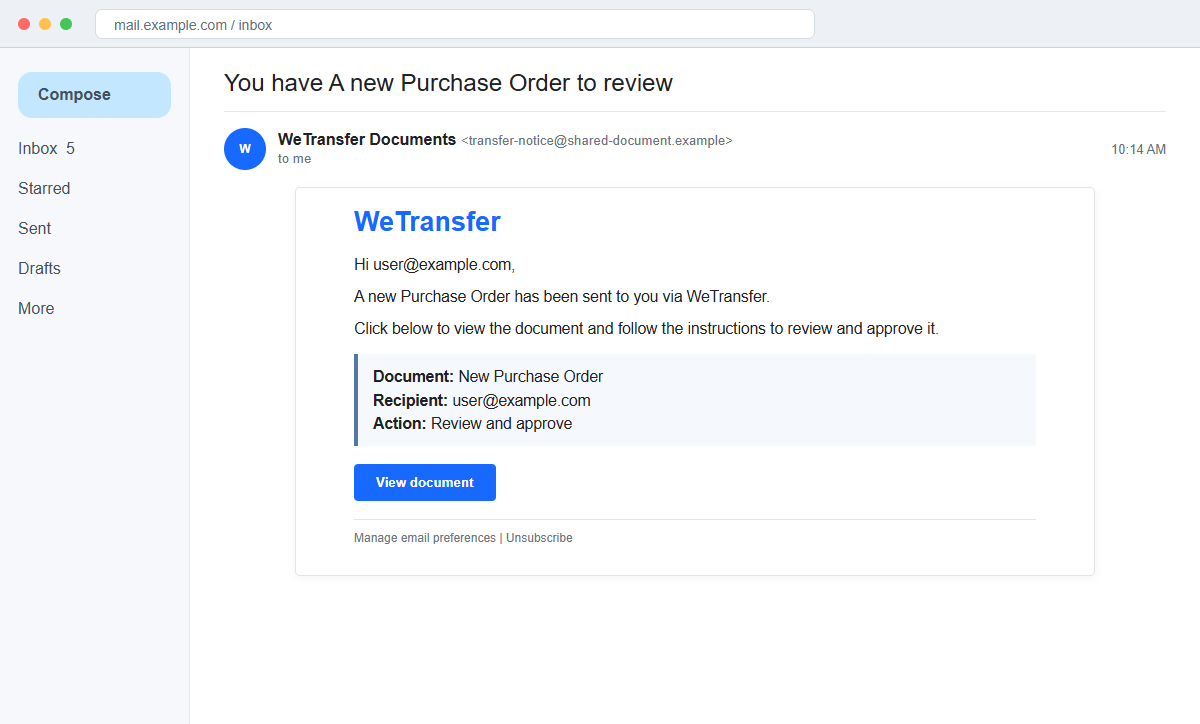
The subject says You have A new Purchase Order to review. The body claims a new order was sent through WeTransfer and asks the recipient to view, review, and approve the document.
Unlike a password-expiration scare, the message relies on curiosity and possible revenue. That positive expectation can lower the recipient's guard just as effectively as urgency.
Familiar file-sharing details make the notice blend in
The email uses the WeTransfer name, a recipient address, a View document button, and footer links such as Manage email preferences and Unsubscribe. These design elements can be copied into any HTML message.
A genuine notification should identify the sender and lead to a recognized WeTransfer address. Footer links and polished formatting do not authenticate the route.
The real target is the recipient's mailbox
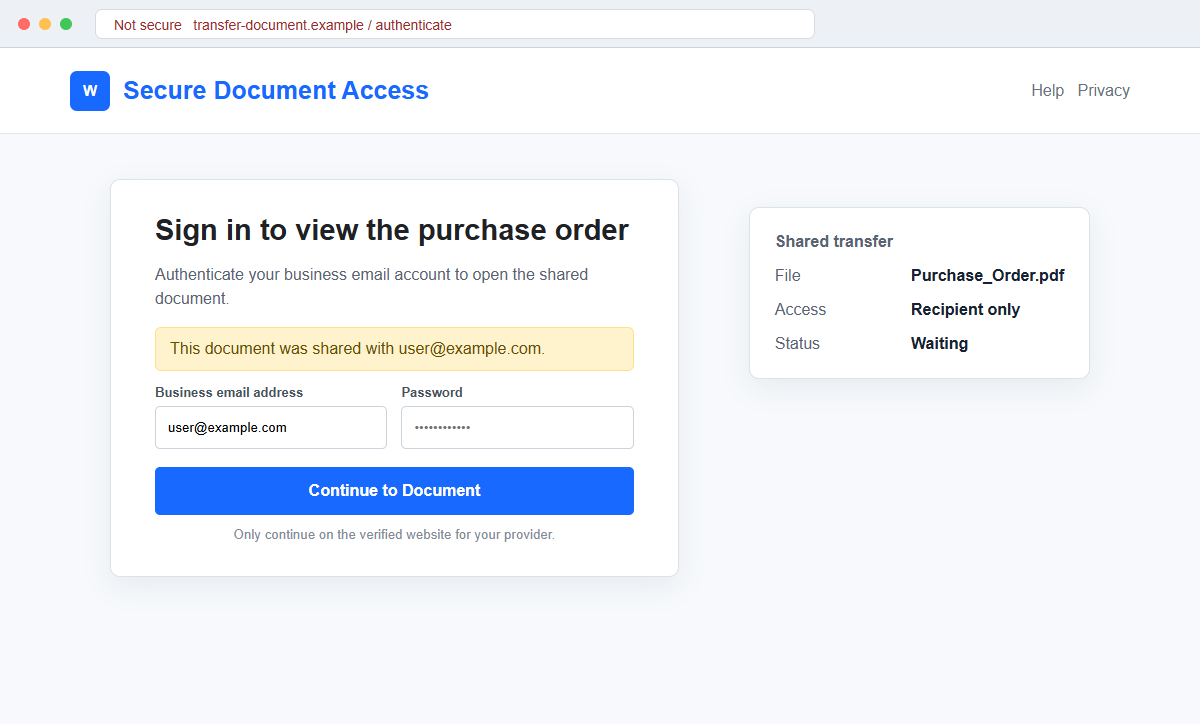
The linked page may detect the recipient's email domain and display a matching Google, Microsoft, or webmail login. It claims the account must be authenticated before the order can be opened.
Anything entered on that copied page goes to the campaign operator. The attacker can then search the inbox for invoices, vendor contacts, payment history, and real file-sharing notifications.
- The subject announces a new purchase order.
- The message claims WeTransfer delivered the file.
- The order is supposedly ready for review and approval.
- A View document button controls access.
- The recipient address is repeated in the body.
- Footer preference and unsubscribe links imitate a real service email.
- The message may not clearly identify the human sender.
- The document route ends at a copied email login.
Why Purchase Orders and File Transfers Make Strong Lures
Purchase orders are routine, time-sensitive, and financially important. Employees may receive them from new customers, shared mailboxes, overseas suppliers, and contacts whose exact addresses are not immediately familiar.
File-sharing platforms also sit between companies. A recipient may trust the platform branding even when they do not recognize the person who supposedly uploaded the document.
Scammers exploit the gap between curiosity and verification. The employee wants to see the buyer, quantity, delivery date, and price before deciding whether the request is real, but the credential form appears first.
A prefilled work address makes the login seem connected to the transfer. That address can be copied directly from the destination mailbox and placed into the phishing URL without contacting any identity provider.
Once a business inbox is compromised, the attack can move beyond one password. Real purchase orders and invoice threads provide the context needed for payment diversion, vendor impersonation, and targeted phishing.
What WeTransfer Says About Suspicious Transfer Emails
WeTransfer advises users to be cautious when an unexpected transfer contains invoices, orders, contracts, or other financial material. It recommends verifying the sender through a separate trusted channel before opening the files.
Official guidance says a fake email may lead somewhere other than wetransfer.com or we.tl, ask the recipient to visit another site, or request an email password before a file can be accessed.
A real WeTransfer service notification normally identifies who sent the transfer. Wording that refers only to someone, or fails to name a recognizable sender, is a strong reason to stop.
There are two possible risks: a completely fake WeTransfer email can lead to a phishing site, while a real transfer can still contain a malicious or deceptive file. Confirming the domain is necessary but not sufficient.
For this campaign, the observed destination was not active during later review. Its disappearance does not make the email safe, and replacement links can reproduce the same adaptive login on another domain.
How the WeTransfer Purchase Order Email Scam Works
Step 1: A new order appears without prior context
The email says a purchase order has been shared and is ready for approval. It may arrive in a sales, accounts, or general business inbox where unsolicited inquiries are normal.
The supposed buyer is vague or missing. The absence is easy to overlook because the recipient expects the document to reveal the details.
Step 2: WeTransfer branding supplies borrowed trust
The layout resembles a familiar transfer notice, with a clear call-to-action and service-style footer. The criminal does not need control of WeTransfer to copy its visual language.
The From display name can also say WeTransfer while the actual address belongs to a disposable, compromised, or unrelated account.
Step 3: The employee is asked to review and approve
Approval language makes the task feel operational. A recipient may assume that delaying the review could hold up a sale, shipment, or supplier relationship.
Real purchase approvals should follow the company's normal procurement controls. A file-sharing email cannot replace vendor verification or delegated authority.
Step 4: View Document leaves the expected service
The button can pass through a redirect or tracking page before reaching an unrelated domain. On mobile, the full address may be difficult to see without deliberately inspecting it.
A legitimate transfer should not require the recipient to trust an unknown website simply because the first email displayed a recognized logo.
Step 5: An adaptive sign-in page appears
The page may read the domain after the @ symbol and choose a matching Microsoft, Google, or webmail design. The employee's address can already be displayed in the username field.
That personalization is generated from the link. It does not prove that the page contacted the employer's account system.
Step 6: The password is captured before any document exists
The visitor enters credentials to continue, and the form sends them to the attacker. An error or loading animation may appear while the page stores the submission.
The user may eventually reach the real WeTransfer home page or an unrelated PDF. This redirect can make the original login look like a temporary session problem.
Step 7: The mailbox is used for invoice and vendor fraud
Attackers can monitor conversations, collect signatures, and learn which employees approve orders or payments. They may create hidden forwarding rules so future replies are copied to them.
A message sent later from the genuine account can request a bank-detail change or distribute the same phishing link to trusted contacts.
Company and Checkout Checks
Confirm the human sender
Contact the named customer, vendor, or colleague using a telephone number or conversation you already trust. Ask for the transfer title and file names without replying to the suspicious notification.
If no person is identified, treat the missing sender as evidence against the message rather than a reason to open it.
Inspect the transfer address
Preview the button and check every redirect. A claimed WeTransfer download should not deliver credentials to an unrelated domain or request a work email password on a copied page.
Typing wetransfer.com directly is safer than following the message, but an unexpected transfer should still be confirmed before any file is opened.
Apply normal purchase-order controls
Verify the company, buyer, requested goods, tax details, shipping address, and approval authority. New bank details or unusual delivery instructions require a second channel.
A document can look professional and still contain fabricated business information. The file is evidence to verify, not proof of a customer relationship.
Report both the email and transfer
Use the mail provider's phishing control and WeTransfer's abuse-reporting route when applicable. Preserve the message headers, URLs, sender details, and file names.
Notify IT and finance quickly if credentials were entered so sessions can be revoked and invoice conversations can be reviewed.
Warning Signs to Check Before You Act
- A purchase order arrives without a prior buyer conversation.
- The human sender is missing or unrecognizable.
- The message says review and approve without describing the order.
- The sender address does not use a recognized WeTransfer domain.
- The button leads somewhere other than wetransfer.com or we.tl.
- Another website appears before the file can be viewed.
- A work email password is requested for a shared document.
- The login page changes its branding to match the recipient's domain.
- The username is prefilled from the email link.
- The password manager refuses to autofill.
- The vendor cannot confirm sending the order.
- The page redirects to a real service only after credentials are entered.
An unexpected order may feel like an opportunity, but a real buyer can confirm it through a separate conversation. Do not trade a business email password for the chance to see an unverified document.
What to Do if You Have Fallen Victim to This Scam
- Change the exposed password immediately. Open wetransfer.com, the known sender's verified contact channel, or your organization's normal document portal through a saved bookmark or its official application, not through the WeTransfer purchase order message. Retire the credential associated with that wetransfer-purchase message completely. A unique replacement limits damage if the password stolen through that wetransfer-purchase message is tested elsewhere.
- Recover the account through the company mail and file-sharing portals, not through the message. Retire the credential associated with that wetransfer-purchase message completely. A unique replacement limits damage if the password stolen through that wetransfer-purchase message is tested elsewhere. The account involved in this wetransfer-purchase case needs an MFA review. Delete recovery methods or app passwords that the owner cannot identify.
- End the access created through the WeTransfer purchase-order message. Sign out all other sessions from the company mail and file-sharing portals, revoke unfamiliar OAuth grants, and reconnect trusted mail applications only after the password change. This closes tokens that can survive a simple reset.
- Review the mailbox for changes connected with the WeTransfer purchase-order message. Remove unknown forwarding addresses, delegates, inbox rules, filters, and automatic replies. Check folders an intruder might use after this wetransfer-purchase incident, including sent, trash, deleted, and archive. Note unrequested recovery events.
- Protect the wider account chain. Prioritize business email, cloud files, and vendor payment workflows. Map the accounts dependent on the inbox touched by that wetransfer-purchase message. Replace credentials wherever that address approves password recovery.
- Verify the supposed sender and purchase order separately. Call the vendor or colleague through a trusted number and ask whether the transfer and order are genuine. Warn procurement and finance not to approve invoices or bank-detail changes that arrived through the compromised conversation.
- Check the device used to open the WeTransfer purchase-order message. A download linked to that wetransfer-purchase message deserves a full Malwarebytes scan. Quarantine detected threats and inspect the browser for unknown extensions.
- Reduce the chance of reopening a related page. AdGuard or another reputable DNS and content blocker may stop known phishing hosts and malicious advertisements tied to the WeTransfer purchase-order message. A domain related to this wetransfer-purchase case may be replaced without warning. Read the address even when a security filter shows no alert.
- Report the phishing message. Use the mail provider's Report Phishing control and notify WeTransfer, your email provider, and your organization's IT or security team. Archive the full source of the message involved in this wetransfer-purchase incident. Sender paths and authentication results may reveal useful infrastructure.
- Warn sales staff, suppliers, and the security team through a separate channel. Explain that the WeTransfer purchase-order message may have exposed the account and ask them to distrust recent file shares, password requests, invoices, payment changes, or urgent replies until the timeline is confirmed.
- Expect follow-up fraud based on the WeTransfer purchase-order message. Details from this wetransfer-purchase incident may be reused in a recovery pitch. End the conversation if the stranger wants payment upfront. For help after this wetransfer-purchase phishing attempt, use the real provider, bank, employer, police, or a verified incident-response professional.
Frequently Asked Questions
Is the WeTransfer purchase order email real?
No. The documented email impersonates a transfer notification and uses the promised purchase order to send recipients toward a fake login.
Does a WeTransfer logo prove the file exists?
No. Logos, buttons, and footer links can be copied. Verify the sender and inspect the actual destination domain before opening anything.
Can a genuine WeTransfer file still be dangerous?
Yes. A real transfer may contain a malicious or deceptive file, so unexpected financial documents should still be confirmed with the sender.
Why does the fake page know my email address?
The address can be embedded in the phishing link because the attacker already needed it to send the message. It is not proof of a live account connection.
What if I clicked but did not sign in?
Close the page, report the message, and check whether anything downloaded. If no data was submitted and no file ran, account theft is less likely.
What if I entered my business password?
Change it immediately, revoke sessions, inspect forwarding rules, alert IT and finance, and warn contacts about possible messages from the compromised account.
The Bottom Line
The WeTransfer Purchase Order email scam hides a password trap behind a potentially valuable business document. The service branding is familiar, but the sender, transfer, and login route do not withstand independent verification.
Call the supposed sender and inspect the destination before opening an unexpected order. Real procurement still requires buyer, company, delivery, and payment checks.
If credentials were submitted, secure the mailbox and alert the business quickly. A stolen inbox can turn one fake purchase order into credible invoice fraud against customers and coworkers.

Join the discussion
0 commentsShare your experience or ask a question about this article.
Discussion
Start the conversation
Have a question or something useful to share? Add the first comment.