

Wells Fargo is supposedly implementing an important security update, and your account must be reviewed to keep uninterrupted access. Ignore the request, the email warns, and temporary limitations may follow.
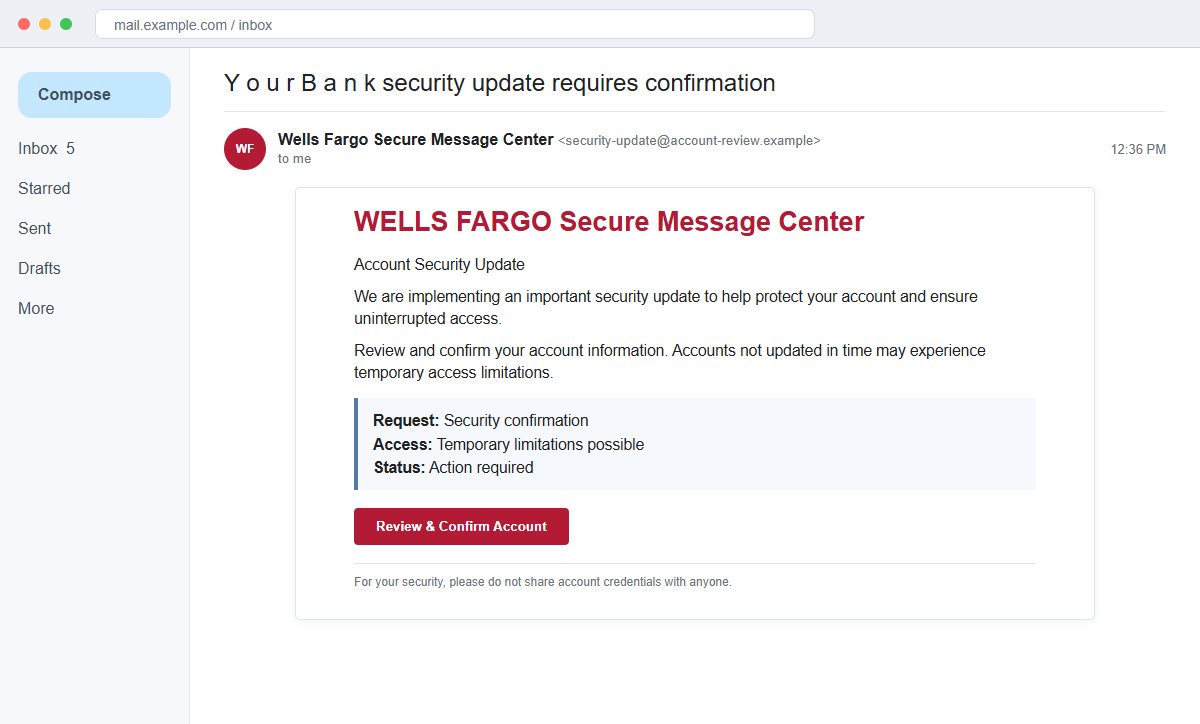
The Wells Fargo Account Security Update email scam is a phishing message, not a bank security procedure. Review and Confirm Account leads toward a copied sign-in where banking credentials can be captured.
The campaign even manipulates the subject with spaced letters and lookalike characters, a tactic that can make automated filtering harder while preserving the message's meaning for a human reader.
Do not use the button to check whether the warning is real. Open the Wells Fargo app or type the bank's address yourself, then review alerts and contact the bank through a verified number.
Overview
The email invents a mandatory security update
The message presents itself as the Wells Fargo Secure Message Center and says an important update is being implemented. Recipients are required to review and confirm account information for continued access.
A bank may introduce security changes, but an unsolicited email does not establish that a particular customer must re-enter credentials. The same alert should be visible inside authenticated online banking.
Temporary restrictions create a believable consequence
The email avoids an extreme claim that the account is already closed. Instead, it says unverified accounts may experience temporary access limitations, which sounds measured and procedural.
That restrained warning still creates urgency. Customers may click to prevent inconvenience before checking whether the message came from a wellsfargo.com address.
The copied sign-in can collect layers of banking data
The phishing page can request a username and password, then ask for card details, Social Security information, or a one-time access code under the pretext of identity verification.
A code sent by the real bank can authorize an attacker's login or transaction. It should never be entered into a page reached through a suspicious message or read to an unsolicited caller.
- The email claims to come from a Secure Message Center.
- An important security update is supposedly underway.
- The recipient must review and confirm account information.
- Temporary access limitations are threatened.
- Review and Confirm Account is the primary button.
- The subject uses unusual spacing and lookalike characters.
- The message tells customers not to share credentials while requesting a risky click.
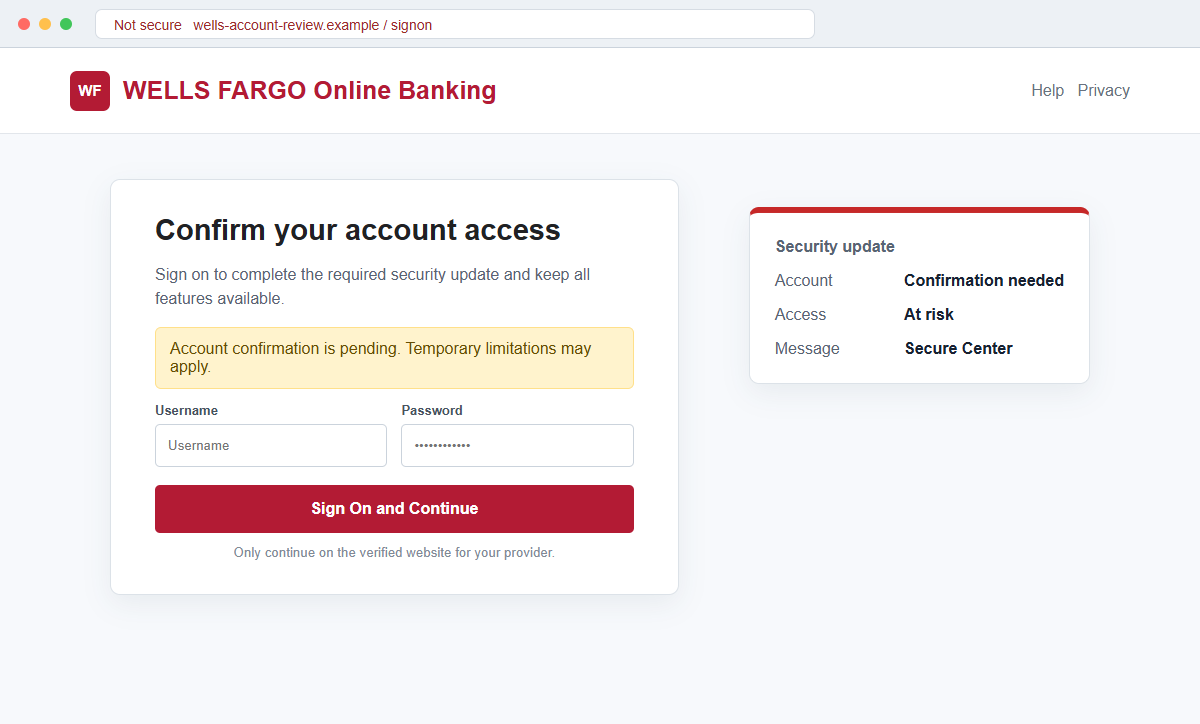
- The destination imitates online banking on an unrelated domain.
Why a Bank Security Update Can Feel Routine
Banks regularly send fraud alerts, policy notices, and secure messages. Customers are trained to respond quickly when account access or suspicious activity is involved, which gives impersonators a familiar script.
The scam uses prevention rather than a fabricated charge. The recipient is invited to protect the account before anything goes wrong, making the button feel like a responsible action.
The Secure Message Center label sounds especially credible because banks do use protected communication systems. A copied label does not prove that the email originated from that system.
Unicode lookalike characters can resemble ordinary letters while producing a different underlying subject string. This technique may help a campaign vary messages and evade simple text-based filters.
The most important security step happens outside the email. A customer can open the official app, inspect messages and alerts, and call the bank without trusting the sender's link.
What Wells Fargo Says About Phishing Messages
Wells Fargo states that it will not ask customers to provide an online banking password, PIN, or one-time access code through an email or text. A request for those secrets should be treated as phishing.
The bank advises recipients who did not interact with a suspicious message to forward it to reportphish@wellsfargo.com and then delete it. Customers who clicked, shared information, or sent money should contact the bank immediately.
The official application and wellsfargo.com are the reliable places to review account alerts. A real security requirement should remain visible after an independent sign-in.
Customers should also compare the timing and wording with messages visible inside online banking. An email-only instruction that cannot be found after signing in has not been authenticated by the account.
Sender addresses outside wellsfargo.com, generic greetings, urgent threats, and unexpected links are recognized warning signs. The display name alone can be forged.
The phishing destination associated with this campaign was inactive during later analysis. Bank-themed campaigns frequently replace domains, so an offline page should not be treated as proof that the email was harmless.
How the Wells Fargo Account Security Update Email Scam Works
Step 1: A secure-message notice enters the inbox
The email uses Wells Fargo branding and a security-oriented subject. Spaced characters or visual substitutes can make the line look unusual without preventing the recipient from understanding it.
The actual sender may have no relationship to the bank. A display name can be changed freely, and even the From address can be spoofed in poorly authenticated mail.
Step 2: A system update creates a neutral explanation
The message says the bank is implementing improvements rather than responding to a specific fraudulent charge. That story avoids details the customer could immediately disprove.
Security updates are broad enough to target any customer. The campaign does not need to know the recipient's balance, card, or account type.
Step 3: Access limitations add pressure
The recipient is warned that delayed verification may temporarily limit account features. Preventing a lockout now appears easier than dealing with support later.
A genuine restriction should be visible in the official app and account. An email warning cannot replace that authenticated record.
Step 4: Review and Confirm Account opens a fake portal
The button leads away from the bank's known domain. The page can copy colors, typography, sign-on fields, and security language from legitimate banking pages.
HTTPS means the connection to that domain is encrypted. It does not mean Wells Fargo owns or approved the website.
Step 5: The page collects the banking login
The visitor enters a username and password to continue. The page may claim the information is required to associate the account with the new security system.
The credentials are transmitted to the attacker, who can attempt a real login while the victim remains on the fake page.
Step 6: Additional verification secrets are requested
A second screen may ask for card numbers, contact details, identity data, or a one-time access code sent by the real bank. Each field helps the attacker overcome another control.
A real code may mention that bank employees will never request it. Read the complete message and do not use the code to finish an unsolicited email flow.
Step 7: The attacker attempts account takeover and theft
With enough information, criminals can add a payee, attempt transfers, change contact details, or gather data for identity fraud. They may call the victim while posing as the fraud department.
Stolen credentials can also be tested against other sites if the password was reused. The response must include every account that shared it.
Company and Checkout Checks
Open the bank independently
Use the official Wells Fargo app or type wellsfargo.com yourself. Check secure messages, profile alerts, card status, recent transactions, and sign-in activity.
If no matching requirement appears, the email has not established that any update is needed.
Inspect the sender and link
Expand the full From address and preview the button. Misspellings, extra words, unrelated domains, URL shorteners, and raw IP addresses are strong warning signs.
Do not paste the link into another browser to test it. Preserve it for the bank or security team without loading the destination.
Contact Wells Fargo through a verified route
Use the number on the back of the card or inside the official app. Ask whether a security update or restriction exists and report the suspicious message.
Never call a number printed in the email. A fake support line can continue the attack by requesting codes or remote access.
Confirm what information was exposed
Record whether the page received a username, password, card details, PIN, Social Security information, or one-time code. The bank needs an accurate list to choose the right protections.
Review other accounts for password reuse and preserve screenshots, headers, URLs, and transaction details for reporting.
Warning Signs to Check Before You Act
- A security update requires action only through an email button.
- The subject contains strange spacing or lookalike letters.
- The sender address is not a recognized Wells Fargo domain.
- The message uses a generic greeting.
- Temporary restrictions are threatened without an in-app alert.
- The link leaves wellsfargo.com.
- A copied bank sign-in appears on an unrelated domain.
- The password manager does not recognize the page.
- The form requests a PIN or full card details.
- A one-time access code is needed to complete the email flow.
- A caller pressures the customer to share the code.
- The official app shows no matching security task.
A bank security message should survive independent verification. If the requirement disappears when you open the real app, do not return to the email. Report it through Wells Fargo's verified channels.
What to Do if You Have Fallen Victim to This Scam
- Change the exposed password immediately. Open the Wells Fargo mobile app or wellsfargo.com typed directly into your browser through a saved bookmark or its official application, not through the Wells Fargo account security update message. Retire the credential associated with that wells-fargo message completely. A unique replacement limits damage if the password stolen through that wells-fargo message is tested elsewhere.
- Call Wells Fargo through the number on the card or a verified statement. Report that online-banking credentials may have been entered on a copied security page and ask the fraud team to secure the profile and review recent transfers. Request a case number and write down the representative’s instructions. Keep that record with the original alert.
- Reset the banking password and username from a clean device, then replace any reused credentials elsewhere. Re-enroll multifactor authentication and remove telephone numbers, devices, or transfer recipients you did not add.
- Review checking, savings, credit-card, bill-pay, Zelle, and wire activity. Pending transfers and newly linked external accounts can be easier to stop than completed payments, so report every unfamiliar change immediately.
- Secure the email account connected to online banking. End active sessions, remove forwarding rules, and protect it with a passkey or authenticator app because an intruder may intercept bank alerts and reset links.
- Contact Wells Fargo immediately through a verified number. Use the number on the back of your card or inside the official banking app. Report any username, password, card data, PIN, or one-time code shared and ask the bank to secure online access and review recent transactions.
- If the fake security update downloaded software or requested remote access, disconnect that device and run a complete Malwarebytes scan. Use another clean device for banking until the inspection is complete.
- AdGuard or another reputable blocking service can prevent some known banking-phishing pages from loading. Always type the bank address yourself because a newly created lookalike may not appear on blocklists yet.
- Report the phishing message. Use the mail provider's Report Phishing control and notify Wells Fargo through its verified fraud channels, your email provider, and IC3 if money was stolen. Before deleting this wells-fargo phishing attempt, save the complete message and its headers. Those records help when several employees received the same lure.
- Warn joint account holders and the bank about the exact compromise window. They should distrust calls or texts that mention the security update and request a one-time code, transfer, or refund payment.
- Reject callers who promise to recover bank funds by moving money into a safe account. A bank will not ask for gift cards, crypto, remote access, or a transfer to protect the balance.
Frequently Asked Questions
Is the Wells Fargo Account Security Update email real?
No. The documented campaign impersonates a bank security notice and directs recipients to a fraudulent login designed to capture banking credentials.
Will Wells Fargo ask for my password by email?
No. Wells Fargo says it will not request an online banking password, PIN, or one-time access code through email or text.
Why does the subject contain unusual characters?
Spacing and Unicode lookalikes can preserve a readable message while changing the underlying text, which may help a campaign evade simple filters.
What if I clicked but entered nothing?
Close the page, report the email, and inspect downloads. If no information was submitted, account takeover is less likely, but continue monitoring the account.
What if I shared a one-time code?
Call Wells Fargo immediately using the card or app, explain exactly what was shared, and ask the bank to secure access and review pending activity.
Where should I report the phishing email?
Wells Fargo directs customers to forward suspicious messages to reportphish@wellsfargo.com. If you interacted with it, contact the bank immediately as well.
The Bottom Line
The Wells Fargo Account Security Update email scam makes phishing look like responsible account maintenance. A Secure Message Center label and measured warning do not authenticate the sender or link.
Check the official app and contact Wells Fargo through the card or verified website. Never provide a password, PIN, or one-time code through an unsolicited email flow.
If information was shared, call the bank immediately and secure reused passwords. Quick action can limit unauthorized access before the attacker turns stolen credentials into transactions.








