

An alarming email says your website certificate expires in less than 24 hours. It predicts an unsafe warning, lost customers, damaged search visibility, and a site that appears hacked unless you renew immediately.
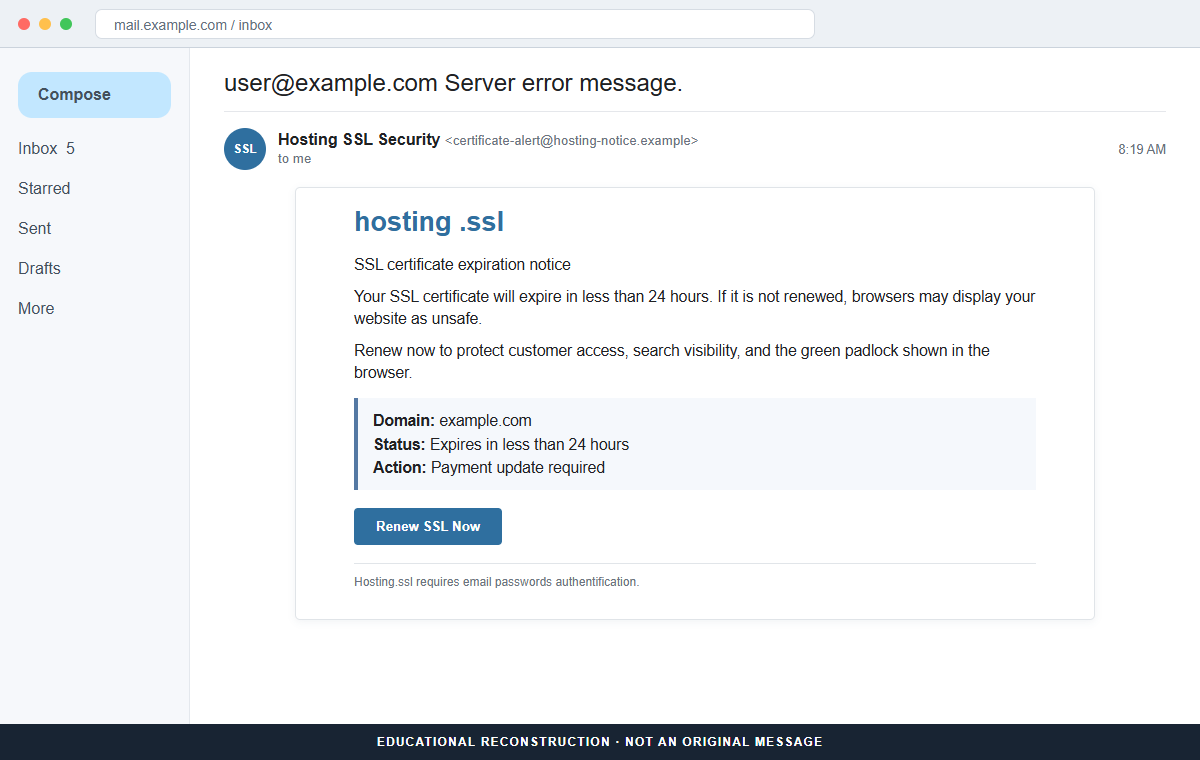
The SSL Certificate Expiration email scam turns a real maintenance task into a credential trap. The Renew SSL Now button does not renew anything.
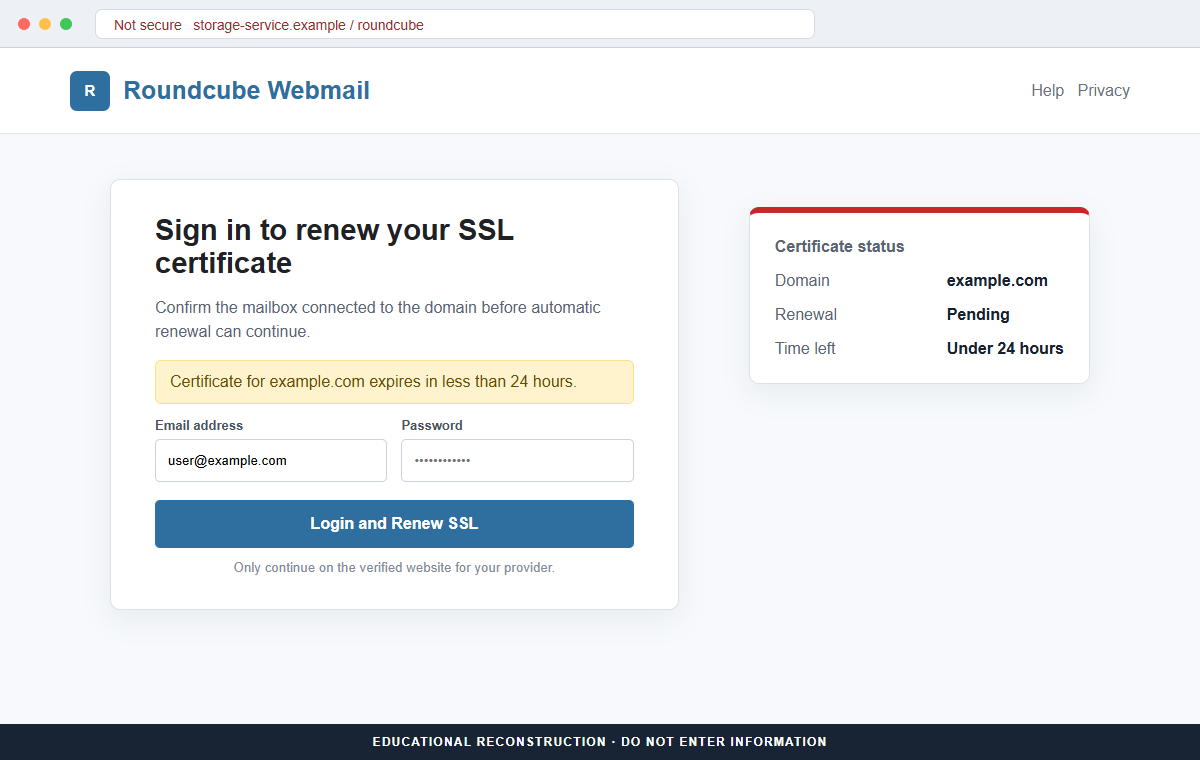
It opens a copied webmail page built to capture the password for the address that received the warning.
That stolen mailbox can be more valuable than the certificate itself. It may control hosting resets, domain notices, invoices, customer conversations, and access to several business services.
Do not use the email button, even if the domain shown in the message belongs to you. Open the hosting or certificate dashboard independently and compare the status there before taking any action.
Overview
The warning borrows a problem website owners understand
TLS certificates do expire, and an expired certificate can cause browsers to display a security warning. That truthful background gives the fraudulent message a believable starting point.
The email then exaggerates the immediate consequences. It claims the site will lose customers, fall in Google rankings, and look compromised, all within a narrow deadline that leaves little room to verify the notice.
Renewal language conceals a webmail theft attempt
The message may use a generic brand such as hosting .ssl and a subject resembling a server error. A button labeled Renew SSL Now suggests that payment or automatic renewal can be fixed in one short flow.
The observed destination imitated Roundcube Webmail and displayed the recipient's email address.
The form requested the mailbox password, even though a certificate renewal should be managed through the host or certificate authority, not by disclosing a webmail password.
A compromised mailbox creates several routes into the business
Once criminals can read domain email, they can request password resets, study vendors, alter invoice conversations, and impersonate staff. They may also remove security notices or create forwarding rules that preserve access.
If the mailbox belongs to a hosting administrator, the attacker may reach the control panel, DNS records, website files, backups, or registrar account. The damage can continue after the fake certificate page disappears.
- The subject may say Server error message.
- A generic hosting or SSL brand sends the warning.
- The certificate supposedly expires in less than 24 hours.
- The email predicts an Unsafe site warning.
- It claims customers and search rankings will be lost.
- A Renew SSL Now button is presented as the solution.
- The link opens a Roundcube-style webmail login.
- The recipient's email may already be filled into the form.
- The page requests an email password rather than certificate account access.
- The destination may be hosted on an unrelated cloud storage domain.
Why a Real SSL Expiration Can Still Lead to a Fake Email
Website certificates create encrypted HTTPS connections and help browsers confirm which domain they reached. Certificate expiration is therefore a real operational event, but that does not authenticate every reminder mentioning it.
Most modern hosts and certificate tools automate renewal. Let's Encrypt and other certificate authorities provide renewal mechanisms that operate through server software or a hosting dashboard. A legitimate alert should match the certificate visible there.
Attackers can discover domain names and contact addresses from public records, business websites, previous data leaks, or harvested mailboxes. They do not need access to the server to send a personalized warning that names the correct domain.
The deadline is designed to move attention away from the sender and URL. A busy owner may picture customers seeing a red browser screen and press the button before checking whether the certificate actually expires that day.
The phrase email passwords authentification is another clue. Certificate renewal does not require sending a mailbox password to a page reached from an unsolicited email, and legitimate providers do not need to reauthenticate webmail in that manner.
Cloud hosting also does not make a page trustworthy. A phishing form can run on Firebase Storage or another reputable infrastructure provider while still being controlled by a criminal account.
Judge the service relationship and exact domain, not merely the presence of HTTPS.
What the Fake Roundcube Page Is Trying to Capture
The page is constructed to look familiar to people who use Roundcube through a hosting provider. A logo, centered sign-in card, and prefilled email address reduce the amount of unexpected information the visitor must process.
Prefilling the address can also make the form seem connected to the email account. In reality, the address may simply be encoded in the link or inserted by the campaign.
It proves only that the attacker already knew where the lure was sent.
After the password is submitted, the page may display an error, redirect to the real webmail service, or claim the certificate renewal is processing.
That handoff can hide the theft because the recipient eventually sees a legitimate-looking destination.
The attacker can test the credentials quickly. If they work, mailbox rules may be added to forward domain, bank, hosting, or payment messages.
Existing conversations reveal how staff write and which invoices or vendors are likely to be trusted.
A reused password expands the exposure. The same combination may unlock a hosting panel, registrar, cloud service, ecommerce platform, or personal account, even when the original phishing form appeared to target only webmail.
A real certificate problem and a phishing email can coexist. If the certificate truly is near expiration, fix it through the host after securing the mailbox.
Do not return to the message or treat a correct date as proof of sender identity.
How the SSL Certificate Expiration Email Scam Works
Step 1: The attacker identifies a domain and contact address
The campaign gathers website domains and associated email addresses from public pages, registration data, breach collections, or earlier phishing lists. A role account such as admin, support, or webmaster is an attractive target.
Knowing a domain does not mean the sender inspected its server. The same expiry template can be sent to thousands of addresses while inserting a different domain into each copy.
Step 2: A server error subject creates immediate concern
The subject may combine the recipient address with Server error message. The body adopts the tone of an automated hosting system and places the alleged deadline near the top.
A business owner opening mail on a phone sees danger before seeing the complete sender address. This first impression is the campaign's most important advantage.
Step 3: Consequences are stacked around the 24-hour deadline
The email says browsers will mark the site unsafe and warns about lost customers, lower rankings, and a hacked appearance. Several possible outcomes make inaction feel reckless.
The claims are not a diagnosis of the website. They are pressure language intended to make independent verification feel slower than pressing Renew SSL Now.
Step 4: Renew SSL Now leads away from the real provider
The button points to a domain unrelated to the host, registrar, or certificate authority. Link text and page branding can say anything, so the registered destination matters more than the words on the button.
A cloud storage address may display a padlock because the platform provides HTTPS. That padlock secures the connection to the phishing page; it does not confirm that the page belongs to the victim's provider.
Step 5: A copied Roundcube login requests the email password
The fake form may display the recipient's address and ask only for a password. The small number of fields makes the request feel like a quick confirmation rather than a high-risk credential disclosure.
Certificate renewals are not performed by giving an unsolicited page the password to a domain mailbox. The mismatch between the claimed task and requested secret exposes the scam.
Step 6: The password is sent to the attacker
Submitting the form transmits the credential to infrastructure controlled by the campaign. A false invalid-password message may encourage a second entry, giving the attacker another password to test.
The page can then redirect to legitimate Roundcube or hosting content. That redirect does not undo the submission and should not be mistaken for a successful renewal.
Step 7: Mailbox access supports a deeper compromise
The criminal signs in, searches for financial and hosting messages, and attempts password resets. Hidden forwarding and filtering rules can help maintain quiet access while the victim continues using the account.
Invoice fraud, customer impersonation, domain takeover, and account recovery attacks may follow. Responding only to the certificate warning leaves those secondary risks unresolved.
Company and Checkout Checks
Check the certificate in the hosting dashboard
Open the provider from a bookmark or type its known address. Review the certificate name, issuer, expiration date, renewal state, payment method, and any error recorded by the automation system.
Do not rely only on the date visible in the browser. A host may already have a replacement queued, and an email may quote publicly observable certificate information.
Inspect the sender and destination separately
Expand the complete From and Reply-To addresses, then preview the button without opening it. Compare every domain with the provider's documented notification and login domains.
Misspellings, unrelated cloud storage, URL shorteners, raw IP addresses, and a reply address different from the sender are strong warning signs.
Ask support through a known route
Use the support link inside the hosting dashboard or a phone number from an existing contract. Ask whether the provider sent the notice and whether any renewal action is actually pending.
Do not call a number printed only in the suspicious message. A fake support agent can continue the attack by requesting passwords, codes, or remote access.
Examine account activity before dismissing the event
If the form was opened or credentials were entered, check webmail sign-ins, forwarding rules, hosting users, DNS changes, registrar locks, billing records, and password reset messages.
Preserve the original message, headers, URL, screenshots, and the time information was submitted. Those details help the provider find related access and remove the fraudulent page.
Warning Signs to Check Before You Act
- A certificate supposedly expires in less than 24 hours.
- The sender uses a generic hosting or SSL identity.
- The subject calls the event a server error without technical detail.
- The email predicts several business disasters at once.
- Renewal is available only through an email button.
- The link does not use the known host or certificate authority domain.
- A cloud storage domain hosts the renewal page.
- The page imitates Roundcube even though the task concerns SSL.
- The recipient's address is prefilled to create familiarity.
- The form asks for a webmail password.
- The wording includes authentication or renewal misspellings.
- The real hosting dashboard shows no matching alert.
A certificate warning should be easy to verify without the email. If the provider dashboard and official support channel do not show the same problem, do not submit a password or payment through the message.
What to Do if You Have Fallen Victim to This Scam
- Change the exposed password immediately. Open your hosting provider, certificate authority, domain registrar, or webmail service through a known address through a saved bookmark or its official application, not through the SSL certificate expiration message. The password entered during that ssl-certificate message should never be used again. Give every affected service a different replacement.
- Harden the account targeted by the SSL expiration warning. The password entered during that ssl-certificate message should never be used again. Give every affected service a different replacement. Check whether this ssl-certificate case led to new recovery or authentication methods. Remove anything unfamiliar before enabling stronger MFA.
- End the access created through the SSL expiration warning. Sign out all other sessions from the hosting control panel, revoke unfamiliar OAuth grants, and reconnect trusted mail applications only after the password change. This closes tokens that can survive a simple reset.
- Review the mailbox for changes connected with the SSL expiration warning. Remove unknown forwarding addresses, delegates, inbox rules, filters, and automatic replies. Review sent, deleted, trash, and recovery notices around this ssl-certificate incident. Look for activity the account owner did not initiate.
- Protect the wider account chain. Prioritize webmail, hosting, domain, and certificate-management accounts. After that ssl-certificate message, protect every service that can be reset through the affected mailbox. Give banking and workplace access priority.
- Verify the certificate and hosting account independently. Open the hosting dashboard from a bookmark and inspect the certificate status, renewal method, billing history, domain DNS, administrator accounts, and support tickets. Ask the host to reverse unauthorized changes and reissue the certificate only if its own dashboard shows a genuine problem.
- Check the device used to open the SSL expiration warning. If anything was installed during that ssl-certificate message, disconnect the device and scan it with Malwarebytes. Remove detections and apply security updates.
- Reduce the chance of reopening a related page. AdGuard or another reputable DNS and content blocker may stop known phishing hosts and malicious advertisements tied to the SSL expiration warning. The operators behind this ssl-certificate case can rotate domains rapidly. An unblocked page is not automatically a legitimate one.
- Report the phishing message. Use the mail provider's Report Phishing control and notify your hosting provider, email administrator, certificate authority, and organization security team. Before deleting this ssl-certificate incident, save the complete message and its headers. Those records help when several employees received the same lure.
- Warn web developer, hosting provider, and domain owner through a separate channel. Explain that the SSL expiration warning may have exposed the account and ask them to distrust recent file shares, password requests, invoices, payment changes, or urgent replies until the timeline is confirmed.
- Expect follow-up fraud based on the SSL expiration warning. Treat recovery offers after this ssl-certificate incident as a possible second scam. Never pay an advance fee to an unexpected caller. Only verified institutions should handle recovery from this ssl-certificate phishing attempt. Contact the provider, financial institution, employer, or police directly.
Frequently Asked Questions
Is the SSL Certificate Expiration email real?
No. The documented message uses an urgent certificate warning to send recipients to a fraudulent Roundcube login page that steals webmail passwords.
Can an SSL certificate genuinely expire?
Yes. Certificates have validity periods, but their status and renewal should be checked through the server, hosting dashboard, or certificate authority reached independently.
Why does the fake page already know my email address?
The campaign sent the message to that address and can place it in the link. A prefilled address does not prove the page has a legitimate connection to your mailbox.
Does HTTPS make the renewal page safe?
No. HTTPS encrypts the connection to a domain. Criminals can obtain HTTPS for phishing pages, including pages hosted on reputable cloud infrastructure.
What if I clicked but did not enter my password?
Close the page and verify the certificate independently. Inspect downloads and browser extensions, but credential theft is less likely if no information was submitted.
What if the certificate really is expiring?
Secure any exposed account first, then renew through the provider's official dashboard or normal automated process. A real deadline does not make the email link trustworthy.
The Bottom Line
The SSL Certificate Expiration email scam wraps credential theft in a believable website maintenance problem. The real target is the mailbox password entered on the copied Roundcube page.
Verify certificate status inside the hosting account and contact support through a known route. Never use an unsolicited renewal link to disclose a webmail password.
If information was submitted, secure email, hosting, registrar, and every reused account immediately. The fastest way to limit damage is to treat the event as a business account compromise, not merely a failed certificate renewal.








