

A short business email says a revised invoice is ready for approval. It refers to payment percentages, work already completed, and a versioned document that appears to belong in an active finance or project conversation.
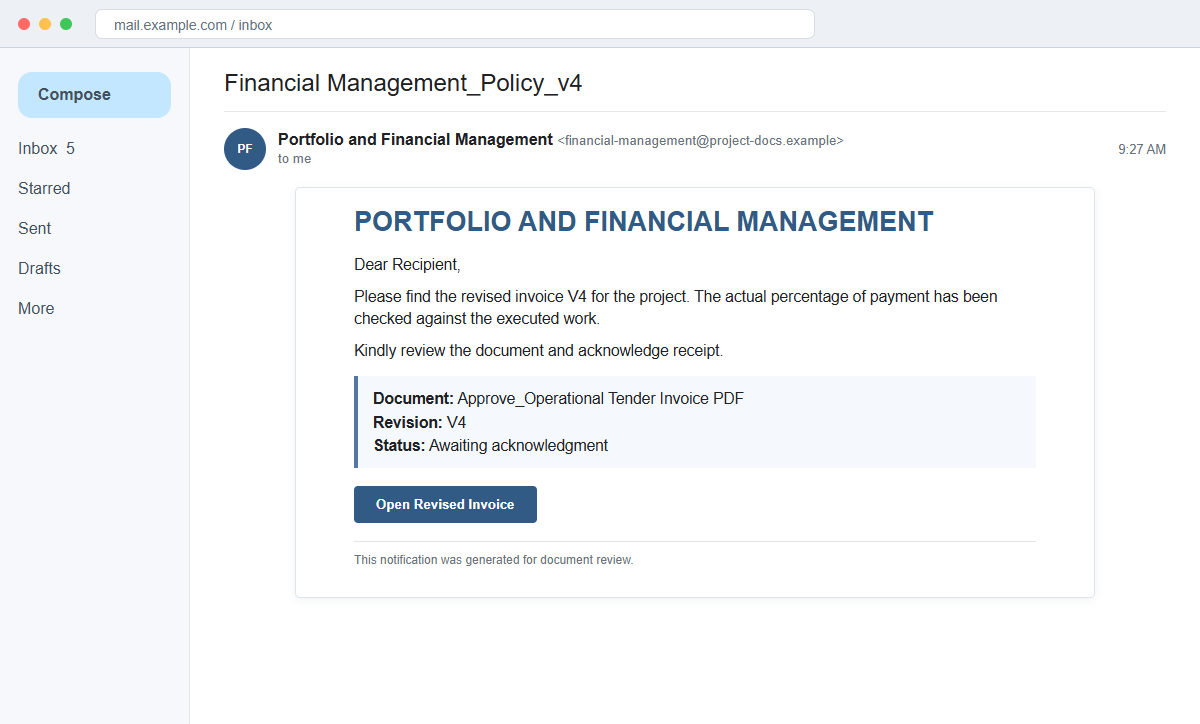
The Revised Invoice email scam does not deliver a genuine invoice. Its document link opens a copied Adobe-style viewer that says the PDF is locked and requests a corporate email address and password to unlock it.
That request targets more than one login. A work mailbox may expose supplier threads, payment schedules, internal files, customer information, and reset links for several company applications.
Do not sign in through the document page. Verify the invoice with the sender through a previously known channel, then open the real procurement or document platform independently.
Overview
The message sounds like part of an existing project
The subject may read Financial Management_Policy_v4, while the body says a revised invoice V4 has been prepared for an unnamed project. It refers to checking the actual payment percentage against executed work.
Those details are specific enough to sound operational but too vague to identify a real contract, supplier, amount, purchase order, project owner, or approving manager.
An approval link is presented as a PDF
The clickable item may say Approve_Operational Tender Invoice PDF. It leads to a site hosted outside the company and outside Adobe, even though the page imitates an Adobe Acrobat document viewer.
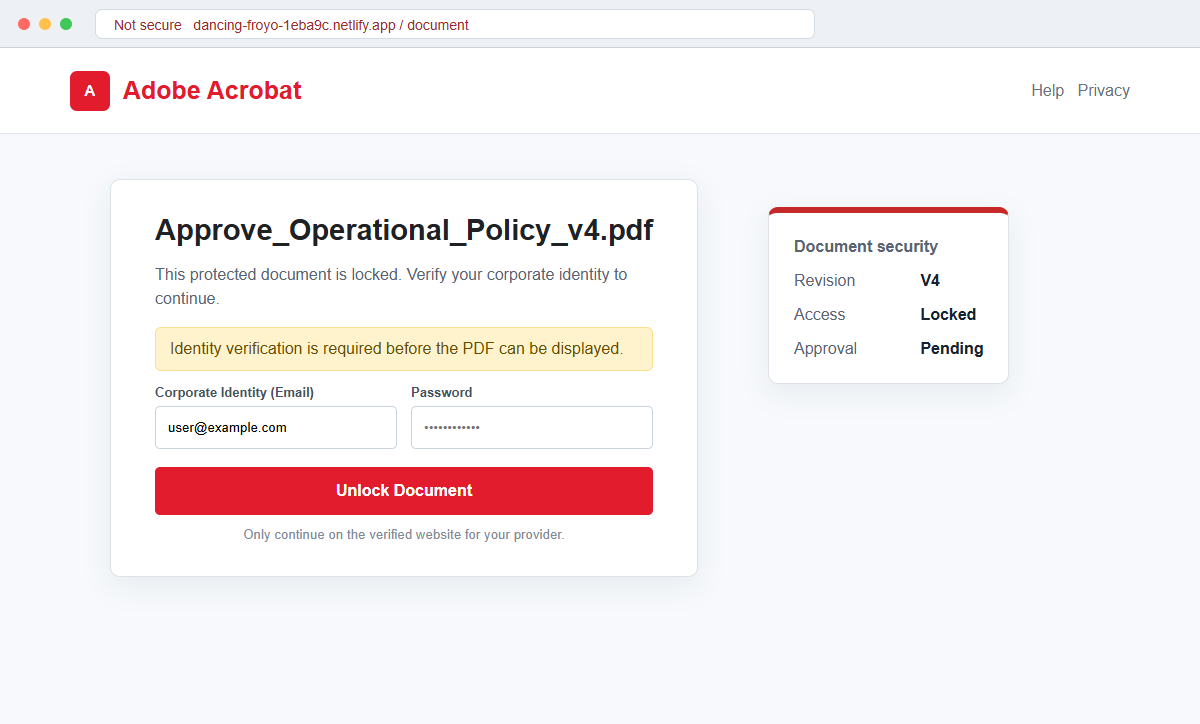
The fake viewer displays a filename such as Approve_Operational_Policy_v4.pdf and claims the document is locked. A pop-up says identity verification is needed before the file can be viewed.
Corporate credentials are the real invoice
Fields labeled Corporate Identity (Email) and Password ask the employee to unlock the document. The data is submitted to the attacker's page, not to the company or Adobe.
If the mailbox is compromised, criminals can study real invoices and send highly convincing payment changes from an address coworkers and vendors already trust.
- The subject resembles a versioned financial policy file.
- A revised V4 invoice is mentioned without a clear supplier or project.
- The email discusses payment percentage and executed work.
- The recipient is asked to acknowledge or approve the document.
- A link is labeled as an operational tender invoice PDF.
- The destination is hosted outside the sender's organization.
- The landing page imitates Adobe Acrobat.
- The PDF is supposedly locked for identity verification.
- Corporate email and password fields are shown.
- Adobe and the named business context have no verified connection to the page.
Why Revised Invoice Messages Bypass Normal Suspicion
Invoices are routinely revised after quantity changes, milestones, tax corrections, currency updates, or disputed work. That normal business process gives the lure a plausible reason to arrive unexpectedly.
Version labels such as V4 imply that earlier drafts exist somewhere in the conversation. A busy employee may assume a colleague handled those versions and focus on clearing the current approval.
The wording about executed work and payment percentage sounds like project controls language. Yet the message avoids the names, amounts, dates, contract references, and purchase order details that a real approver needs.
Adobe branding is useful because many organizations exchange PDFs through Acrobat and cloud document services. A familiar viewer can make the recipient overlook that the page is running on an unrelated hosting domain.
Password-protected documents also exist, but a genuine encrypted PDF normally asks for a document password inside trusted software. It does not require the user's corporate email password on an unknown website.
The lure is especially dangerous when it reaches finance, procurement, operations, or executive staff. Those mailboxes contain the relationships and approval language needed for later business email compromise.
How a Fake Document Login Can Become Invoice Fraud
The phishing page records the corporate email and password entered into the unlock form. A false invalid-password message may be used to capture a second attempt or a corrected credential.
Once inside the mailbox, the attacker can search for terms such as invoice, remittance, wire, purchase order, overdue, bank details, and payment. Real conversations reveal the timing and people involved in upcoming transfers.
Forwarding rules can copy messages to an outside account, while filters hide warnings or vendor replies. This allows criminals to monitor a transaction without immediately disrupting the employee's normal access.
The attacker may reply within an existing thread, register a lookalike domain, or impersonate a supplier. A request to change bank details is far more convincing when it includes a real invoice number and familiar writing style.
Work credentials may also unlock collaboration suites, cloud storage, document-signing systems, customer databases, or single sign-on applications. The page's apparent purpose is narrow, but the account exposure can be broad.
Multi-factor authentication reduces risk but does not justify entering credentials. The criminal may relay the sign-in attempt in real time and request a one-time code or push approval while the victim still believes a PDF is loading.
How the Revised Invoice Email Scam Works
Step 1: A business mailbox receives a versioned invoice notice
The attacker sends a concise message that resembles routine project or finance correspondence. A V4 label suggests the document has already passed through several internal revisions.
The lack of a real supplier name may be overlooked when the recipient handles many invoices or believes the file was forwarded automatically.
Step 2: Financial language creates professional context
The email mentions checking the percentage paid against executed work. This sounds like a meaningful control even though no amount, currency, project milestone, or contract is supplied.
The recipient is asked to acknowledge or approve the revision, which creates a small task that appears easier to complete than to investigate.
Step 3: A PDF label conceals the external destination
The link text describes an operational tender invoice PDF, but clicking it loads a web page rather than a normal attachment. The registered domain does not belong to the supposed sender or Adobe.
A reputable hosting platform can serve the page over HTTPS. That infrastructure does not endorse the content placed there by one of its users.
Step 4: A copied Adobe viewer displays a locked document
Adobe colors, document controls, and a plausible filename create familiarity. The viewer says the file cannot be opened until corporate identity is verified.
The document preview may be blurred or empty because there is no invoice behind the overlay. The lock message exists to move attention toward the login form.
Step 5: The employee enters corporate email credentials
The form requests an email address and password, sometimes with an Unlock Document button. A real document sender has no need to collect the recipient's mailbox password.
The mismatch is decisive: an encrypted PDF may require a separate file password, while corporate authentication should occur only on the organization's known identity domain.
Step 6: The attacker tests the account and seeks persistence
Submitted credentials are tested against the real mail or single sign-on service. If successful, the criminal inspects messages and may add forwarding, delegates, app passwords, or connected applications.
A redirect to Adobe or an error page can hide the theft. The victim may assume the file is broken and postpone reporting it.
Step 7: Real conversations are reused for deeper fraud
The compromised account can send new phishing messages, request document signatures, or alter supplier payment instructions. Existing threads and genuine signatures make the follow-up harder to detect.
Finance teams may discover the compromise only when a supplier reports a missing payment. Immediate internal reporting is therefore important even when no money has yet moved.
Company and Checkout Checks
Confirm the invoice through the existing business relationship
Call the supplier or project owner using a number already stored in company records. Ask for the purchase order, invoice number, revision reason, total, and approved payment destination.
Do not reply to the suspicious thread to verify it. A compromised sender can answer the reply and continue the same story.
Open the real platform independently
Use the company's procurement, accounting, or document portal from a bookmark. Search for the invoice there rather than following the embedded approval link.
If Adobe authentication is genuinely required, the address should match Adobe's documented domains or the company's configured identity provider.
Compare the requested secret with the claimed task
Ask why viewing a PDF would require the corporate mailbox password. The file owner should use proper document sharing or a separate document password, not collect login credentials.
Cancel any page that requests a password outside the expected company or vendor identity system, even if the visible document appears accurate.
Apply a two-person check to payment changes
Verify new bank details, beneficiary names, and urgent transfer requests through a second channel and a previously known contact. Require another employee to approve sensitive changes.
This control remains important after the phishing email is deleted because a compromised mailbox may produce a more convincing request later.
Warning Signs to Check Before You Act
- A revised invoice arrives without a recognizable supplier or project.
- The subject uses a version label but no traceable reference.
- Financial language is detailed enough to sound official but lacks amounts.
- A supposed PDF is actually an external web link.
- The destination domain does not belong to the sender or Adobe.
- An Adobe-style viewer appears on unrelated hosting.
- The document is hidden behind a corporate identity prompt.
- The page asks for the mailbox password.
- The sender asks for quick acknowledgment without normal approval records.
- No matching invoice appears in the procurement system.
- The supplier cannot confirm the revision through a known contact.
- A later message changes bank or payment instructions.
An invoice may be confidential, but confidentiality does not require surrendering your corporate mailbox password to an unknown page. Verify the invoice and login domain separately.
What to Do if You Have Fallen Victim to This Scam
- Change the exposed password immediately. Open your company email, procurement system, accounting platform, or Adobe service through a known bookmark or official application through a saved bookmark or its official application, not through the Revised Invoice message. Set a long password through the real provider after that revised-invoice message. Change matching or closely related passwords on other accounts.
- Treat the password entered after the revised invoice message as compromised. Set a long password through the real provider after that revised-invoice message. Change matching or closely related passwords on other accounts. Audit the authentication methods registered after this revised-invoice case. Remove unknown telephone numbers, recovery addresses, app passwords, and security keys.
- End the access created through the revised invoice message. Sign out other sessions created around this revised-invoice case. Inspect OAuth grants, mail clients, browser sessions, and third-party applications. This closes tokens that can survive a simple reset.
- Review the mailbox for changes connected with the revised invoice message. Remove unknown forwarding addresses, delegates, inbox rules, filters, and automatic replies. Check folders an intruder might use after that revised-invoice message, including sent, trash, deleted, and archive. Note unrequested recovery events.
- Protect the wider account chain. Prioritize business email, document storage, and payment approvals. Map the accounts dependent on the inbox touched by this revised-invoice phishing attempt. Replace credentials wherever that address approves password recovery.
- Notify the company security and finance teams immediately. Provide the original email, headers, fake document address, time of submission, and any password or multi-factor prompt entered. Ask finance to pause unusual invoice changes and verify pending payments with suppliers through previously known contacts.
- Check the device used to open the revised invoice message. A download linked to this revised-invoice phishing attempt deserves a full Malwarebytes scan. Quarantine detected threats and inspect the browser for unknown extensions.
- Reduce the chance of reopening a related page. AdGuard or another reputable DNS and content blocker may stop known phishing hosts and malicious advertisements tied to the revised invoice message. A domain related to this revised-invoice incident may be replaced without warning. Read the address even when a security filter shows no alert.
- Report the phishing message. Use the mail provider's Report Phishing control and notify your employer's security and finance teams, email provider, vendor being impersonated, and Adobe abuse reporting. Archive the full source of the message involved in that revised-invoice message. Sender paths and authentication results may reveal useful infrastructure.
- Warn accounts payable, supplier, and security team through a separate channel. Explain that the revised invoice message may have exposed the account and ask them to distrust recent file shares, password requests, invoices, payment changes, or urgent replies until the timeline is confirmed.
- Expect follow-up fraud based on the revised invoice message. Details from that revised-invoice message may be reused in a recovery pitch. End the conversation if the stranger wants payment upfront. For help after this revised-invoice case, use the real provider, bank, employer, police, or a verified incident-response professional.
Frequently Asked Questions
Is the Revised Invoice email legitimate?
No. The documented message leads to a fake Adobe-style document viewer designed to steal corporate email credentials.
Does Adobe ask for an email password to unlock a PDF?
A legitimate Adobe or company sign-in occurs on its known identity domain. A separate encrypted PDF may use a document password, not your mailbox password on an unrelated site.
Why does the email mention a V4 invoice?
The version number makes the file sound like part of an existing workflow. It is not evidence that earlier versions or a real project exist.
What if the document page redirected to Adobe afterward?
A redirect can hide the theft but does not erase submitted credentials. Secure the account and notify company security immediately.
What if I entered the password but multi-factor authentication blocked access?
Change the password, revoke sessions, review authentication methods and mailbox rules, and report the event. The password itself is still compromised.
How should a business verify a revised invoice?
Use the normal procurement system and confirm material changes with a known supplier contact through a second channel, especially before changing payment details.
The Bottom Line
The Revised Invoice email scam uses realistic project language and a copied Adobe viewer to turn an ordinary approval task into corporate credential theft.
The strongest clue is the requested secret. Viewing an invoice should not require entering a work mailbox password on an unrelated website.
If credentials were submitted, secure the account, inspect rules and sessions, notify security and finance, and verify pending payments. The stolen mailbox may be used for a more convincing invoice fraud after the original lure is forgotten.








