

An automated-looking email says routine platform improvements are underway. To keep the account active and avoid interrupted service, the recipient is told to log in with the same password already used for email.
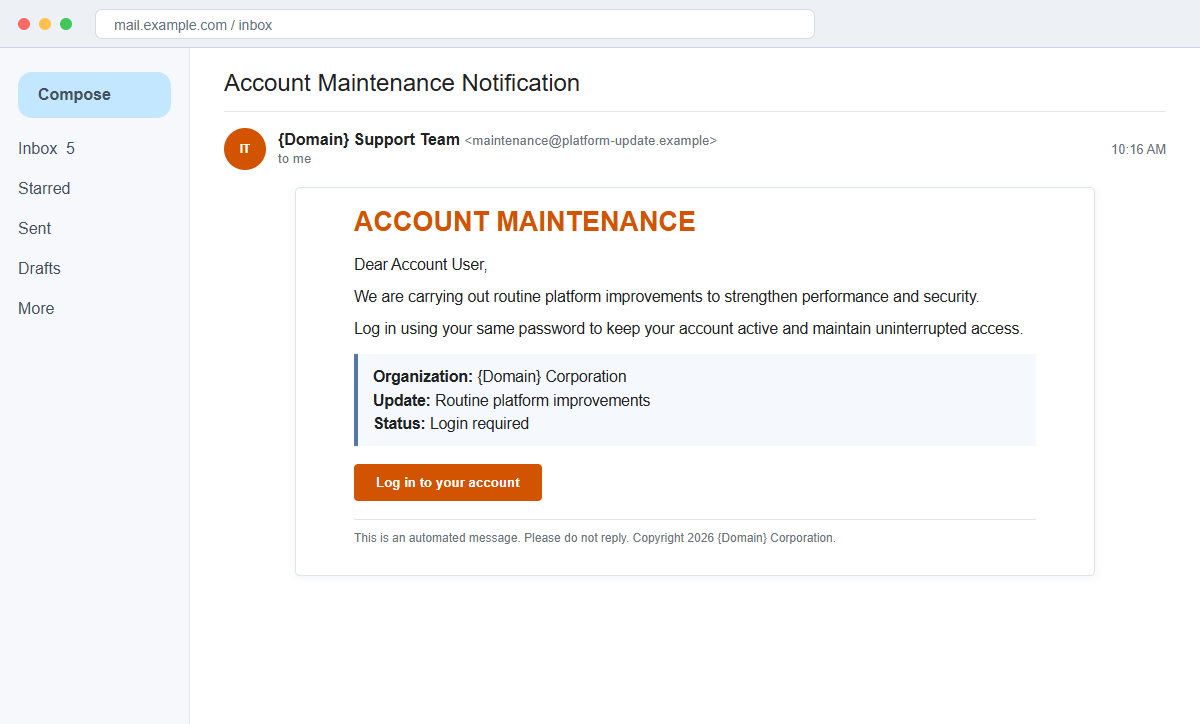
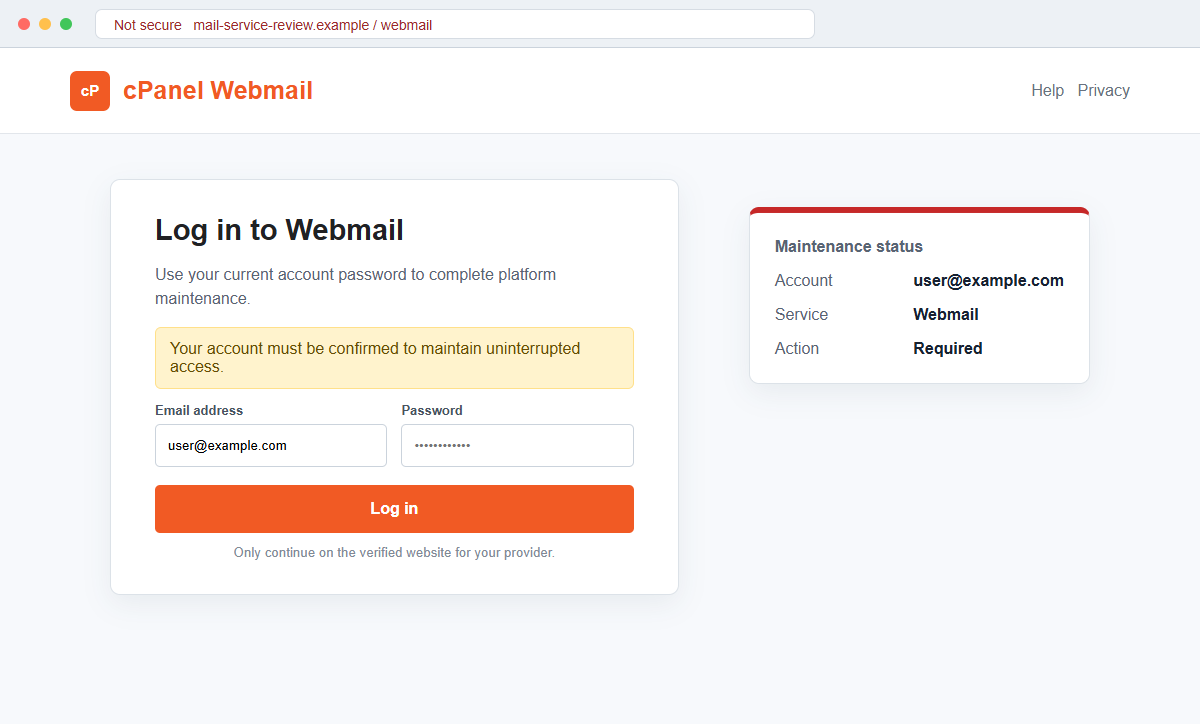
The Account Maintenance Notification email scam leads to a copied cPanel Webmail-style sign-in page. The page does not perform maintenance. It sends the email address and password to the scam operator.
In some copies, the sender forgets to replace placeholders such as {Domain}. That mistake reveals the mass-produced template, but a corrected version would still be dangerous because the login destination remains unrelated to the real provider.
Do not use the Log in to your account button. Open webmail or the hosting dashboard from a known address and check whether the same maintenance notice appears there.
Overview
Routine improvements provide a harmless-looking reason to sign in
The email says the platform is receiving performance and security improvements. Instead of reporting a specific threat, it frames the request as ordinary maintenance that every customer must complete.
The recipient is told to log in with the same password to keep the account active. A real provider already has an authentication system and does not need a password submitted through an unsolicited external page.
Template placeholders expose the mass mailing
The signature may say {Domain} Support Team and Organization {Domain} Corporation. These unfilled fields show that the sender intended to insert a different domain for each target.
Even when a campaign fills the fields correctly, knowing a domain proves nothing. Business domains and email addresses can be collected from public websites, data leaks, or previous campaigns.
A cPanel-style login captures the mailbox password
The button opens a page designed to resemble cPanel Webmail, with an email field, password field, and familiar hosting colors. The destination is controlled by the attacker rather than the recipient's web host.
Stolen hosted-email credentials may expose customer messages, invoices, resets, and hosting notices. A reused password can also endanger the control panel or registrar account.
- The subject says Account Maintenance Notification.
- Routine platform improvements are presented as the reason.
- Performance and security are mentioned without technical details.
- The user must log in to keep the account active.
- The same existing password is specifically requested.
- A Log in to your account button is provided.
- The signature may contain {Domain} placeholders.
- The footer says the email is automated and should not receive replies.
- The linked page imitates cPanel Webmail.
- The destination does not belong to the known hosting provider.
Why Maintenance Notices Are Useful Phishing Lures
Hosting companies and workplace IT teams perform genuine maintenance, and many send advance notices. Most maintenance does not require users to re-enter their existing email passwords through a link, especially on infrastructure outside the provider's domain.
The message avoids a dramatic threat and instead promises better performance and security. That calm tone can appear more credible than an obvious suspension warning while still making continued access dependent on immediate action.
Telling the recipient to use the same password reduces mental friction. The request sounds like confirmation rather than a credential disclosure, even though the page is receiving the complete secret.
The automated-email footer discourages replies that might expose the sender. A legitimate no-reply message should still point users to a known dashboard, help center, or authenticated status page where the same event can be verified.
cPanel branding is widely recognized by people who use shared hosting, but every hosting company configures its own legitimate webmail address. A copied logo does not connect an external page to that provider.
The unfinished {Domain} text is strong evidence of fraud, not merely poor formatting. It shows the organization identity was supposed to be generated from the victim's domain rather than supplied by a real sender.
What a Stolen Hosted-Mail Password Gives the Attacker
The fake webmail page forwards the entered email and password to the campaign. It may show an error or redirect to a legitimate cPanel login after submission, creating the impression that maintenance simply failed.
Once logged in, the attacker can read conversations, download attachments, search for invoices, and identify services that use the mailbox for recovery. A role account such as billing, sales, support, or admin can be particularly valuable.
Forwarding rules may send selected messages to an external address. Filters can hide security alerts and vendor replies, allowing unauthorized access to continue without obvious changes to the inbox.
Hosted mail often sits close to website administration. Password reuse or password-reset access may expose cPanel, WordPress, a registrar, DNS settings, backups, databases, or ecommerce services.
The account can also be used as a trusted sender. Customers and coworkers are more likely to open a fake invoice, shared document, or password notice when it comes from a real company domain.
A multi-factor prompt may arrive after the password is tested. An attacker can claim the code or approval is needed to complete maintenance, so every unexpected sign-in notification should be denied and reported.
How the Account Maintenance Notification Email Scam Works
Step 1: A hosting or business address is selected
The campaign collects email addresses and their domains from websites, mailing lists, breach data, or earlier phishing. It does not need control of the provider to personalize the lure.
Role addresses are attractive because they may reach multiple staff members and contain business conversations that can support later fraud.
Step 2: Routine improvements create a plausible event
The message says performance and security updates are underway. It does not identify a server, maintenance window, change ticket, or feature because the same copy must fit many targets.
The neutral explanation keeps the recipient focused on account continuity rather than asking why an unknown sender knows about a real technical problem.
Step 3: Account activity is tied to a fresh login
The user must supposedly log in with the same password to keep the mailbox active and uninterrupted. The request is framed as a simple confirmation rather than a password update.
Real maintenance is managed by the provider. When reauthentication is genuinely required, it should occur through the normal application or known identity page.
Step 4: An unfinished template may reveal the fraud
Placeholders such as {Domain} appear in the support-team name and copyright line when the campaign's personalization fails. The words are not a valid company identity.
A completed domain name would not make the message legitimate. Attackers can insert any public domain into a template and create a matching display name.
Step 5: The login button opens copied webmail
The destination imitates cPanel Webmail and asks for an email address and password. Its domain differs from the host, employer, and normal mail portal.
A padlock confirms that the browser encrypted the connection to the fake site. It says nothing about who operates that site.
Step 6: Credentials are captured and tested
Submitting the form delivers the secret to the attacker. A repeated login prompt may collect another password, while a redirect can make the page appear merely temperamental.
The criminal tests webmail, hosting, and other services associated with the address. Reused credentials expand the possible access.
Step 7: Mail access supports persistence and impersonation
The attacker inspects messages, creates forwarding, changes recovery settings, and sends phishing from the genuine account. Hosting alerts can help identify paths toward the website or registrar.
Customers, suppliers, and employees may trust requests from the compromised domain. Fast reporting limits the number of people who can be drawn into the incident.
Company and Checkout Checks
Check the provider's maintenance or status page
Open the hosting dashboard and service-status page through known addresses. Look for a maintenance window, incident number, affected server, and matching action for your account.
A legitimate event should be verifiable without touching the email button. If the dashboard works normally and shows no request, report the message.
Compare the real webmail address
Use the address from an existing bookmark, hosting panel, or provider documentation. Compare its registered domain and certificate with the link shown in the email.
Do not accept visual similarity as a match. A copied cPanel logo can be placed on any page.
Inspect placeholders and technical details
Look for {Domain}, generic organization names, missing server identifiers, vague maintenance claims, and an unexplained demand for the same password. These details reveal a reusable template.
Expand the sender and Reply-To addresses. A no-reply display name does not stop the underlying address from belonging to an unrelated domain.
Ask support from inside the account
Open a ticket from the verified hosting dashboard or contact company IT through its normal help desk. Ask whether reauthentication is required and provide the suspicious email headers.
Never call a telephone number or use a support chat reached only from the message. That channel may belong to the same scammer.
Warning Signs to Check Before You Act
- Routine maintenance is announced without a maintenance window.
- No server, ticket, feature, or provider is clearly identified.
- The account will supposedly become inactive without a login.
- The recipient is told to use the same password.
- The only route is a button in the email.
- {Domain} placeholders remain in the signature.
- The message says do not reply but provides no known help route.
- The linked domain differs from the hosting provider.
- A cPanel-style page appears on unrelated infrastructure.
- The normal dashboard shows no matching alert.
- The page asks again after a password is entered.
- An unexpected multi-factor approval follows the visit.
Maintenance can affect a service, but it should not require you to hand an existing email password to an unknown domain. Use the real control panel and let the provider authenticate you there.
What to Do if You Have Fallen Victim to This Scam
- Change the exposed password immediately. Open your email provider, hosting dashboard, or company IT portal through a bookmarked address or official application through a saved bookmark or its official application, not through the Account Maintenance Notification message. Create a fresh, unique password for the account exposed by that account-maintenance message. Replace similar passwords anywhere else they were reused.
- Start with the credentials exposed to the maintenance notification. Create a fresh, unique password for the account exposed by that account-maintenance message. Replace similar passwords anywhere else they were reused. Compare every sign-in method after this account-maintenance case with the owner's devices. Unrecognized numbers, addresses, keys, and app passwords must go.
- End the access created through the maintenance notification. Sign out all other sessions from the hosting provider’s official portal, revoke unfamiliar OAuth grants, and reconnect trusted mail applications only after the password change. This closes tokens that can survive a simple reset.
- Review the mailbox for changes connected with the maintenance notification. Remove unknown forwarding addresses, delegates, inbox rules, filters, and automatic replies. Examine mail activity from the time of this account-maintenance incident. Unfamiliar sent messages or deleted security alerts can reveal what followed this account-maintenance incident.
- Protect the wider account chain. Prioritize webmail, hosting, and domain accounts. Reset credentials on services whose recovery messages reach the inbox exposed by that account-maintenance message. Begin with financial and administrator accounts.
- Review the webmail and hosting control panel together. Check mail sign-ins, forwarding rules, delegates, app passwords, hosting users, domain records, recovery contacts, and support tickets. If the same password protected cPanel or another control panel, change it through the verified hosting dashboard.
- Check the device used to open the maintenance notification. Run a complete Malwarebytes scan if that account-maintenance message delivered a file, extension, or remote-support tool. Clean the device before changing sensitive passwords there.
- Reduce the chance of reopening a related page. AdGuard or another reputable DNS and content blocker may stop known phishing hosts and malicious advertisements tied to the maintenance notification. Blocklists may not recognize the next domain used for this account-maintenance case. Verify every address before entering account information.
- Report the phishing message. Use the mail provider's Report Phishing control and notify your email or hosting provider, company IT team, and the organization whose domain was impersonated. The raw headers from this account-maintenance incident should be preserved before reporting. They are especially valuable when the campaign reached multiple inboxes.
- Warn mail administrator, hosting provider, and domain owner through a separate channel. Explain that the maintenance notification may have exposed the account and ask them to distrust recent file shares, password requests, invoices, payment changes, or urgent replies until the timeline is confirmed.
- Expect follow-up fraud based on the maintenance notification. A supposed recovery expert mentioning this account-maintenance incident may belong to the same operation. Work only with a professional you verify yourself. Choose recovery help for this account-maintenance phishing attempt through organizations you contact independently. Avoid strangers who appear in messages or search ads.
Frequently Asked Questions
Is the Account Maintenance Notification email real?
No. The documented message leads to a fake cPanel Webmail-style page designed to capture email addresses and passwords.
Do real providers require a login after maintenance?
Sometimes reauthentication is needed, but it should happen through the normal application or known provider domain, not an unexpected external link.
What does {Domain} in the email mean?
It is an unfilled template placeholder. It shows the sender intended to personalize the same message for many domains.
Does the cPanel logo prove the page belongs to my host?
No. Logos and page styles are easy to copy. Verify the registered domain against the webmail address supplied by your host.
What if I entered the password and received an error?
Treat the password as stolen. Change it through the real service, revoke sessions, inspect mailbox rules, and review hosting access.
Could the scam affect my website?
Yes, especially if the password was reused or email controls hosting resets. Secure the hosting panel, registrar, WordPress, and other linked services.
The Bottom Line
The Account Maintenance Notification email scam makes credential theft look like a calm, routine platform update. Its copied webmail page has no role in maintaining the real account.
Unfilled {Domain} placeholders expose the template, but the decisive clue is the unrelated login destination. Always open webmail and hosting services through known addresses.
If a password was entered, secure both email and hosting, remove unknown sessions and rules, review linked services, and warn people who may receive messages from the compromised company address.

Join the discussion
0 commentsShare your experience or ask a question about this article.
Discussion
Start the conversation
Have a question or something useful to share? Add the first comment.