

A fake password manager security update arrives by email and says the service changed its policy.
The message looks routine, the deadline is close, and the button appears to open a familiar electronic-signature document. That ordinary compliance request can be the opening move in a dangerous account-takeover attempt.
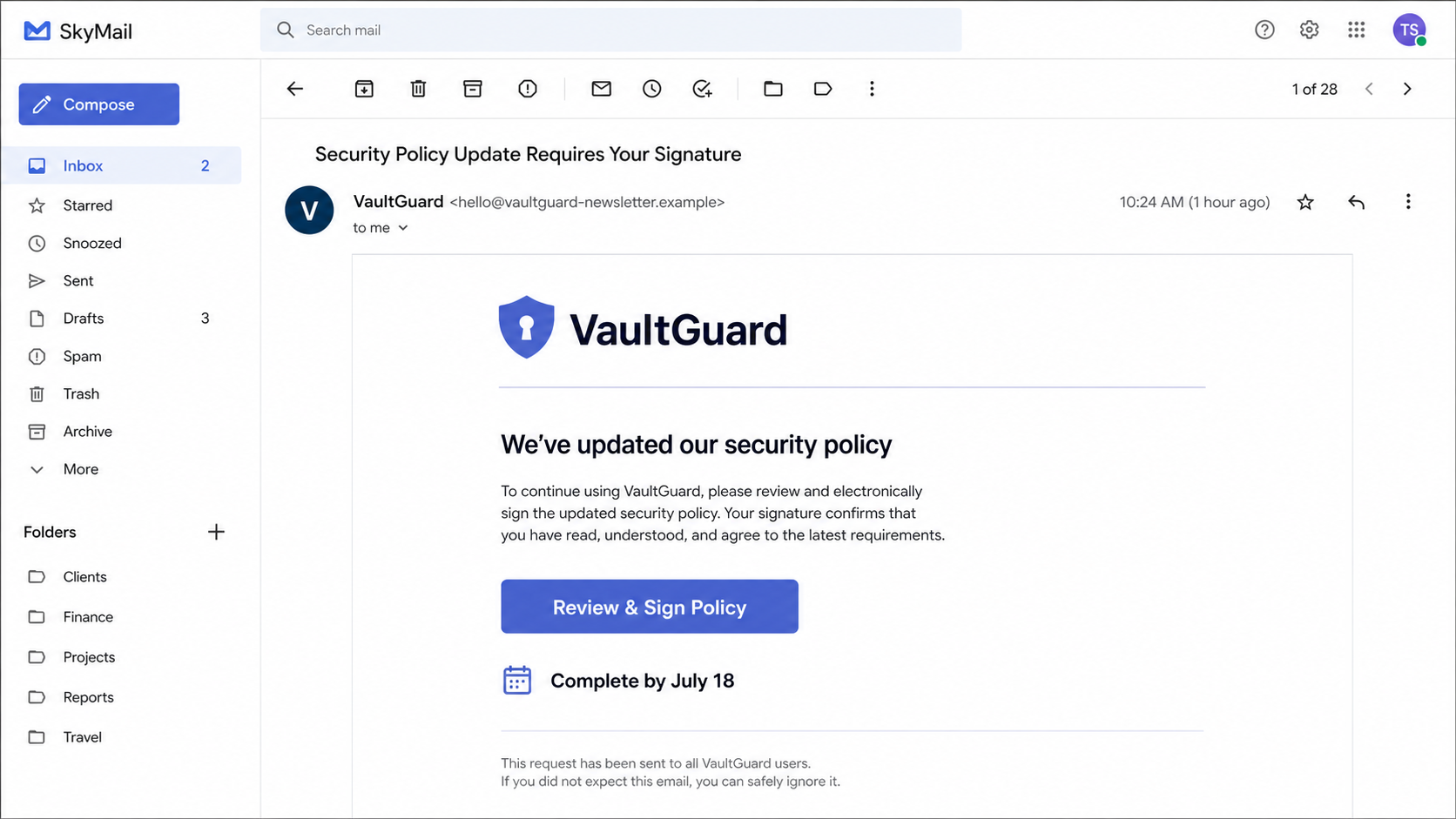
The campaign reported in July 2026 impersonated LastPass and Bitwarden with nearly identical messages. Recipients were told to review updated terms and sign a document, even though neither company had sent the request.
The sender addresses used lookalike newsletter domains instead of the companies' real domains.
A button labeled like a normal policy review led to a separate compliance-themed website designed to borrow trust from the brand and the electronic-signature process.
This distinction matters. The presence of a recognizable logo does not mean the password manager was breached, and a document-signing theme does not make the destination safe.
The attack depends on imitation, not access to the real vault service.
Overview
One submitted master password may expose far more than a single login.
The email turns routine compliance into an urgent security task
Security-policy updates are believable because legitimate services do revise privacy terms, authentication rules, and business agreements. Attackers use that expectation to make an unusual request feel administrative rather than dangerous.
In the observed campaign, recipients were asked to follow a button such as Review and Access Terms. The wording implied that continued use of the password manager depended on completing the document promptly.
Urgency narrows attention. A reader who is worried about losing vault access may focus on the deadline and overlook the sender domain, destination address, or strange request for a master password.
Lookalike domains create the illusion of an official newsletter
LastPass-themed messages used hello@lastpassnewsletter.com, while a matching Bitwarden variation used hello@bitwardennewsletter.com. Those names sound plausible, but they were not official company addresses.
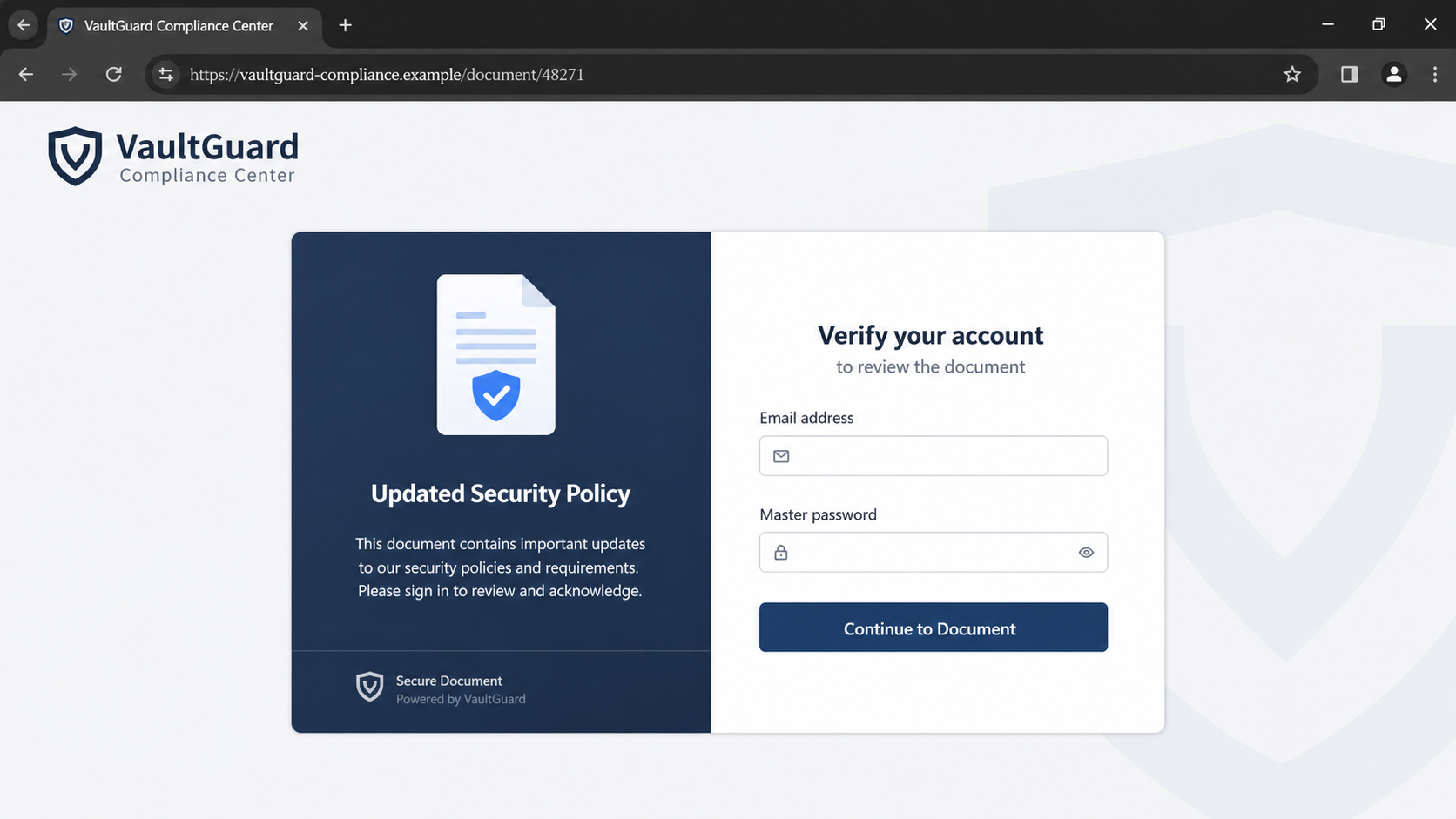
The buttons led to lastpasscompliance.com and bitwardencompliance.com. Security reporting indicated those domains were unaffiliated with the password managers and were flagged as malicious before going offline.
A domain can contain a complete brand name and still belong to anyone who registered it. The part immediately before the final suffix, not the logo or page title, determines which site the browser is visiting.
The real prize is the password vault, not a signed document
A password manager can contain logins for email, banking, shopping, work systems, cloud storage, social media, and identity records. That makes the master password unusually valuable to criminals.
The fake compliance page may request the account email, master password, or a multifactor code. It can also redirect the victim through several screens so the theft feels like a normal document workflow.
Neither LastPass nor Bitwarden was reported breached in this campaign. The danger came from users being tricked into handing credentials to an unrelated site, not from the genuine services losing control of their systems.
- An unexpected policy update arrives from a newsletter-style lookalike domain.
- The email uses a DocuSign or electronic-signature theme to appear routine.
- A review button opens an unrelated compliance domain.
- The fake page asks for credentials that a real document should not require.
- LastPass and Bitwarden used different names, but the underlying script was nearly identical.
- The password-manager companies were impersonated, not breached by this email campaign.
Why This Phishing Email Feels More Credible Than a Typical Password Alert
Most people have learned to distrust an email that simply says a password expired. A policy document feels different. It sounds legal, boring, and connected to normal business administration, which lowers the reader's guard.
Electronic-signature services are also common in employment, banking, insurance, property, and vendor relationships. Attackers know that a Sign Document button may receive less scrutiny than a button that openly says Enter Your Password.
Password-manager customers are especially sensitive to security notices. A message about updated protection can feel consistent with the reason they bought the service in the first place.
The attackers reinforce that credibility with professional spacing, legal language, security icons, and a sender display name that shows only the trusted brand. On a phone, the actual address may be hidden until the recipient expands the header.
The duplicated LastPass and Bitwarden versions reveal the industrial nature of the campaign. The operator could swap a logo, two domains, and a few names while keeping the same document story and credential-collection path.
A real company may send policy notices, but it should not ask customers to reveal a vault master password to view or sign a document. That single request is enough to stop and verify through the official app.
What the Reported LastPass and Bitwarden Campaign Actually Used
The July 2026 campaign used the sender hello@lastpassnewsletter.com and directed recipients toward lastpasscompliance.com. A parallel Bitwarden version used bitwardennewsletter.com and bitwardencompliance.com.
Reports described a Review and Access Terms button and a claim that security policies had changed. The compliance domains were separate from lastpass.com and bitwarden.com, even though the names were constructed to look official at a glance.
Both malicious destinations were reported offline after security providers flagged them. That does not end the risk because the same kit can return on new domains with different wording or another password-manager brand.
LastPass has separately warned customers that its employees will never ask for a master password. It also tells users to submit questionable branded emails through official abuse channels instead of responding to the sender.
The evidence supports a phishing conclusion about the messages and domains. It does not support telling users that their stored passwords were automatically exposed merely because the email arrived.
How the Fake Password Manager Security Update Scam Works
Step 1: A polished policy email lands in the inbox
The message claims that the password manager updated security policies, compliance terms, or account protections. It may say a signature is required before a deadline.
The visible sender name displays the brand, while the full address uses a newly registered newsletter domain. Mobile email apps often hide that difference until the header is expanded.
The email avoids wild promises. Its calm corporate language is deliberate because an ordinary administrative request attracts less suspicion than an obvious security scare.
Step 2: An electronic-signature theme supplies borrowed trust
The email suggests that a document is waiting in DocuSign or a similar signing workflow. Familiar wording such as Review Terms or Access Document makes the next click feel expected.
A real DocuSign notice identifies the sender and envelope context. An unexpected document about a password-manager policy should be verified inside the official account before any link is opened.
The attacker benefits even if the page only resembles a signing service. Many recipients remember the color and button style but do not verify the destination domain.
Step 3: The button passes through a lookalike compliance domain
Instead of opening the password manager's real website, the button sends the browser to a domain that combines the brand name with words such as compliance, policy, security, or documents.
HTTPS and a padlock only show that traffic to that domain is encrypted. They do not prove the domain belongs to the company being impersonated.
Some campaigns use redirects or tracking links before the final page. The browser address after every redirect matters more than the text printed on the original button.
Step 4: The fake page asks for vault credentials
The compliance page may say the visitor must verify an account before the document can be displayed. It asks for an email address and the master password in a form controlled by the attacker.
A second screen may request a one-time code. Entering that code immediately can help the criminal complete a real login while the victim is still waiting for the fake document.
A policy acknowledgment does not need the secret that decrypts a password vault. Close the page when a document workflow asks for a master password.
Step 5: Stolen credentials are tested against the real service
After submission, the attacker can try the email and master password on the genuine password-manager site. The fake page may show an error or success message to delay suspicion.
If the victim reused the same password elsewhere, the criminals can test it against email and other high-value accounts. Automated credential testing makes reuse especially dangerous.
A stolen vault login can lead to follow-up attempts against every account listed inside it. The criminal may prioritize primary email, financial services, cloud backups, and workplace systems.
Step 6: The mailbox and vault become tools for more phishing
Control of the email account can allow password resets, deletion of warning messages, and convincing scams sent to contacts. Access to work credentials can create a business compromise as well.
The attacker may search stored notes for recovery codes, identity documents, card details, or cryptocurrency information. The exact impact depends on what the victim stored and which protections were enabled.
This is why recovery must cover the entire account chain. Changing only the password-manager password may not be enough if the email account or recovery settings were also exposed.
Step 7: The same template returns under another domain
Once security providers block one site, the operator can register a new newsletter or compliance domain. The email design and credential form require only minor changes.
The campaign can also shift to another password manager, cloud-storage provider, or security product. The story remains an urgent policy document that supposedly requires account verification.
Remember the behavior, not just the domain names from one alert. Unexpected documents, unrelated domains, and requests for master passwords are the durable warning signs.
Company, Address, and Fulfillment Checks
The logo is borrowed, but the sender is an unrelated operator
LastPass and Bitwarden are real companies, but the newsletter addresses in this campaign were not their official sending domains. The display name cannot establish ownership.
Compare the sender with messages already visible inside the official account. A one-word difference, added newsletter label, or different final domain can separate a real notice from a credential trap.
Do not use contact details inside the suspicious email. Open the official application or type the known company address yourself and ask support whether the policy request exists.
A domain registration is not a company address
Lookalike domains may use privacy services, short registration periods, or infrastructure unrelated to the brand. A registrant address, when visible, does not prove the business behind the email is legitimate.
The important mismatch is direct: the password manager operates on its established domain, while the document opens on a newly introduced compliance address with no verified relationship.
A physical office or mailing address is largely irrelevant to an urgent security notice. If the relationship cannot be confirmed through the real service, do not treat contact details on the imitation page as evidence.
Support disappears when you reply to the fake sender
Criminal mailboxes may not accept replies, or they may send automated messages that keep the victim inside the same fake workflow. A response from the sender does not make the request genuine.
Use the official abuse or support channel and include the complete message headers, sender address, link destination, and a screenshot. That gives the impersonated company information it can investigate.
For a workplace account, notify IT or the security team immediately. Administrators may need to reset sessions, review sign-ins, and warn other recipients before the same message spreads.
The credential route must be traceable from email to final domain
A legitimate security process should remain inside documented company domains or a clearly identified vendor relationship. Every redirect should have a defensible purpose and an expected destination.
In this scam, the brand name, newsletter domain, compliance domain, and electronic-signature theme create separate layers. That fragmentation hides who actually receives the submitted data.
If a page will not identify the responsible company, privacy policy, and verified support channel without first collecting a master password, the safest conclusion is to leave and verify elsewhere.
What to Check Before Signing Any Password-Manager Document
Open the password manager directly and look for an account banner, inbox message, or policy notice. Real changes that require action should be visible without entering through an unsolicited email.
Expand the sender details and compare the complete address character by character. Then inspect the button destination without clicking, or use a safe link-analysis process managed by your security team.
Read the permission or credential request literally. A master password exists to unlock a vault, not to prove that a customer read a policy. No legal-document screen should need it.
Use phishing-resistant multifactor authentication where the service supports it. A hardware security key or passkey tied to the correct domain can reduce the damage from a lookalike page, but it does not excuse clicking unknown links.
Finally, keep recovery codes offline and avoid storing the only recovery path inside the same vault. A resilient setup gives you a way back in even when the primary account is under attack.
Warning Signs to Watch For
- An unexpected security-policy signature arrives without an in-app notice.
- The sender uses a newsletter domain that is not the company's main domain.
- The button leads to a separate compliance-themed website.
- A document page asks for the password-manager master password.
- The message creates a short deadline or threatens loss of vault access.
- The email gives no named employee or verifiable envelope context.
- A one-time code is requested immediately after the password.
- The same design appears with several password-manager brands.
Any one of these signs deserves verification. A request involving a master password should stop the process completely until the genuine provider confirms it.
What to Do if You Have Fallen Victim to This Scam
- Close the phishing page and preserve the evidence. Do not submit the form again. Save the email as a file, capture the sender, headers, button destination, compliance domain, time, and every page you reached.
- Change the master password from a clean path. Open the official password-manager app or type its known address directly. Create a unique master password that has never been used on another account.
- Secure the primary email account next. Change its password, review recovery addresses and phone numbers, sign out unknown sessions, inspect forwarding rules, and enable strong multifactor authentication.
- Rotate the most important passwords stored in the vault. Start with banking, email, cloud storage, workplace access, social media, shopping accounts with saved cards, and any account that can reset others.
- Revoke sessions and review account history. Use the genuine password manager to remove unfamiliar devices and sessions. Check recent sign-ins, exports, sharing changes, emergency access, and security notifications.
- Contact your workplace security team if business credentials were involved. Report the event immediately, even if the login appeared to fail. Administrators may need to invalidate tokens, inspect mailbox rules, and warn colleagues.
- Scan the device if anything was downloaded. If the page delivered a file, extension, or installer, disconnect from sensitive work and run a full Malwarebytes scan. Remove unknown browser extensions and applications.
- Block repeat lures while you recover. AdGuard can reduce malicious advertising, redirects, and known scam pages. It cannot protect credentials already submitted, so complete every account-recovery step as well.
- Report the impersonation through trusted channels. Send the message to the provider's official abuse address, report it to your email service, and file a report with the FTC at ReportFraud.ftc.gov. Include domains without revisiting them.
Frequently Asked Questions
Was LastPass or Bitwarden breached by this policy email?
The reported campaign impersonated both services with lookalike domains. Reporting said their genuine infrastructure was not compromised by these emails.
Can a real DocuSign email ask me to sign company terms?
Yes, legitimate documents exist, but an unexpected password-manager policy should be confirmed inside the official account. A signing page should not request your vault master password.
Does HTTPS mean the compliance page is safe?
No. HTTPS encrypts the connection to the domain in the address bar. Criminals can obtain certificates for lookalike domains too.
What if I entered my email but not the master password?
Expect targeted follow-up messages and secure the email account. The address confirms that you engaged, but the most serious vault risk begins when credentials or codes are submitted.
What if I entered the password but multifactor authentication stopped the login?
Change the password immediately and review all sessions. Do not approve unexpected prompts, because an attacker may keep trying while the stolen password remains valid.
Will changing the master password protect every stored account?
It protects the vault login going forward, but it does not undo credentials that may already have been viewed or exported. Rotate the most sensitive stored passwords and monitor them.
The Bottom Line
The fake password manager security update scam succeeds because it looks boring and responsible. A policy document, familiar signature language, and a brand-filled domain make credential theft feel like routine account maintenance.
Do not sign through the email. Open the real password manager independently, verify the notice, and never enter a master password on a compliance or document page.
If credentials were submitted, move quickly through the entire recovery chain: vault, primary email, sensitive stored accounts, sessions, devices, and official reporting.








