

A polished page announces that the $TKST Airdrop Is Here and invites visitors to join an innovative decentralized ecosystem. One Claim button promises free tokens and offers hundreds of familiar wallet options.
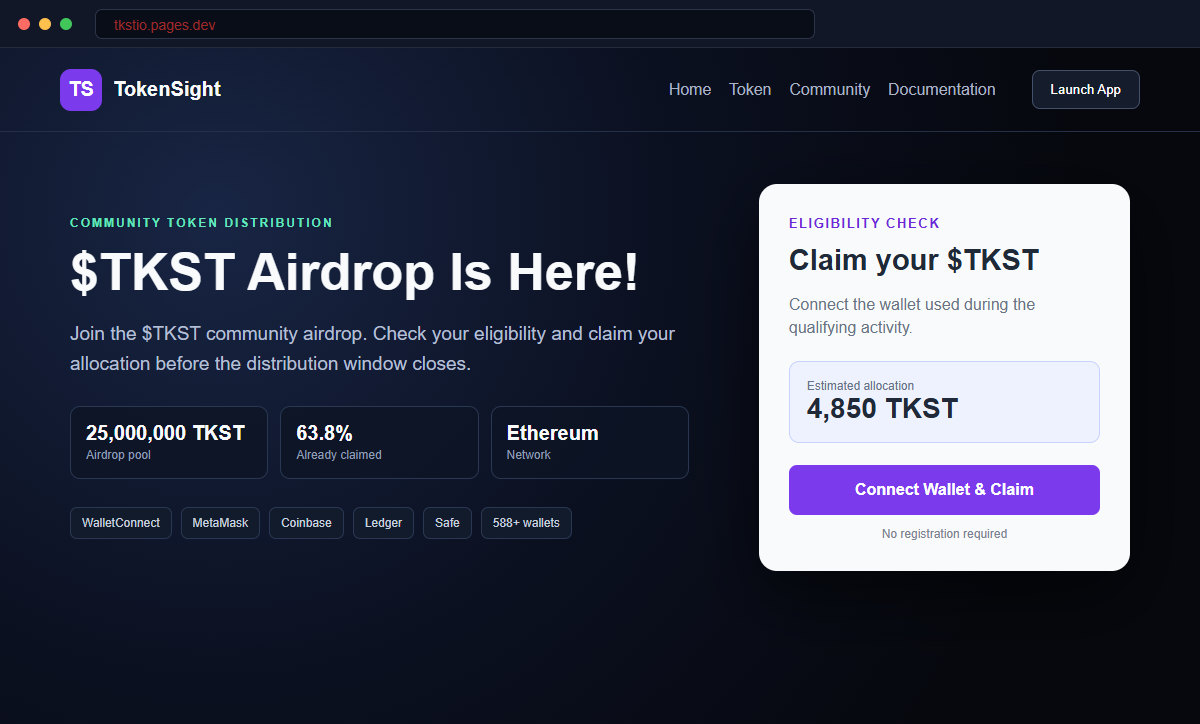
The TokenSight TKST airdrop scam copies the identity of a real Web3 trading project on an unofficial pages.dev address.
Its wallet flow is designed to move visitors toward a transaction, signature, or token approval that can expose assets.
Connecting a wallet is not the same as authorizing a transfer, but it gives the page an address to inspect and a channel for requesting dangerous actions.
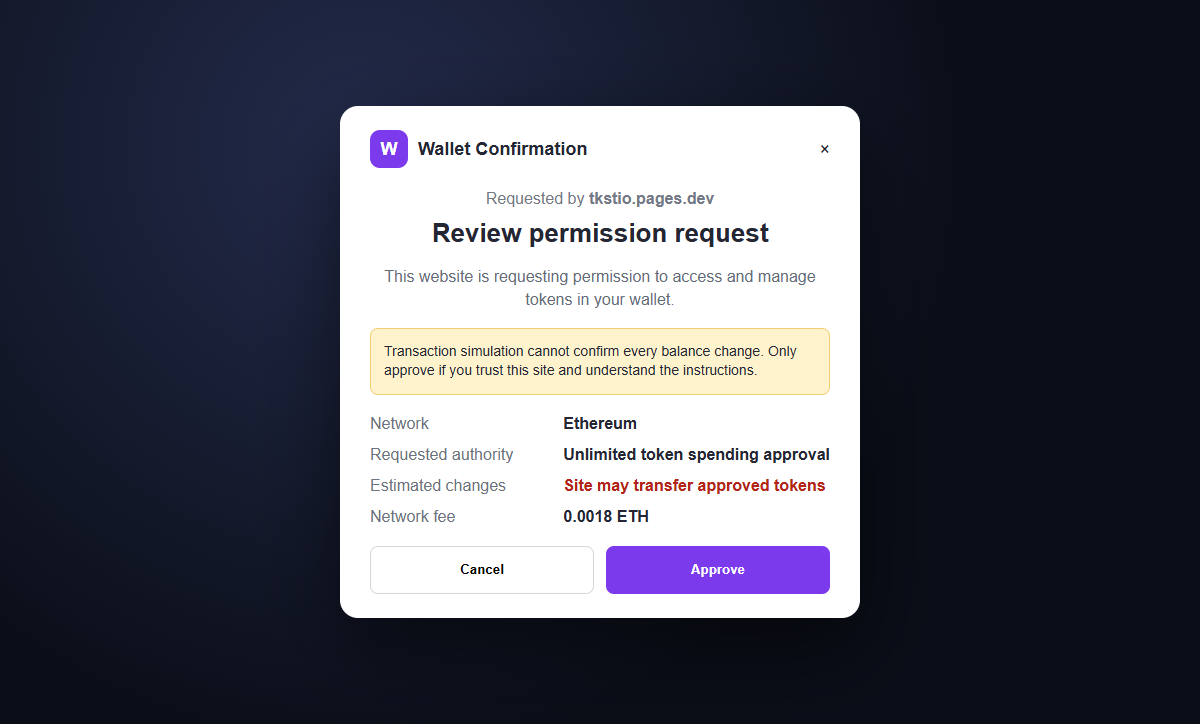
The wallet's confirmation screen, not the promise on the website, defines what will happen.
Do not connect a funded wallet or approve a prompt. Verify every TokenSight announcement through the project's known channels and never treat a free-token message as proof that a claim page is official.
Overview
The fake page borrows a real token and project identity
TokenSight has used the $TKST token name in its project communications. The fraudulent page at tkstio.pages.dev copies that recognition while operating outside the project's known application and channels.
Its headline says $TKST Airdrop Is Here and asks visitors to claim tokens as participants in a decentralized ecosystem. The message offers excitement but no independently verifiable campaign record.
A huge wallet list makes the claim look widely supported
The connection dialog may show WalletConnect, Binance Wallet, MetaMask, Ledger, Coinbase, Safe, and an All Wallets option advertising more than 588 choices.
Wallet compatibility does not equal endorsement. A website can request a connection from legitimate wallet software without being reviewed or approved by the wallet's developer.
The claim flow leads toward approvals a drainer can exploit
After connection, the site may request a signature, spending cap, token allowance, NFT operator approval, or transaction. The visible button may still call the action a claim even when the wallet describes broader authority.
A malicious approval can remain usable after the tab closes. Disconnecting the site and revoking on-chain permissions are different actions, so both must be considered after exposure.
- The headline says $TKST Airdrop Is Here.
- The page promises free tokens from an innovative ecosystem.
- The domain is tkstio.pages.dev.
- The address is separate from known TokenSight channels.
- A Claim button begins the wallet flow.
- WalletConnect, MetaMask, Coinbase, Ledger, Safe, and Binance Wallet appear.
- More than 588 additional wallets are advertised.
- The wallet receives a signature, approval, or transaction request.
- The requested authority may be broader than a simple token claim.
- Assets can remain exposed through permissions after disconnection.
Why a Real $TKST History Makes the Fake Airdrop More Convincing
TokenSight is associated with Web3 trading and the $TKST token, so the campaign is not inventing every word from nothing. It is attaching an unauthorized claim page to a recognizable project identity.
TokenSight's own earlier explanation of its initial revenue-share distribution said no action was required from holders for that initial airdrop and directed later claims to its known application.
That historical statement does not authenticate a 2026 pages.dev claim.
Crypto projects can change domains and campaigns, which is why a single old post is not the only verification. Users should compare current announcements across the project's known website, social accounts, documentation, and community channels.
The pages.dev host can provide HTTPS and reliable delivery to a user-created page. Cloudflare's platform does not certify that the tenant is TokenSight or that its wallet transaction is safe.
A long wallet list creates social proof. Visitors may believe that Ledger, Coinbase, MetaMask, or WalletConnect reviewed the page, but those tools only provide ways for sites to request interactions.
Free-token campaigns exploit fear of missing out and low perceived cost. The user thinks there is nothing to lose because the token is free, while the connected wallet may contain far more valuable assets.
What a Wallet Approval Can Authorize Beyond a Token Claim
A basic connection generally shares the public address and lets the site see balances and request further actions. That alone does not automatically authorize every transfer, but it helps the page tailor the next prompt.
Token approvals can let a smart contract spend a specified amount of an ERC-20 token. Unlimited allowances create broader exposure and can remain valid until the owner revokes them on-chain.
NFT collections may use operator approvals such as setApprovalForAll. A malicious operator permission can expose multiple assets from the approved collection rather than one item.
Signature-based permissions, including Permit2-style messages, may not move assets immediately. A victim can see no loss, assume the site was harmless, and experience theft later while the authorization remains usable.
The site may describe the prompt as eligibility verification, wallet synchronization, gas confirmation, or a claim signature. Those labels are written by the site; the wallet's decoded effects and contract addresses are more important.
If the page requests a Secret Recovery Phrase or private key, it is seeking full control. No airdrop, wallet connection, synchronization, support agent, or token claim needs those secrets.
How the TokenSight TKST Airdrop Scam Works
Step 1: A fake promotion reaches crypto users
The campaign may spread through fabricated or hijacked social accounts, Telegram posts, direct messages, search results, browser notifications, or malicious advertisements.
The message uses the TokenSight name and $TKST token to attract people who recognize the project or regularly look for airdrops.
Step 2: An unofficial page announces a free-token claim
Visitors reach tkstio.pages.dev and see a polished claim page saying the $TKST airdrop is live. The page has no authority merely because the project name is displayed correctly.
The registered domain differs from the project's known application. Verify the campaign through official channels before connecting anything.
Step 3: The Claim button opens a broad wallet selector
Familiar names and more than 588 wallet choices make the promotion appear technically mature and widely compatible.
The selector is not an audit badge. Wallet software is built to receive requests from many decentralized applications, including malicious ones.
Step 4: The connected address helps personalize the lure
After connection, the site can read the public address and visible asset information and decide which tokens or networks are worth targeting.
The page can then present a signature or transaction as the final claim step. Cancel if the exact purpose and balance changes are unclear.
Step 5: A dangerous permission is described as a claim
The wallet may request a spending cap, token approval, NFT operator permission, contract call, or signature. The website encourages approval before the user studies the decoded instruction.
A free airdrop should not need unlimited access to unrelated assets. Read the contract, network, token, amount, and expected changes inside the wallet.
Step 6: Assets move immediately or remain exposed
Some malicious transactions transfer or swap assets as soon as they are confirmed. Other permissions stay dormant until the attacker uses them later.
Closing the browser or disconnecting the dapp does not revoke an on-chain allowance. Review approvals separately and pay the required gas to revoke them.
Step 7: Recovery scammers target the victim again
After a public report or on-chain theft, accounts may offer wallet recovery, tracing, or guaranteed reversal. They request a fee, remote access, or the recovery phrase.
Blockchain transfers are difficult to reverse. Report quickly to exchanges and authorities, but never give a second stranger control of the remaining wallet.
Company and Checkout Checks
Start from TokenSight's known channels
Open the project's established website, application, documentation, and social accounts from bookmarks or independently verified profiles. Look for the exact claim domain and contract address across several channels.
An announcement repeated only by new accounts or replies is not sufficient. Compromised social profiles can also post convincing links, so compare domains and contracts.
Compare the domain and historical claim method
The suspicious page uses tkstio.pages.dev. TokenSight's earlier published distribution information directed activity to its known application and said the initial airdrop required no action.
Campaign rules can evolve, but an unrelated cloud subdomain requires explicit current confirmation from the project before any wallet interaction.
Read the wallet request as the authoritative action
Inspect the network, contract, token, spending cap, operator, signature type, and simulated balance changes. Reject unlimited or unexplained authority.
Do not rely on the Claim label in the browser. The confirmation presented by the wallet defines what you are authorizing.
Use a low-risk verification setup
Do not test unknown claims with a primary wallet. A separate empty address limits exposure, but it does not make a malicious contract safe or prove the promotion is real.
Never enter a recovery phrase or private key into a website. Hardware-wallet confirmation should be read on the device, not approved automatically.
Warning Signs to Check Before You Act
- A free $TKST claim appears on an unfamiliar pages.dev address.
- The promotion is not confirmed across known TokenSight channels.
- A Claim button immediately requests a wallet connection.
- Hundreds of wallet logos create borrowed trust.
- The site describes a signature only as verification.
- The wallet requests unlimited token access.
- An NFT operator approval covers an entire collection.
- The contract address is absent from official documentation.
- The simulated balance changes are unclear or unavailable.
- The page pressures the user to approve before a deadline.
- A recovery phrase or private key is requested.
- A recovery account guarantees reversal for an advance fee.
A free token does not justify broad authority over a funded wallet. If the domain is unofficial or the wallet request is difficult to explain, cancel the interaction.
What to Do if You Have Fallen Victim to This Scam
- Disconnect the suspicious site. Remove tkstio.pages.dev from connected applications in the wallet. Disconnecting limits the ordinary session but does not cancel on-chain token approvals or signed permissions.
- Revoke suspicious approvals and spending caps. Use the wallet's official approval manager, MetaMask Portfolio, or the approval checker in the correct blockchain explorer. Revoke allowances associated with the fake page or any contract you do not recognize. Revocation requires an on-chain transaction and gas.
- Move assets when a malicious signature may remain valid. If you approved an unclear transaction, Permit2 message, setApprovalForAll request, or broad token authority, move valuable assets to a clean account while investigating. A delayed theft is possible when a signed permission remains usable.
- Create a new wallet if the recovery phrase was exposed. A Secret Recovery Phrase or private key cannot be changed. If either was entered on a site or shared with anyone, create a wallet from a completely new phrase on a clean device and transfer remaining assets away from every account derived from the old phrase.
- Review the complete on-chain history. Check approvals, transfers, swaps, contract interactions, NFT permissions, and destination addresses on the correct explorer. Save transaction hashes, contract addresses, wallet addresses, timestamps, and token amounts.
- Contact exchanges quickly when funds reach them. Send the receiving exchange the transaction hashes, destination addresses, time, asset, network, and amount. A freeze is not guaranteed, but prompt reporting gives the best chance of identifying an account before funds move onward.
- Secure email, wallet software, and exchange accounts. Change exposed or reused passwords, revoke sessions, and enable strong multi-factor authentication. Verify wallet extensions and mobile applications came from the official publisher.
- Scan the device for unwanted software. Run a complete scan with Malwarebytes or another trusted security product if the page delivered a file, browser extension, wallet update, or remote-support tool. Remove unknown applications and patch the device before creating a replacement wallet.
- Block known scam infrastructure. AdGuard or another reputable DNS and content blocker can stop some known drainer domains, malicious ads, and redirects. It cannot decide whether a new wallet signature is safe, so verify every domain and instruction.
- Preserve evidence and report the campaign. Save the fake domain, screenshots, advertisements, social accounts, wallet prompts, contracts, transactions, and conversations. Report them to the wallet provider, host, explorer, exchanges, and national fraud authority.
- Ignore guaranteed crypto recovery services. Anyone who contacts you unexpectedly and promises to reverse a blockchain transfer for a fee, recovery phrase, or remote access may be running a second scam. Work only with verified providers and law enforcement.
Frequently Asked Questions
Is the TokenSight TKST airdrop page legitimate?
No. The documented tkstio.pages.dev page impersonates TokenSight and pushes visitors toward a wallet-draining claim flow.
Does connecting a wallet automatically transfer every asset?
A basic connection usually shares the public address and allows requests. Theft generally follows a signed transaction, approval, or exposed secret, so reject every unclear prompt.
Why are MetaMask, Coinbase, Ledger, and other wallets listed?
Their presence shows the page can request a connection through common standards. It does not show those companies approved or audited the airdrop.
Is disconnecting the website enough?
No. Disconnecting a dapp and revoking token approvals are different actions. Review and revoke unwanted on-chain allowances separately.
What if I signed something but no crypto is missing?
Review signatures, approvals, spending caps, and NFT operators immediately. Some permissions can be used later, so move assets when exposure cannot be ruled out.
What if I shared my Secret Recovery Phrase?
Create a new wallet from a completely new phrase on a clean device and move remaining assets. The old phrase remains permanently capable of controlling its accounts.
The Bottom Line
The TokenSight TKST airdrop scam borrows a real project identity and turns a free-token promise into a wallet-permission trap on an unofficial pages.dev domain.
The important evidence is not the polished claim page or long wallet list. It is the domain, contract, and exact action shown in the wallet confirmation.
If you interacted, disconnect the site, revoke permissions, review signatures and transactions, and move assets when necessary. An exposed recovery phrase requires a completely new wallet, not a password change.

Join the discussion
0 commentsShare your experience or ask a question about this article.
Discussion
Start the conversation
Have a question or something useful to share? Add the first comment.