

The PowerGacha $GACHA airdrop scam uses a token giveaway to lure visitors into connecting a cryptocurrency wallet. A polished portal says the $GACHA community allocation is live.
It offers a simple path to free tokens: connect a wallet, verify eligibility, and claim before the distribution window closes.
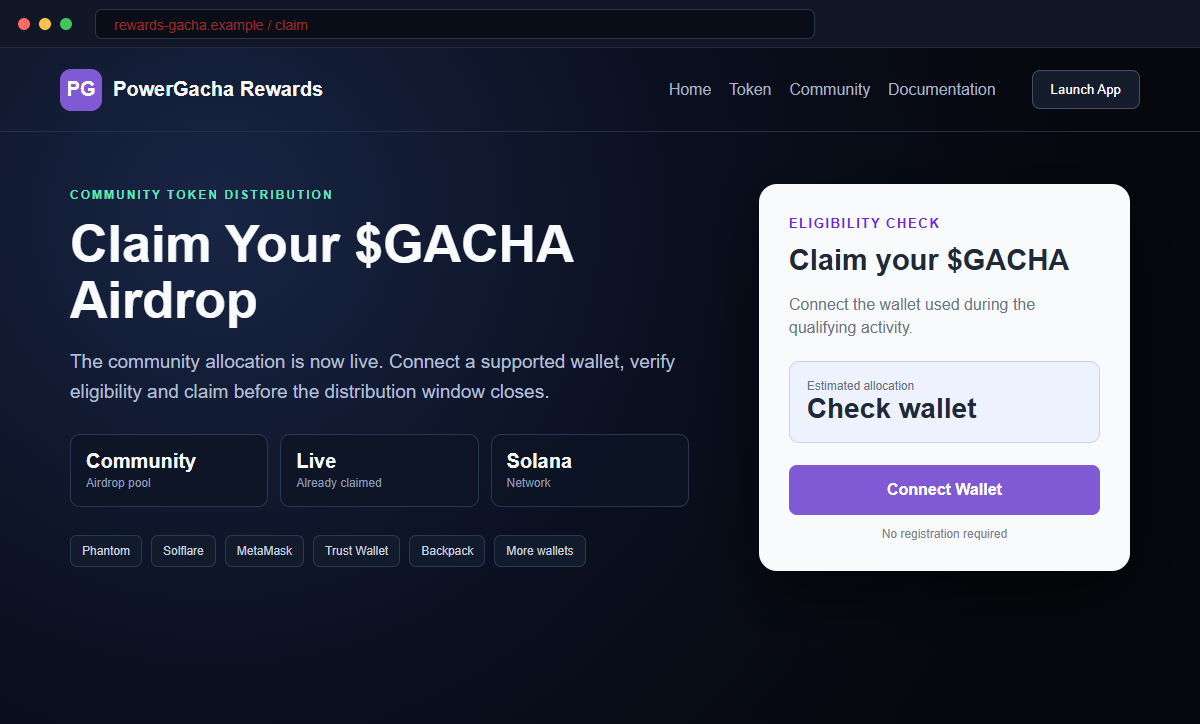
The PowerGacha $GACHA airdrop page reviewed for this report is a crypto wallet-draining scam. It impersonates the real PowerGacha project and uses a fake claim process to push visitors toward a harmful wallet request.
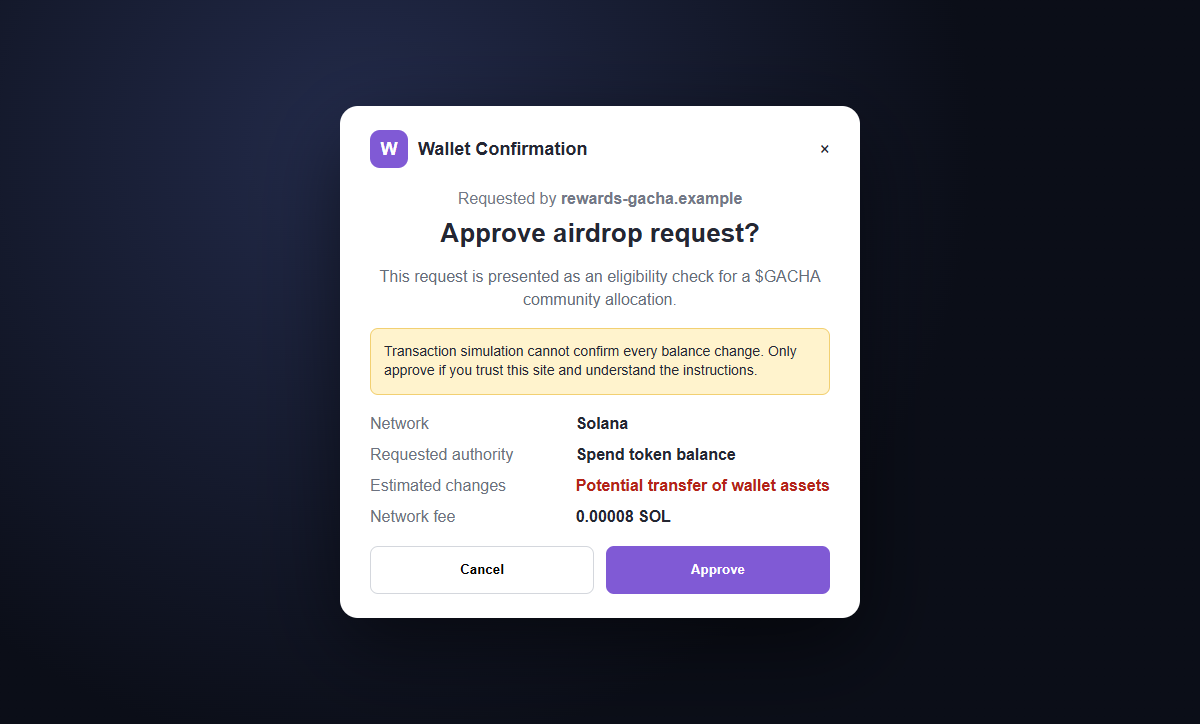
Nothing may look stolen when the wallet first connects. The dangerous moment arrives when the site asks for a signature, token approval, or transaction that gives a malicious contract authority over assets.
Do not connect to rewards-gacha[.]com or approve its requests. Close the page and check PowerGacha announcements only through the project's verified website and established social channels.
Overview
The site copies a real project and invents an urgent reward
The fraudulent page calls itself an Official Airdrop Portal and displays a prominent “Claim Your $GACHA Airdrop” message. Community-allocation language makes the offer sound like a normal token distribution.
A limited claim window encourages visitors to act before checking the domain. The reviewed site used rewards-gacha[.]com, while the established project website is powergacha.io. Similar names do not make the domains related.
A long wallet list makes the trap feel widely supported
The connection window offers familiar choices such as Phantom, Solflare, MetaMask, Trust Wallet, and other wallet brands. These names are public interface labels that any webpage can display.
A real wallet extension may open after the visitor clicks. That does not verify the website. The wallet is only showing a request created by the page, and the user must decide whether the requested authority is safe.
The signature can be worth far more than the promised tokens
A malicious approval can let a contract spend a token balance, while a deceptive transaction may directly move assets. Drainers can target valuable tokens first and send them to addresses controlled by the attacker.
Blockchain transfers are generally irreversible. A victim may lose tokens within seconds, and a convincing recovery account that appears afterward may be another scam.
- The page impersonates PowerGacha with copied naming and crypto styling.
- It advertises an Official Airdrop Portal without independent proof.
- A community allocation is described as already live.
- A closing claim window creates artificial urgency.
- The domain differs from powergacha.io.
- Popular wallet names are displayed to create familiarity.
- Connecting is framed as a harmless eligibility check.
- The wallet request may contain spending authority or transfers.
- The promised $GACHA reward may never exist for the visitor.
- Approved transactions can move real assets and cannot simply be canceled later.
What the Real PowerGacha Project Says About Participation
PowerGacha describes itself as a Solana-based platform built around on-chain games involving graded cards. That legitimate project identity is what the scam borrows to make an unrelated reward page seem familiar.
The project's published participation information explains an hourly raffle mechanism based on holding $GACHA at the top and close of a qualifying window. It says ordinary entry does not require a separate signup or gas payment.
That description is materially different from visiting rewards-gacha[.]com, connecting through a surprise airdrop portal, and approving a wallet request. A similar token name cannot bridge that gap.
On-chain projects can change promotions, so users should not rely on memory alone. A new event should be announced through the official website and verified accounts, with consistent domains and clear contract information.
The real project also makes clear that blockchain games can involve real financial risk. That is another reason not to treat a branded interface as proof that a transaction is safe.
A legitimate distribution should explain eligibility, network, contract addresses, timing, and the exact wallet action required. Users should be able to verify those facts independently before any signing window opens.
Why the rewards-gacha.com Airdrop Page Is Dangerous
The strongest evidence is the domain mismatch. rewards-gacha[.]com is not a subdomain of powergacha.io. A hyphenated marketing name on a separate registered domain belongs to whoever controls that separate domain.
The page uses broad phrases such as community allocation and official portal but supplies no verifiable proposal, announcement, or on-chain distribution contract. Urgency takes the place of documentation.
The eligibility process begins with a wallet connection before the visitor can verify a meaningful allocation. A safe distribution can normally publish its rules and contract details without first asking for account access.
The large wallet selector does not prove partnerships. Website developers can copy wallet names and icons, then call a standard connection interface from a page created the same day.
The decisive clue appears inside the wallet. If a supposed check requests permission to spend tokens, transfer assets, change an account owner, or interact with an unexplained contract, the request is not a passive eligibility lookup.
A small network fee is not a measure of safety. The fee can be tiny while the authority granted by the transaction exposes an entire token balance.
How the PowerGacha $GACHA Airdrop Scam Works
Step 1: Scammers promote a fake $GACHA distribution
Links may appear in social replies, direct messages, search advertisements, compromised accounts, community chats, or token-related posts. The promotion says a distribution is live and implies that existing holders deserve a share.
The campaign benefits from a real project name. People who have seen PowerGacha or $GACHA before may recognize the branding and stop examining who published the link.
Step 2: The lookalike page manufactures credibility
Dark crypto styling, project colors, a token symbol, navigation links, allocation figures, and wallet logos create the appearance of a finished decentralized application.
These elements are easy to reproduce. The page does not need access to PowerGacha systems to copy public graphics and words.
Step 3: A deadline narrows the visitor's attention
The airdrop is described as live for a limited period, while claim counters or community statistics suggest that other users are already participating. Missing out begins to feel more costly than pausing.
This is deliberate. A careful comparison between rewards-gacha[.]com and powergacha.io would end the scam before the wallet is involved.
Step 4: Connect Wallet starts the trust transfer
The site offers Phantom, Solflare, MetaMask, Trust Wallet, and additional choices. Clicking one may invoke the genuine extension installed in the browser.
Users sometimes assume that a real wallet pop-up has approved the website. In reality, the wallet is asking the user for a decision and may not know whether the underlying project claim is true.
Step 5: A harmful request is disguised as verification
The next prompt may be labeled verify, claim, initialize, activate, or confirm eligibility. Behind that friendly button can be a token allowance, transfer instruction, ownership change, or contract interaction.
The attacker relies on the user reading the label on the website instead of the authority and balance changes shown by the wallet.
Step 6: The drainer moves assets to attacker-controlled addresses
Once approved, the malicious code can transfer exposed tokens or execute the transaction the victim authorized. Automated drainers often inspect balances and prioritize assets with the highest value.
Some approvals remain usable after the page closes. A criminal can wait, monitor the address, and take later deposits until the permission is revoked or the wallet is abandoned.
Step 7: Recovery scammers pursue the victim
Public blockchain activity can reveal that an address lost funds. Fake investigators, support agents, hackers, and recovery services then promise to reverse the transaction for an advance payment or recovery phrase.
That request is another theft attempt. No legitimate wallet support representative needs the secret recovery phrase, and confirmed blockchain transfers usually cannot be reversed.
Company and Checkout Checks
Start with the official domain, not a promotional link
Type powergacha.io yourself or use a bookmark created after independent verification. Look for the same announcement there and on verified project accounts before considering any wallet interaction.
A separate domain containing gacha, power, rewards, claim, or airdrop is not automatically affiliated.
Compare the event with the project's documented mechanism
The reviewed official material describes participation based on holding $GACHA during hourly windows. A surprise portal that demands a wallet approval should therefore receive extra scrutiny.
Check dates, eligibility rules, contract addresses, and whether trusted community channels consistently reference the exact same destination.
Read the wallet simulation and requested authority
Do not approve based on the website's button text. Expand every instruction and look for token spending, transfers, account changes, blind signing, unlimited allowances, or an unfamiliar program.
Cancel when the wallet cannot explain the result clearly. A lost opportunity is cheaper than a drained address.
Use a separated wallet when exploring unfamiliar applications
A low-value testing wallet limits exposure but does not make a malicious request safe. Never connect a primary savings wallet merely to check whether an offer is real.
Hardware wallets protect keys, yet they still sign a harmful transaction when the owner approves it.
Warning Signs to Check Before You Act
- The page calls itself an official portal on a different registered domain.
- No matching announcement is visible on powergacha.io.
- The event rules are replaced by vague community-allocation language.
- A countdown or closing window pressures immediate action.
- Large claim statistics cannot be independently verified.
- The page wants a wallet connection before explaining eligibility.
- Popular wallet names are treated as proof of a partnership.
- The wallet asks for token spending or transfer authority.
- The contract or program address is unexplained.
- The button says verify while the wallet predicts balance changes.
- Support arrives by direct message and asks for secrets.
- Recovery is promised in exchange for a payment or recovery phrase.
The safe decision is based on the domain and the transaction, not the artwork. If the official project does not confirm the event and the wallet request cannot be explained line by line, cancel it.
What to Do if You Have Fallen Victim to This Scam
- Disconnect the suspicious application. Open the wallet's connected-app settings and remove rewards-gacha[.]com or any unknown session. Disconnection stops ordinary reconnections, but it does not by itself cancel token permissions already recorded on-chain.
- Revoke malicious token approvals. Use the wallet's verified approval-management feature or an established blockchain explorer reached independently. Revoke unlimited and unfamiliar allowances, then confirm the revocation on-chain before trusting the address again.
- Move remaining assets to a newly created wallet. If a harmful transaction was signed or the wallet's security is uncertain, create a fresh wallet on a clean device and transfer remaining assets promptly. Test with a small amount and then move valuable tokens and collectibles.
- Abandon the old wallet if its recovery phrase was exposed. A recovery phrase or private key cannot be changed. Anyone who has it can recreate the wallet forever, so remove assets and never use that address for future deposits.
- Preserve the transaction evidence. Record the fraudulent domain, wallet address, transaction hash, token contracts, destination addresses, timestamps, screenshots, messages, and amount lost. Do not delete the browser history or chat that led to the page.
- Report the malicious addresses and website. Notify the wallet provider, the project's verified team, the domain registrar or host, relevant blockchain explorers, and local cybercrime authorities. Reports may help warn other users even when funds cannot be recovered.
- Contact exchanges that received stolen assets. If the funds move to a known exchange, send its compliance team the transaction trail and police report as quickly as possible. The exchange may be able to preserve account records, though recovery is not guaranteed.
- Scan the device for additional threats. Run a full Malwarebytes scan or another trusted security product if the page delivered an extension, app, file, or wallet update. Remove unknown software and update the browser, operating system, and wallet extension.
- Add protection against known scam domains. AdGuard or another reputable DNS and content blocker may prevent some malicious advertising and known phishing hosts from loading. New domains can bypass lists, so continue checking every address and approval.
- Warn the community without exposing secrets. Share the fraudulent domain and public transaction details through verified community channels. Never post a recovery phrase, private key, authentication code, or sensitive identity document while asking for help.
- Ignore recovery agents who contact you first. No stranger can guarantee reversal of a confirmed blockchain transfer. Refuse requests for an advance fee, remote access, wallet connection, private key, or recovery phrase.
Frequently Asked Questions
Is the PowerGacha $GACHA airdrop real?
The rewards-gacha[.]com page reviewed here is a scam and is not the established powergacha.io domain. Do not connect a wallet or approve its requests.
Can connecting a wallet alone drain it?
A basic connection normally reveals public account information but does not transfer assets by itself. The larger danger is the signature, approval, or transaction requested immediately afterward.
Why did my genuine wallet extension open?
Websites can request a connection from genuine extensions. The extension's presence proves that your wallet is real, not that the website or transaction is legitimate.
Can I cancel a blockchain transaction after it is confirmed?
Usually not. Confirmed blockchain transactions are generally irreversible, which is why every authority and predicted balance change must be checked before signing.
Will a hardware wallet stop a drainer?
It protects the private key from leaving the device, but it cannot prevent the owner from approving a malicious transaction. Read the device prompt and cancel unexplained actions.
Can PowerGacha support recover stolen tokens?
A project or wallet support team may document and investigate the scam, but it usually cannot reverse confirmed transfers. Be suspicious of anyone who guarantees recovery for a fee.
The Bottom Line
The PowerGacha $GACHA airdrop scam borrows a real project name, invents a community allocation, and uses a lookalike domain to obtain dangerous wallet approvals.
Verify promotions through powergacha.io and the project's established channels, then judge the exact transaction inside the wallet. A genuine extension, small network fee, or polished portal does not make unexplained spending authority safe.
If you interacted with the site, disconnect it, revoke approvals, move remaining assets when necessary, preserve evidence, scan the device, report the addresses, and refuse every unsolicited recovery offer.

Join the discussion
0 commentsShare your experience or ask a question about this article.
Discussion
Start the conversation
Have a question or something useful to share? Add the first comment.