

The Grass Vote Rewards scam imitates a governance reward page to obtain wallet access and transaction approval. A proposal page says $GRASS holders can vote on a new rewards allocation.
The event looks active, the choices look reasonable, and a Vote Now button promises that participating wallets may qualify for a reward.
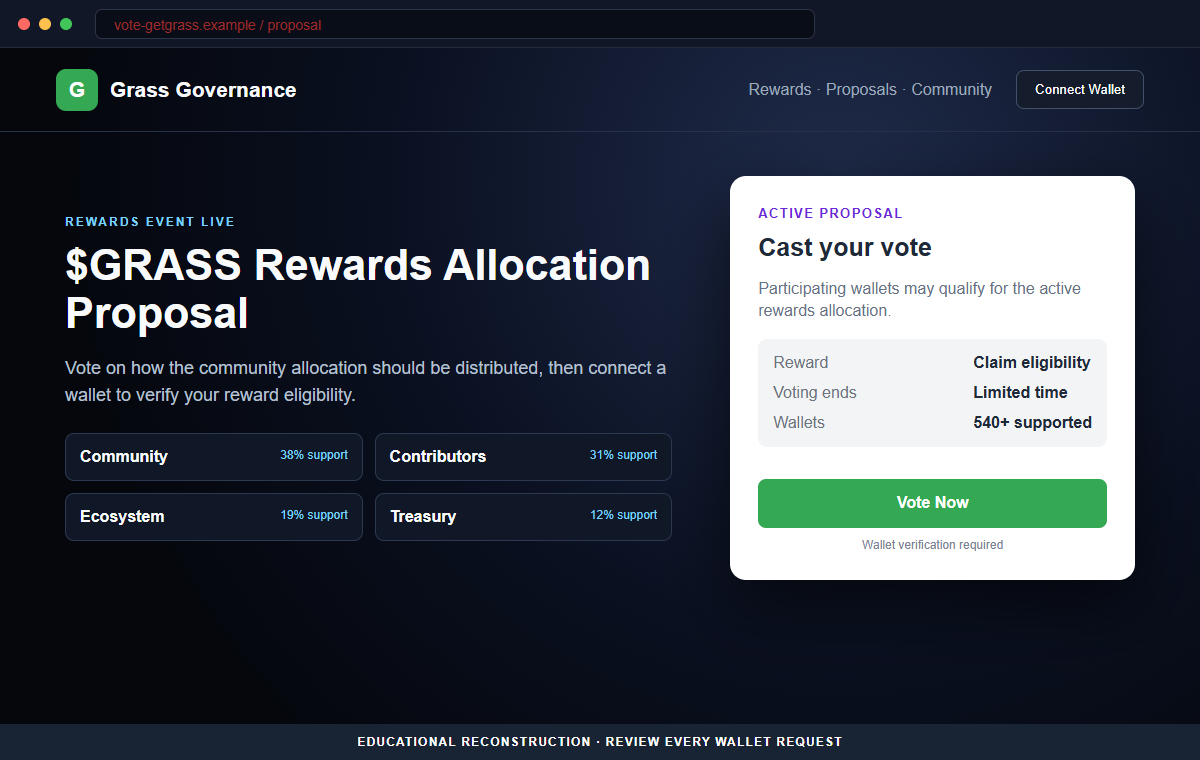
The Grass Vote Rewards page reviewed here is a crypto wallet-draining scam. It has no legitimate connection to Grass and uses a fake vote to persuade visitors to connect a wallet and approve a harmful transaction.
The trap is easy to miss because governance is normal in crypto. A user may expect to sign a harmless vote, yet the actual wallet request can authorize token spending or move assets instead.
Do not interact with vote-getgrass[.]app. Grass says reward allocations should be checked and claimed through its official dashboard, not through a surprise voting domain shared in a message or advertisement.
Overview
The page turns a reward into a community decision
The fraudulent site displays “$GRASS Rewards Allocation Proposal” and labels the event live. It offers voting choices and suggests that participation helps decide how tokens or rewards will be distributed.
This framing makes the visitor feel involved rather than greedy. The promised reward seems like a benefit of governance participation, even though the page provides no verifiable proposal record or official announcement.
A huge wallet menu creates false social proof
The page claims support for hundreds of wallets and may display names such as MetaMask, Trust Wallet, and Zerion. A broad connector can make the portal look established and technically compatible.
Those interface elements are not endorsements. Any developer can display wallet names and trigger a connection request, including the operator of a newly created phishing site.
The vote is only a cover for the wallet request
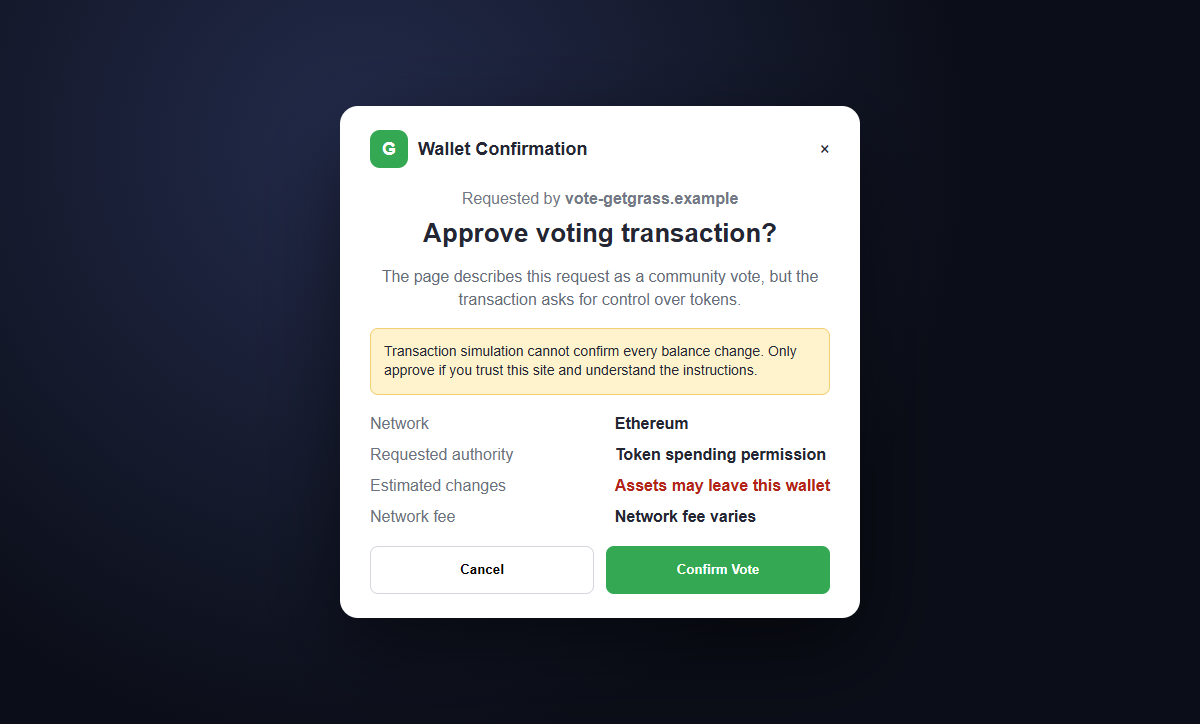
After the visitor chooses an option and connects, the site presents a transaction as the final voting step. The request can contain token permissions or transfers that have nothing to do with recording an opinion.
If approved, a drainer can move exposed assets to an attacker-controlled address. The transfer may complete in seconds and is generally not reversible.
- The page impersonates the Grass name and visual style.
- A rewards allocation is presented as an active governance proposal.
- Voting is linked to possible reward eligibility.
- The site claims a large worldwide user community.
- The domain vote-getgrass[.]app is not the official Grass dashboard.
- Hundreds of supported wallets are advertised as social proof.
- The page asks for a wallet before proving the proposal exists.
- A transaction is mislabeled as a simple vote.
- The request may grant token spending authority.
- Approved assets can be transferred to the attacker.
How Legitimate Grass Rewards Are Actually Checked
Grass is a real project that rewards eligible users for contributing unused internet bandwidth. That recognizable product and its active community give impersonators a believable story for fake reward pages.
Official Grass information published for Stage 2 says rewards for Epochs 1 through 19 were based on bandwidth contribution. It describes those rewards as being made available in USDC rather than through a random community-vote portal.
Most importantly, Grass directs users to check and claim allocations through the official dashboard at app.grass.io/dashboard. That known destination is fundamentally different from vote-getgrass[.]app.
Reward programs can evolve, and eligibility can vary. Users should therefore confirm current terms from grass.io and the official dashboard instead of trusting screenshots, replies, sponsored search results, or direct messages.
A real governance proposal should have a traceable origin. The project should publish the proposal, voting rules, relevant contract or platform, dates, and an explanation of whether signing is gasless or on-chain.
Even when a real vote uses a wallet, the prompt should match the announced mechanism. A spending approval is not needed merely to record a preference, and a vote should not predict that tokens will leave the wallet.
Details That Expose the Fake Grass Rewards Proposal
The destination is the clearest warning. vote-getgrass[.]app is a separate registered domain, not a page under grass.io or app.grass.io. Placing getgrass in the hostname does not make Grass its owner.
The site uses “Rewards Event Live” and a limited voting window to hurry visitors. It presents urgency before supplying a proposal identifier, official discussion, eligibility calculation, or verifiable contract address.
A claim about more than 8.5 million users is social proof, not authentication. Even an accurate public statistic could be copied by an impersonator and placed beside a malicious button.
The portal advertises more than 540 wallet options. That number describes a connector interface at most. It does not show that any wallet provider inspected, endorsed, or partnered with the site.
The actual wallet prompt matters more than the page. Token spending permission, an unlimited allowance, an unexpected transfer, or unexplained contract instructions contradict the harmless vote shown on screen.
The official reward route provides an easy independent test. If the allocation does not appear after the user opens the verified Grass dashboard manually, an unrelated vote page should not be used to create one.
How the Grass Vote Rewards Scam Works
Step 1: A fake proposal is promoted to Grass users
Scammers distribute the link through social media replies, direct messages, community groups, search ads, compromised accounts, and posts about current rewards. They may target people already discussing Grass points or allocations.
The message says a vote is live and suggests that early participation can protect or increase the recipient's reward.
Step 2: The page imitates a governance interface
The site displays proposal choices, support percentages, community navigation, and a countdown. These details turn a one-button theft page into something that resembles a working governance application.
None of the displayed vote totals needs to come from a blockchain or real database. They can be fixed values written into the page.
Step 3: Reward language changes the visitor's motivation
A simple vote feels low risk, while possible reward eligibility adds a reason to finish. The visitor may focus on choosing an option and overlook the lack of an official Grass announcement.
The scam also uses fear of missing out. A limited event makes independent verification feel like a delay that could cost money.
Step 4: Vote Now requests a wallet connection
The page offers MetaMask, Trust Wallet, Zerion, and hundreds of other choices. Selecting one can open the user's genuine wallet application or browser extension.
That pop-up is not an approval stamp for the website. It is the boundary where the user must verify the domain, requested network, account, contract, authority, and predicted balance changes.
Step 5: The malicious action is labeled as voting
The site may ask the user to confirm a transaction, sign a message, enable a token, or verify eligibility. Friendly labels can hide a request that grants spending permission or directly transfers assets.
Blind signing makes the risk worse because the wallet may be unable to explain the instructions. Cancel whenever the purpose and result are not clear.
Step 6: The drainer exploits the approved authority
After approval, malicious code can call the permission and move exposed tokens. A direct transfer instruction can move assets as soon as the transaction confirms.
Some allowances remain active. Closing the website or disconnecting it later does not automatically revoke an on-chain approval, so future deposits may also be at risk.
Step 7: The campaign hides behind irreversible transfers
Funds can be split across addresses, swapped, bridged, or deposited to services, making recovery difficult. The public transaction trail does not give a victim control over the receiving wallet.
Impostor support accounts may then promise recovery. Their requests for a fee, remote access, or recovery phrase are attempts to take more.
Company and Checkout Checks
Open the official Grass dashboard yourself
Type app.grass.io/dashboard or follow the dashboard link from grass.io after checking the address. Do not reuse the destination supplied by the proposal message.
Look for the allocation in that authenticated account. An unrelated website cannot create eligibility that the official dashboard does not recognize.
Find the matching official announcement
Check Grass news and verified social accounts for the exact proposal title, date, rules, destination, and contract. Beware of replies that imitate the project beneath a genuine post.
Consistency across official channels is useful, but the domain and transaction still need review.
Separate a vote from token authority
Read the wallet prompt line by line. A vote should not require unlimited spending, unexplained token transfers, ownership changes, or approval for a contract that the official proposal never named.
Cancel if the simulation predicts assets leaving the account. The website's Vote Now label cannot override the transaction.
Protect high-value wallets from casual browsing
Do not connect a wallet holding savings or valuable collectibles merely to investigate an offer. A separate low-value address reduces the possible loss but is not a substitute for verification.
Never enter a recovery phrase into a website. A normal connection or vote does not require it.
Warning Signs to Check Before You Act
- A Grass rewards event appears only in an unsolicited message or ad.
- The domain is vote-getgrass[.]app instead of grass.io.
- The page offers rewards for voting without documented eligibility rules.
- A limited timer pressures users to skip the official dashboard.
- Large user numbers are presented as proof of legitimacy.
- Displayed vote percentages cannot be verified independently.
- More than 540 wallet choices are treated as endorsements.
- The proposal has no traceable identifier or official discussion.
- The wallet requests token spending permission.
- Predicted balance changes contradict a harmless vote.
- The contract address is missing or unexplained.
- Support asks for a recovery phrase or advance recovery fee.
Treat the official dashboard as the source of truth for allocations and the wallet prompt as the source of truth for requested authority. When either one contradicts the voting page, close the page.
What to Do if You Have Fallen Victim to This Scam
- Disconnect vote-getgrass.app from the wallet. Remove the site from connected applications using the wallet's official settings. This blocks ordinary reconnections but does not cancel permissions already written to the blockchain.
- Revoke every suspicious token allowance. Use the wallet's verified approval manager or a reputable explorer opened independently. Revoke unknown and unlimited permissions on every network used during the interaction.
- Move remaining funds to a clean wallet when risk is unclear. Create a new wallet on a trusted device, protect its new recovery phrase offline, and transfer valuable assets. Send a small test first and avoid interacting again from the compromised address.
- Retire any wallet whose recovery phrase was shared. A phrase or private key cannot be rotated. Anyone who obtained it can recreate the wallet indefinitely, even after passwords, extensions, and devices are changed.
- Save public and private evidence safely. Record the site, referral message, transaction hash, network, token contracts, destination addresses, screenshots, timestamps, and value lost. Never include a recovery phrase in the evidence.
- Report the scam to relevant services. Notify the verified Grass team, wallet provider, web host or registrar, blockchain explorers, and local cybercrime authorities. Mark malicious addresses where reporting tools are available.
- Contact an exchange if stolen funds arrive there. Send its compliance team the transaction trail and any police report promptly. An exchange may retain account records or freeze remaining funds, but no result is guaranteed.
- Scan devices that downloaded anything. Run a complete Malwarebytes scan or another trusted security product if the site delivered software, a browser extension, or a supposed wallet update. Remove unknown programs and install security updates.
- Use a blocking layer as a backup. AdGuard or another reputable DNS and content blocker may stop some known phishing pages and malicious ads. Newly registered campaign domains can appear before lists update, so manual checks remain essential.
- Warn other Grass users through verified channels. Share the malicious domain and public transaction details without exposing private information. A prompt warning can prevent the same promoted link from reaching more wallets.
- Reject unsolicited recovery offers. Do not pay a person who claims to reverse the transaction, and never provide remote access, a private key, or a recovery phrase. Legitimate support will not request those secrets.
Frequently Asked Questions
Is the Grass Vote Rewards proposal legitimate?
No. The vote-getgrass[.]app page reviewed here is a wallet-draining scam and is not the official Grass dashboard.
Where should I check real Grass rewards?
Grass directs users to its official dashboard at app.grass.io/dashboard. Reach it from a verified route rather than a link in a message, reply, or advertisement.
Does signing a vote normally spend my tokens?
A legitimate vote mechanism varies, but a simple governance preference should not secretly require unlimited token spending or an unrelated transfer. Read the exact wallet request.
What if I connected but canceled every request?
Disconnect the site and inspect the wallet's activity and approvals. Risk is lower when no signature or transaction was approved and no recovery phrase was shared.
Can disconnecting the site revoke an approval?
Usually not. Connection state and on-chain token permissions are different. Use a verified revocation tool to remove suspicious allowances.
Can blockchain support reverse the loss?
There is no central blockchain administrator who can cancel a confirmed transfer. Report quickly, trace the funds, and contact receiving services, but beware guaranteed recovery claims.
The Bottom Line
The Grass Vote Rewards scam disguises a crypto drainer as a community proposal. Voting choices, reward language, and a large wallet menu are used to make an unrelated domain feel official.
Check allocations through app.grass.io/dashboard and verify announcements through grass.io. Never let a website's button label distract from token authority or balance changes shown inside the wallet.
If you approved a request, disconnect the site, revoke allowances, secure remaining assets, preserve the transaction trail, scan downloaded content, report the campaign, and ignore anyone who promises guaranteed recovery.

Join the discussion
0 commentsShare your experience or ask a question about this article.
Discussion
Start the conversation
Have a question or something useful to share? Add the first comment.