

An HR email says your compensation and benefits review is complete. The promise of updated pay and coverage information feels personal enough to open, especially when the message arrives during a busy workday.
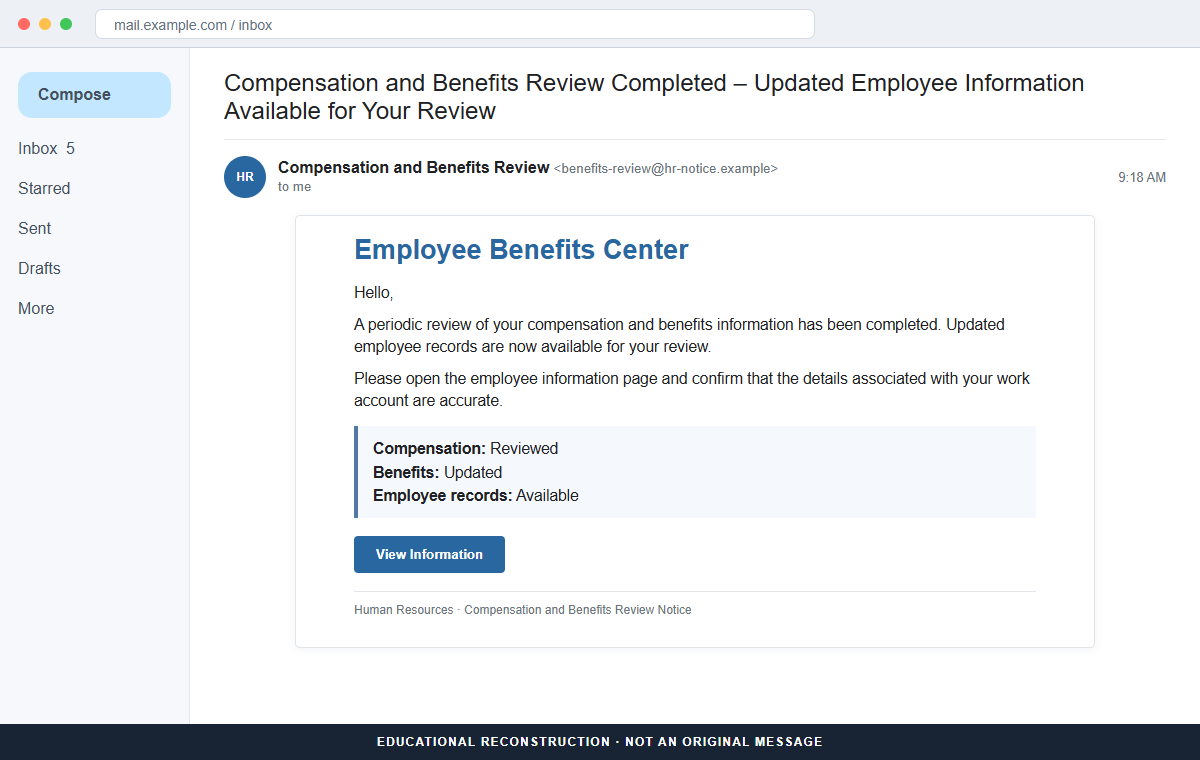
The Benefits Review Notice email is a phishing scam. Its View Information button does not open a protected employee record.
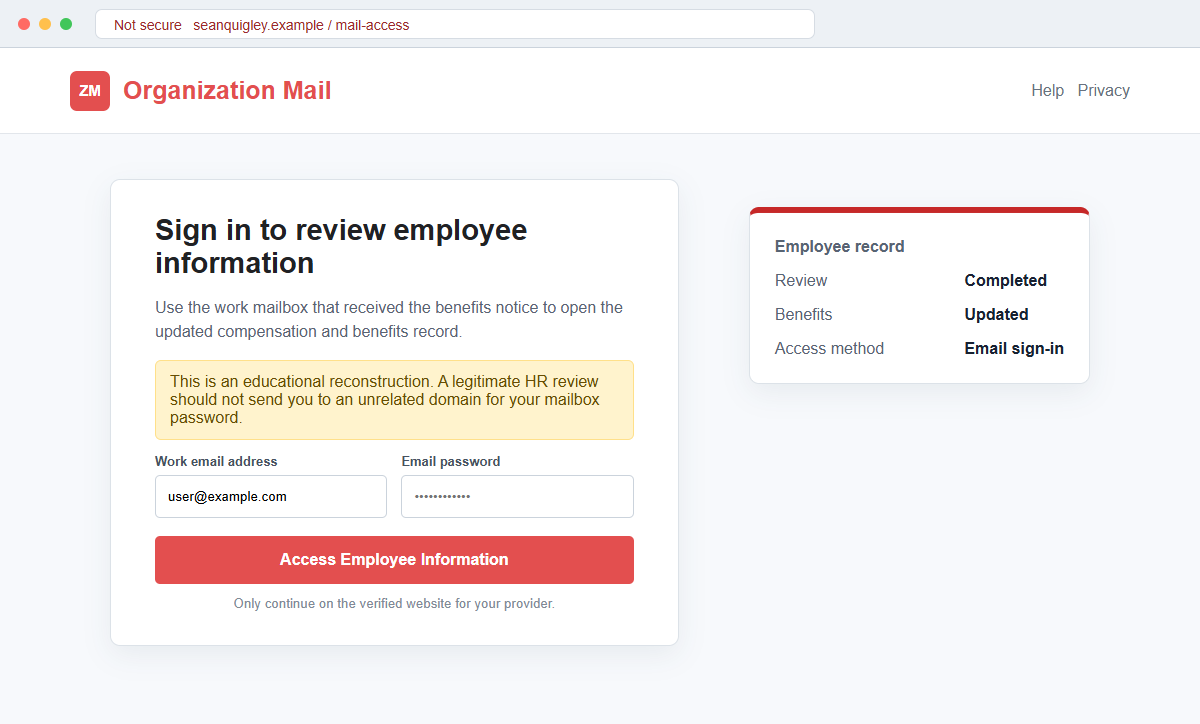
It sends the recipient to a counterfeit email sign-in page built to capture a work address and password.
This lure is effective because it mixes curiosity with responsibility. Employees naturally want to check changes involving salary, insurance, leave, or retirement benefits, and they may believe that reviewing the record is part of a required company process.
Do not sign in through the message. Open the real employee portal or company mailbox from a saved bookmark, then ask HR or IT through a known channel whether a review was actually issued.
Overview
The message imitates a routine internal HR process
The reviewed email uses a subject resembling “Compensation and Benefits Review Completed – Updated Employee Information Available for Your Review.” It presents itself as an automated notice rather than a conversation from a named HR employee.
Inside, check marks say compensation was reviewed, benefits were updated, and employee records are available.
Those familiar administrative phrases make the message sound organized without revealing any real plan, employee number, review period, or employer details.
A tempting button hides an unrelated destination
The View Information button appears to lead to a private record. The destination observed in this campaign was hosted on an unrelated domain rather than the employer's benefits system, human resources platform, or established email provider.
The page then copied the appearance of an organization mail login. It asked for an email address and password and also referenced signing in with an email one-time passcode, giving the form another layer of borrowed credibility.
A stolen work inbox can unlock much more than email
The form is controlled by the attacker. Credentials entered there can be tested immediately against real webmail, collaboration tools, cloud storage, payroll systems, VPN access, and other services that use the same identity.
An inbox also receives password resets and security alerts. Once inside, a criminal can study internal conversations, impersonate the employee, request payments, send more phishing messages, or hide activity with forwarding rules and filters.
- The subject promises newly updated compensation and benefits information.
- The sender looks automated but does not identify a real HR contact.
- Generic check marks create the impression that a formal review occurred.
- No employer, plan provider, employee number, or review period is verified.
- The View Information button is presented as the normal next step.
- The button leads away from the employer's known systems.
- The landing page imitates an organization email login.
- The form requests the employee's current mailbox password.
- The password can be reused against workplace and recovery accounts.
- Mailbox access can grow into payroll, invoice, and business email fraud.
What a Real Compensation or Benefits Review Usually Looks Like
Employers do conduct compensation and benefits reviews, but the process normally has a recognizable owner. A legitimate notice should identify the company, relevant plan or review period, and a support contact employees already know.
Sensitive records are generally presented inside an authenticated human resources, payroll, or benefits portal. Employees reach that portal through the company intranet, a saved bookmark, a password manager, or instructions supplied during onboarding.
An email may notify an employee that information is ready, yet the employee should still be able to open the established portal independently. The record should exist there even when the email button is ignored.
HR does not need an employee to disclose an email password through a separate website. A real benefits platform may use company single sign-on, but the complete domain and sign-in flow should match the employer's normal process.
Organization email services also have stable official sign-in routes. A page placed on an unrelated personal or business domain does not become part of that provider merely because it copies colors, wording, or an email logo.
When a change is important, HR or IT can confirm it through the employee directory, ticketing system, internal chat, or a known telephone number.
This independent check takes a minute and prevents a curiosity-driven click from becoming an account breach.
Details That Expose the Fake Benefits Review Notice
The email sounds specific at first, but it contains almost no information unique to the recipient. It does not name the employer, benefits carrier, payroll system, manager, open-enrollment window, or compensation cycle.
Its sender display name is crowded with bureaucratic language about reviews, audit references, or compliance. Long official-looking labels can make the inbox row feel authoritative while concealing an address that has no relationship with the company.
The three completed status lines are assertions, not evidence. Anyone can type that compensation was reviewed and records were updated. A real portal would show account-specific information only after the employee reaches the verified service.
The most important clue is the full destination hostname. In the reviewed campaign, the sign-in form was placed on seanquigley[.]com, a domain unrelated to the recipient's employer and the organization mail service it imitated.
A familiar logo and HTTPS do not prove ownership. HTTPS encrypts the connection to the phishing host, which means it can also protect the password while the browser sends it directly to the criminal's server.
The request is backwards. The page wants mailbox credentials before it proves that any employee record exists. A legitimate HR platform should be reached through the known company identity system, not an unexplained domain introduced by an unsolicited message.
How the Benefits Review Notice Email Scam Works
Step 1: Attackers collect employee email addresses
Company websites, professional profiles, conference lists, public documents, old breaches, and predictable address formats provide a steady supply of work emails.
Attackers can target a specific organization or send the same template across many employers.
They do not need to know the employee's real salary or benefits. The subject is broad enough to interest staff in almost every department and seniority level.
Step 2: The email creates curiosity around private employment information
Compensation and benefits are unusually effective bait because people care about them but may not discuss them openly with coworkers. The promise of an update creates a private reason to click quickly.
The message avoids an outrageous reward. It presents the review as ordinary administration, which can feel more believable than a dramatic prize or obvious security threat.
Step 3: Administrative language makes the request feel mandatory
Check marks and completed statuses imply that an internal workflow is already underway. The employee may assume that viewing the information is the final task needed to acknowledge the review.
Words such as compliance, audit, review, and updated records add weight without supplying verifiable facts. They are emotional signals dressed as process details.
Step 4: View Information opens a counterfeit mail login
The button leads to a page designed to resemble an organization email service. The recipient may see a familiar-looking sign-in box, a prefilled work address, and an option that mentions an email one-time passcode.
The destination is not the employer's HR platform or the real provider. The visual imitation is intended to keep attention on the form and away from the address bar.
Step 5: The form records the employee's credentials
When the employee submits an address and password, the page can transmit both directly to the attacker. It may display a loading screen, claim the password was wrong, or redirect to a harmless site afterward.
A second password attempt can be useful to the criminal because many people try a different password when the first login appears to fail.
Step 6: Criminals test the password and challenge multi-factor security
The credentials may be tried against webmail, Microsoft 365, Google Workspace, Zoho, VPNs, file sharing, payroll, and other company services. Reused passwords make the exposure wider.
If multi-factor authentication blocks the login, attackers may trigger repeated approval prompts, send a fake verification page, or call the employee while pretending to be IT and request the code.
Step 7: The compromised identity supports larger workplace fraud
After gaining access, criminals can search for invoices, payroll conversations, benefits documents, customer lists, and executive travel. They can learn writing styles and wait for an opportunity that looks financially valuable.
They may add hidden forwarding rules, reset connected accounts, request a direct-deposit change, alter supplier payment details, or send the same HR lure from a genuine internal mailbox.
Company and Checkout Checks
Open the employee portal without using the email
Use the company intranet, a saved bookmark, a password-manager entry, or the address provided during onboarding. If a review is genuine, the corresponding record or notification should appear in that authenticated account.
Avoid searching for the portal and clicking the first advertisement. Sponsored results can also lead to imitation sign-in pages.
Confirm the request with a known HR or IT contact
Call the internal number, open a ticket, or message a directory-listed employee. Ask whether the exact subject and review were sent, and forward the suspicious message as an attachment so its headers remain intact.
Do not reply to the original sender for verification because the attacker controls that channel.
Compare every part of the destination domain
Hover over the button without clicking and read the complete registered domain. A provider name in a path or subdomain does not matter when the actual domain belongs to someone else.
Check the same detail after the page opens. Redirects can make the visible link and final destination different.
Treat a mailbox-password request as a security event
A benefits document does not require an unexplained third-party site to learn the employee's email password. Stop when the flow changes from viewing HR information to authenticating a mailbox on an unfamiliar host.
Report the page even if its design looks polished. A convincing copy is still a copy.
Warning Signs to Check Before You Act
- The email promises compensation or benefits details without naming the employer.
- A generic automated sender replaces a real HR contact.
- Audit or compliance language is packed into the display name.
- The review period and affected benefit plans are missing.
- Check marks claim work was completed without account-specific evidence.
- The message creates curiosity but discourages independent navigation.
- The View Information button leaves the company's established systems.
- The final hostname is unrelated to HR and the email provider.
- A benefits page suddenly requests the current mailbox password.
- The email address is prefilled to make the form appear personalized.
- An OTP option is shown without proving the page owns the email service.
- No matching notice appears in the real employee portal.
The wording and branding can change, but the core test is stable: benefits information should be available through the employer's known systems, and an unrelated webpage should never receive a work email password.
What to Do if You Have Fallen Victim to This Scam
- Change the exposed password immediately. Open the employer's official webmail and employee portal through a saved bookmark or its official application, not through the Benefits Review Notice message. Create a fresh, unique password for the account exposed by that benefits-review message. Replace similar passwords anywhere else they were reused.
- Start with the credentials exposed to the benefits review notice. Create a fresh, unique password for the account exposed by that benefits-review message. Replace similar passwords anywhere else they were reused. Compare every sign-in method after this benefits-review case with the owner's devices. Unrecognized numbers, addresses, keys, and app passwords must go.
- End the access created through the benefits review notice. Sign out all other sessions from the employer’s benefits and identity portals, revoke unfamiliar OAuth grants, and reconnect trusted mail applications only after the password change. This closes tokens that can survive a simple reset.
- Review the mailbox for changes connected with the benefits review notice. Remove unknown forwarding addresses, delegates, inbox rules, filters, and automatic replies. Examine mail activity from the time of this benefits-review incident. Unfamiliar sent messages or deleted security alerts can reveal what followed this benefits-review incident.
- Protect the wider account chain. Prioritize work email, benefits, payroll, and identity records. Reset credentials on services whose recovery messages reach the inbox exposed by that benefits-review message. Begin with financial and administrator accounts.
- Notify the employer's security team immediately. A work mailbox compromise affects the organization as well as the employee. Provide the time of the click, the page address, the information entered, and any approval prompts received so administrators can inspect logs, contain sessions, and warn other recipients.
- Check the device used to open the benefits review notice. Run a complete Malwarebytes scan if that benefits-review message delivered a file, extension, or remote-support tool. Clean the device before changing sensitive passwords there.
- Reduce the chance of reopening a related page. AdGuard or another reputable DNS and content blocker may stop known phishing hosts and malicious advertisements tied to the benefits review notice. Blocklists may not recognize the next domain used for this benefits-review case. Verify every address before entering account information.
- Report the phishing message. Use the mail provider's Report Phishing control and notify the employer's HR, IT, or security team. The raw headers from this benefits-review incident should be preserved before reporting. They are especially valuable when the campaign reached multiple inboxes.
- Warn HR, benefits administrator, and security team through a separate channel. Explain that the benefits review notice may have exposed the account and ask them to distrust recent file shares, password requests, invoices, payment changes, or urgent replies until the timeline is confirmed.
- Expect follow-up fraud based on the benefits review notice. A supposed recovery expert mentioning this benefits-review incident may belong to the same operation. Work only with a professional you verify yourself. Choose recovery help for this benefits-review phishing attempt through organizations you contact independently. Avoid strangers who appear in messages or search ads.
Frequently Asked Questions
Is the Benefits Review Notice email genuine?
The reviewed message is phishing. It uses the promise of updated employee information to direct recipients to a fake organization mail login that collects email credentials.
Can an employer send real compensation or benefits updates by email?
Yes, but the update should be confirmable in the established employee portal and through a known HR contact. The message should not require a mailbox password on an unrelated domain.
Why did the page already know my work email address?
The address may have been inserted into the link or collected from public sources. Prefilling a field is easy and does not prove the page has access to company systems.
What if I clicked but did not enter a password?
Close the page and report the message. Risk is much lower if no information was submitted, file downloaded, or browser permission granted, but the security team may want the URL and headers.
Does multi-factor authentication keep the account safe after password theft?
It provides important protection, but the attacker may send prompts, request a code, or try to steal a session. Change the password, review sessions and registered methods, and reject unexpected approvals.
Why would criminals want an ordinary employee mailbox?
A normal inbox can provide internal contacts, password resets, trusted conversations, and a credible identity. It can be used to target payroll, vendors, colleagues, customers, or more privileged employees.
The Bottom Line
The Benefits Review Notice email scam turns a believable HR task into a work-account credential trap. The promised compensation and benefits record is only the reason supplied for opening the fake login.
Verify any employment update inside the known employee portal and with a directory-listed HR contact. The unrelated destination and mailbox-password request matter more than polished logos or administrative wording.
If credentials were submitted, change them from the real service, revoke sessions, inspect mailbox changes, protect connected accounts, notify the employer, scan downloaded content, and warn anyone who may receive messages from the compromised identity.

Join the discussion
0 commentsShare your experience or ask a question about this article.
Discussion
Start the conversation
Have a question or something useful to share? Add the first comment.