

The American Express Personal Loan email scam uses a fake approval notice to capture financial and account details.
An email says an American Express personal loan for $18,940 has been approved and will soon be sent to a PenFed account ending in 2893. The request supposedly came from an unfamiliar location.
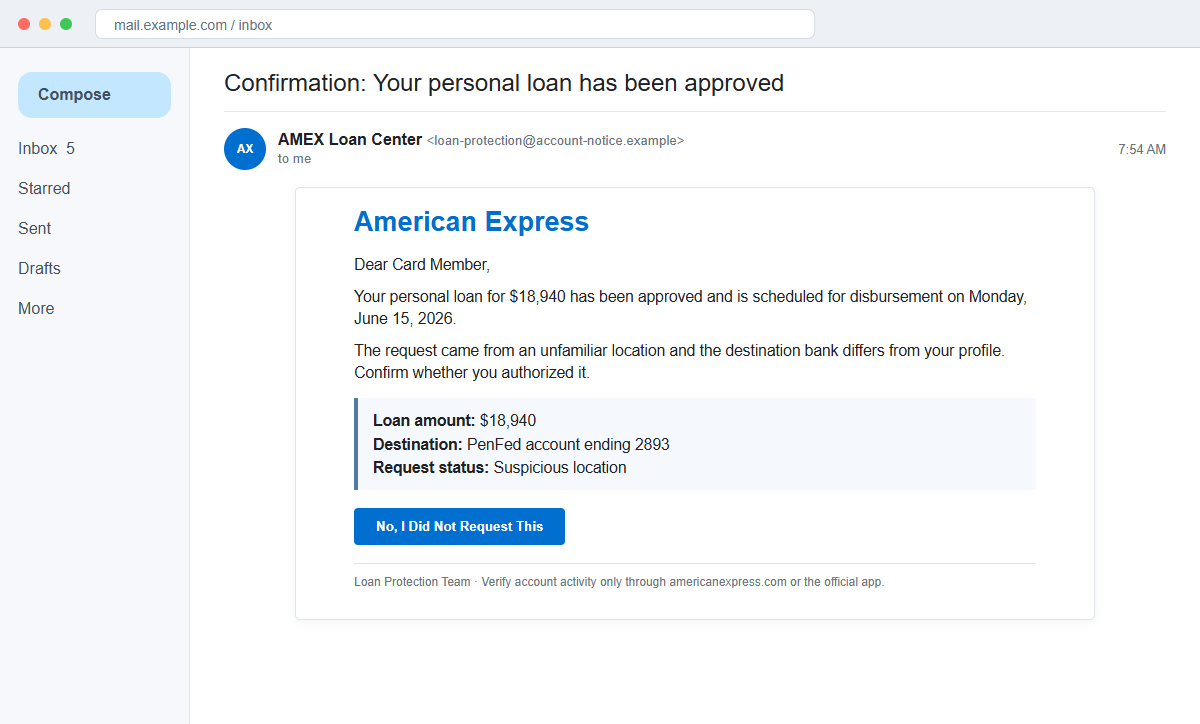
The American Express Personal Loan Approved email is a phishing scam. It invents an unauthorized loan to frighten recipients into clicking Yes or No before they verify whether any application exists.
Both choices can lead into the same fraudulent path. The goal is to capture an American Express login, email password, card data, personal details, or a verification code under the pretext of stopping the transfer.
Do not use either button. Open the official American Express app or type americanexpress.com yourself, review the account there, and call the number on the back of the card if anything is uncertain.
Overview
A specific loan and unfamiliar bank create immediate alarm
The message claims that $18,940 was approved and scheduled for disbursement on Monday, June 15, 2026. It names a PenFed destination account ending in 2893 and says that bank differs from the customer's profile.
Those details turn a generic alert into an apparent identity-theft emergency. The recipient may click to prevent debt from being created in their name, even if they have never applied for a loan.
Yes and No can be two labels for one phishing destination
The email invites the recipient to confirm or deny the application. People often consider the No button safe because it appears to reject the transaction rather than accept it.
A criminal controls both links and can send them to the same login page. The choice changes only the emotion used to reach the form, not who receives the submitted information.
The unauthorized-loan story disguises a credential request
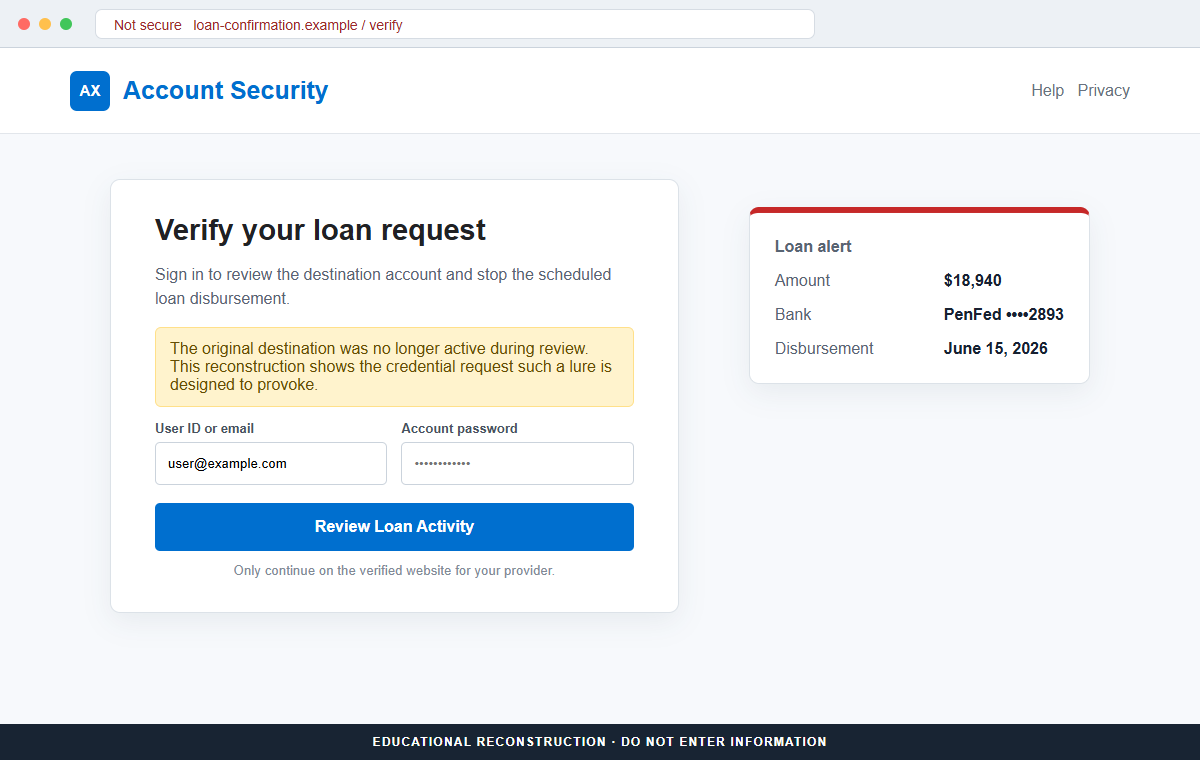
The landing page can imitate an account-security screen and ask the user to sign in before viewing or cancelling the loan.
The page may request a user ID, password, card number, Social Security number, or one-time code.
During review, the original campaign destination was no longer active, so its exact final form could not be reproduced independently.
The email's structure nevertheless shows a phishing lure designed to make recipients follow an untrusted account-verification route.
- The subject says a personal loan has already been approved.
- The stated amount is $18,940.
- A June 15, 2026 disbursement date is supplied.
- The destination is a PenFed account ending in 2893.
- The request supposedly originated from an unfamiliar location.
- The message uses AMEX Loan Center and Loan Protection Team labels.
- Two urgent Yes and No response buttons are provided.
- Either control can lead to the same attacker-managed website.
- The real American Express account is not checked independently first.
- The campaign seeks credentials and identity data through fear.
How Real American Express Personal Loan Access Works
American Express does offer legitimate personal loans, but its official information says they are available to eligible Card Members. Customers check eligibility and manage loan documents through their American Express online account.
That means an unexpected email is not the authority on whether a loan exists. A customer can open the official app or independently navigate to the real website and view account activity in an authenticated session.
American Express's security guidance tells customers to pause and verify suspicious communications. When uncertain, the customer should use the number on the back of the card rather than a number or link supplied by the message.
The company also states that it will not call and ask for full identification details, verification codes, login credentials, passwords, card details, or a PIN. Those secrets should not be surrendered to someone who creates an emergency.
A legitimate fraud alert can ask a customer to review activity, so the presence of a Yes or No choice is not enough by itself.
The critical question is whether the review occurs in the known app or independently opened official account.
If a real unauthorized application appears, contact American Express and the relevant bank through verified channels. Do not let the suspicious message become the only path for investigating its own claim.
Why the $18,940 Approval Notice Is Designed to Trigger Panic
The amount is large enough to feel serious but plausible enough to resemble consumer debt. A round multimillion prize might invite skepticism, while $18,940 can look like a real consolidation or home-improvement loan.
The unfamiliar PenFed account creates a clear villain and a reason to act. The recipient may assume that a criminal changed the destination, even though no independently verified loan has been shown.
A scheduled Monday disbursement implies a narrow prevention window. Deadlines are powerful because victims fear that using slower official support will allow the money to move.
The labels AMEX Loan Center and Loan Protection Team sound authoritative but are merely display text. Sender authentication, registered domains, and matching account activity provide stronger evidence.
The two response buttons create an illusion of control. The user believes No communicates a safe rejection, yet a link does not perform any action until the destination and authentication flow are trusted.
The disappearance of the original destination is not proof that the alert was legitimate. Phishing pages are often removed, abandoned, or rotated, and credentials entered while a page was active may already have been captured.
How the American Express Personal Loan Email Scam Works
Step 1: A fake approval notice reaches a broad audience
Attackers distribute the email to leaked addresses and consumer lists, sometimes adding a name or partial account detail from previous breaches. They do not need to know who actually has an American Express card.
Recipients without an account may delete it, while real Card Members or people worried about identity theft are more likely to engage.
Step 2: The email invents a loan the victim did not request
The message says approval has already occurred, avoiding the slower language of an application under review. This makes the threat feel active rather than hypothetical.
A specific $18,940 amount and destination account ending create the appearance of data pulled from a financial system, although the sender offers no authenticated account view.
Step 3: A disbursement deadline makes independent checking feel risky
The recipient is told that money will be sent on a particular date. Fear of being responsible for an unauthorized debt encourages a quick response.
The message may imply that failure to click equals consent or that support cannot stop the transfer later. Those claims are meant to prevent a call to the real institution.
Step 4: Two buttons create a false safety choice
Yes, I requested this and No, I did not request this appear to offer opposite actions. In a phishing email, both can contain an attacker-selected URL.
The No option is especially effective because victims think they are avoiding danger. The label on a button does not reveal what the link will actually open.
Step 5: A counterfeit security page requests account secrets
The destination may claim that sign-in is required to cancel the loan, lock the destination bank, or verify identity. It can copy American Express branding and display the same amount and account ending.
The form may collect login credentials, card data, an email password, Social Security information, and later a one-time code. Each request deepens the compromise.
Step 6: Criminals attempt real account access
Submitted credentials are tested against American Express, the email provider, banking portals, and other services where the password may be reused. A correct login can trigger a genuine verification code.
The phishing page or a caller may ask for that code, claiming it is needed to reject the loan. In reality, the code can approve the attacker's login or account change.
Step 7: Stolen data supports financial and identity fraud
Account access can reveal card details, statements, contact information, and linked financial relationships. Criminals may change recovery settings, attempt purchases, or use the information in other applications.
If the first credential attempt fails, the campaign can evolve into an advance-fee loan pitch or a support call. The victim may be asked to pay for cancellation, insurance, processing, or identity protection that does not exist.
Company and Checkout Checks
Open the American Express app or website yourself
Do not follow either response button. Use the installed app, a saved bookmark, or manually entered americanexpress.com and look for loan documents, alerts, messages, and recent account activity.
If no matching approval appears, preserve the suspicious email and report it rather than trying the buttons.
Call the number printed on the physical card
The number on the back of the card provides a route that the email sender did not choose. Explain the amount, date, and destination shown in the message.
Never call a telephone number supplied in a suspicious alert, even when the caller ID or recorded menu sounds professional.
Check loan eligibility through the authenticated account
American Express says eligible Card Members can view offers and apply through their online account. An approval should correspond to a process and documents visible there.
Do not submit identity details merely to discover whether an unsolicited offer is real.
Inspect both button destinations without opening them
On a desktop, hover to preview each URL. On mobile, use the mail app's safe link-inspection option if available. A non-American Express domain or identical destination for Yes and No is a strong warning.
Security staff can extract and analyze links from the original message without visiting them in a normal browser.
Warning Signs to Check Before You Act
- You receive approval for a loan you never applied for.
- The notice relies on a specific amount but no authenticated application record.
- An unfamiliar bank account is used to provoke immediate fear.
- The disbursement date creates an artificial deadline.
- AMEX Loan Center appears only as a display name.
- Yes and No buttons are offered inside an unexpected email.
- Both buttons lead to the same or an unrelated domain.
- The page asks for login, card, identity, or mailbox credentials.
- A one-time code is requested to supposedly cancel the loan.
- The real app contains no matching alert or loan document.
- The destination later disappears or returns an error.
- A cancellation or protection fee is introduced after contact.
An alarming loan notice should send you away from the email and into a channel you already trust. Never let an unsolicited message choose the website, telephone number, or person who verifies its own claim.
What to Do if You Have Fallen Victim to This Scam
- Change exposed American Express and email credentials. Navigate independently to each official service and set strong, unique passwords. Replace reused passwords on banking, payment, cloud, and shopping accounts.
- Contact American Express through the card or official app. Tell the fraud team exactly what was entered, including credentials, card information, identity details, and verification codes. Ask them to review sessions, profile changes, cards, and any loan activity.
- Revoke sessions and unknown authentication methods. Sign out other devices and remove unfamiliar recovery addresses, telephone numbers, security keys, passkeys, trusted browsers, app passwords, and connected applications.
- Protect credit files and identity records. If a Social Security number, license, passport, or bank document was submitted, follow the identity-theft process and consider a credit freeze or fraud alert with the appropriate bureaus.
- Review American Express, bank, and credit activity. Look for unauthorized charges, applications, inquiries, new accounts, added payees, contact-detail changes, and statement delivery changes. Report discrepancies immediately through official channels.
- Secure the mailbox used for recovery. Inspect forwarding, filters, delegates, deleted mail, sent mail, and recovery settings. A compromised inbox can let criminals intercept genuine alerts and password resets.
- Scan devices that downloaded anything. Run a complete Malwarebytes scan or another trusted security product if the page delivered a file, extension, security tool, or remote-access program. Remove unknown software and update the device.
- Block known campaign pages. AdGuard or another reputable DNS and content blocker can prevent some recognized phishing hosts and malicious ads from loading. It cannot replace checking the full address and using the official app.
- Report the phishing message. Send the suspicious email or fake site to spoof@americanexpress.com, use the mail provider's Report Phishing function, and notify the hosting service behind the landing page.
- Document any financial loss. Save original messages, headers, screenshots, URLs, call logs, receipts, and transaction identifiers. Contact the payment provider and relevant fraud authority quickly if money was sent.
- Reject unsolicited account-recovery help. A caller who says they can cancel the loan or recover money may be extending the scam. Do not share codes, install remote software, or pay a protection fee; contact the institution yourself.
Frequently Asked Questions
Is the American Express Personal Loan Approved email real?
The reviewed notice is a phishing lure. It invents a $18,940 loan and suspicious destination to push recipients toward untrusted response links.
Does American Express offer legitimate personal loans?
Yes. Eligible Card Members can receive offers and manage applications through their authenticated American Express account. That does not authenticate an unsolicited email.
Is it safe to click No, I did not request this?
Not in an unverified message. The sender controls the No link and can direct it to the same phishing page as Yes. Open the official app instead.
Why mention a PenFed account ending in 2893?
A named bank and partial account number make the alert feel specific and urgent. Those details can be invented and must be checked through the real account.
What if the landing page no longer works?
Assume any information previously submitted may have been captured. Change credentials and contact American Express even if the campaign page has since been removed.
Will American Express ask for my password or verification code by phone?
Its security guidance says it will not call and request logins, passwords, full identity details, card details, PINs, or verification codes. End the call and use the number on the card.
The Bottom Line
The American Express Personal Loan email scam uses a believable $18,940 approval and unfamiliar destination account to turn fear of identity theft into a phishing click.
Yes and No are not safe choices when a criminal controls both links. Verify every loan and alert inside the official app, independently opened website, or through the number on the physical card.
If information was entered, secure financial and email accounts, contact American Express, review credit activity, scan downloaded content, preserve evidence, report the campaign, and refuse follow-up requests for codes or fees.

Join the discussion
0 commentsShare your experience or ask a question about this article.
Discussion
Start the conversation
Have a question or something useful to share? Add the first comment.