

A page carrying the Tonkeeper name says an official airdrop is ready. One Connect Wallet button and a familiar TON Connect picker appear to stand between the visitor and free cryptocurrency.
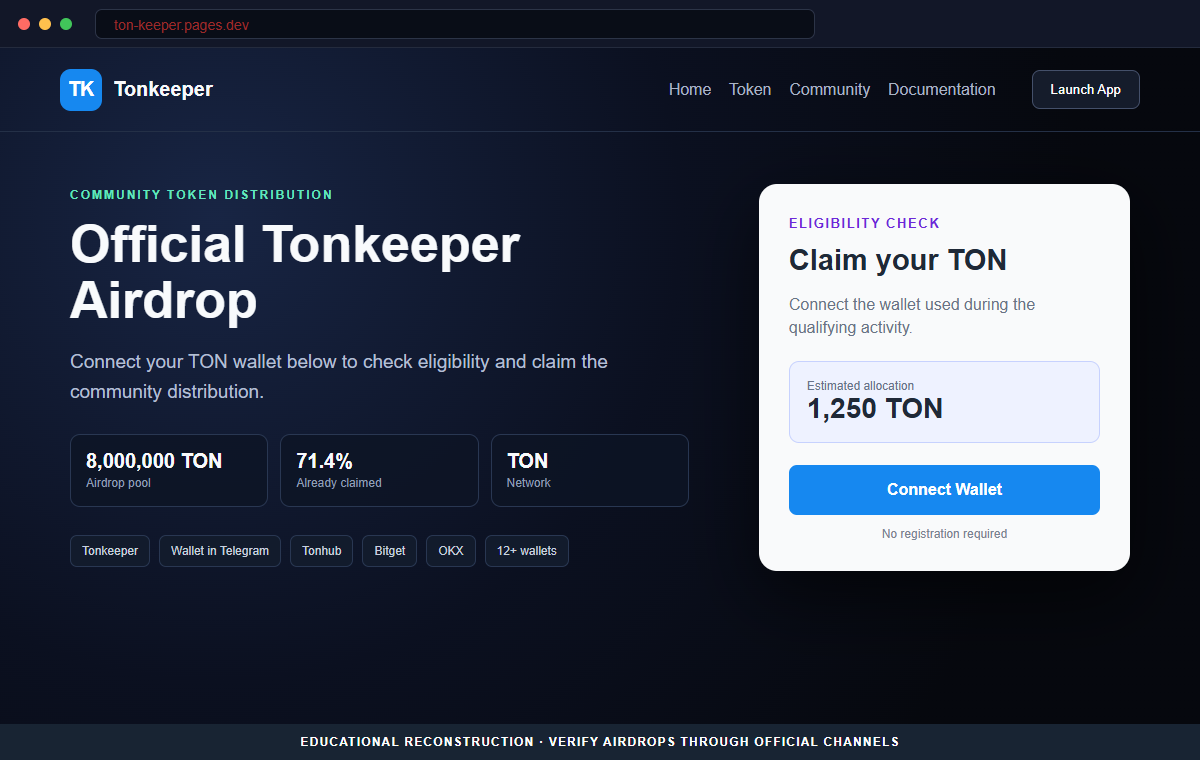
The Tonkeeper Airdrop scam is hosted on ton-keeper.pages.dev, not Tonkeeper's verified website. Its purpose is to move users from a copied promotion into wallet requests they may not understand.
The wallet list can include Tonkeeper, Wallet in Telegram, Gram Wallet, Tonhub, Bitget, Binance, OKX, Bybit, and SafePal. Compatibility does not mean any of those providers endorsed the page.
Close the page and check Tonkeeper's official channels. A legitimate airdrop does not become real because a standard wallet connection dialog can open.
Overview
The page copies a real TON wallet brand
Tonkeeper is a self-custody wallet for the TON ecosystem. The fraudulent page borrows its name and appearance to make an unofficial giveaway feel like a built-in wallet event.
The address is ton-keeper.pages.dev. The added hyphen and developer-hosting domain are materially different from tonkeeper.com and the installed Tonkeeper application.
A simple airdrop message hides an undefined wallet action
Visitors see wording such as Connect wallet below to claim the airdrop. The page does not provide a verified announcement, token contract, eligibility rule, allocation record, distribution schedule, or auditable terms.
Without those details, the button supplies movement before evidence. The user is asked to connect first and understand the promotion later.
TON Connect is legitimate technology used in an illegitimate setting
The wallet picker may display a QR code and a long list of compatible TON wallets. TON Connect is a real protocol, but any website can attempt to integrate it.
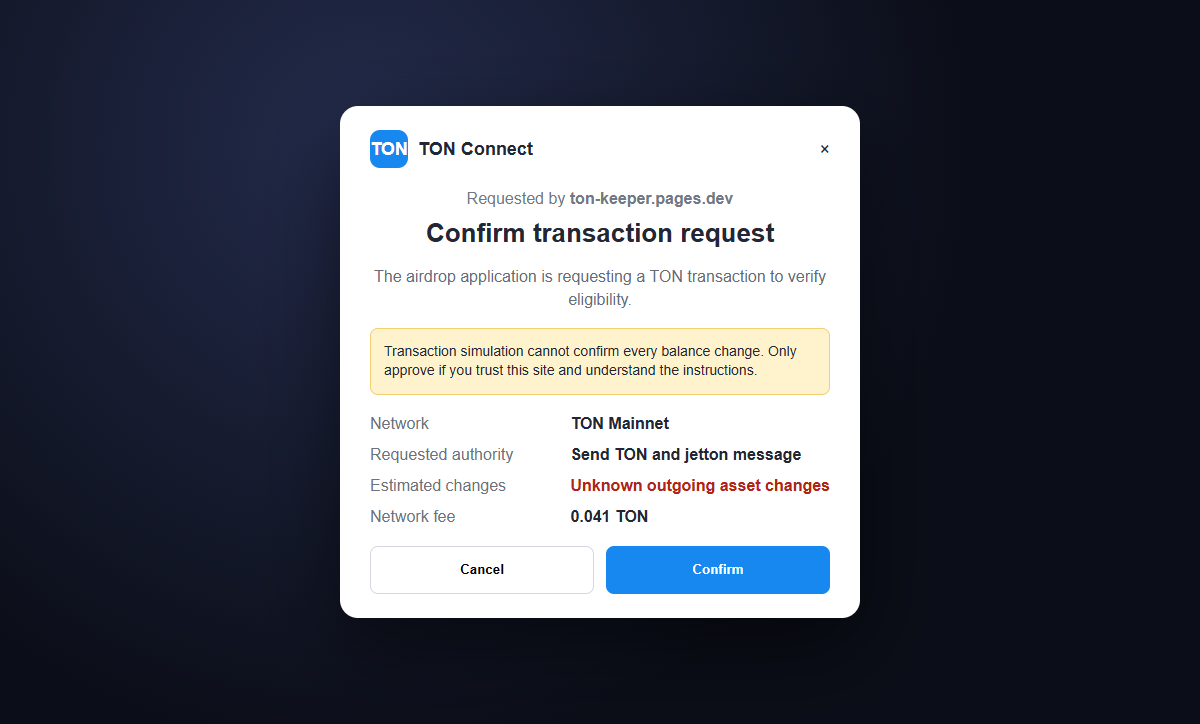
A connection generally reveals the public address and establishes a session. The danger escalates when the page presents a transaction or signature request and the user approves it without checking the domain, recipient, amount, and payload.
- The promotion claims an official Tonkeeper airdrop exists.
- The page is hosted at ton-keeper.pages.dev.
- Tonkeeper branding is copied without proof of authorization.
- Connect wallet below to claim the airdrop is the main instruction.
- No official campaign announcement is identified.
- No token contract or eligibility record is shown.
- A TON Connect QR code and wallet picker appear.
- Multiple compatible wallets create borrowed credibility.
- The site can request signatures or outgoing transactions after connection.
- The final wallet confirmation, not the claim button, determines what is authorized.
What a Real Tonkeeper and TON Connect Flow Should Show
Tonkeeper is a self-custody wallet, which means the user controls the keys and approves actions. It is not a bank account where a central support desk can reverse every mistaken transfer.
TON Connect is the standard connection protocol for TON applications. Official documentation explains that a dApp can receive the public account information and later request signatures or transactions without receiving the user's private keys.
That separation matters. A basic connection is not identical to an outgoing transfer, but it gives the site a channel to present the next request. The wallet confirmation must be read as a new security decision.
A legitimate transaction request includes information such as the network, destination, value, validity window, and encoded message. Technical payloads can still be difficult to interpret, so an unexplained request should be rejected.
A QR code does not authenticate the website that generated it. It simply carries connection information. The domain shown in the wallet and the application's manifest should match the service the user intended to visit.
Tonkeeper's official website is tonkeeper.com. A promotion on a separate pages.dev address needs confirmation from official announcements before any wallet session is created.
Why the Wallet Picker Does Not Make the Airdrop Official
The list of wallet options is produced by connection technology, not by a joint marketing approval from every company whose wallet can be selected.
Scammers benefit from that distinction. A professional modal with known names makes the surrounding page look vetted even when the wallet provider has never reviewed the domain.
The fake page supplies almost no campaign-specific evidence. There is no official Tonkeeper post, token address, snapshot date, wallet eligibility proof, allocation calculation, or claim contract the visitor can compare.
The pages.dev hostname indicates a user-deployed site on a legitimate hosting platform. HTTPS secures the browser connection to that deployment, but it does not prove Tonkeeper owns or endorses it.
A malicious request can be framed as verification, eligibility, or claim activation. The wallet confirmation may instead authorize TON, jetton, or NFT movement to an address controlled by the attacker.
Some thefts happen quickly after approval, while others depend on later requests or permissions. The safe explanation is to examine the exact signed action rather than assume the word Connect describes everything that follows.
How the Tonkeeper Airdrop Scam Works
Step 1: A social post or advertisement promises free TON rewards
The link may appear in a fabricated Tonkeeper account, a compromised community profile, a direct message, a sponsored ad, or an unsafe website notification.
Free-token language attracts users who already understand wallet connections and may regard the request as routine.
Step 2: An unofficial page copies Tonkeeper's identity
Ton-keeper.pages.dev uses the wallet name, colors, and a clean claim layout. The address can be overlooked when attention is on the airdrop.
The hyphenated name is not tonkeeper.com. A hosting subdomain does not become official because the page design is accurate.
Step 3: The claim lacks verifiable campaign details
The page tells visitors to connect below but does not establish who qualifies, what token is distributed, which contract performs the claim, or where Tonkeeper announced it.
Urgency and simplicity replace documentation. The visitor is encouraged to act before performing an independent check.
Step 4: TON Connect opens a familiar wallet selector
A QR code and wallet list appear. Tonkeeper and numerous other compatible options make the process resemble a normal TON application.
The modal shows technical compatibility only. It does not certify the business claim made by the page behind it.
Step 5: The connection prepares a transaction or signature request
After the session is created, the site can identify the public address, read visible holdings, and present an action tailored to the account.
The next wallet screen may contain a recipient, amount, token operation, or encoded payload. Describing it as a claim does not change its blockchain effect.
Step 6: Approval can send assets to the scammer
If the user confirms an outgoing transaction or dangerous request, it is signed by the wallet and broadcast to TON. The website does not need the recovery phrase to obtain that authorized transfer.
A loading animation or claim error can distract the victim while the transaction completes. The promised airdrop never arrives.
Step 7: Stolen funds and victim reports attract follow-up fraud
The attacker can move received assets through additional addresses or exchanges. Confirmed transfers are difficult to reverse once control leaves the victim's wallet.
Recovery scammers monitor public complaints and offer guaranteed tracing or reversal for another fee. Their request for wallet access or recovery words creates a second threat.
Company and Checkout Checks
Start from tonkeeper.com or the installed application
Open Tonkeeper through a trusted bookmark or official app-store installation. Look for the airdrop in its verified announcements and support information.
Do not use the promotional page as the source that proves its own legitimacy.
Compare the domain shown in every wallet request
The wallet connection should identify the requesting application and domain. Ton-keeper.pages.dev is different from tonkeeper.com even though the name looks related.
Reject a manifest or request associated with an address you did not independently verify.
Read the transaction instead of the claim label
Check the network, recipient, amount, token, fees, and human-readable warnings. If the wallet cannot explain the payload or simulated balance changes, cancel it.
A legitimate reward should not require an unrelated transfer or blanket authority over assets.
Verify the token and distribution record
Find the official token contract, eligibility method, claim dates, and campaign announcement. Compare those facts with the page and the contract the wallet is about to call.
A missing or mismatched contract is a decisive reason to stop.
Warning Signs to Check Before You Act
- A Tonkeeper airdrop is advertised from an unofficial account.
- The domain is ton-keeper.pages.dev rather than tonkeeper.com.
- The page asks for a wallet connection before explaining eligibility.
- No verified Tonkeeper announcement is linked.
- No token contract or claim contract is identified.
- A long wallet list creates the appearance of endorsement.
- The QR code is treated as proof that the site is trusted.
- The wallet shows a transaction when only a connection was expected.
- The recipient or amount is unclear.
- The page describes every signature as claim verification.
- A recovery phrase or private key is requested.
- A stranger promises to reverse TON transfers for an advance fee.
TON Connect can be used by legitimate and fraudulent sites. Trust comes from the verified domain and the exact wallet action, not from the presence of a familiar picker or QR code.
What to Do if You Have Fallen Victim to This Scam
- Disconnect the fake Tonkeeper page. Open Tonkeeper's connected-app or TON Connect controls and remove ton-keeper.pages.dev or any unfamiliar session. Close the browser tab and do not scan its QR code again. Disconnection reduces further interaction but does not undo a transaction already signed and broadcast.
- Review recent TON transactions and pending requests. Check the wallet activity and a reputable TON explorer for outgoing TON, jetton, or NFT transfers. Record transaction hashes, recipient addresses, amounts, timestamps, and any message or payload displayed by the wallet.
- Move remaining assets if an unsafe transaction was approved. Create a clean wallet through the official Tonkeeper application and transfer assets whose control may be at risk. Verify the receiving address on the wallet screen and leave enough TON for legitimate network fees.
- Replace the wallet completely if the recovery phrase was exposed. Generate a new phrase on a clean device and stop using every account derived from the old one. A password or biometric change cannot prevent an attacker from restoring a wallet with copied recovery words.
- Contact exchanges quickly when funds move. If a recipient address belongs to a known exchange or custodial service, send its fraud team the transaction hash and police report reference. Confirmed blockchain transfers are not guaranteed to be recoverable, but prompt reporting may preserve useful account records.
- Preserve the QR code and approval evidence. Save the fake URL, screenshots, referral post, wallet picker, transaction confirmation, recipient address, and full timeline. Do not revisit the live page merely to collect evidence if a screenshot or browser history entry already exists.
- Secure social and email accounts used in the interaction. Change reused passwords, revoke sessions, and enable strong multi-factor authentication. A compromised social profile or mailbox can be used to distribute the same airdrop link to friends and communities.
- Scan devices that installed anything. Run a complete scan with Malwarebytes or another trusted product if the page delivered an extension, application, mobile profile, or download. Remove unfamiliar software and update the operating system, browser, and wallet application.
- Block known scam and advertising domains. AdGuard or another reputable DNS and content blocker may stop recognized phishing pages, malicious ads, and redirect chains. Domain checking remains essential because a fresh pages.dev address may appear before filters update.
- Report the impersonation through verified channels. Notify Tonkeeper, the hosting provider, the social platform that carried the link, and the appropriate fraud authority. Include ton-keeper.pages.dev, screenshots, transaction hashes, and the source account that promoted it.
- Ignore guaranteed TON recovery offers. A person who contacts you after the theft may demand a tracing fee, remote access, wallet connection, or recovery phrase. Do not create a second loss. Work only with verified exchanges, authorities, counsel, or an established incident-response professional.
Frequently Asked Questions
Is the Tonkeeper airdrop on ton-keeper.pages.dev legitimate?
No. The documented page impersonates Tonkeeper on an unrelated hosting domain and leads visitors into a deceptive wallet flow.
Does connecting a TON wallet automatically transfer funds?
A normal connection establishes a session and shares public account information. Theft generally requires a subsequent transaction, signature, embedded request, or exposed secret, so inspect every wallet screen.
Why does the page show real wallets in the picker?
TON Connect can list compatible wallets. Compatibility does not mean those wallet providers audited or endorsed the promotion.
What if I scanned the QR code but rejected the transaction?
Disconnect the session, review wallet activity, and verify no request was approved. Rejecting the outgoing action normally prevents that action from being signed.
What if I approved an unknown TON transaction?
Record the transaction, move remaining assets if exposure continues, contact identifiable exchanges, and report the recipient address. Do not approve another request that claims to reverse it.
What if the site asked for my recovery phrase?
Do not enter it. If it was shared, generate a completely new wallet on a clean device and move all remaining assets away from accounts derived from the old phrase.
The Bottom Line
The Tonkeeper Airdrop scam uses an unofficial pages.dev address, copied wallet branding, and a legitimate-looking TON Connect selector to make an unsupported giveaway feel real.
The wallet list is not an endorsement. The important evidence is the requesting domain and the exact transaction, signature, recipient, and value displayed before approval.
If an unsafe request was confirmed, review the TON history and move remaining assets when necessary. If recovery words were exposed, only a wallet created under a new phrase can restore separation from the attacker.








