

A polished Zoho Workplace notice says the saved payment method could not be charged. Unless the billing details are updated now, mail and workplace services may be interrupted.
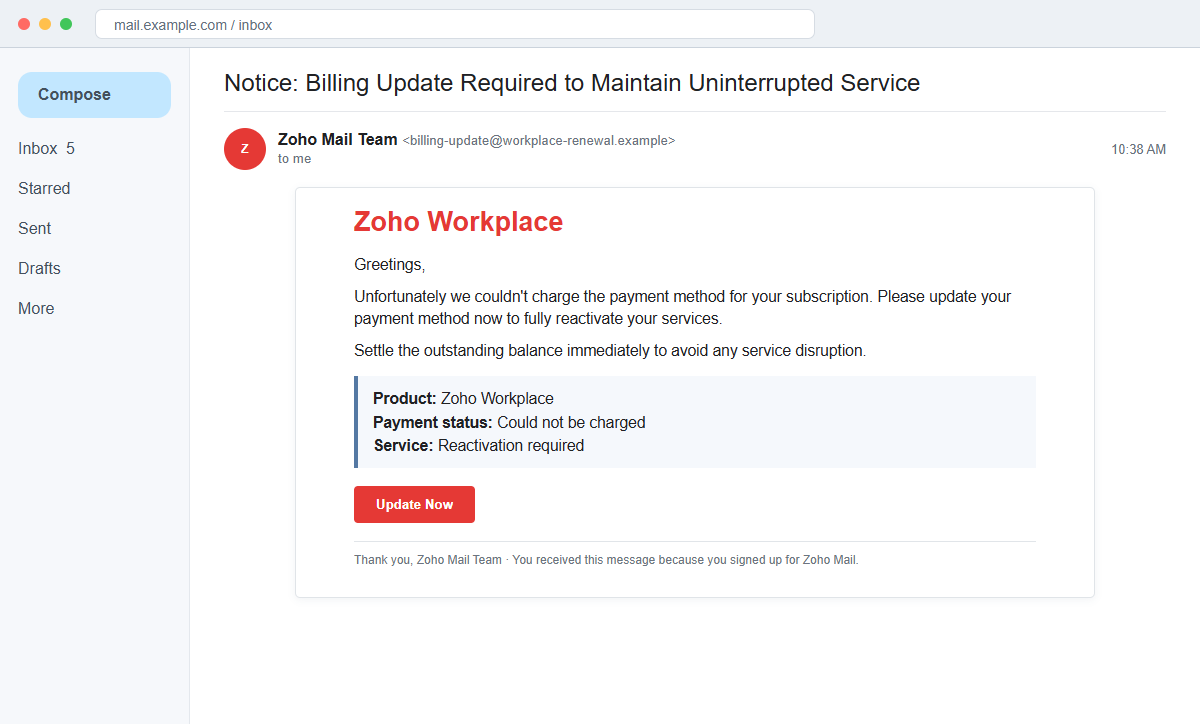
The Zoho Workplace Payment Method Update email scam turns a believable subscription problem into a fake sign-in journey that can capture account credentials and financial information.
Some letters in the subject and body may look normal while actually coming from other writing systems. This homoglyph trick helps the message evade simple spam filters without looking obviously misspelled.
Do not use the Update Now button. Reach the Zoho Store from the official product or account page and check whether a real balance or billing alert exists.
Overview
A failed renewal creates immediate business pressure
The message claims Zoho could not charge the payment method associated with a Workplace subscription. It warns that service reactivation and uninterrupted access depend on an immediate update.
For an organization that relies on Zoho Mail, WorkDrive, or other workplace tools, even a short disruption sounds expensive. That operational concern encourages a fast click.
The email borrows Zoho branding but not Zoho infrastructure
The sender may call itself the Zoho Mail Team and reproduce the Zoho Workplace name, social links, copyright line, and the explanation that the recipient signed up for Zoho Mail.
Those elements are copied text. The message originates from an unrelated third-party domain, and the Update Now destination is not the authenticated Zoho Store.
A fake billing route can collect both credentials and card data
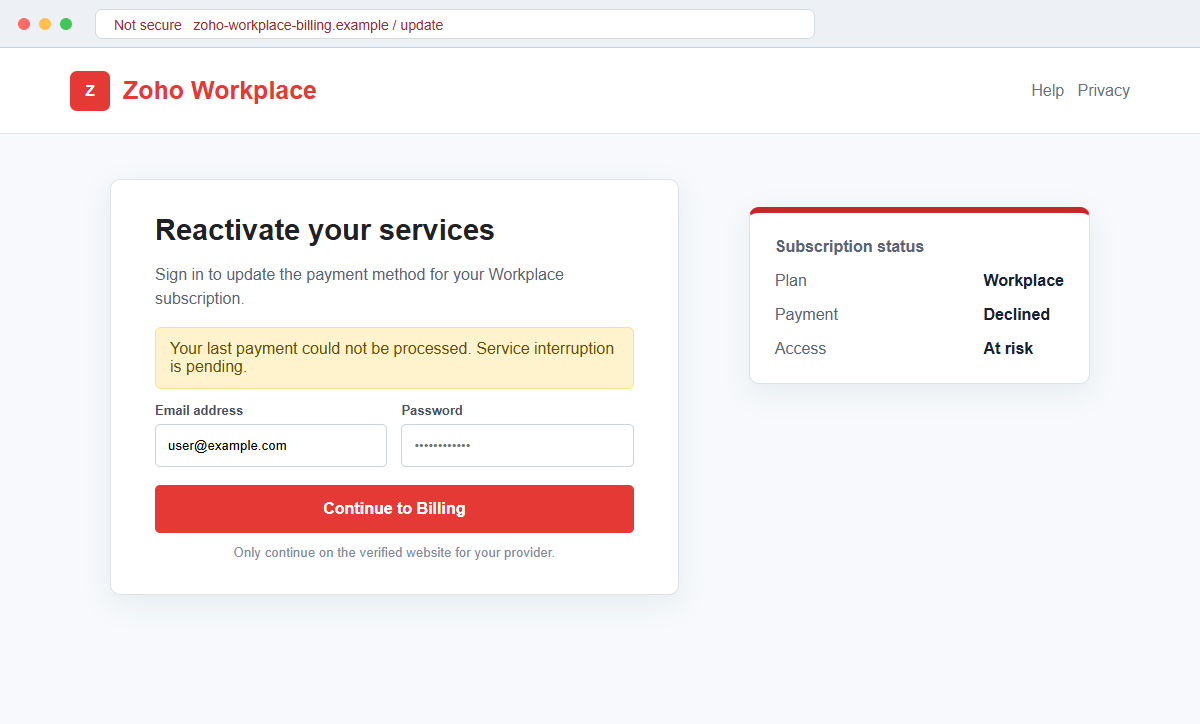
The linked page may imitate a Zoho sign-in screen, adapt its appearance to the recipient's email provider, or continue to a payment form after the password is submitted.
Information entered on that path goes to criminals. A stolen administrator or mailbox account can be more valuable than one card because it may expose users, files, invoices, and password-reset messages.
- The subject says a billing update is required to maintain uninterrupted service.
- The email claims the subscription payment method could not be charged.
- Zoho Workplace and Zoho Mail Team branding are used.
- Immediate reactivation is promised after an update.
- Service disruption is threatened if the recipient waits.
- An Update Now button supplies the only route.
- Lookalike Unicode letters appear in the subject and body.
- The sender uses an unrelated third-party domain.
- The destination imitates a login or billing page.
- Passwords and payment details entered there can be stolen.
Why Subscription Billing Emails Are Effective Business Lures
Recurring software charges are routine, and real cards do expire or fail. A billing warning therefore fits an event administrators already expect to handle.
The cost of ignoring the message appears larger than the cost of checking it. Employees imagine email stopping, shared files becoming unavailable, or coworkers losing access during the workday.
Attackers often send these notices to addresses such as billing, accounts, admin, or support. Even when the recipient is not responsible for Zoho, the message may be forwarded internally to someone with greater privileges.
Homoglyph characters add a less visible layer. A Cyrillic or Greek character can resemble a Latin letter closely enough for a person to read the word normally while a filtering rule sees a different string.
The body uses awkwardly formal wording about settling an outstanding balance for services rendered. That phrasing can be overlooked because subscription messages are usually skimmed for the button and deadline.
Real billing issues should survive independent verification. If a charge failed, the same status should appear inside the official subscription or Zoho Store area after the administrator signs in through a trusted route.
How Real Zoho Billing and Security Guidance Changes the Check
Zoho documentation routes subscription and payment management through authenticated product settings and the Zoho Store. Administrators can view plans, invoices, balances, billing addresses, and payment methods there.
That means an email button is optional, not authoritative. A recipient can discard the message and still resolve a legitimate payment problem from inside the account.
Zoho's own phishing guidance says fraudulent messages imitate trusted organizations to collect passwords, user IDs, bank information, card details, and similar sensitive data. It states that Zoho Mail will not ask for such information by email.
Official Zoho security guidance also recommends checking that credential pages use a trusted Zoho domain for the user's region. A copied logo on a different domain is not a valid sign-in prompt.
A failed card payment and an account password are separate issues. A page that requests mailbox credentials before it will display an invoice or card update deserves additional scrutiny.
Even a genuine-looking social-media footer proves nothing. Scammers can copy icons, legal text, and copyright notices faster than they can establish control of Zoho's verified domains.
How the Zoho Workplace Payment Method Update Email Scam Works
Step 1: A fake billing alert reaches a Zoho user or company
The email claims a saved payment method could not be charged for a Zoho Workplace subscription. It may arrive at a personal mailbox, a shared finance address, or an administrator account.
The criminals do not need access to the subscription. The organization domain and use of Zoho may be guessed, obtained from public mail records, or discovered in leaked data.
Step 2: Homoglyph letters help the message bypass filters
The subject may resemble Notice: Billing Update Required to Maintain Uninterrupted Service, but several letters are substituted with similar characters from other alphabets.
A human sees the expected words. A basic filter searching for an exact Latin phrase may not produce the same match.
Step 3: Suspension language moves attention toward Update Now
The body says the account must be reactivated and the outstanding balance settled immediately. Service disruption is presented as the consequence of delay.
No authenticated invoice number, amount, last four card digits, administrator name, or billing-period record is provided.
Step 4: Copied branding makes the message feel complete
Zoho Workplace colors, team name, social links, copyright language, and an automated footer are reproduced. These details fill the visual gaps that often reveal a rushed phish.
Brand design can be copied from a public website. Sender authentication and destination ownership carry more evidentiary value.
Step 5: The button opens an imitation sign-in page
Update Now leads outside the verified Zoho account and Store environment. The destination may mimic Zoho or select another email-provider design based on the address entered.
The first form collects an email and password. A failed-login message may be used to request the password twice and reduce typing-error noise for the attacker.
Step 6: A payment screen expands the data theft
Some variants continue to a billing form requesting card number, expiration date, security code, name, address, or telephone number. The victim believes this is the update promised by the email.
The page can redirect to a legitimate Zoho site afterward. That final destination does not make the earlier forms genuine.
Step 7: The compromised account supports wider business fraud
A stolen Zoho or email login can expose documents, contacts, invoices, reset messages, and administrator settings. Attackers may create forwarding rules or connected sessions to preserve access.
The genuine mailbox can then send fake invoices, file shares, or password notices to coworkers and customers who trust the sender.
Company and Checkout Checks
Open billing from the authenticated Zoho account
Navigate to the official Zoho product, subscription area, or Zoho Store from a saved bookmark. Review the plan, next payment date, invoice history, balance, and payment method there.
If no alert appears in the authenticated account, the email has not established that a payment failed.
Inspect the sender and destination character by character
Expand the From address and preview the Update Now link. Look for unrelated domains, added words, substitutions, and domains that merely contain zoho in another company's address.
Regional Zoho sign-in domains can differ, so begin with the official site rather than guessing from the email.
Ask the named subscription administrator
Confirm who owns the Zoho subscription and whether that person received an invoice or card alert inside the account. A second-channel check is faster than recovering an administrative mailbox.
Do not forward the clickable message as the verification method. Send a screenshot or describe the claim without encouraging another person to use the button.
Review the exact data being requested
A billing page should explain the subscription, invoice, amount, currency, and merchant before asking for payment information. A generic login page on an unrelated host does not meet that standard.
Never provide a password, one-time code, or card details merely because a copied page threatens interruption.
Warning Signs to Check Before You Act
- A surprise billing message threatens immediate Zoho service disruption.
- The sender domain is unrelated to Zoho.
- The subject contains subtle lookalike Unicode letters.
- No invoice number or subscription administrator is identified.
- No amount, billing period, or last four card digits appear.
- The email says services must be fully reactivated.
- Update Now is the only verification route.
- The button opens a non-Zoho login page.
- A password is requested before any invoice is shown.
- Card information is requested on an unfamiliar host.
- The footer and social icons are treated as proof of origin.
- The real Zoho Store shows no matching payment problem.
A legitimate failed payment remains visible when you ignore the email and open the Zoho Store independently. If the problem exists only behind an unfamiliar Update Now button, do not submit credentials or card information.
What to Do if You Have Fallen Victim to This Scam
- Change the exposed password immediately. Open the Zoho Store or subscription page reached after signing in through an official Zoho domain through a saved bookmark or its official application, not through the Zoho Workplace Payment Method Update message. Create a fresh, unique password for the account exposed by that zoho-workplace message. Replace similar passwords anywhere else they were reused.
- Start with the credentials exposed to the Zoho payment update. Create a fresh, unique password for the account exposed by that zoho-workplace message. Replace similar passwords anywhere else they were reused. Compare every sign-in method after this zoho-workplace case with the owner's devices. Unrecognized numbers, addresses, keys, and app passwords must go.
- End the access created through the Zoho payment update. Sign out all other sessions from the official Zoho account page, revoke unfamiliar OAuth grants, and reconnect trusted mail applications only after the password change. This closes tokens that can survive a simple reset.
- Review the mailbox for changes connected with the Zoho payment update. Remove unknown forwarding addresses, delegates, inbox rules, filters, and automatic replies. Examine mail activity from the time of this zoho-workplace incident. Unfamiliar sent messages or deleted security alerts can reveal what followed this zoho-workplace incident.
- Protect the wider account chain. Prioritize Zoho Workplace, email, stored documents, and billing information. Reset credentials on services whose recovery messages reach the inbox exposed by that zoho-workplace message. Begin with financial and administrator accounts.
- Protect the payment card and verify the real subscription. Contact the card issuer if card details were entered and request monitoring, replacement, or a block on unauthorized charges. Then sign in through the real Zoho Store to review the subscription status, invoices, payment method, and account administrators.
- Check the device used to open the Zoho payment update. Run a complete Malwarebytes scan if that zoho-workplace message delivered a file, extension, or remote-support tool. Clean the device before changing sensitive passwords there.
- Reduce the chance of reopening a related page. AdGuard or another reputable DNS and content blocker may stop known phishing hosts and malicious advertisements tied to the Zoho payment update. Blocklists may not recognize the next domain used for this zoho-workplace case. Verify every address before entering account information.
- Report the phishing message. Use the mail provider's Report Phishing control and notify the organization's Zoho administrator and security team, Zoho through its verified abuse channel, the card issuer, and the email provider. The raw headers from this zoho-workplace incident should be preserved before reporting. They are especially valuable when the campaign reached multiple inboxes.
- Warn Zoho administrator, finance team, and coworkers through a separate channel. Explain that the Zoho payment update may have exposed the account and ask them to distrust recent file shares, password requests, invoices, payment changes, or urgent replies until the timeline is confirmed.
- Expect follow-up fraud based on the Zoho payment update. A supposed recovery expert mentioning this zoho-workplace incident may belong to the same operation. Work only with a professional you verify yourself. Choose recovery help for this zoho-workplace phishing attempt through organizations you contact independently. Avoid strangers who appear in messages or search ads.
Frequently Asked Questions
Is the Zoho Workplace Payment Method Update email legitimate?
No. The documented message is sent from unrelated infrastructure and leads to a phishing page. Zoho Corporation is not connected to the campaign.
Can a real Zoho subscription payment fail?
Yes. Cards can expire or be declined, but the billing status should be visible in the authenticated subscription area or Zoho Store reached independently.
Why do some letters in the subject look slightly unusual?
The campaign uses homoglyphs, characters from other scripts that resemble Latin letters. This can make the message readable to people while complicating simple filtering rules.
What if I entered my Zoho password?
Change it immediately through the real Zoho account, revoke sessions, inspect recovery methods and connected applications, enable strong multi-factor authentication, and alert the administrator.
What if I entered my card details?
Call the card issuer through the number on the card or official app. Ask for monitoring or replacement and dispute any unauthorized charge.
How should administrators verify billing notices?
Open the product's Subscription Details and the Zoho Store from the authenticated account. Compare invoices, balance, payment method, and administrator records without using the email link.
The Bottom Line
The Zoho Workplace Payment Method Update email scam uses a plausible failed renewal, service-disruption warning, copied branding, and hidden homoglyph characters to push recipients toward a fake billing route.
Real subscription information belongs inside the authenticated Zoho account and Zoho Store. An unrelated sender or credential page cannot be validated by a familiar logo and copyright line.
If a password or card was submitted, secure both separately. Revoke account access, inspect business mail and documents, and contact the card issuer before the phishing page becomes a wider company incident.

Join the discussion
0 commentsShare your experience or ask a question about this article.
Discussion
Start the conversation
Have a question or something useful to share? Add the first comment.