

The DHL Express Commerce email scam turns an ordinary business inquiry into a credential theft attempt.
A message headed DHL Express Commerce says three documents were shared during the last two hours. A Word invoice appears ready to open, and a large View Documents button promises immediate access.
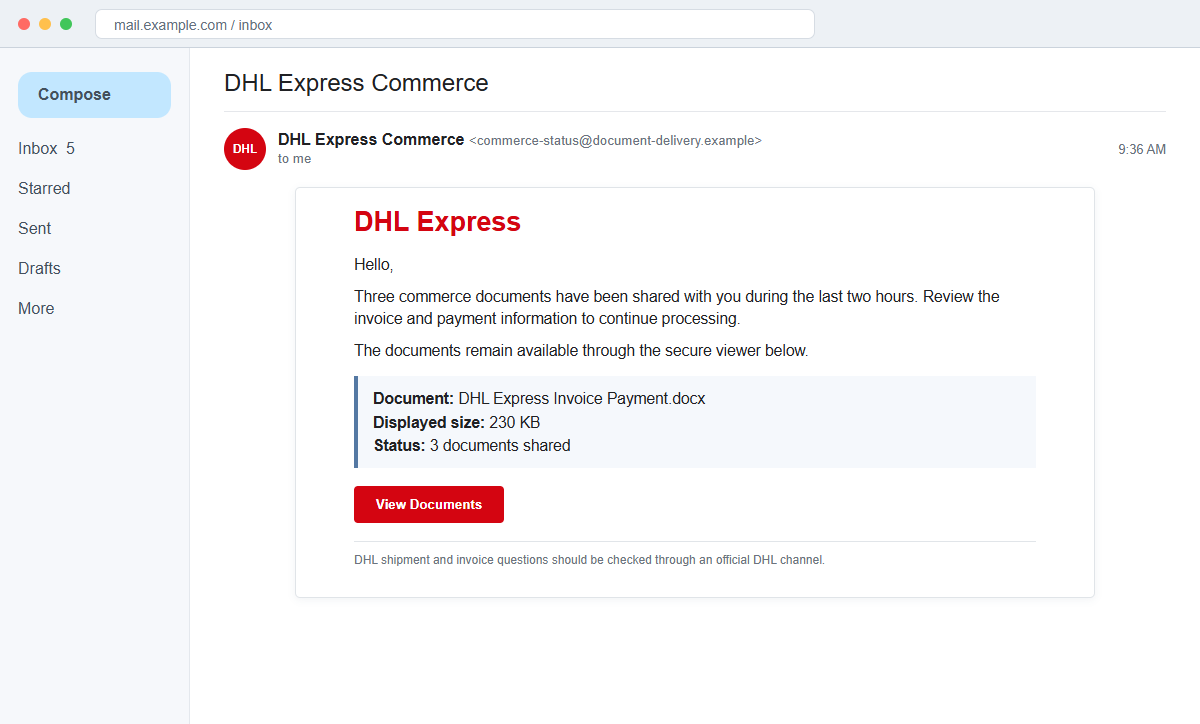
The DHL Express Commerce email is a phishing scam. The attachment line is part of the lure, and the button leads to a counterfeit DHL document screen hosted outside the company's legitimate web infrastructure.
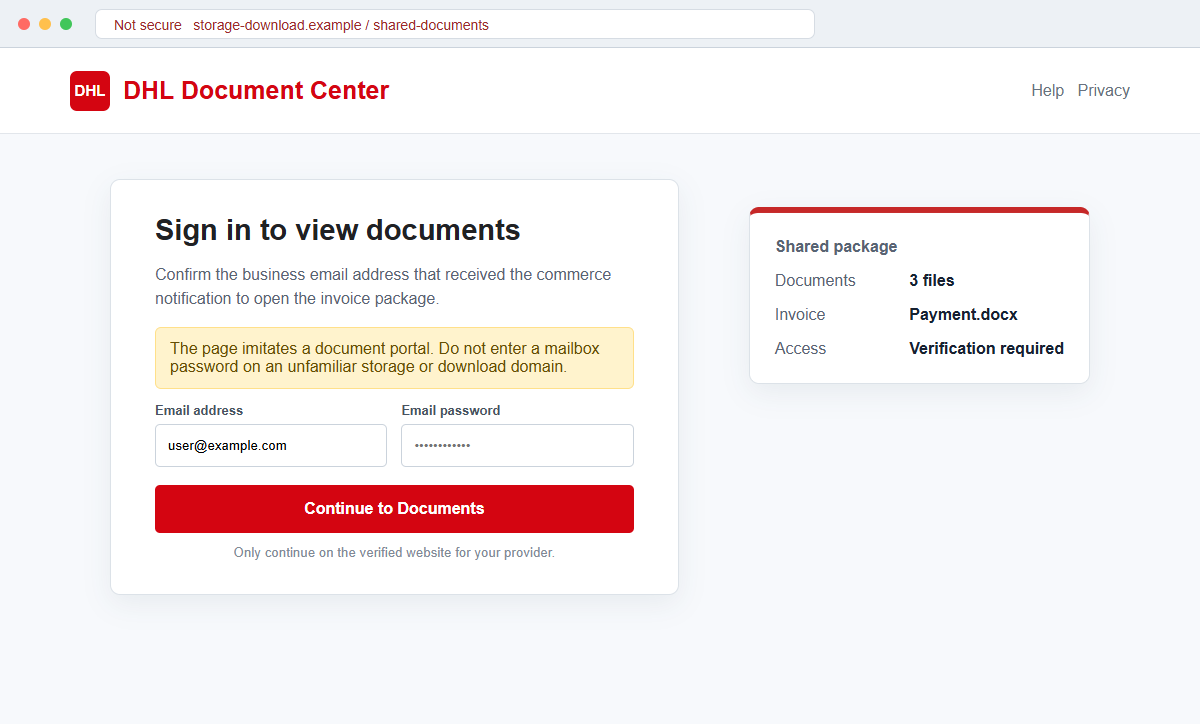
The destination asks the recipient to sign in with an email address and password. Those credentials do not unlock an invoice. They are sent to criminals who can use the mailbox to reach company systems and payment conversations.
Delete the message after reporting it. If a shipment or invoice might be real, open DHL through its official website and contact the supplier, customer, or internal logistics team using details you already trust.
Overview
A recent document share creates a small, believable deadline
The email says three commerce documents arrived within two hours. That timing suggests a live business transaction and makes the recipient feel that a colleague, shipper, or customer is waiting.
Instead of explaining the shipment, the message offers a file labeled “DHL Express Invoice Payment.docx,” a displayed size of about 230 KB, and a button. The document details provide texture without proving origin.
The file display and button can lead to the same place
What looks like an attachment may simply be an image or linked text inside the email. Both the filename and View Documents control can direct the user to one external phishing destination.
In the reviewed campaign, the page used cloud-hosted infrastructure rather than an official DHL site. A legitimate hosting platform can be abused by its users and does not endorse a page placed there.
The supposed document viewer is a mailbox credential form
The page copies DHL branding and says the intended recipient must authenticate before viewing the invoice package. It then asks for an email address and email password.
A carrier does not verify a person by collecting the password to a separate mail service. The request is designed to compromise the inbox, not to protect a shipment.
- The sender calls the message DHL Express Commerce.
- Three documents are said to have arrived during the last two hours.
- A Word file named like an invoice payment document is displayed.
- The shown file size is about 230 KB.
- The attachment can be a visual link rather than a true attached document.
- View Documents points to an external web location.
- The landing page imitates a DHL document center.
- The recipient is asked for a business email address and password.
- No independent shipment or invoice confirmation occurs first.
- A stolen mailbox can enable invoice interception and supplier fraud.
How DHL Says Customers Should Evaluate Suspicious Messages
DHL maintains official fraud-awareness guidance because criminals regularly copy shipping brands. It advises recipients to inspect sender addresses, urgent language, grammar, unfamiliar URLs, and unexpected attachments rather than trusting a logo.
DHL lists its recognized corporate email domains and warns that even a visible sender address can be spoofed. That means the content and final destination still need scrutiny when the From line appears familiar.
The company says it does not use free consumer mail services for official communication and does not direct customers to arbitrary domains.
Genuine links should lead to DHL-controlled web properties or an identified official country or campaign site.
For a questionable shipment or invoice, the right move is to reach DHL customer support from the official website. The suspicious email should not supply the contact details used to authenticate itself.
DHL also asks recipients to submit suspicious email as an attachment so complete headers can be examined. A normal forward can remove routing information that helps investigators identify the sending infrastructure.
A real file-sharing system may require a login, but it should use an established account and recognizable domain. It should never ask a recipient to disclose the secret password belonging to another company's mailbox.
Why the Commerce Document Story Does Not Hold Up
The phrase “three documents shared in the last two hours” sounds automated but does not name the sender of those documents. There is no verified shipper, customer, account, tracking number, or purchase order tying them to the recipient.
The displayed .docx filename and size may be only decoration. If clicking the filename opens the same website as the main button, the email did not actually deliver the Word file it claims to describe.
The landing address matters more than its branding. Cloud storage and download services allow user-created content; a DHL logo on one hosted page does not make the storage provider or DHL responsible for that page.
The form requests an email password rather than a known DHL account credential. It attempts to cross an important trust boundary by convincing the user to hand one service's secret to another service.
A phishing kit may record the email automatically, display the company domain's logo, or claim that the document is encrypted. These features are assembled from public or input data and do not demonstrate real authentication.
The campaign's destination may later disappear. A dead page does not make the message harmless or legitimate; takedowns and short campaign lifetimes are common, and another copy can appear on a different host.
How the DHL Express Commerce Email Scam Works
Step 1: The email is aimed at business operations
Criminals target addresses linked to purchasing, accounting, logistics, customer service, management, and general office work. Some are public, while others come from breaches or earlier mailbox compromises.
These roles already exchange invoices and shipment documents, so the recipient can mistake the lure for a routine handoff during a busy day.
Step 2: Recent activity suggests someone is waiting
The message says several documents were shared very recently. That detail creates mild urgency without the obvious threat used by many phishing campaigns.
The recipient may worry that delaying the review will hold up customs, delivery, invoice approval, or a supplier payment, even though the email does not prove any such process exists.
Step 3: A Word invoice display acts like an attachment
A filename such as DHL Express Invoice Payment.docx and a plausible file size appear inside the message. The visual design encourages the user to treat the item as a normal document.
It may not be attached at all. The entire file row can be clickable HTML that sends the browser to the same external page as View Documents.
Step 4: The external page borrows DHL identity
The destination displays DHL colors, a document-center heading, and a summary of three shared files. These public brand assets are easy to copy.
The actual registered domain may belong to cloud storage, a compromised site, or a newly created host. Always read the address from right to left and identify who controls the registered domain.
Step 5: Email sign-in is presented as document security
The page asks for the address that received the notification and the corresponding password. It may claim this verifies the intended recipient or decrypts the package.
The carrier has no legitimate reason to learn the mailbox password. A secure share would use a known DHL account, a one-time link, or another established method without collecting a third-party secret.
Step 6: The phishing service captures the submitted data
The form transmits the fields to attacker-controlled infrastructure. It may then show an incorrect-password message, ask for the password again, or send the browser to a real DHL page.
Attackers quickly test the credential and may trigger multi-factor prompts. If the password is reused, they can try it across cloud, shipping, procurement, and financial services.
Step 7: The compromised mailbox is used to redirect trust
Once inside, criminals can read authentic DHL notifications, supplier invoices, purchase orders, and payment discussions. That context supports precise impersonation rather than generic spam.
They may change payment instructions, send malicious documents to partners, or create rules that hide warnings. A single document lure can therefore develop into a wider business email compromise.
Company and Checkout Checks
Check expected DHL activity from a new browser session
Type dhl.com yourself, choose the correct regional service, and review tracking or account activity from there. Do not reuse the suspicious message's button, QR code, or telephone number.
If the email provides no tracking number or account reference, ask the supposed shipper for one through a separate conversation.
Confirm the document with the named business partner
Contact the supplier, customer, broker, or colleague using a saved address or known number. Ask whether three documents were shared and which platform should host them.
If the partner denies sending the message, notify both organizations' security teams because one address may have been spoofed or compromised.
Distinguish a true attachment from a linked picture
Inspect the email's attachment area and hover over the displayed file without clicking. A browser URL appearing for a supposed Word attachment is a warning that it is actually a link.
Security staff can examine the original message source and URL in an isolated tool rather than opening it in a production mailbox.
Compare every domain with DHL's official routes
The beginning of an address can include the word DHL while the registered domain belongs to someone else. Confirm the ending and use the official fraud-awareness page when uncertain.
Never enter a business email password on a carrier or cloud-storage page reached through an unexpected notification.
Warning Signs to Check Before You Act
- The message says documents were shared but never identifies the human sender.
- Three recent files are mentioned without a shipment or account reference.
- The invoice filename appears as a visual element inside the email.
- Clicking the alleged attachment opens an external website.
- The destination is cloud storage or another non-DHL domain.
- The page copies branding but cannot show authenticated account history.
- The recipient must use an email password to open carrier documents.
- A generic greeting replaces the customer or company name.
- The message creates urgency around documents from the last two hours.
- The supposed file and View Documents button share one destination.
- No matching activity exists after an independent DHL login.
- The page disappears or changes when visited later.
The safest response to an unexpected DHL document share is to leave the email, open the carrier independently, and contact the real business partner. A mailbox password should never be part of that verification.
What to Do if You Have Fallen Victim to This Scam
- Change the compromised email password. Use the mail provider's known website or application and choose a new, unique password. Replace reused credentials on DHL, shipping, cloud, supplier, and financial accounts.
- Strengthen multi-factor authentication. Prefer a passkey, hardware key, or authenticator app where supported. Review every registered method and remove telephone numbers, recovery addresses, or devices you do not recognize.
- Revoke sessions and connected applications. Sign out other sessions and inspect OAuth access, mail clients, app passwords, mobile devices, and browser sessions. A stolen token can remain useful after a password change.
- Remove malicious inbox rules. Check forwarding, filters, delegates, automatic replies, sent mail, trash, archive, and spam. Delete rules that hide security notices or route invoices and supplier replies away from the owner.
- Review shipping and payment conversations. Look for changed beneficiary details, newly approved payees, altered purchase orders, unauthorized shipments, and messages sent in the user's name. Call affected partners through known numbers.
- Preserve the message and page indicators. Save the original email with complete headers, the displayed filename, destination URL, screenshots, and any form-response details. Do not type real data into the page to test it.
- Scan devices that opened or downloaded content. Run a full Malwarebytes scan or another trusted security product if a document, archive, browser extension, or installer was delivered. Remove unfamiliar software and install current security updates.
- Block known malicious destinations. AdGuard or another reputable DNS and content blocker can prevent some phishing hosts from loading. Company administrators should add confirmed domains, URLs, sender patterns, and hashes to protective controls.
- Report the fake DHL communication. Send the suspicious email as an attachment with full headers to DHL's published phishing channel, and report the host to its provider and the message to the mail service.
- Notify the employer's incident-response contact. Business mail exposure can affect customers and vendors, not just one user. Security staff should inspect sign-in logs, conditional-access events, mailbox changes, and outbound messages.
- Reject follow-up calls asking for codes or remote access. The same criminals may pose as DHL support or an email administrator. End the contact and call the organization using a verified number instead.
Frequently Asked Questions
Is the DHL Express Commerce email legitimate?
The reviewed campaign is phishing. It uses a fake recent-document notice and a counterfeit portal to collect business email credentials.
Does the .docx filename prove a Word document exists?
No. The filename and size can be styled text or an image linked to a website. Verify whether the mail client shows a real attachment and confirm the sender separately.
Why do criminals use a cloud-storage address?
Cloud platforms let customers host files and pages. Abuse by one user does not mean the platform or DHL created or approved the content.
Can a legitimate DHL message contain a link?
Yes, genuine notifications can contain links. Compare the full domain with official DHL routes and independently verify the shipment rather than trusting the display text.
What if the phishing page is no longer available?
The specific host may have been removed or abandoned. Treat any submitted credentials as compromised, because the data could have been captured while the page was active.
What should I do if I only clicked?
Close the page, report the URL, and check downloads and browser changes. If no credential or code was entered, takeover risk is lower, but the device and account should still be reviewed.
The Bottom Line
The DHL Express Commerce email scam makes an external credential page look like a recent share of invoice and payment documents.
A decorative .docx filename, copied carrier branding, and a cloud-hosted page do not establish authenticity. Real shipment activity should be checked from dhl.com and confirmed with the known sender.
Anyone who entered a password should secure the mailbox, revoke access, inspect invoice conversations and rules, warn partners, scan the device, preserve the evidence, and report the impersonation.








