

An email from “Mail Admin” says a routine security review is underway. Re-verify your account settings, it warns, or uninterrupted access to incoming and outgoing mail may no longer be guaranteed.
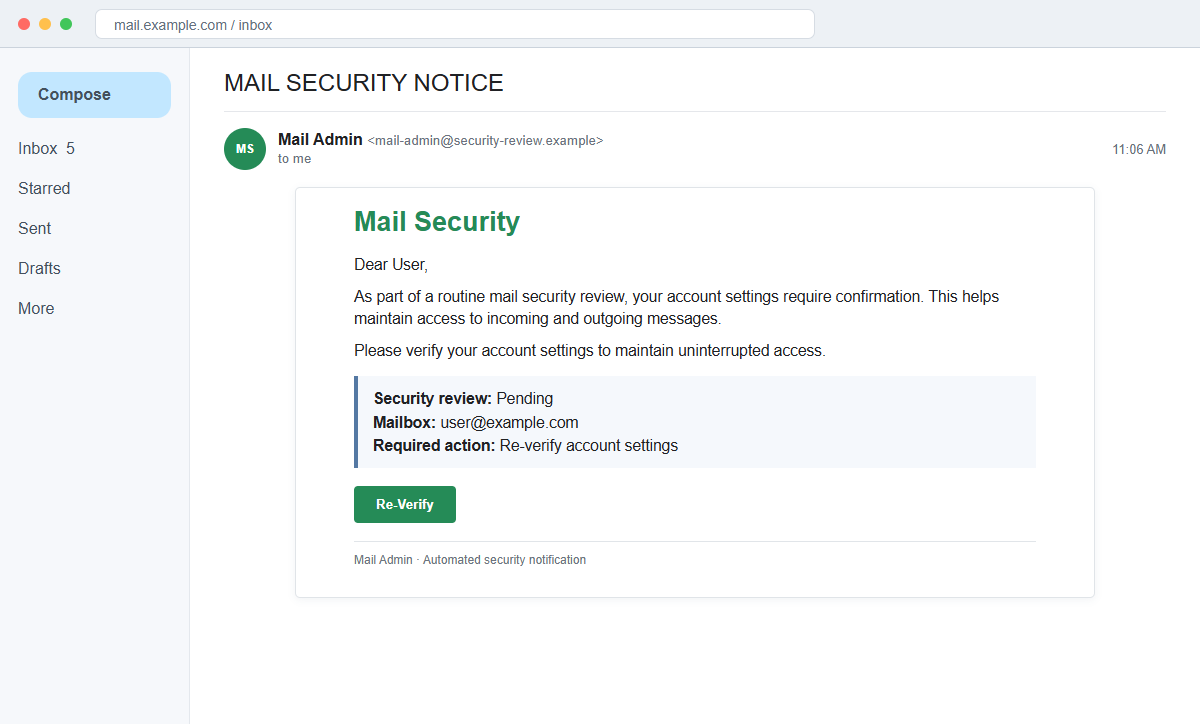
The Mail Security Notice message is a phishing scam. Its green Re-Verify button leads to a counterfeit webmail page where the recipient's address is prefilled and the current password is requested.
The wording feels plausible because email administrators do review security. Yet this notice never proves which provider, server, employer, or account policy is involved. It uses the fear of disruption to push the user past that missing context.
Do not use the button. Open webmail through the provider's known address or hosting control panel, then ask the real administrator whether any confirmation is pending.
Overview
A generic security review fits almost any mailbox
The message uses the subject “MAIL SECURITY NOTICE” and is signed simply “Mail Admin.” It says account settings must be confirmed as part of routine review, without identifying a real technician or service ticket.
A line resembling “Please verify your account settings to maintain uninterrupted access” creates a consequence while remaining vague enough to send to users of many different providers.
The button opens a provider-neutral password trap
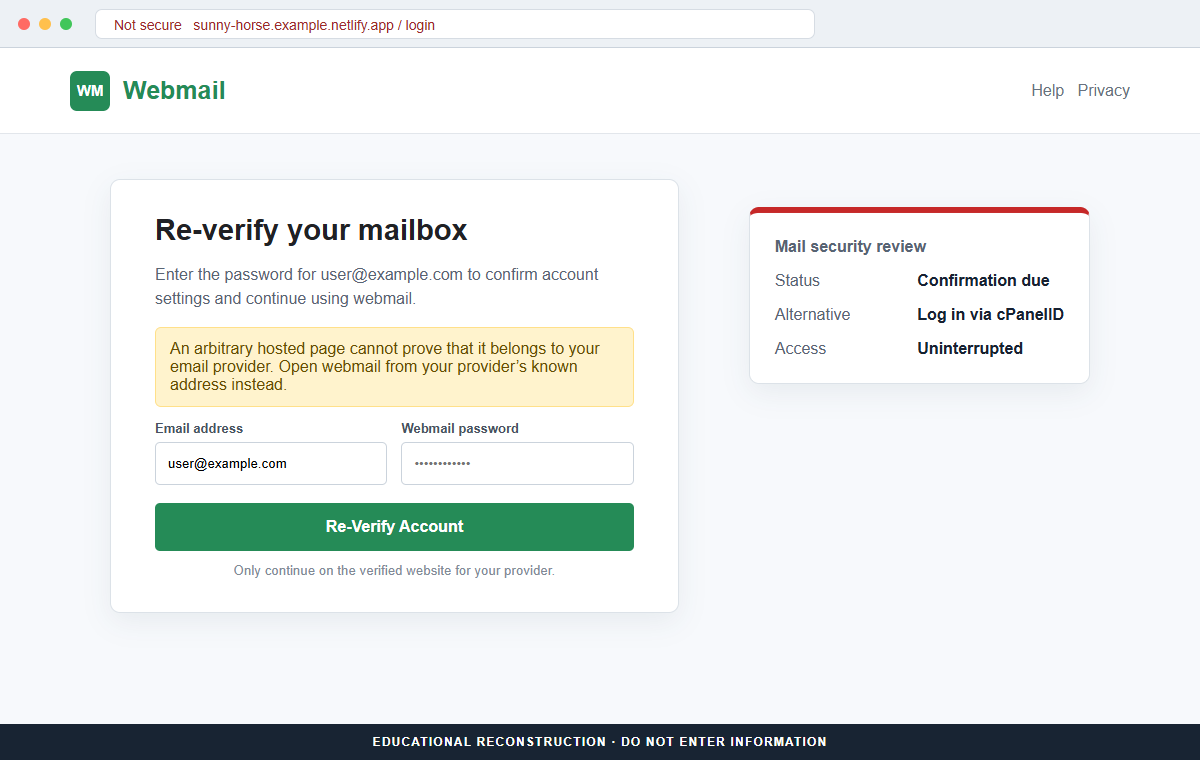
The landing page resembles a generic Webmail or cPanel-style login. It can prefill the recipient's email address and ask only for the password, making the form feel like a continuation of an existing account session.
It may also offer “Log in via cPanelID” and language choices. These public interface concepts add familiarity but do not prove the page belongs to the recipient's hosting company.
The destination is a temporary hosted page
The reviewed campaign used a long Netlify-hosted address ending in sunny-horse-ca4dd5[.]netlify.app. That location was unrelated to the email provider and could not re-verify the user's real mailbox.
A password submitted there can be tested against genuine webmail, hosting, and reused accounts. The criminal may then read messages, alter forwarding, reset services, and impersonate the victim.
- The subject uses the broad label Mail Security Notice.
- The sender signs only as Mail Admin.
- A routine review is claimed without a ticket or policy reference.
- Uninterrupted mail access is used as the threat.
- Re-Verify is presented as the single safe response.
- The message does not identify the real provider or server.
- The landing page copies a generic webmail interface.
- cPanelID wording is borrowed to appear technical.
- The page sits on an unrelated Netlify subdomain.
- The form captures the current mailbox password.
How Real Webmail and cPanel Sign-In Routes Work
Webmail is a general name for accessing email through a browser. Hosting companies commonly supply webmail on their own domain or server hostname, and the correct address is normally documented in the customer's account.
cPanel documentation describes secure webmail access through a provider-controlled hostname, often on port 2096, or from the cPanel Email Accounts interface using the Check Email action.
Some cPanel environments can offer cPanelID as an external authentication method when the provider has configured it. The presence of those words on a page does not activate or authenticate that integration.
The trust comes from the known provider route and correctly configured service, not from a button that says cPanelID. An arbitrary hosted page cannot grant itself authority over a different server's mailbox.
Real administrators may require password changes or stronger authentication. Those actions should appear in the authenticated provider account and can be confirmed using a known support ticket, directory entry, or telephone number.
Users should save the correct webmail and hosting addresses before an emergency occurs. A bookmark or password-manager entry makes it easier to reject an unexpected page with a similar logo but different hostname.
Details That Expose the Mail Security Notice Phishing Page
The email never names the provider, hosting company, server, employer, administrator, or policy. A universal template can therefore be sent to Gmail users, hosted-domain users, and employees without modification.
The sender label “Mail Admin” is not an identity. Display names can be typed freely, and the actual sending address may belong to a compromised account or a domain created for bulk mail.
The destination hostname is decisive. A random-looking subdomain under netlify.app is not the established webmail address simply because the page displays an email field, languages, and a cPanelID option.
Netlify is a legitimate hosting platform, but legitimate infrastructure can be abused to publish deceptive pages. The hosting company's reputation does not transfer to every site created by a customer.
Prefilling the email address only shows that the phishing link carried that address. The page has not demonstrated access to the mailbox, its server settings, or any security review.
HTTPS also cannot solve the ownership problem. It protects the connection to the Netlify page, not the user's relationship with their email provider.
How the Mail Security Notice Email Scam Works
Step 1: Scammers assemble lists of active email accounts
Addresses are gathered from business websites, contact forms, professional networks, public documents, old breaches, and guessed aliases such as admin, sales, billing, and support.
The campaign needs little personalization because every target already understands the value of uninterrupted email access.
Step 2: A generic administrator warning arrives
The message claims a routine security review requires confirmation. It avoids details that could be checked, such as a server name, maintenance window, authentication policy, or help-desk ticket.
Signing as Mail Admin lets the attacker sound internal without impersonating a named employee who might be easy to contact.
Step 3: Service-continuity language creates urgency
Recipients are told to verify settings to keep mail working. The possibility of missing an important message can make the Re-Verify button feel safer than doing nothing.
The message does not necessarily use a strict deadline. It creates enough uncertainty that the user may click simply to remove the perceived risk.
Step 4: Re-Verify opens a counterfeit webmail form
The page shows a familiar mailbox layout, the recipient's address, password field, language selector, and possibly a cPanelID choice. These elements imitate common hosting interfaces.
The address bar shows that the form is hosted elsewhere. Visual similarity cannot give that host access to the real provider's account system.
Step 5: The password is sent to the attacker
When the recipient submits the form, the page stores or transmits the address and password. It may display an error, ask again, or redirect to the provider's genuine webmail page afterward.
A redirect can make the theft appear to be an expired session. The victim may continue using email without realizing that the secret was copied.
Step 6: Credentials are tested across email and hosting services
Attackers try the password on the likely webmail provider, cPanel, Microsoft 365, Google Workspace, cloud storage, remote access, and other services tied to the same address.
If multi-factor authentication is active, they may request codes, send approval prompts, or place a call pretending to be the administrator who sent the original warning.
Step 7: The mailbox is turned into a trusted attack channel
Inside the inbox, criminals can find invoices, contacts, password resets, and active conversations. They can create forwarding rules, delete alerts, and send messages that pass ordinary sender checks.
A compromised business mailbox may be used for supplier-payment changes, payroll diversion, malicious attachments, customer phishing, or access to the wider hosting environment.
Company and Checkout Checks
Use the webmail address you already trust
Open a saved bookmark, password-manager entry, hosting dashboard, or provider documentation. For a managed account, ask IT for the exact hostname rather than copying one from the notice.
A genuine review should be visible or confirmable after authentication through that established route.
Verify with the real administrator
Call the known provider or internal help desk, open a ticket from the existing customer portal, or contact a directory-listed administrator. Ask whether the exact message and review are legitimate.
Attach the original email so the technical team receives its headers. Do not rely on a reply to the suspicious sender.
Read the registered domain from right to left
In the reviewed address, netlify.app is the registered platform domain and the long sunny-horse label is a customer subdomain. Neither one identifies the recipient's provider.
A familiar word placed earlier in a long hostname does not change who controls the final registered domain.
Check what the page knows before entering a secret
A legitimate authenticated portal can show the mailbox, quota, provider, server, and relevant notice. A page that only repeats an address carried in the URL has proved nothing.
Stop when an unverified page asks for the current password as its first meaningful interaction.
Warning Signs to Check Before You Act
- The subject is the generic phrase Mail Security Notice.
- The sender identifies itself only as Mail Admin.
- No provider, employer, server, or ticket number is named.
- A routine review is mentioned without describing the policy.
- Uninterrupted access is threatened in vague terms.
- The Re-Verify button is the only offered verification route.
- The destination is a long Netlify subdomain.
- The webmail design is generic enough to fit many providers.
- The email address is prefilled before ownership is proved.
- cPanelID wording is used on a page outside the known hosting account.
- The form requests the existing mailbox password.
- No matching notice appears through the real webmail route.
A real administrator can be reached independently and a real security action can be completed through the established account. The need to use an unrelated hosted page is the part that exposes this scam.
What to Do if You Have Fallen Victim to This Scam
- Change the exposed password immediately. Open the email provider's established webmail or cPanel portal through a saved bookmark or its official application, not through the Mail Security Notice message. Create a fresh, unique password for the account exposed by that mail-security message. Replace similar passwords anywhere else they were reused.
- Start with the credentials exposed to the mail security notice. Create a fresh, unique password for the account exposed by that mail-security message. Replace similar passwords anywhere else they were reused. Compare every sign-in method after this mail-security case with the owner's devices. Unrecognized numbers, addresses, keys, and app passwords must go.
- End the access created through the mail security notice. Sign out all other sessions from the hosting or webmail provider’s official portal, revoke unfamiliar OAuth grants, and reconnect trusted mail applications only after the password change. This closes tokens that can survive a simple reset.
- Review the mailbox for changes connected with the mail security notice. Remove unknown forwarding addresses, delegates, inbox rules, filters, and automatic replies. Examine mail activity from the time of this mail-security incident. Unfamiliar sent messages or deleted security alerts can reveal what followed this mail-security incident.
- Protect the wider account chain. Prioritize webmail, hosting, and connected mail clients. Reset credentials on services whose recovery messages reach the inbox exposed by that mail-security message. Begin with financial and administrator accounts.
- Ask the provider to inspect the mailbox and hosting logs. Provide the phishing URL, submission time, source IP if known, and any approval prompts. Administrators should review sign-ins, cPanel activity, account changes, forwarding, app passwords, file access, and messages sent during the possible compromise window.
- Check the device used to open the mail security notice. Run a complete Malwarebytes scan if that mail-security message delivered a file, extension, or remote-support tool. Clean the device before changing sensitive passwords there.
- Reduce the chance of reopening a related page. AdGuard or another reputable DNS and content blocker may stop known phishing hosts and malicious advertisements tied to the mail security notice. Blocklists may not recognize the next domain used for this mail-security case. Verify every address before entering account information.
- Report the phishing message. Use the mail provider's Report Phishing control and notify the hosting provider, email administrator, or workplace security team. The raw headers from this mail-security incident should be preserved before reporting. They are especially valuable when the campaign reached multiple inboxes.
- Warn mail administrator and recent correspondents through a separate channel. Explain that the mail security notice may have exposed the account and ask them to distrust recent file shares, password requests, invoices, payment changes, or urgent replies until the timeline is confirmed.
- Expect follow-up fraud based on the mail security notice. A supposed recovery expert mentioning this mail-security incident may belong to the same operation. Work only with a professional you verify yourself. Choose recovery help for this mail-security phishing attempt through organizations you contact independently. Avoid strangers who appear in messages or search ads.
Frequently Asked Questions
Is the Mail Security Notice email genuine?
The reviewed message is phishing. It uses a vague routine review to direct recipients to a fake webmail login on an unrelated Netlify-hosted page.
Can a real mail administrator require re-verification?
An administrator can require security changes, but the request should be confirmable through known support and completed on the provider's established portal, not an arbitrary hosted page.
Is cPanelID a real sign-in option?
cPanel can support cPanelID external authentication when a provider configures it. The words alone do not prove that an unrelated webpage is connected to the recipient's server.
What if I clicked Re-Verify but entered nothing?
Close the page, report the URL, and inspect the real account. Risk is lower if no password, code, file, browser permission, or recovery information was provided.
Why did the page display my correct email address?
The address can be copied from the recipient field and placed inside the link. A prefilled address does not show that the page accessed the mailbox.
Does Netlify hosting make a page trustworthy?
No. Netlify is a legitimate hosting service, but an individual customer page can still be abusive. Judge the exact site and whether it is the provider's verified domain.
The Bottom Line
The Mail Security Notice scam disguises a password form as a routine account review. Generic administrator language and cPanel-style details are used to make an unrelated hosted page feel familiar.
Open webmail through the provider's known route and confirm security requests with the real administrator. A prefilled address, HTTPS, language menu, or cPanelID label cannot authenticate a random Netlify subdomain.
If credentials were submitted, change them immediately, revoke sessions, inspect mailbox and hosting settings, protect connected accounts, notify the provider or employer, scan downloaded content, warn contacts, and report the phishing host.








