

A mail security notice says several business messages never reached your inbox. A quotation, a new order, and a product request are waiting in quarantine, but they may be permanently removed unless you review them now.
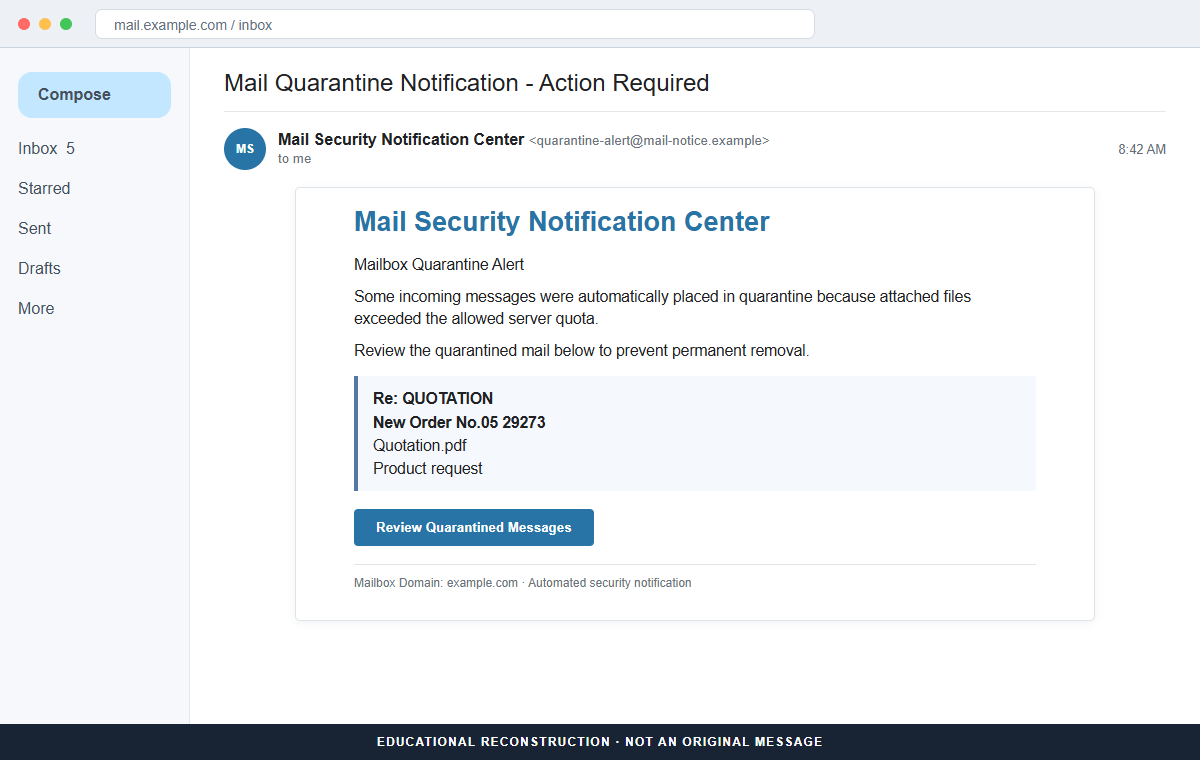
The Mailbox Quarantine Alert is a phishing email. The listed messages are invented, and the Review Quarantined Messages button opens a fake webmail sign-in form created to capture the recipient's email address and password.
The lure works because the missing messages sound valuable. A sales employee may worry about losing an order, while an accounts team may believe a delayed quotation could damage a real customer relationship.
Do not sign in through the alert. Open the provider's quarantine dashboard from a trusted bookmark or ask the real email administrator to check whether the listed messages exist.
Overview
The alert invents a believable queue of missed business mail
The reviewed email uses the subject “Mail Quarantine Notification – Action Required” and appears to come from a Mail Security Notification Center. It claims oversized attachments caused incoming messages to exceed a server quota.
A short list includes “Re: QUOTATION,” “New Order No.05 29273,” “Quotation.pdf,” and “Product request.” These subjects are generic enough to fit thousands of businesses while still feeling relevant to sales, purchasing, and administration.
Permanent removal turns curiosity into urgency
The recipient is told to review the quarantined mail before it is deleted. That threat makes the button appear to be a protective action, not a login request introduced by an unknown sender.
No sender addresses, received times, message identifiers, quarantine reasons, or actual file sizes are provided. The list resembles a security report without containing the details a real filtering service would use for review.
The review page is a webmail password trap
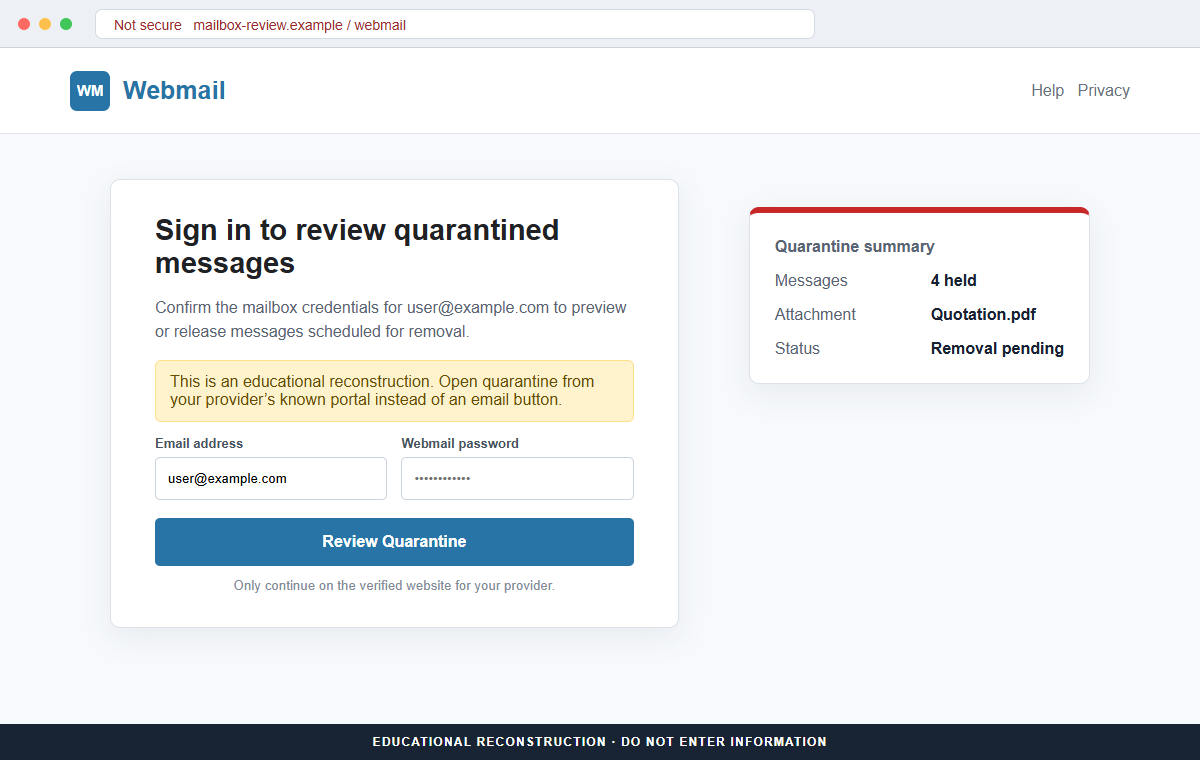
Clicking the button leads to a counterfeit cPanel-style webmail page. It asks for the email address and current password under the pretext of displaying or releasing the held messages.
Credentials entered there go to the attacker. Mailbox access can expose private conversations, password-reset links, cloud accounts, invoices, contacts, and trusted threads that support a larger business email compromise.
- The subject says a mail quarantine action is required.
- A generic security center is used instead of a named provider.
- Oversized attachments supposedly exceeded a server quota.
- Quotation and new-order subjects create commercial urgency.
- The listed senders and received times are missing.
- Permanent deletion is threatened if the button is ignored.
- The button leaves the provider's established mail system.
- The destination imitates a cPanel-style webmail login.
- The form requests the current mailbox password.
- Stolen access can lead to account resets, impersonation, and payment fraud.
What a Real Email Quarantine Review Should Show
Legitimate mail systems do quarantine suspicious messages. Spam, phishing, malware, policy violations, and risky attachments may be held so a user or administrator can review them without placing the original content in the inbox.
The exact process depends on the provider and the organization's policy. In Microsoft 365, for example, users reach quarantine through the authenticated Microsoft Defender portal and can see the sender, subject, received time, expiration date, and quarantine reason.
Available actions can include previewing a message, viewing headers, requesting release, releasing it when policy permits, deleting it, or blocking the sender. High-risk messages may remain restricted to administrators.
Hosted webmail has its own established access route. cPanel documentation directs users to their provider-controlled webmail hostname or to Email Accounts inside cPanel, where Check Email opens the webmail interface.
A real notification may contain a review link, but the recipient should still be able to reach the same queue independently. Opening the known dashboard first removes the need to trust the button.
The mailbox password should only be entered on the verified identity or webmail domain. A page introduced by an alert cannot prove ownership by displaying the recipient's address, company domain, or familiar mail graphics.
Details That Expose the Fake Quarantine Notification
The supposed security center is not tied to a recognizable provider. The message does not identify Microsoft 365, Google Workspace, the hosting company, the mail gateway, or an internal administrator who can confirm the quarantine event.
Its explanation mixes attachment size with a server quota but provides no measurements. A real system that rejected a file for size should be able to show the message size, applicable limit, timestamp, sender, and delivery event.
The business subjects are bait. “Quotation,” “new order,” and “product request” are common enough to interest many recipients, and no evidence shows that the messages were ever sent.
The review button changes the task from inspecting held mail to providing a password. A legitimate quarantine record should appear after the recipient opens the known provider account, not only after an unfamiliar page collects credentials.
A generic cPanel-style screen is easy to copy. Webmail logos, rounded fields, and a company domain printed on the page are public design elements, not proof of a connection to the mail server.
HTTPS would not authenticate the claim. It can encrypt the stolen password while it travels to the phishing host, so the complete hostname still needs to match the real provider.
How the Mailbox Quarantine Alert Email Scam Works
Step 1: Attackers obtain active email addresses
Business websites, professional profiles, vendor directories, old data breaches, and predictable aliases such as sales, purchasing, orders, and accounts provide useful targets. The campaign can also be sent broadly to personal addresses.
The criminals do not need access to the real mail server. They only need a recipient who believes one of the invented subjects could be genuine.
Step 2: A fake security center reports held messages
The email claims that oversized attachments caused several incoming messages to enter quarantine. A technical explanation gives the notification the appearance of an automated system event.
The sender avoids verifiable details. That lets the same template work across different hosting companies and email platforms.
Step 3: Commercial subject lines create a reason to click
Quotations, new orders, and product requests imply possible revenue or an unanswered customer. The recipient may feel responsible for rescuing the messages before a colleague notices the delay.
The attachment name Quotation.pdf adds specificity without proving that any file exists.
Step 4: A deletion warning shortens the decision
The alert says quarantined mail will be permanently removed. Instead of checking with IT, the user may click immediately because the apparent cost of waiting feels higher than the risk of the button.
Real quarantine systems do have retention periods, but that fact can be copied. The correct response is to inspect the verified dashboard.
Step 5: The button opens a counterfeit webmail login
The landing page resembles a standard webmail or cPanel screen and may prefill the recipient's address. It claims authentication is necessary to preview or release the waiting messages.
The address bar belongs to the phisher's host, not the established mail service. Familiar styling is used to distract from that difference.
Step 6: Submitted credentials are tested against real accounts
The form sends the email address and password to the attacker. The page may request a second attempt, display an error, or redirect to genuine webmail so the theft appears to be a normal sign-in failure.
Criminals can then test the password on the actual mailbox, hosting control panel, cloud storage, remote access, and services where it may have been reused.
Step 7: Mailbox access supports a wider fraud
An intruder can read conversations, create forwarding rules, hide security messages, reset connected accounts, and learn how the victim communicates with customers and vendors.
The compromised address can send convincing invoice changes, new phishing alerts, malicious documents, or password requests that appear to come from a trusted colleague.
Company and Checkout Checks
Open quarantine through the known provider portal
Use a saved bookmark, official application, password-manager entry, or address supplied by the real administrator. Microsoft 365 users can reach quarantine from security.microsoft.com, while other providers publish their own authenticated route.
Search the queue for the listed subjects and compare sender, time, reason, and expiration details.
Ask IT to verify the message identifiers
Send the suspicious email as an attachment to the help desk or hosting provider through a known ticket system. Administrators can check mail traces, quarantine logs, and gateway records without asking for the user's password.
Do not use a telephone number or reply address supplied only by the alert.
Inspect the button destination before opening it
Hover over Review Quarantined Messages and read the complete registered domain. A company name or email address earlier in the URL does not matter when the controlling domain is unrelated.
If the link uses a URL shortener or tracking redirect, treat that as another reason to navigate independently.
Compare the data quality with a real security record
A trustworthy quarantine entry should show who sent the message, when it arrived, why it was held, and what actions policy allows. A list of tempting subjects without those details is not enough.
Never release an unexpected message merely because its subject sounds valuable. Preview safely or ask the administrator to inspect it.
Warning Signs to Check Before You Act
- The sender is a generic Mail Security Notification Center.
- No actual provider or administrator is identified.
- Oversized files are blamed without showing sizes or limits.
- The message list contains broadly tempting business subjects.
- Sender addresses and received times are absent.
- Quotation.pdf is named without a verifiable message record.
- Permanent deletion creates immediate pressure.
- The only review route is a button inside the email.
- The final hostname differs from the known mail portal.
- A cPanel-style page requests the existing password.
- The address may be prefilled to simulate account knowledge.
- No matching entries appear in the real quarantine dashboard.
Quarantined messages can be real, but a notification should lead back to a record that exists in the verified mail system.
If the queue only appears after an unrelated page requests a password, it is not a safe review process.
What to Do if You Have Fallen Victim to This Scam
- Change the exposed password immediately. Open the email provider's official quarantine or webmail dashboard through a saved bookmark or its official application, not through the Mailbox Quarantine Alert message. Create a fresh, unique password for the account exposed by that mailbox-quarantine message. Replace similar passwords anywhere else they were reused.
- Start with the credentials exposed to the mailbox quarantine alert. Create a fresh, unique password for the account exposed by that mailbox-quarantine message. Replace similar passwords anywhere else they were reused. Compare every sign-in method after this mailbox-quarantine case with the owner's devices. Unrecognized numbers, addresses, keys, and app passwords must go.
- End the access created through the mailbox quarantine alert. Sign out all other sessions from the provider’s real quarantine console, revoke unfamiliar OAuth grants, and reconnect trusted mail applications only after the password change. This closes tokens that can survive a simple reset.
- Review the mailbox for changes connected with the mailbox quarantine alert. Remove unknown forwarding addresses, delegates, inbox rules, filters, and automatic replies. Examine mail activity from the time of this mailbox-quarantine incident. Unfamiliar sent messages or deleted security alerts can reveal what followed this mailbox-quarantine incident.
- Protect the wider account chain. Prioritize webmail, shared files, and business conversations. Reset credentials on services whose recovery messages reach the inbox exposed by that mailbox-quarantine message. Begin with financial and administrator accounts.
- Ask the administrator to review quarantine and sign-in logs. Provide the phishing message, destination, submission time, and any multi-factor prompts. The administrator should inspect mail traces, active sessions, forwarding, inbox rules, OAuth grants, app passwords, and messages sent after the exposure.
- Check the device used to open the mailbox quarantine alert. Run a complete Malwarebytes scan if that mailbox-quarantine message delivered a file, extension, or remote-support tool. Clean the device before changing sensitive passwords there.
- Reduce the chance of reopening a related page. AdGuard or another reputable DNS and content blocker may stop known phishing hosts and malicious advertisements tied to the mailbox quarantine alert. Blocklists may not recognize the next domain used for this mailbox-quarantine case. Verify every address before entering account information.
- Report the phishing message. Use the mail provider's Report Phishing control and notify the email provider, hosting company, or workplace security team. The raw headers from this mailbox-quarantine incident should be preserved before reporting. They are especially valuable when the campaign reached multiple inboxes.
- Warn mail administrator, coworkers, and recent senders through a separate channel. Explain that the mailbox quarantine alert may have exposed the account and ask them to distrust recent file shares, password requests, invoices, payment changes, or urgent replies until the timeline is confirmed.
- Expect follow-up fraud based on the mailbox quarantine alert. A supposed recovery expert mentioning this mailbox-quarantine incident may belong to the same operation. Work only with a professional you verify yourself. Choose recovery help for this mailbox-quarantine phishing attempt through organizations you contact independently. Avoid strangers who appear in messages or search ads.
Frequently Asked Questions
Is the Mailbox Quarantine Alert genuine?
The reviewed message is phishing. It lists invented business emails and directs recipients to a counterfeit webmail page that captures login credentials.
Can legitimate email services quarantine oversized attachments?
Mail systems can reject or hold messages for size and policy reasons. Confirm the event inside the provider's verified quarantine dashboard and review the actual sender, time, size, and reason.
Why are the quotation and order subjects so believable?
They are common business phrases chosen to interest sales and purchasing teams. A subject that fits your work does not prove the underlying message exists.
What if I clicked but did not enter a password?
Close the page, report the alert, and inspect the real quarantine queue. Risk is lower when no information, file, code, or browser permission was provided.
Should I release a message that looks like a customer order?
Not until the sender and attachment have been verified. Preview it through the official system or ask the administrator to inspect it for phishing and malware.
Does cPanel send quarantine notifications?
Hosting environments and security tools vary, but legitimate cPanel webmail is reached through the provider-controlled server or cPanel account. A copied login on an unrelated domain is not cPanel authentication.
The Bottom Line
The Mailbox Quarantine Alert scam turns the fear of missing a quotation or order into a webmail credential trap. The business subjects are bait, not evidence that real messages are waiting.
Open quarantine through the provider's known dashboard and compare the sender, time, reason, and expiration there. Never give a mailbox password to an unfamiliar page introduced by an unsolicited alert.
If credentials were submitted, change them immediately, revoke sessions, inspect forwarding and connected apps, secure recovery accounts, notify the administrator, scan downloaded content, warn contacts, and report the phishing host.








