

The cPanel Final Account Upgrade email scam uses an urgent service warning to push recipients toward a counterfeit login.
A strange service notice says your mailbox has entered its final upgrade state. Confirm it now, the message warns, or email service may be interrupted and the account could be closed.
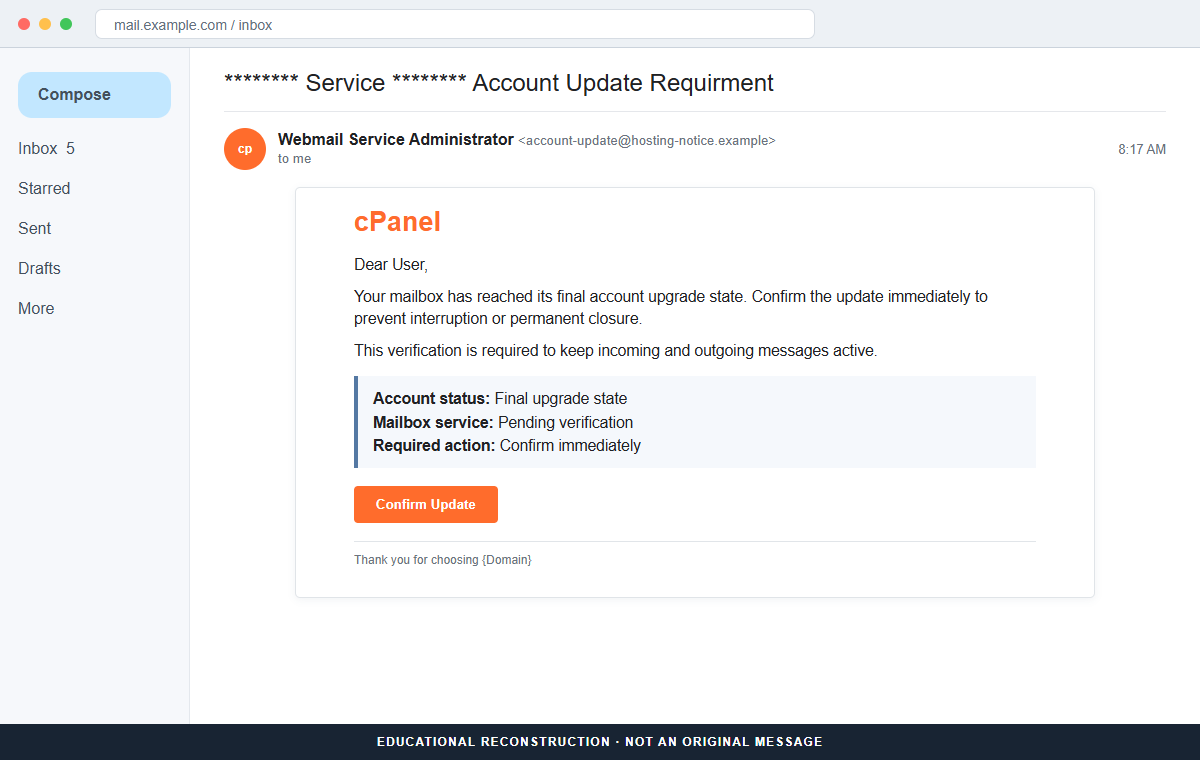
The cPanel Final Account Upgrade email is a phishing scam. Its button does not complete a server update. It leads toward a counterfeit sign-in page that collects the mailbox address and password entered by the recipient.
The wording is deliberately vague enough to fit many companies. Attackers can replace asterisks with a domain name, imitate a hosting provider, or leave broken template fields in place and still catch hurried mailbox owners.
Do not use the Confirm Update button. Open the hosting or webmail portal from a trusted bookmark, check the account there, and ask the real server administrator whether any action is actually required.
Overview
The email turns an undefined upgrade into a deadline
The reviewed message uses a subject resembling “Service Account Update Requirment” and says the mailbox has reached a final account upgrade state. It never clearly explains what software, hosting plan, or server change is taking place.
Instead, it moves directly to consequences. The recipient is told to verify immediately or risk interruption, deactivation, or permanent closure. That threat is meant to replace a careful technical check with a quick click.
Generic branding lets the same template target many domains
The message may mention cPanel, webmail, an account service, or the recipient's own domain. Because cPanel is widely used by hosting companies, its name can sound familiar even when the sender has no relationship with the real server.
A leftover phrase such as “Thank you for choosing {Domain}” exposes the mass-mail template. Attackers often fill some variables, leave others broken, and depend on urgency to keep recipients from noticing.
The destination asks for the one secret an upgrade does not need
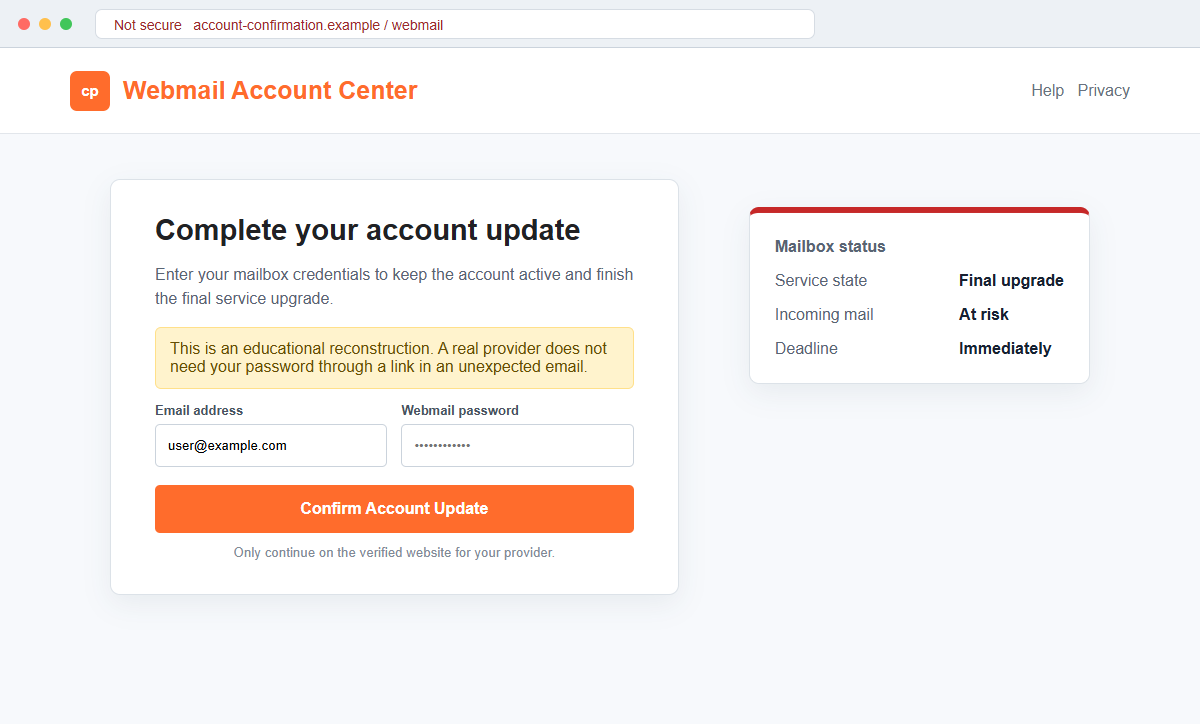
After the button is clicked, a branded page requests the full email address and current webmail password. It claims those credentials will confirm ownership, preserve delivery, or complete the upgrade.
The form is controlled by the phisher. Submitting it can give criminals access to correspondence, password-reset links, invoices, customer records, and every other account that relies on the mailbox for recovery.
- The subject contains awkward wording such as Account Update Requirment.
- A so-called final upgrade state is never technically defined.
- Immediate confirmation is presented as the only safe choice.
- The message threatens interruption or permanent mailbox closure.
- cPanel or webmail branding supplies borrowed credibility.
- Generic asterisks or domain placeholders reveal a reusable template.
- The sender does not identify the real hosting plan or server account.
- The Confirm Update button points outside the established provider portal.
- The landing page requests the current mailbox password.
- The stolen inbox can be used for resets, impersonation, and payment fraud.
What a Real cPanel Account Update Looks Like
cPanel is legitimate control-panel software supplied through hosting companies. There is no single universal customer mailbox where every cPanel user completes upgrades.
The correct address normally belongs to the hosting provider or to a hostname configured for that server.
Official cPanel documentation places email-account management inside the authenticated Email Accounts interface. That area shows account quota status and provides management actions for passwords, storage, restrictions, and connected devices.
Hosting-plan upgrades can also be offered from an authenticated provider interface. The important sequence is that the customer first reaches a known portal, verifies its hostname, signs in, and then sees account-specific information.
A genuine maintenance notice should be confirmable without surrendering a password to the notice itself. The provider's status page, ticket system, dashboard, administrator, or support number can independently confirm the work.
The phrase “final account upgrade state” is not useful operational information. A real notice would normally identify the affected service, maintenance window, server or account, expected impact, and a support route that belongs to the provider.
Mailbox owners should also distinguish webmail access from server administration. An ordinary user's email password does not authorize a hosting company to change the server platform, renew a plan, or migrate infrastructure through an unrelated webpage.
Details That Expose the Final Account Upgrade Message
The misspelling “Requirment” is an immediate warning, but correct grammar would not make the email genuine. Modern phishing kits can produce polished text, copy a real notification, and insert the recipient's address automatically.
The subject surrounds a generic service label with asterisks. This formatting creates the impression of an automated alert while avoiding the account-specific details that a real provider already knows.
The footer may contain an unfilled {Domain} variable. That is strong evidence that the sender distributed a template without even completing its personalization fields.
No authenticated dashboard reading appears before the password request. The page may claim the account is pending verification, yet it cannot show real storage, mail flow, plan, server, billing, or administrator information.
A lock icon would not solve the problem. HTTPS only encrypts the connection between the victim and the phishing host. It does not prove that the host belongs to cPanel, the hosting company, or the recipient's employer.
The safest clue is the destination. If the complete hostname differs from the established webmail or hosting portal, close it. A logo, orange color, and familiar product name cannot transfer ownership to an unrelated domain.
How the cPanel Final Account Upgrade Email Scam Works
Step 1: Attackers collect domain-based email addresses
Business addresses are available on contact pages, directories, public records, old data breaches, social profiles, and marketing lists. Common aliases such as admin, accounts, sales, office, and support can also be guessed automatically.
The criminal does not need to know whether every domain uses cPanel. Sending the same hosting-themed lure at scale is inexpensive, and enough recipients will recognize webmail terminology to make the campaign worthwhile.
Step 2: A vague upgrade notice creates uncertainty
The email claims the account has reached a final upgrade state but withholds the details needed to evaluate that claim. Recipients may assume it refers to storage, security, software compatibility, or a provider migration.
That ambiguity is useful to the attacker. Each reader fills in the missing explanation with whichever email problem seems most plausible in their own workplace.
Step 3: Closure language creates a false emergency
The message warns that service may stop or the mailbox may be removed if confirmation is delayed. For a company that depends on customer email, even a short disruption can feel expensive.
Urgency narrows attention. A worried user may focus on preserving messages and skip the slower checks that would reveal the unrelated sender, broken placeholders, and unfamiliar button destination.
Step 4: Familiar cPanel styling lowers suspicion
Logos, product colors, technical terms, and an automated-looking footer make the alert resemble ordinary hosting mail. None of these public design elements proves who sent it.
The visible From name can say cPanel or Webmail Administrator while the underlying address belongs to a disposable or compromised domain. Display names are labels, not verified identities.
Step 5: Confirm Update opens a counterfeit sign-in form
The landing page may repeat the recipient's domain or prefill the email address. It then asks for the current password under the pretext of confirming ownership and finishing the update.
Some pages show a failed sign-in and ask again, allowing the criminal to collect more than one likely password. Others redirect to the real provider afterward so the victim assumes the first attempt simply expired.
Step 6: The stolen password is tested against real services
Attackers can try the credentials on webmail, cPanel, Microsoft 365, Google Workspace, VPNs, cloud storage, and other company tools. Reused passwords multiply the possible entry points.
If multi-factor authentication is enabled, the criminal may trigger approval prompts, request a one-time code, or launch a second message pretending that extra verification is required.
Step 7: Mailbox access becomes a platform for larger fraud
Inside the inbox, criminals can study invoices and relationships, add forwarding rules, hide security alerts, reset other accounts, and impersonate the owner in convincing conversations.
A compromised shared mailbox can lead to fake payment instructions, malicious document shares, customer phishing, payroll changes, or domain takeover. The original upgrade email may be only the first step in a business email compromise.
Company and Checkout Checks
Open the established provider portal independently
Use a bookmark, password-manager entry, hosting contract, or address supplied by the real administrator. Do not copy the hostname from the alert and do not rely on a sponsored search result.
Once signed in, compare the mailbox state, notices, plan, and maintenance information with the claim in the email.
Ask the administrator what is actually changing
Contact internal IT, the managed-service provider, web developer, or hosting company through a known ticket system or telephone number. Send the suspicious message as an attachment so its headers remain available.
A legitimate administrator can verify an upgrade without asking the user to disclose the existing password by reply email.
Inspect the complete sender and destination addresses
Expand the sender details and hover over the button without clicking. Compare every character in the domain with the provider's verified hostname, including the ending and any deceptive subdomains.
An address containing a familiar name to the left of an unrelated registered domain still belongs to the unrelated domain.
Confirm account changes inside the authenticated interface
Real quota, password, and account-management controls appear after a verified login. Look for matching notifications, timestamps, affected addresses, and support references.
If the dashboard shows no update or warning, preserve the email and ask the provider's security team to investigate the impersonation.
Warning Signs to Check Before You Act
- The subject misspells requirement as Requirment.
- A final upgrade state is mentioned without a product version or maintenance plan.
- Asterisks replace meaningful account identification.
- The greeting does not name the account owner or organization.
- The provider, server hostname, and support ticket are missing.
- The footer still contains a {Domain} template variable.
- Permanent closure is threatened unless the recipient acts immediately.
- The button destination differs from the known webmail portal.
- The page asks for a current password before showing account data.
- A logo and HTTPS are presented as the main signs of legitimacy.
- No matching alert appears after an independent provider login.
- The sender discourages normal administrator verification through urgency.
The wording may change from one campaign to another, but the safe test remains simple: a hosting notice should be verifiable inside the known provider account before any password is entered.
What to Do if You Have Fallen Victim to This Scam
- Change the mailbox password from the real portal. Navigate independently to the hosting or email provider and set a long, unique password. Replace it on every service where it or a close variation was reused.
- Protect the hosting control panel and domain account. Change related cPanel, billing, registrar, DNS, FTP, and administrator credentials if they could share the exposed password. Enable a passkey, security key, or authenticator app where available.
- Sign out unknown sessions and revoke persistent access. Review active webmail sessions, app passwords, OAuth grants, connected mail clients, recovery addresses, and registered devices. Remove anything the owner or administrator cannot explain.
- Inspect forwarding rules and hidden mailbox changes. Delete unfamiliar filters, redirects, delegates, automatic replies, and forwarding destinations. Check sent, deleted, junk, and archive folders for messages the attacker may have moved or concealed.
- Review the server and website for secondary access. Administrators should inspect recent cPanel users, FTP accounts, SSH keys, cron jobs, DNS edits, redirects, plugins, and modified web files. Preserve logs before routine retention removes useful evidence.
- Reset accounts that depend on the inbox. Prioritize banking, payment, cloud, password-manager, social, advertising, and workplace accounts whose reset links arrive by email. Verify that their recovery details were not changed.
- Scan any device that received a download. Run a complete Malwarebytes scan or another trusted security product if the page delivered an archive, extension, installer, or remote-access tool. Remove unknown software and install system and browser updates.
- Add a layer that blocks known phishing destinations. AdGuard or another reputable DNS and content blocker may stop some campaign pages before they load. Treat it as a backup because newly created domains can appear before blocklists catch them.
- Warn coworkers, customers, and vendors. Tell contacts to verify recent password requests, file shares, invoices, and payment changes through another channel. A criminal may already be replying from the genuine mailbox.
- Report the message and fraudulent host. Use the provider's phishing channel, notify the impersonated host or administrator, and report the landing page to its hosting service. Preserve the original email with full headers and the destination address.
- Ignore paid recovery and technical-support approaches. Do not grant remote access or pay a stranger who claims to restore the mailbox through a special tool. Work with the known provider, employer, insurer, police, or a verified incident-response professional.
Frequently Asked Questions
Is the cPanel Final Account Upgrade email genuine?
The reviewed message is phishing. It uses an undefined upgrade and a closure threat to direct recipients to a page that asks for webmail credentials.
Can a hosting company require a real account upgrade?
Yes, plans and server software can change. A legitimate requirement should also appear in the authenticated provider dashboard and be confirmable through known support channels.
Why does the email know my domain name?
Domain-based addresses and domain names are often public. A template can insert them automatically without giving the sender access to the server or mailbox.
What if I clicked but entered nothing?
Close the page and inspect the real account independently. Risk is lower if no data was submitted or file downloaded, but report the URL so the campaign can be blocked.
Does a browser lock icon make the update page safe?
No. The lock shows that traffic is encrypted to that particular host. It does not prove the host belongs to cPanel or the hosting provider.
Could the attackers bypass multi-factor authentication?
Multi-factor authentication significantly helps, but criminals may request codes, trigger approval fatigue, or steal session tokens. Reject unexpected prompts and review registered methods after exposure.
The Bottom Line
The cPanel Final Account Upgrade email scam disguises a password-stealing form as an urgent requirement for keeping a mailbox active.
Broken template fields, vague technical claims, closure threats, and an unrelated destination reveal the deception. A real account change can be checked inside the known hosting portal or confirmed with the administrator.
If a password was submitted, secure the mailbox and hosting environment immediately, revoke access, inspect rules and logs, warn contacts, scan downloaded content, and report the campaign through verified channels.

Join the discussion
0 commentsShare your experience or ask a question about this article.
Discussion
Start the conversation
Have a question or something useful to share? Add the first comment.