

The Email Migration Notice is a credential-phishing scam. It claims that your mailbox must move to a new platform during a scheduled weekend maintenance window, then asks you to verify the account through a fake Webmail login.
Do not use Start Webmail Migration. The button leads to an unrelated website impersonating a hosting login page. If you entered a password, secure the real mailbox immediately and inspect it for forwarding rules, new sessions and messages sent by the attacker.
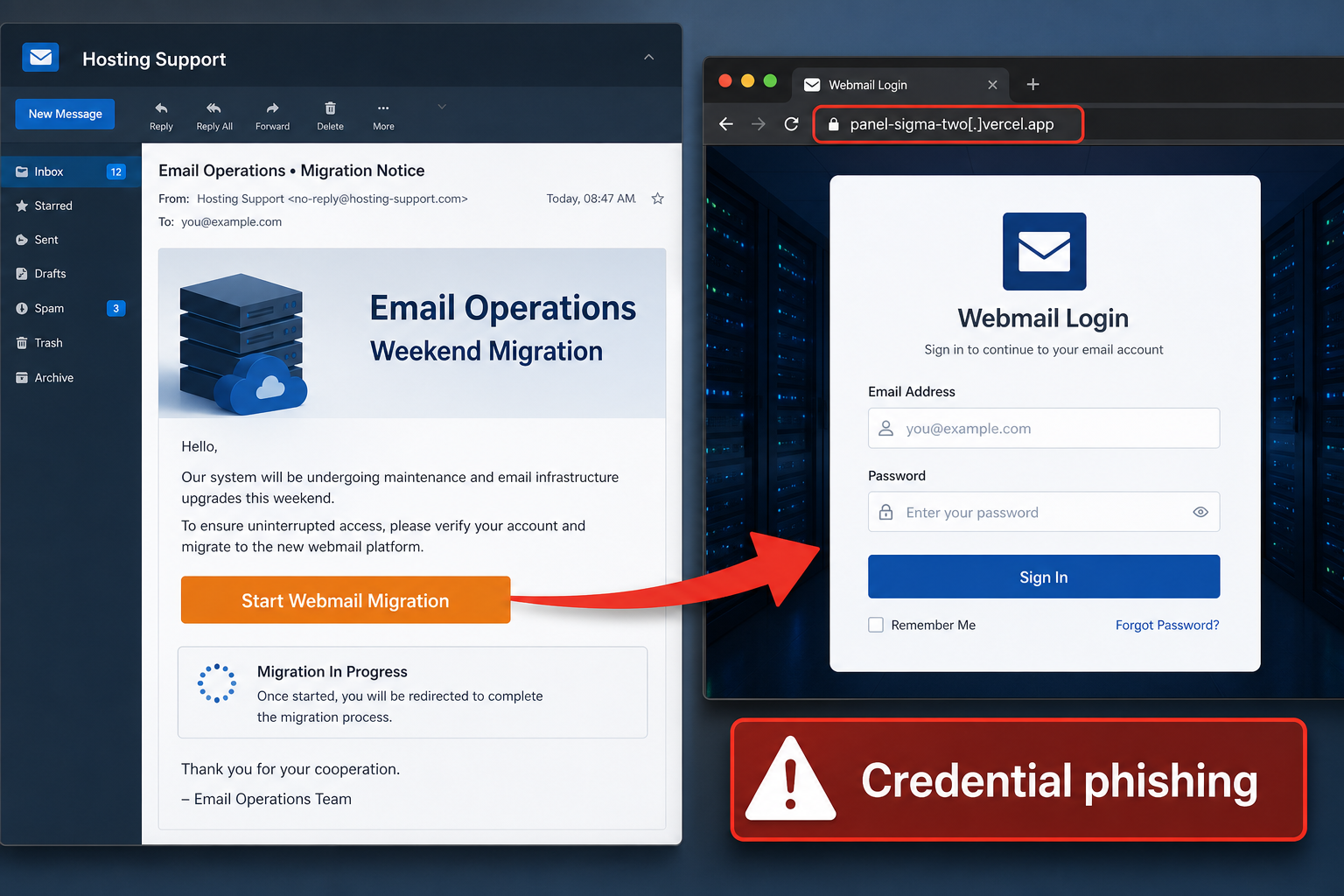
Email Migration Notice Scam Overview
This campaign presents itself as an automated message from the recipient’s email or hosting provider. It says the account is scheduled for migration to a new Webmail platform and claims that work will occur between midnight and 6:00 AM from Friday through Sunday. Those details make the notice sound like a planned technical change rather than a mass phishing email.
The recipient is instructed to select Start Webmail Migration before the scheduled window. A Migration Guidelines section says credentials must be verified in the tool to prevent delays and uninterrupted access. That instruction is the trap: real administrators do not need users to send mailbox passwords through a link in an unsolicited email to copy data between systems.
The button opens a counterfeit hosting Webmail page on an unrelated Vercel address. The observed page imitated cPanel branding and could pre-fill the victim’s email address. That personalization can come from the phishing URL; it does not prove the page is connected to the provider. The actual cPanel company and legitimate hosting services have no association with the scam.
What the criminals gain from a stolen mailbox
- Private messages, attachments and contact information.
- Password-reset links for cloud, shopping and financial accounts.
- Access to customer, supplier or coworker conversations.
- The ability to send new phishing from a trusted address.
- Invoice and payment information useful for business email compromise.
- Personal details that support identity theft and targeted fraud.
The email provider, maintenance window, button wording and phishing domain can change. The core behavior remains the same: an unexpected infrastructure notice sends the user outside the provider’s official domain and requests the current mailbox password.
How the Email Migration Phishing Scam Works
Step 1: A technical maintenance notice reaches the inbox
The email resembles a message from a hosting support or email operations team. Generic wording lets the criminals target users at many organizations without knowing the real provider.
Step 2: A weekend schedule makes the change believable
Midnight-to-6:00 AM maintenance sounds plausible because providers often schedule work outside business hours. Specific times create the appearance of an organized migration plan.
Step 3: The message demands advance verification
The recipient is told to verify credentials before the migration window to avoid disruption. This shifts responsibility to the user and creates pressure to act before asking an administrator.
Step 4: Start Webmail Migration opens an impersonation page
The button hides an unrelated destination. The page copies a familiar hosting or Webmail interface, but its address does not belong to the recipient’s provider.
Step 5: The fake form captures the email password
The recipient’s email address may already appear in the form. When the password is submitted, it is delivered to the scammers. Some pages ask twice to collect another variation and reduce the chance of a typing error.
Step 6: The compromised inbox supports follow-on attacks
The criminals can read mail, reset accounts, create forwarding rules and impersonate the victim. In a company, they may monitor real conversations until an opportunity appears to redirect a payment or request confidential data.
How to Recognize the Fake Migration Notice
No known administrator announced the project
Real migrations normally include advance communication, a named support contact and an internal project timeline. An isolated message arriving without context should be verified through the existing help desk.
The email asks you to verify your current password
Administrators can migrate mailbox data without collecting users’ passwords through email. A request to type the credential into a linked tool is a major warning sign.
The destination belongs to a hosting platform, not your provider
An address ending in a public app-hosting domain identifies the infrastructure provider, not the organization operating the page. The path, page title and padlock cannot replace the correct official domain.
The page imitates cPanel or another familiar interface
Scammers copy login panels because users recognize them. Confirm the exact hostname with the bookmark or address supplied by your real hosting company. Do not rely on logos.
The message links uninterrupted access to immediate action
Warnings about delayed processing or lost mailbox access are designed to suppress verification. A legitimate provider can confirm a migration through its dashboard or support channel.
What to Do If You Received the Migration Email
- Do not click Start Webmail Migration or reply to the message.
- Ask the hosting provider or internal IT team through a known channel whether a migration exists.
- Open the provider dashboard through a bookmark rather than the email.
- Report the message and preserve headers for the security team.
- Search other mailboxes for the same subject and destination domain.
- Block the phishing link and remove matching messages when you administer the environment.
Opening the page without submitting information does not automatically expose the password. Close the tab and report the URL. Run a security scan if the site downloaded a file, requested a browser extension or told you to install a migration utility.
What to Do If You Entered Your Email Password
Reset the credential from the real provider
Use a clean device and navigate directly to the genuine account page. Create a unique password. If the same password protects another service, change it there as well rather than waiting for suspicious activity.
Terminate active sessions
Sign out all devices and revoke app passwords, connected applications and unfamiliar OAuth access. A criminal may retain access through a session even after the main password changes.
Repair account recovery and multi-factor settings
Review recovery addresses, phone numbers, authenticator apps, passkeys and backup codes. Remove anything you did not configure and enable multi-factor authentication if it was not already active.
Remove mailbox rules created by the attacker
Inspect forwarding, filters, inbox rules, delegates, aliases and automatic replies. Look for rules that hide security notifications, delete replies or copy messages to an external address.
Review messages and hosting controls
Check Sent, Deleted and Draft folders for unauthorized activity. If the mailbox is tied to a hosting account, inspect domain, DNS, FTP, billing and administrator settings. Change separate hosting credentials that were reused or stored in email.
Warn contacts and protect payments
Tell coworkers, customers and suppliers to ignore unexpected requests from the compromised address. Verify recent changes to invoices or bank details by phone. Contact the bank immediately if a fraudulent transfer may have occurred.
Keep monitoring the mailbox after recovery. Delayed password-reset messages, new login alerts or replies to phishing sent during the compromise can reveal activity that was not visible during the first review.
How Organizations Can Reduce Migration-Themed Phishing
- Announce real infrastructure changes through a consistent internal channel.
- Teach users that administrators do not collect mailbox passwords by email.
- Require phishing-resistant multi-factor authentication for email accounts.
- Alert on new forwarding rules, unusual sign-ins and mass mailbox access.
- Block newly created or low-reputation domains at the mail gateway.
- Require verbal confirmation for payment-detail changes.
- Use a visible report-phishing button and respond quickly to employee reports.
The Bottom Line
The Email Migration Notice is a confirmed phishing scam, not a genuine weekend upgrade. Its technical schedule and migration guidelines are props used to lead recipients to a counterfeit Webmail login on an unrelated domain.
Verify any real migration through your provider or IT team. If you submitted a password, reset it, end sessions, repair recovery settings and inspect forwarding rules immediately. A stolen mailbox can become the launch point for account takeover, identity theft and invoice fraud.

Join the discussion
0 commentsShare your experience or ask a question about this article.
Discussion
Start the conversation
Have a question or something useful to share? Add the first comment.